
Remove an Emoji From a Photo on Your Android Phone
تعلم كيفية إزالة الإيموجي على Android باستخدام Magic Eraser. دليل بسيط خطوة بخطوة مع أداة ذكاء اصطناعي مجانية. يعمل على الويب وiOS وAndroid.
Last updated
جرب الآن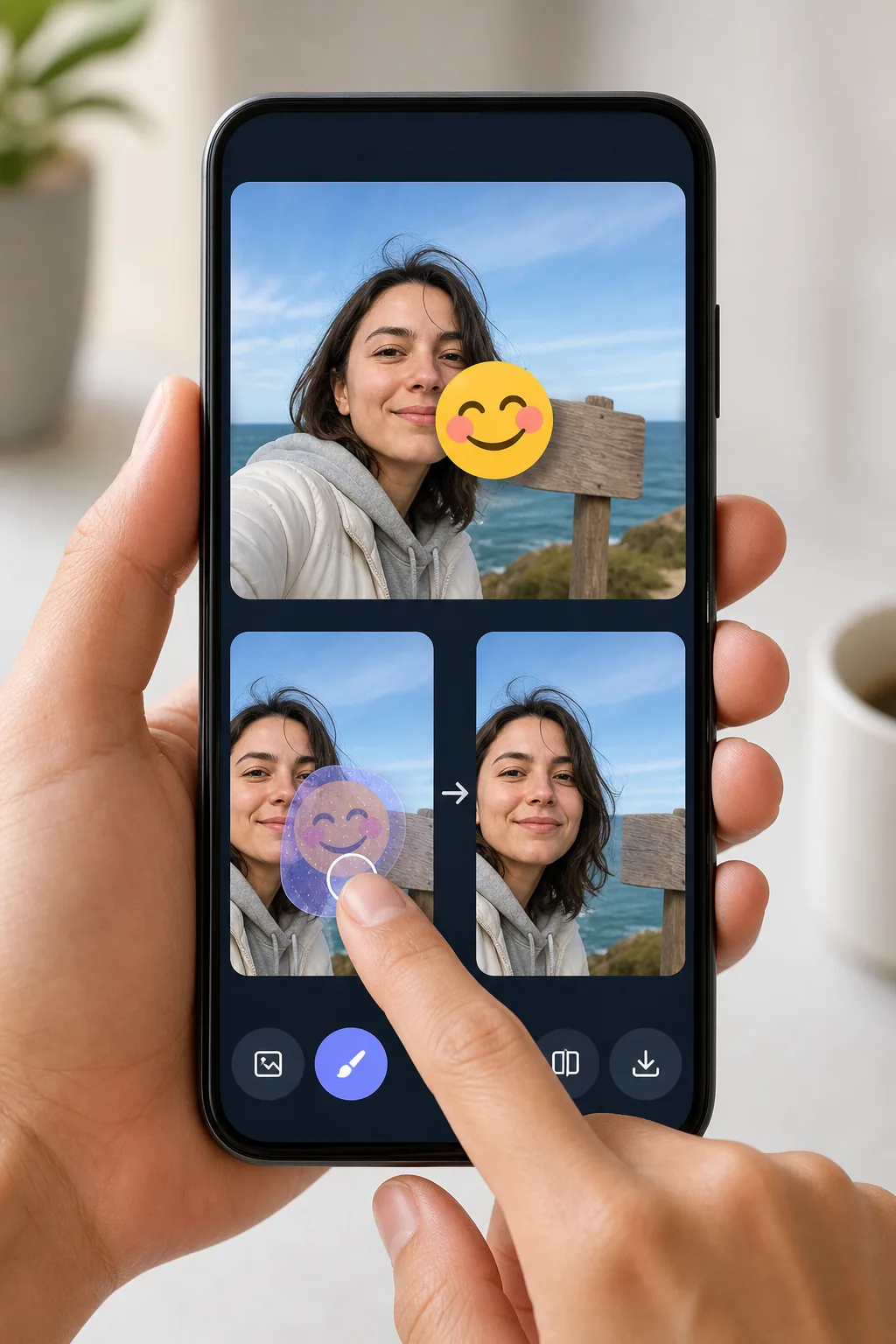
Erase emojis from Android photos without exporting to a desktop — Magic Eraser
Android makes it easy to drop an emoji or sticker onto a shot — Google Photos Markup, the built-in Gallery editor, Snapchat, WhatsApp Status — but undoing it later is the hard part. Once the edited image is saved to your camera roll, the emoji is baked into the pixels, so the Gallery's own undo button can't help. Magic Eraser handles exactly this: open the photo from your Android device, brush over the emoji, and the AI redraws the area behind it. Be clear about what's happening — the tool synthesizes a believable reconstruction of the background or surface, it does not recover the literal pixels that the emoji covered. For a patch of sky, wall, grass, or clothing the result usually looks seamless. It runs in your mobile browser or the Android app, works on the free tier, and never stamps a watermark on what you download back to your phone.
Before you start
التعليمات خطوة بخطوة
Start with ارفع الصورة. The result preview above and tips below use this guide's existing content; no separate before-and-after proof is assumed.
- 1
ارفع الصورة
افتح Magic Eraser على الويب أو iOS أو Android. اسحب وأفلت صورتك بتنسيق JPEG أو PNG أو HEIC أو WebP. لا حاجة لحساب.
- 2
اختر الأداة والمنطقة
اختر الأداة المناسبة وحدد المنطقة المراد معالجتها. سيحلل الذكاء الاصطناعي ويطبق التغييرات تلقائيًا في ثوانٍ.
- 3
حمّل النتيجة
معاينة النتيجة وتحميل الصورة المعدلة. تصدير بصيغة PNG أو JPEG عالي الجودة.
الأنسب لـ
- Removing a face-covering emoji you added in Google Photos Markup before sharing the photo properly
- Cleaning a sticker off a WhatsApp Status or Snapchat shot that auto-saved to your Gallery
- Taking the smiley or heart emoji off a screenshot so the background reads clearly
- Stripping a privacy emoji from a phone number, plate, or sign once you no longer need it hidden
- Fixing a photo where the Gallery editor's emoji got baked in and undo no longer works
نصائح للحصول على أفضل النتائج
Start from the highest-resolution copy in Google Photos — if you've already shared the picture and got a compressed version back, the AI has less detail to work with. Brush slightly past the emoji's edges to catch the soft anti-aliased halo Android renders around stickers. Emojis sitting on a simple, repeating background (sky, a painted wall, water) reconstruct almost invisibly; one placed directly over an eye, mouth, or detailed pattern will be a convincing guess, not the true hidden detail. If the first pass leaves a smudge, undo and erase in two smaller strokes rather than one large swipe.
الأسئلة الشائعة
- هل ميزة إزالة الإيموجي على Android مجانية؟
- نعم، يتيح لك Magic Eraser إزالة الإيموجي على Android مجانًا ضمن الحد اليومي. قم بالترقية إلى Pro للمعالجة غير المحدودة والتصدير بدقة عالية.
- كم يستغرق إزالة الإيموجي على Android؟
- بضع ثوانٍ فقط. يعالج الذكاء الاصطناعي في Magic Eraser الصور بسرعة — معظم النتائج متاحة فور الرفع.
- هل يمكنني استخدامه على الهاتف؟
- نعم، Magic Eraser يعمل على iOS وAndroid وجميع متصفحات الويب. يمكنك التبديل بين الأجهزة بحرية.
- هل تتأثر جودة الصورة؟
- لا، يحافظ Magic Eraser على جودة الصورة الأصلية. يعالج الذكاء الاصطناعي بذكاء للحفاظ على التفاصيل والوضوح.