
تحرير الصور للقصص ومقاطع Reels
كيّف صورك مع اللوحة العمودية 9:16 المستخدمة في القصص ومقاطع Reels وTikTok وYouTube Shorts.
Lesson context before the long read
Review the result preview above, then scan the learning objectives below before reading the full lesson. Updated 2026-05-17.
Example visual uses an existing public asset: /content-images/stories-reels-vertical-editing-academy.webp.
Learning Objectives
- 1إعادة تأطير الصور الأفقية والمربعة إلى الصيغة العمودية 9:16 دون فقدان الموضوع
- 2تصميم مناطق آمنة لإبقاء العناصر الأساسية مرئية فوق تراكبات واجهة المنصة
- 3إضافة تصديرات طبقية جاهزة للحركة لتأثيرات Ken Burns والبارالاكس البسيطة
التحرير للصيغ العمودية والمؤقتة
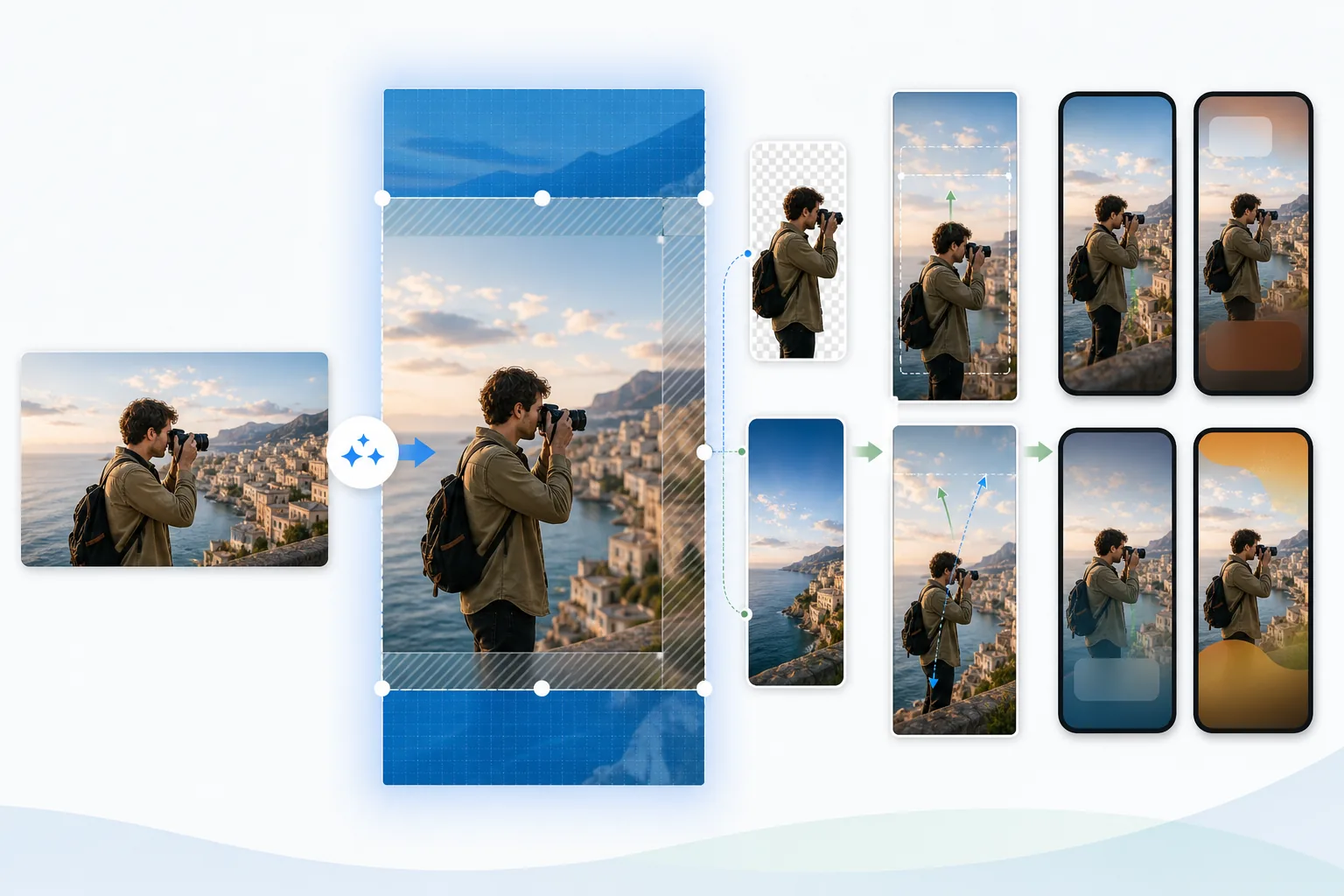
تستخدم القصص ومقاطع Reels نسبة عرض إلى ارتفاع عمودية 9:16 بأبعاد 1080 في 1920 بكسل، وهي العكس الدقيق للتصوير الأفقي التقليدي. يتطلب تحويل الصور الأفقية إلى عمودية إعادة تأطير إبداعية. استخدم ميزة توسيع اللوحة في Magic Eraser لتمديد الخلفية فوق الإطار الأصلي وتحته باستخدام التوليد الخارجي بالذكاء الاصطناعي، أو اقتصص أكثر أجزاء الصورة جاذبية. للبورتريهات والتكوينات أحادية الموضوع، عادةً ما يعمل توسيط الموضوع في الإطار العمودي على أفضل وجه. أما للمناظر الطبيعية، ففكّر في تخطيط مقسوم بحيث يكون المشهد في الأعلى والنص أو عنصر العلامة التجارية في الأسفل.
إنشاء رسومات قصص طبقية من الصور
تضع واجهات مستخدم المنصات عناصر تفاعلية فوق قصتك أو مقطع Reel. يضع Instagram اسم المستخدم وصورة الملف الشخصي في الأعلى، وشريط التعليقات وأزرار المشاركة في الأسفل. لدى TikTok عمود كثيف من الأيقونات على الجانب الأيمن. تحجب هذه التراكبات نحو 250 بكسل في الأعلى، و400 بكسل في الأسفل، و150 بكسل على الجانب الأيمن. أبقِ موضوعك الأساسي وأي نص ضمن المنطقة الآمنة التي تتجنب هذه المناطق. يعرض قالب القصص في Magic Eraser المنطقة الآمنة كتراكب شبه شفاف حتى تتمكن من تحديد موضع العناصر بدقة.
الحفاظ على الجودة في المحتوى قصير العمر
قد تبدو الصور الثابتة في القصص مسطحة مقارنةً بمحتوى الفيديو الأصلي. تؤدي إضافة حركة خفيفة إلى زيادة وقت الاحتفاظ وجودة الإنتاج المُدركة. صدّر صورتك المحرّرة كملفات طبقية مع فصل الموضوع عن الخلفية، ثم استورد الطبقات إلى أداة حركة أو مباشرةً إلى ميزات الحركة المدمجة في Instagram. يضيف تكبير Ken Burns بسيط من 100% إلى 110% على مدى خمس ثوانٍ حياةً لأي صورة ثابتة. تخلق تأثيرات البارالاكس، حيث تتحرك المقدمة أسرع من الخلفية، عمقًا ويسهل تحقيقها بتصدير من طبقتين من Magic Eraser.
Key Takeaways
- ✓التوليد الخارجي بالذكاء الاصطناعي أو الاقتصاص الاستراتيجي يحوّل الصور الأفقية إلى إطارات عمودية 9:16
- ✓أبقِ الموضوعات والنصوص ضمن المناطق الآمنة للمنصة لتجنب حجب تراكب الواجهة
- ✓تتيح التصديرات الطبقية تأثيرات Ken Burns والبارالاكس التي تعزز الاحتفاظ بالقصص