
إنشاء محتوى أسبوع في دقائق
استخدم سير عمل التحرير بالدفعات لإنتاج وجدولة محتوى اجتماعي لمدة خمسة إلى سبعة أيام في جلسة واحدة.
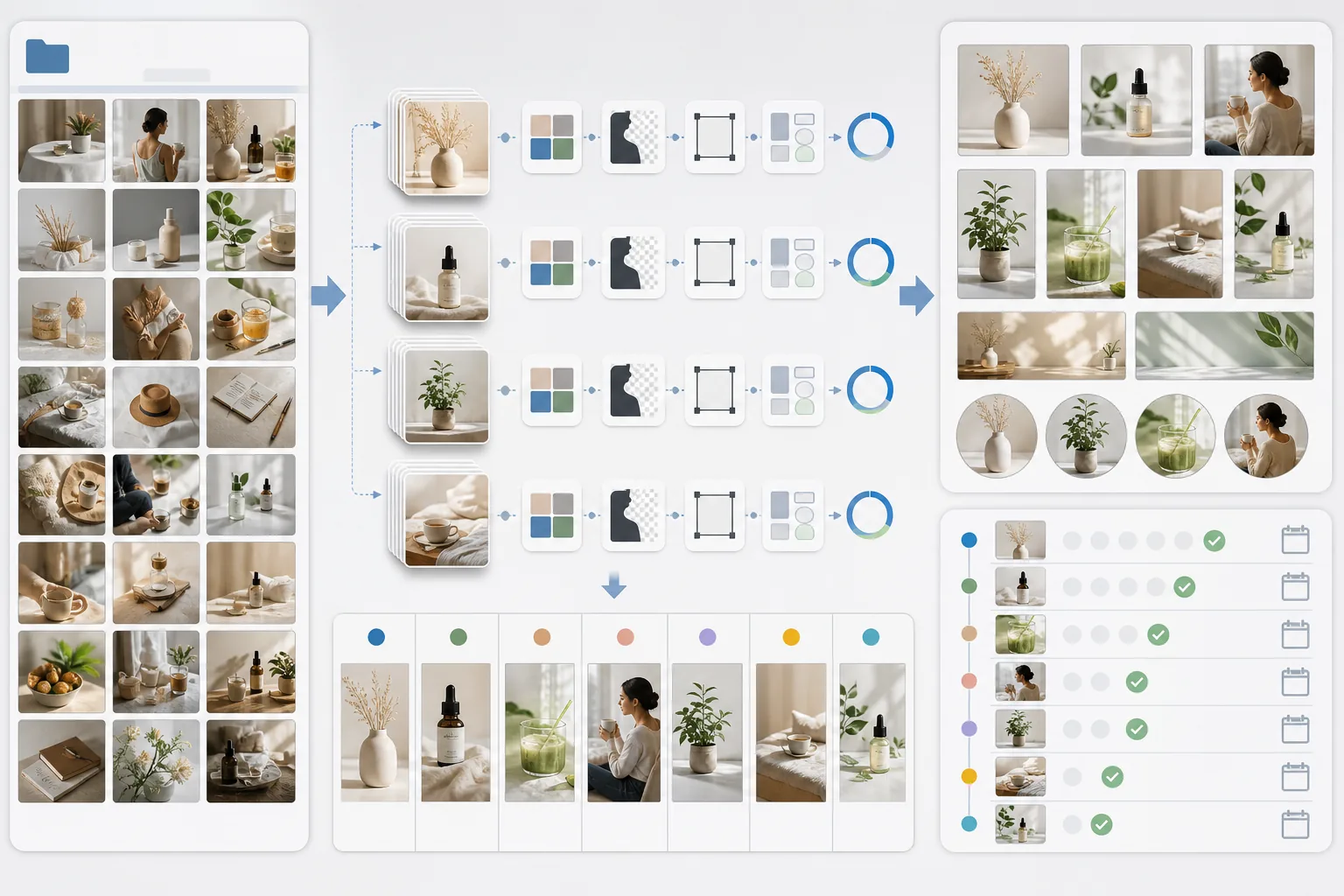
Lesson context before the long read
Review the result preview above, then scan the learning objectives below before reading the full lesson. Updated 2026-05-17.
Example visual uses an existing public asset: /content-images/social-content-batching-academy.webp.
Learning Objectives
- 1تخطيط تقويم محتوى أسبوعي يربط موضوعات المنشورات بمتطلبات تحرير الصور
- 2معالجة مجموعة من الصور الخام بالدفعات باستخدام الإعدادات المسبقة للعلامة التجارية والتصدير الخاص بكل منصة
- 3تنظيم الأصول النهائية حسب التاريخ والمنصة لجدولة سلسة
تخطيط المحتوى وتحريره بالدفعات
يعني الإنتاج بالدفعات إنتاج جميع صورك المرئية لوسائل التواصل الاجتماعي لفترة قادمة في جلسة مركّزة واحدة بدلًا من إنشائها واحدة تلو الأخرى على مدار الأسبوع. ابدأ بتخطيط موضوعات منشورات سبعة أيام، مع تدوين الصور التي يحتاجها كل منشور والمعالجة التحريرية المنطبقة. على سبيل المثال، قد يحتاج منشور يوم الاثنين التعليمي إلى استبدال خلفية نظيف، ويحتاج منشور تمييز المنتج يوم الأربعاء إلى قص بخلفية بيضاء، بينما يحتاج منشور كواليس يوم الجمعة إلى تدرّج لوني فقط. تصبح هذه الخطة قائمة مهام التحرير لجلسة الدفعة.
الحفاظ على الجودة عند حجم إنتاج أعلى
بعد جاهزية خطتك، اجمع كل الصور الخام في مجلد عمل واحد وافتحها في وضع الدفعات في Magic Eraser. طبّق الإعداد المسبق لعلامتك التجارية على الدفعة بأكملها أولًا، ثم عالِج انتقائيًا الصور التي تحتاج إلى معالجة إضافية مثل إزالة الخلفية أو تنظيف الكائنات. صدّر كل صورة نهائية بالأبعاد الصحيحة لمنصتها المستهدفة، باستخدام اصطلاح التسمية YYYY-MM-DD_platform_topic حتى تُرتَّب الملفات زمنيًا ويسهل العثور عليها. يتيح لك مجلد تصدير منظّم جدولة المنشورات في دقائق باستخدام أي أداة لإدارة وسائل التواصل الاجتماعي.
الأدوات وسير العمل للمحتوى الاجتماعي بالدفعات
تتراكم مكاسب الكفاءة من الإنتاج بالدفعات بمرور الوقت. يقضي المبدع الذي يحرر يوميًا نحو 15-20 دقيقة يوميًا في إنتاج الصور، بإجمالي يقارب ساعتين أسبوعيًا. عادةً ما يستغرق الإنتاج نفسه في جلسة دفعة واحدة 30-45 دقيقة لأن تبديل السياق يُلغى وتحدث العمليات المتكررة مثل تطبيق الإعدادات المسبقة والتصدير دفعةً واحدة. استخدم الوقت الذي توفّره للتركيز على التفاعل وإدارة المجتمع والاستراتيجية بدلًا من التدافع لإنتاج محتوى الساعة التالية.
Key Takeaways
- ✓خطّط موضوعات أسبوع كامل من المنشورات ومتطلبات التحرير قبل بدء جلسة الدفعة
- ✓طبّق الإعدادات المسبقة للعلامة التجارية بالدفعات أولًا، ثم تعامل مع المعالجات الفردية مثل الإزالات والقصّ
- ✓يقلّل الإنتاج بالدفعات وقت إنتاج الصور الأسبوعي من ساعتين إلى أقل من 45 دقيقة