
تجهيز الصور للطباعة بالمقاسات الكبيرة
جهّز صورك للإخراج بالمقاسات الكبيرة بما في ذلك الملصقات والمطبوعات على القماش واللافتات وعروض المعارض.
Lesson context before the long read
Review the result preview above, then scan the learning objectives below before reading the full lesson. Updated 2026-05-17.
Example visual uses an existing public asset: /content-images/print-large-format-academy.webp.
Learning Objectives
- 1احسب متطلبات الدقة للمطبوعات بالمقاسات الكبيرة بناءً على مسافة المشاهدة
- 2طبّق تحديدًا خاصًا بالإخراج يراعي ركيزة الطباعة وظروف المشاهدة
- 3اضبط الحافة الزائدة والمناطق الآمنة ومواصفات تنسيق الملفات لمورّدي الطباعة بالمقاسات الكبيرة
متطلبات الصورة للطباعة بالمقاسات الكبيرة
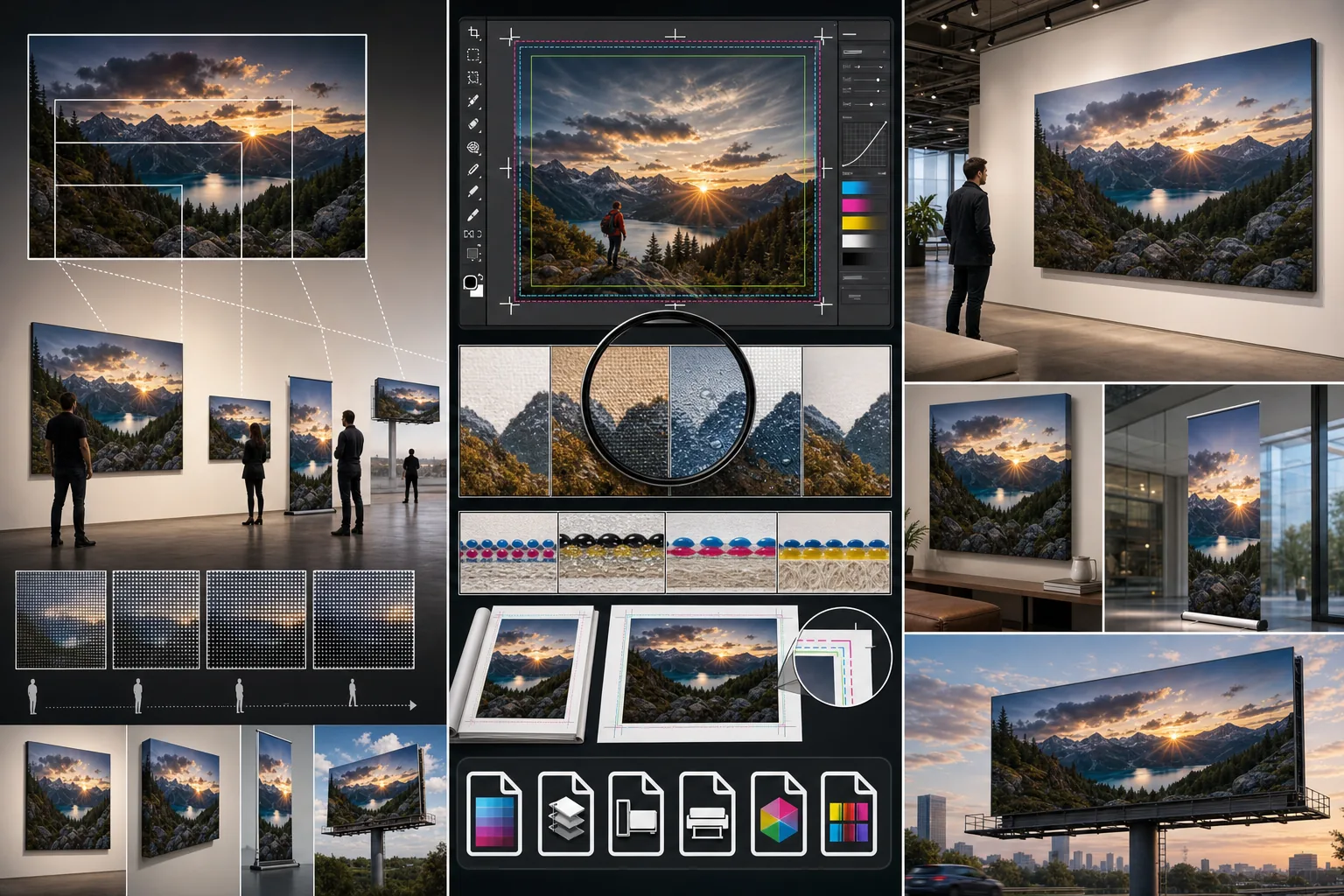
تشمل الطباعة بالمقاسات الكبيرة كل شيء من الملصقات بمقاس 24 بوصة إلى الجداريات بحجم الحائط ولافتات المعارض التجارية. والرؤية الجوهرية للمقاسات الكبيرة هي أن متطلبات الدقة تقل كلما زاد مقاس الطباعة لأن المشاهد يقف على مسافة أبعد. فالملصق بمقاس 24x36 بوصة يبدو ممتازًا عند 150 DPI، واللافتة بمقاس 4x6 أقدام تحتاج فقط إلى 100 DPI، والمطبوعة بحجم لوحة إعلانية يمكن أن تكون منخفضة حتى 30 DPI. احسب متطلبات ملفك بضرب أبعاد الطباعة بالبوصة في قيمة DPI المناسبة لتحديد أبعاد البكسل التي يحتاج ملفك المصدري إلى توفيرها.
تعزيز التفاصيل بمقاسات الملصقات واللافتات
يتبع التحديد للإخراج بالمقاسات الكبيرة قواعد مختلفة عن التحديد لعرض الشاشة. فانتشار الحبر على ركائز القماش والفينيل والورق يُليّن الصورة قليلًا أثناء الطباعة، لذا تستفيد ملفات المقاسات الكبيرة من تحديد أكثر شدّة مما قد تطبقه لصورة مخصصة للشاشة فقط. طبّق تحديد الإخراج كخطوة أخيرة بعد جميع التعديلات الأخرى وبعد تغيير الحجم إلى أبعاد البكسل النهائية. وتحتاج المطبوعات على القماش عادةً إلى تحديد أكثر بنسبة 10-15% من المطبوعات على الورق، وتمتص الأسطح المطفأة حبرًا أكثر من الأسطح اللامعة، مما يتطلب تعديلًا مقابلًا.
معايير الجودة للإخراج الاحترافي
عند تقديم الملفات إلى مورّد الطباعة، يتعين عليك مراعاة الحافة الزائدة والمناطق الآمنة. فالحافة الزائدة هي مساحة الصورة الإضافية، عادةً 0.125 إلى 0.25 بوصة، التي تمتد خارج خط القص لمنع الحواف البيضاء إذا كان القص منحرفًا قليلًا. والمنطقة الآمنة هي المساحة داخل خط القص، عادةً 0.5 بوصة، حيث يجب أن يبقى المحتوى المهم مثل الوجوه أو النصوص. صدّر ملفك بصيغة TIFF أو PDF عالية الجودة بملف الألوان المحدد من المورّد، وضمّن دائمًا علامات القص إذا طلبها المورّد. وأكّد حدود حجم الملف وطريقة التسليم قبل تجهيز تصديرك النهائي.
Key Takeaways
- ✓تقل متطلبات DPI للمقاسات الكبيرة مع مسافة المشاهدة: 150 للملصقات، و100 للافتات، و30 للوحات الإعلانية
- ✓طبّق تحديد الإخراج أخيرًا، مع زيادة الشدّة لركائز القماش والمطفأة لتعويض انتشار الحبر
- ✓ضمّن دائمًا الحافة الزائدة، واحترم المناطق الآمنة، وأكّد مواصفات الملف مع مورّد الطباعة قبل التصدير