
产品照片白色背景
电子商务产品摄影的行业标准。此模板创建纯白色(#FFFFFF)背景,满足 Amazon、Shopify、eBay 和各大市场的要求 — 无需摄影师。
免费试用此模板E-commerce template preview
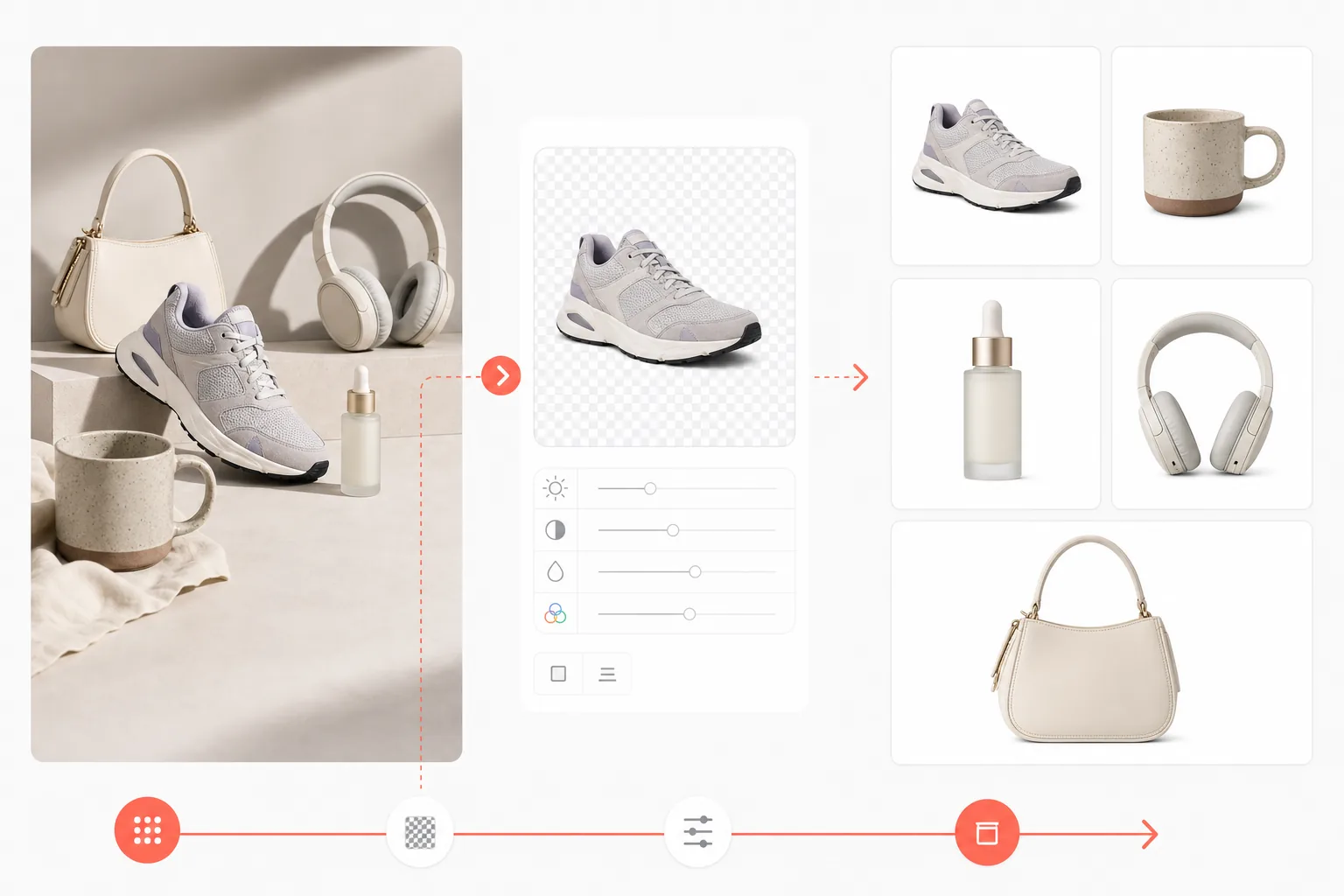
此模板的功能
移除任何背景并替换为纯白色,然后按照电子商务商品列表标准增强产品色彩和清晰度。成品符合 Amazon 对白色背景主产品图片的要求,并适用于所有主流市场。
模板设置
| 背景 | 纯白色(#FFFFFF) |
| 输出尺寸 | 2000×2000px(正方形,市场标准) |
| 文件格式 | PNG(无损)或 JPEG(95% 质量) |
| 色彩配置文件 | sRGB |
| 产品占比 | 画面的 85%(带均匀留白) |
| 阴影 | 无(边到边纯白色) |
如何使用此模板
上传您的产品照片
在任何表面上拍摄产品照片。自然的窗户光线能呈现最准确的色彩。背景将被完全替换。
应用 Background Eraser
AI 会移除整个背景,同时保留产品的精确边缘,包括复杂形状、透明部分和细微细节。
增强产品外观
AI Enhance 校正室内照明带来的色彩准确度,锐化产品细节,并确保图像在 2000px 导出尺寸下达到印刷级分辨率。
为您的市场导出
为 Amazon 下载 2000×2000px,为 Shopify 下载 2048×2048,或为您的平台下载自定义尺寸。所有导出均保持纯白色背景。
获得最佳效果的专业技巧
- ✓在视线高度拍摄产品以获得最自然的视角 — 俯视会产生变形。
- ✓在产品下方使用哑光(非光面)表面,以避免反光给背景移除带来困难。
- ✓对于透明或半透明产品(玻璃、透明塑料),请在中灰色背景上拍摄,以获得最干净的 AI 提取效果。
- ✓以横向拍摄照片,然后再裁剪为正方形 — 这样您就有空间在画面中调整产品位置。
E-commerce workflow
Product photo hub
Use this template with the full ecommerce product photo workflow for marketplace backgrounds, cleanup, compression, resizing, and listing-ready exports.
View ecommerce product photo workflow常见问题
这符合 Amazon 的主图要求吗?
+
符合。Amazon 要求主产品图片使用纯白色背景(RGB 255,255,255)。此模板正好生成该规格,并满足推荐的 2000px 最小尺寸以支持缩放功能。
产品边缘看起来自然吗?
+
AI 能精确处理复杂边缘 — 包括发丝般的纹理、半透明材质和精细的产品形状。成品看起来就像产品在白色无缝背景上经过专业拍摄一样。
我可以批量处理多个产品吗?
+
可以。上传您所有的产品照片,并对每张应用相同的白色背景模板。几分钟内即可在整个目录中获得一致的效果。
Related templates
More e-commerce templates for your workflow.
Etsy 优化的列表照片模板。将生活照片转换为 2000 像素的干净白色背景,增强手工产品细节,并符合 Etsy 的图像指南。
eBay 优化的列表照片模板。图库图像的白色背景、状况文档增强以及符合 eBay 图像标准的多角度布局。
适用于戒指、项链和手表的专业珠宝摄影模板。控制反射,增强宝石的闪光,并在干净的背景上提供适合市场的图像。
用于市场列表的专业家具照片模板。消除房间杂乱,显示真实尺寸,并在干净的背景或风格化的房间环境中展示作品。
通过除皱、绒毛清理、纯白色背景和准确的织物颜色来清理服装平铺照片。为 Shopify、亚马逊和精品店做好准备。
创建符合亚马逊标准的产品照片,具有纯白色背景、适当的照明校正以及主和次列表图像的优化尺寸。