
珠宝产品照片
将任何珠宝随手拍照片变成媲美奢侈品目录的专业产品图。本模板应对拍摄反光金属和半透明宝石时的独特挑战——控制不需要的反射、增强闪光,并确保宝石颜色的准确还原。
免费试用此模板E-commerce template preview
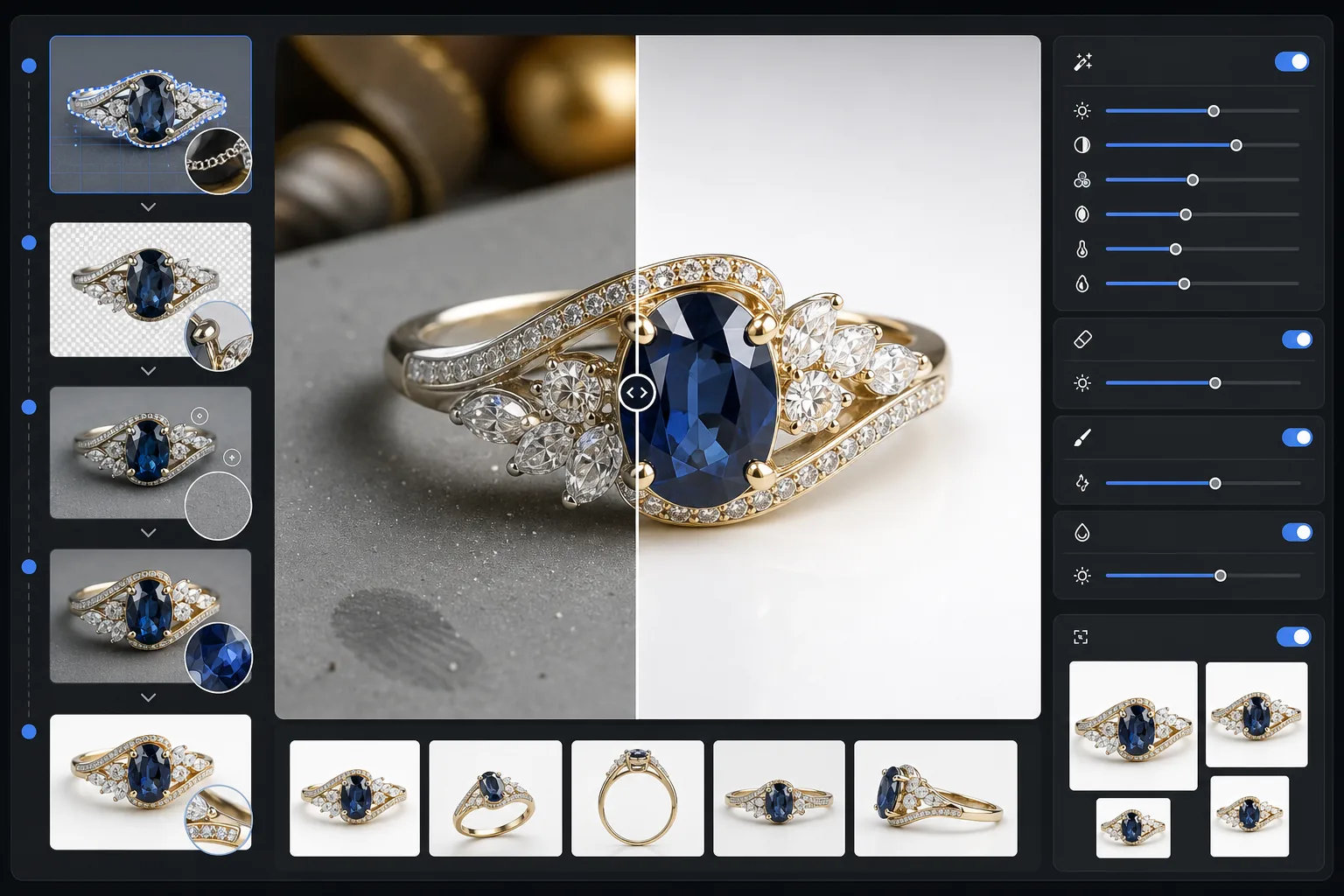
此模板的功能
从珠宝照片中去除杂乱的背景,并替换为干净、无干扰的表面。AI 增强随后锐化刻面细节,在不过曝的情况下平衡金属高光,并还原室内灯光经常使其偏移的真实宝石颜色。Magic Eraser 可清除灰尘颗粒、金属上的指纹以及拍摄小型反光物体时几乎无法避免的杂散反射。
模板设置
| 背景 | 纯白或渐变灰(可选) |
| 输出尺寸 | 2400×2400px(高分辨率缩放,呈现精细细节) |
| 闪光增强 | 中等(在不产生人工眩光的情况下保留自然光泽) |
| 反射控制 | 柔和——减少抛光金属上刺眼的镜面反射 |
| 色彩准确度 | 宝石校准 sRGB(针对祖母绿、红宝石、蓝宝石、钻石优化) |
| 细节锐化 | 微距级别——增强刻面、爪镶和雕刻 |
如何使用此模板
拍摄您的珠宝单品
将单品放在不反光的哑光表面上。使用柔和的自然光或灯箱,尽量减少金属上刺眼的反射。从略高处以 30-45 度角拍摄,以捕捉宝石的正面。
去除背景
Background Eraser 可将珠宝从任何表面上分离出来,处理细爪、精致链条和小巧搭扣与背景相接处的棘手边缘——即使在高反光的单品上也是如此。
增强细节与色彩
AI Enhance 锐化缩放时可见的刻面边缘和雕刻,校正因人工照明而偏移的宝石颜色,并平衡金属高光,使黄金显得温暖、白银显得冷峻,且不会出现过曝亮斑。
清理并导出
使用 Magic Eraser 去除金属表面的灰尘颗粒、指纹污渍或不需要的反射。以 2400px 导出,以兼容市场平台的缩放并准确呈现细节。
获得最佳效果的专业技巧
- ✓在中灰色卡纸而非白色背景上拍摄——这能让 AI 在白银和白金单品上实现更干净的边缘分离。
- ✓对于钻石和透明宝石单品,在宝石下方放一小片白纸,以捕捉光的透射和火彩。
- ✓使用博物馆蜡或戒指托将戒指竖立拍摄,然后用 Magic Eraser 擦除托架,呈现悬浮展示效果。
- ✓为每件单品拍摄多个角度,并使用相同的模板设置进行批量处理,以获得一致的目录外观。
E-commerce workflow
Product photo hub
Use this template with the full ecommerce product photo workflow for marketplace backgrounds, cleanup, compression, resizing, and listing-ready exports.
View ecommerce product photo workflow常见问题
我的钻石闪光看起来会自然吗?
+
会。闪光增强会放大照片中已捕捉到的现有光线反射,而不是添加人工眩光。效果看起来就像专业布光的影棚拍摄,保留每颗宝石自然的火彩图案。
它能处理高反光的抛光黄金和铂金吗?
+
当然可以。反射控制设置在保留每种金属特有光泽的同时,减少刺眼的镜面反射。黄金保留其温暖光芒,铂金保持其冷峻光泽,不会出现过曝白斑。
哪种背景最适合奢侈珠宝的商品列表?
+
纯白符合 Amazon 和 Etsy 的市场平台要求。对于您自己的网站或高端品牌塑造,渐变灰选项可增添层次感和高级质感。本模板包含这两种选项。
Related templates
More e-commerce templates for your workflow.
产品照片的纯白色背景模板。 Amazon、Shopify 和市场就绪设置,可实现干净、专业的产品图像转换。
Etsy 优化的列表照片模板。将生活照片转换为 2000 像素的干净白色背景,增强手工产品细节,并符合 Etsy 的图像指南。
eBay 优化的列表照片模板。图库图像的白色背景、状况文档增强以及符合 eBay 图像标准的多角度布局。
用于市场列表的专业家具照片模板。消除房间杂乱,显示真实尺寸,并在干净的背景或风格化的房间环境中展示作品。
通过除皱、绒毛清理、纯白色背景和准确的织物颜色来清理服装平铺照片。为 Shopify、亚马逊和精品店做好准备。
创建符合亚马逊标准的产品照片,具有纯白色背景、适当的照明校正以及主和次列表图像的优化尺寸。