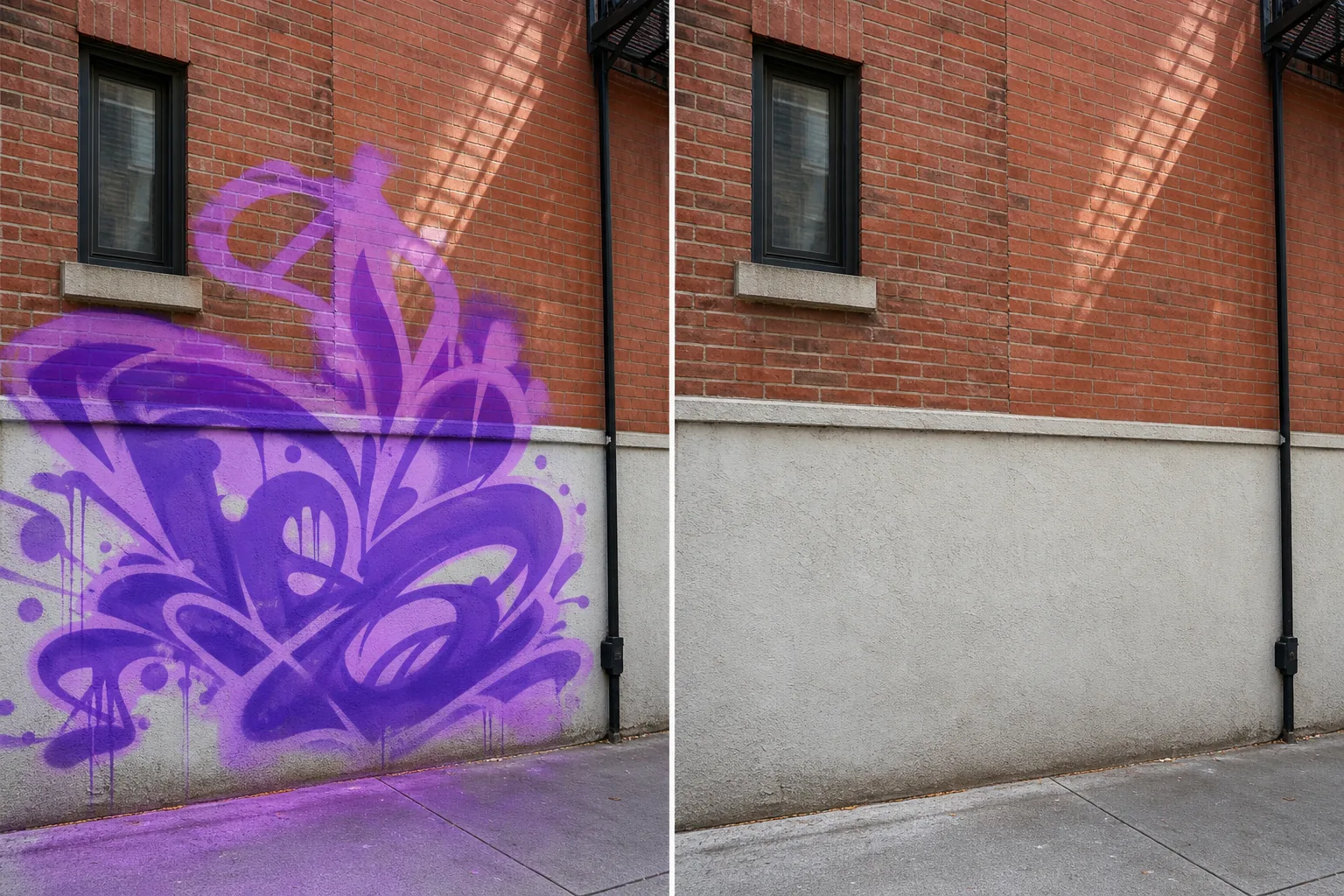
Remove graffiti from photos
Get the clean exterior shot you needed — without the tags, the spray paint, or the unwanted wall markings that competing photos don't have. Magic Eraser's AI removes graffiti and rebuilds the underlying wall texture in seconds, whether the surface is brick, concrete, stucco, painted siding, or stone.
Last updated
立即尝试Why graffiti shows up in the wrong shots — Magic Eraser
Graffiti is the failure mode where the listing photo, the travel shot, the storefront photo, or the family vacation photo got composed correctly — and a section of the wall, the alley, the underpass, or the back fence has tags or paint markings that the surrounding scene doesn't. For real-estate listings, a single tagged section of the back garage wall can drop the listing's perceived value by 5-10% in initial-impression studies even when the rest of the property is pristine — viewers anchor on the most prominent visual problem. For travel photography, graffiti on the back of a famous monument or inside the alleyway leading to a landmark turns a scenic shot into one that looks like it was taken somewhere it shouldn't have been. For small-business storefronts, a tagged exterior wall on the listing photo for Google Business Profile or the menu cover photo signals neglect to visitors before they read a single word of copy. Manual graffiti cleanup in Photoshop is feasible but tedious — the clone-stamp tool works on plain surfaces but breaks down on brick patterns, painted siding seams, and stone textures where the regular geometry matters. Magic Eraser's AI rebuilds the wall surface underneath the brushed area using the surrounding intact regions as reference, which handles all the common surface types: solid color paint, brick, concrete, stucco, painted siding, stone, plaster, and even most graffiti-on-windows or graffiti-on-metal cases. Brush over the tags and the wall returns to its untagged state in seconds.
分步教程
- 1
Upload the photo
Open Magic Eraser on web, iOS, or Android. Drop in the real-estate exterior, the travel landmark shot, the storefront photo, or any image where graffiti needs to disappear. JPEG, PNG, HEIC, and WebP are all supported, including phone shots and DSLR exports.
- 2
Brush over the graffiti
Paint over the tags, spray paint, stickers-with-tags, or marker-pen scrawls. Cover the full markings plus any small overspray drips or paint-bleed around the edges. Leave the surrounding clean wall, the building architecture, and the foreground subjects untouched — the AI only rebuilds what you mark.
- 3
Tap Erase and refine
The AI rebuilds the wall surface underneath in seconds, matching the existing brick course / stucco texture / siding pattern / paint color. Inspect the cleaned region — most rebuilds are clean on the first pass; complex multi-layered tags or graffiti spanning multiple surface types (brick-to-mortar joints, painted siding seams) may need one touch-up brush pass. Export at full resolution.
最适合
- Real-estate listing photos where the garage wall, retaining wall, or back fence has tags that hurt the listing's first impression
- Travel photography of landmarks, monuments, and historic buildings where graffiti on a side wall disrupts the otherwise-clean composition
- Small-business storefront photos for Google Business Profile, Yelp, and menu covers where exterior tags signal neglect
- Architecture and urban photography portfolios where the building is the subject and graffiti is the unwanted distraction
- Property-management 'before' photos documenting a building's state without the legal and PR risks of publishing identifiable tags
- Vacation photos in cities where street art is everywhere and you want a clean version of one specific shot for a frame or album
- Insurance documentation photos of damage where unrelated graffiti would distract from the actual claim subject
重要提示
Graffiti cleanup works best when the wall surface continues somewhere visible in the same frame — a stretch of clean brick above or below the tag, a section of unmarked siding to either side, an exposed corner of the same stucco color. The AI uses those clean regions to rebuild the covered ones, and the more clean reference area available, the cleaner the rebuild. Three cases are harder. First, full-wall murals or floor-to-roof tags that cover the entire visible surface leave the AI with no reference to extrapolate from — for these, AI Fill with a text prompt ('clean red-brick wall with mortar joints' or 'smooth grey concrete') produces better results than the standard eraser brush because the prompt steers the reconstruction toward the correct surface type. Second, graffiti spanning multiple surface types (brick-to-mortar joints, painted-siding seams, stone-to-window-frame transitions) sometimes produces a rebuilt seam that doesn't quite match — work in 2-3 passes by surface region (brick first, then the mortar transition, then the painted area) rather than one large selection. Third, very high-detail surfaces like cut-stone facades or carved historic brick where each unit is unique benefit from manual touch-up after the AI pass to preserve the exact stone-face character. For real-estate use, MLS and listing-platform rules vary by region on what edits are disclosed; consult your local board. For news photography and historic preservation documentation, the edit should typically be disclosed because the unedited image is part of the historical record. For personal travel and home-use albums, disclosure is optional.
常见问题
- Is it free to remove graffiti from a photo?
- Yes. Magic Eraser's free tier covers graffiti cleanup with daily usage limits. Upgrading to Premium ($29.99/year) removes the limits and unlocks higher-resolution exports — useful for MLS listing photos, business profile uploads, and printable architectural portfolios where full resolution matters.
- Does it work on brick, stucco, and other textured wall surfaces?
- Yes. The AI handles solid paint, brick, concrete, stucco, painted siding, stone, plaster, and most graffiti-on-windows or graffiti-on-metal cases. Brick is the most common case the model handles cleanly because the brick-and-mortar pattern repeats across the rest of the wall. Hand-laid stone facades and historic carved brick where each unit is unique are the cases most likely to benefit from a 1-2 minute manual touch-up pass after the AI rebuild.
- Is removing graffiti from a real-estate listing photo allowed?
- Rules vary by MLS and listing platform. Most regional MLS boards require that listing photos accurately represent the property's current state, and some require disclosure on any AI-edited photos. The cleaner path for graffiti specifically is to remediate the actual wall (graffiti-removal contractors typically run $200-500 per wall depending on size and surface) and reshoot, which removes the disclosure question entirely. For 'before' photos used internally for property-management documentation, AI cleanup is generally fine; for the public listing, check your local MLS guidelines first.
- Can the AI handle very large or complex graffiti?
- For graffiti that covers most or all of a wall (full-wall murals, floor-to-roof tags), the standard eraser brush has less surrounding reference to work with, so the rebuild quality drops. For these cases, switch to AI Fill and add a text prompt describing the underlying surface ('clean red-brick wall with mortar joints,' 'smooth grey concrete with subtle texture,' 'white-painted wood siding with horizontal seams'). The text prompt steers the reconstruction toward the correct surface even when there's almost no clean reference in the frame. The output is generally usable for listing and business-profile purposes after one touch-up pass.
- Will the cleaned wall look obviously edited?
- On most photos, no — the AI matches the existing wall texture, brick pattern, color, lighting direction, and ambient shadow. The places it can show are highly repetitive patterns where a slight registration offset between rebuilt and original sections is visible at close inspection (cobblestone, mosaic tile, regular-spaced fence slats), and high-detail unique-stone facades where each stone is visually distinct. For frame-worthy prints or featured-listing hero photos, plan on 2-3 minutes of refinement brushing after the first AI pass. For typical listing photos, business-profile uploads, and social sharing, the first AI pass is usually sufficient.