
Magic Eraser 对比 Pixlr:哪款网页编辑器能更快出结果?
Pixlr 为用户提供经典的、基于浏览器的编辑环境,带有图层和特效。Magic Eraser 则专注于 AI 优先的清理、增强和背景处理,适合希望在没有完整编辑界面的情况下也能获得精致效果的用户。
Last updated
免费试用 Magic EraserComparison rows are editorial summaries from the latest page review, not a guarantee of current pricing, limits, watermark policy, batch support, speed, or platform availability.
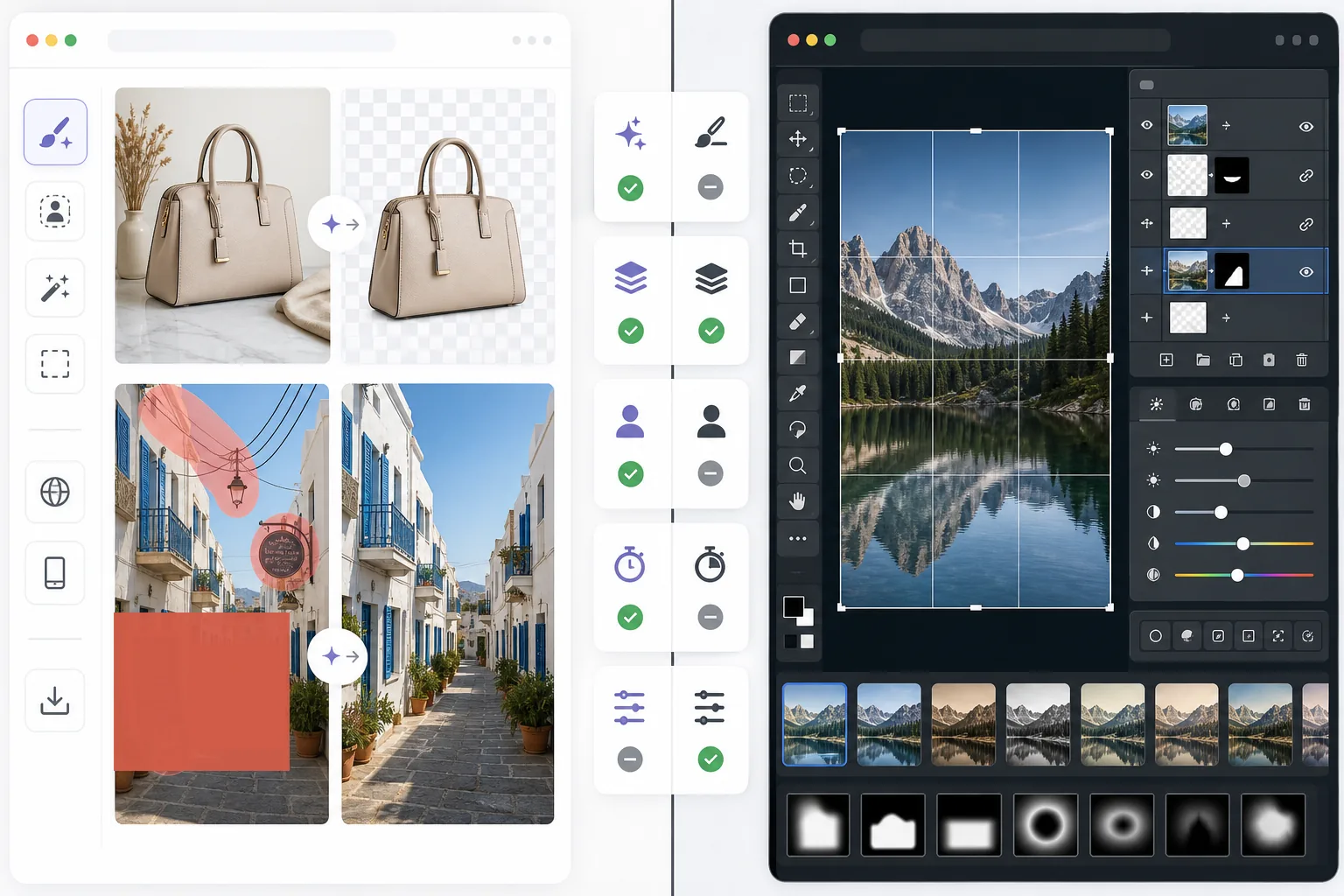
概览
Magic Eraser 借助 AI 帮助用户快速解决实际的图像问题:移除多余物体、擦除文字、清理背景、锐化细节并填补缺失区域。
Pixlr 提供更传统的、基于浏览器的编辑体验,带有图层、滤镜和手动工具。它很灵活,但在处理重复性的清理任务时往往较慢。
功能对比
Magic Eraser 借助 AI 帮助用户快速解决实际的图像问题:移除多余物体、擦除文字、清理背景、锐化细节并填补缺失区域。
Pixlr 提供更传统的、基于浏览器的编辑体验,带有图层、滤镜和手动工具。它很灵活,但在处理重复性的清理任务时往往较慢。
| Feature | Magic Eraser | Pixlr |
|---|---|---|
| 物体移除 | 支持 — AI 笔刷 | 有限 |
| 背景移除 | 支持 | 支持 |
| 图像增强 | 支持 | 基础 |
| 基于图层的编辑 | 不支持 | 支持 |
| 生成式填充 | 支持 | 有限 |
| 新手友好 | 支持 | 一般 |
| 最适合 | 快速清理与 AI 编辑 | 通用网页编辑 |
| 平台 | 网页 + 移动端 | 网页 + 移动端 |
Feature rows summarize visible product positioning and should be rechecked against official product pages before purchase, migration, or compliance decisions.
- Last content review June 21, 2026
- Pixlr source: official product site (https://pixlr.com/)
- Magic Eraser source: https://magiceraser.live/zh/product/magic-eraser
- Pricing, feature availability, platform support, and limits can change; recheck official sources before relying on a buying decision.
价格对比
| Plan | Magic Eraser | Pixlr |
|---|---|---|
| 免费版 | 免费 — 有限编辑次数 | 免费 — 基础功能 + 广告 |
| 按月 | $9.99/mo | $7.99/mo (Plus) |
| 按年 | $4.99/mo(按年计费) | $4.90/mo (Plus,按年计费) |
价格截至 May 2026。请向各服务商核实当前费率。
Pricing rows are snapshots from review time. Free tiers, subscriptions, trials, export limits, and regional availability can change without notice.
- Last content review June 21, 2026
- Pixlr source: official product site (https://pixlr.com/)
- Magic Eraser source: https://magiceraser.live/zh/product/magic-eraser
- Pricing, feature availability, platform support, and limits can change; recheck official sources before relying on a buying decision.
为什么选择 Magic Eraser
在编辑控件上花费更少时间
当主要目标只是快速清理并改善一张照片时,Magic Eraser 减少了管理工具栏、图层和手动特效的需要。
更适合可重复的工作流
如果你每天都要编辑产品照片、社交图片、商品列表或创作者素材,Magic Eraser 更专注但更强大的 AI 工作流往往比通用编辑器节省更多时间。
更擅长背景和干扰元素的清理
当问题是杂乱、文字、电线或需要自然消失的干扰环境时,Magic Eraser 的表现尤为出色。
更低的学习成本
团队可以更快地上手 Magic Eraser,因为相比拥有更多手动工具的经典浏览器编辑器,它所需的编辑知识更少。
常见问题
Magic Eraser 比 Pixlr 更易用吗?
+
对于以清理为主的任务来说是的。Pixlr 提供更传统的编辑灵活性,但对于主要需要 AI 物体移除和背景编辑的用户来说,Magic Eraser 更易用。
Pixlr 有图层功能吗?
+
有。Pixlr 包含更经典的、基于图层的编辑环境。Magic Eraser 则更专注于快速的 AI 辅助效果,而非手动图层编辑。
哪款工具更适合营销人员和卖家?
+
Magic Eraser 往往是更合适的选择,因为它能更快地完成清理、增强和适合展示的图像准备工作。
我可以用 Magic Eraser 从图像中移除文字吗?
+
可以。Magic Eraser 能够移除文字、标签、标志和其他干扰元素,同时自然地重建背景。
哪款编辑器在移动端和桌面端协同使用时表现更好?
+
Magic Eraser 在网页端和移动端之间提供更一致的 AI 工作流,使得在实际编辑任务中切换设备更加轻松。
相关使用场景
了解专业人士如何在实际工作流程中使用这些工具。
其他对比
了解Magic Eraser与其他照片编辑工具的对比。
两款各具优势的强大AI照片编辑器。Magic Eraser提供更广泛的生成式AI工具集,而Photoroom在电商产品摄影和批量处理方面表现出色。看看哪款更适合您的工作流程。
我们测试并对比了顶级AI照片编辑工具。从物体移除到背景替换,看看哪个编辑器能为你的工作流程提供最佳效果。
Adobe Photoshop 功能强大,但大多数人只用到了它的一小部分功能。Magic Eraser 为你提供真正需要的照片清理工具 — 物体移除、背景移除、AI 增强和生成式填充 — 界面更简洁,可在网页和移动端使用,起步无需任何订阅。
remove.bg 擅长一件事:移除背景。Magic Eraser 在移除背景方面同样出色,除此之外还能擦除不需要的物体、增强画质、用 AI 填补缺失区域,并处理您的完整照片编辑工作流——全部在一个平台内完成。
Tried to remove an object or background and hit a Pro paywall in Canva, Adobe Express/Photoshop, or Fotor? Magic Eraser does the same job — object removal, background removal, watermark cleanup, and enhancement — for free. No subscription, and no watermark stamped on your download.
将 Magic Eraser 与 magic-eraser.io 进行对比。并排查看功能、价格和易用性。了解为什么 Magic Eraser 是 AI 照片编辑的更好选择。