
Magic Eraser 对比 Adobe Lightroom:清理 AI 对比 RAW 显影和目录
Adobe Lightroom 是摄影师在 RAW 显影、色彩与色调校正、预设和大规模目录管理方面的工作流标准——其设计假设摄影师正在处理一次拍摄的数百到数千张照片,并需要在整组照片上应用一致的全局调整。Magic Eraser 解决相反的问题:对单张照片进行 AI 驱动的清理,工作内容是去除干扰物、替换背景、生成式填充或恢复质量,在 web、iOS 和 Android 上并带有免费层级。两款工具位于照片工作流的不同站点,正确的选择取决于你的工作形态是目录规模的 RAW 显影还是逐张照片的清理与编辑。
Last updated
免费试用 Magic EraserComparison rows are editorial summaries from the latest page review, not a guarantee of current pricing, limits, watermark policy, batch support, speed, or platform availability.
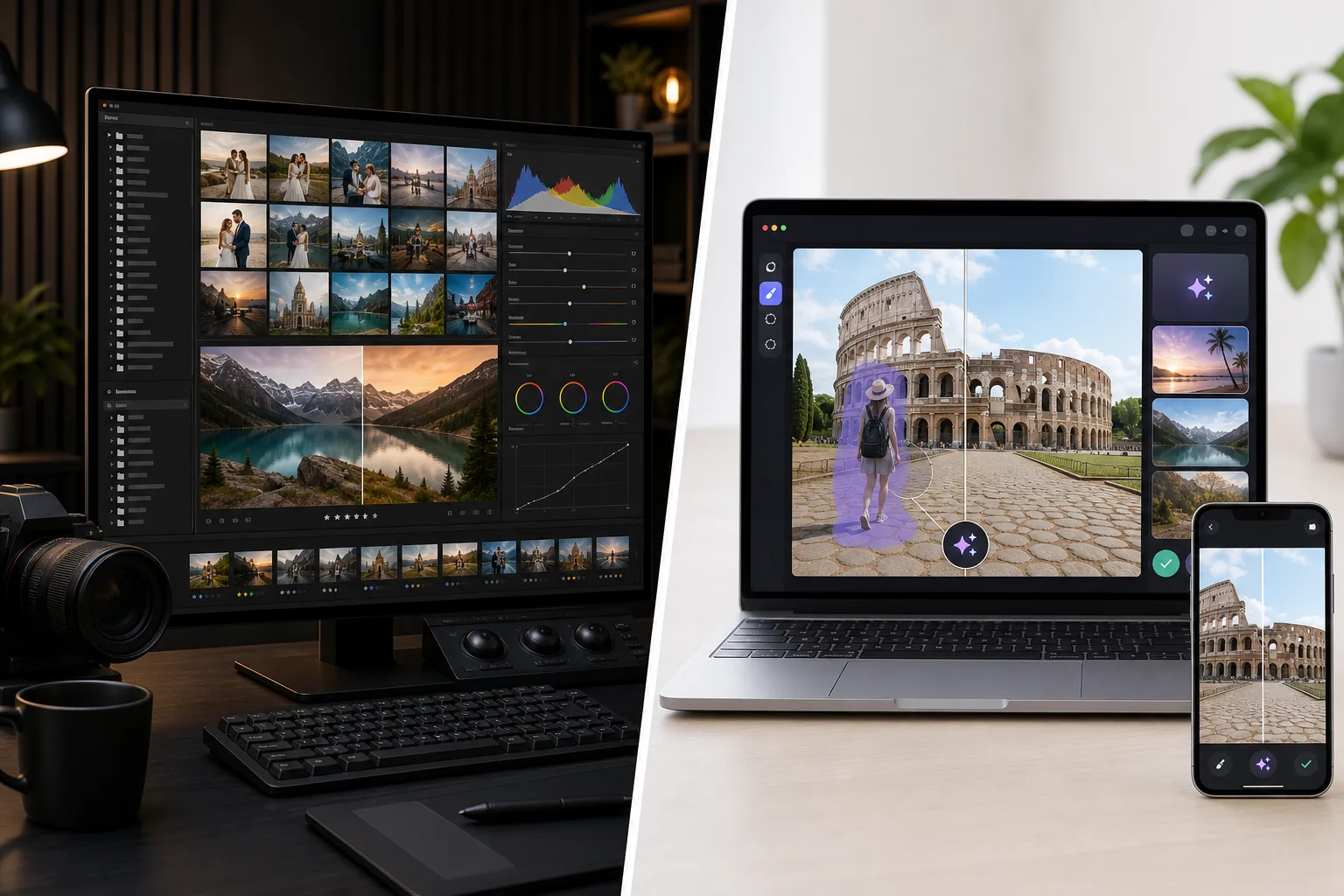
概览
Magic Eraser 是一款针对清理工作优化的 AI 优先照片编辑器:用于去除干扰物的 Magic Eraser 画笔、用于背景替换的 Background Eraser、用于生成式填充和扩图的 AI Fill、用于锐化 / 降噪 / 放大的 AI Enhance、用于调色的 AI Filter。完整的功能集在 web、iOS 和 Android 上运行,每个平台都有免费层级和每年 $29.99 的 Premium 层级。每款工具都是单画布操作,无目录管理、无逐张照片元数据、无 RAW 显影流程——该产品围绕单次编辑构建,结果速度是优化目标。Magic Eraser 在摄影师的工作流中作为 Lightroom 显影 RAW 之后的清理与编辑站点,或作为使用手机相机 JPEG / HEIC 源的摄影师和创作者的独立编辑器。
Adobe Lightroom(Classic 桌面目录版和 Lightroom 云版本)是摄影师的 RAW 显影和目录工具,围绕拍摄工作流设计,每次拍摄需要导入、排序、色彩校正、色调调整、曝光平衡、白平衡校正 100-2000+ 张照片,并应用一致的预设导出整组。Lightroom Classic 仅限桌面(Windows / macOS),带本地目录存储,是大多数专业摄影师使用的版本;Lightroom(云版本,独立产品)在桌面 / iPad / iOS / Android 上运行并带云同步。价格为 Adobe Photography Plan(与 Photoshop 捆绑,每月 $9.99-19.99)或 Lightroom 单独版(每月 $9.99,带 1TB 云存储)。Lightroom 的 AI 功能已增长(AI Denoise、AI Masking、2024-2025 的生成式移除),但产品的重心仍是 RAW 显影和大规模目录管理。
功能对比
Magic Eraser 是一款针对清理工作优化的 AI 优先照片编辑器:用于去除干扰物的 Magic Eraser 画笔、用于背景替换的 Background Eraser、用于生成式填充和扩图的 AI Fill、用于锐化 / 降噪 / 放大的 AI Enhance、用于调色的 AI Filter。完整的功能集在 web、iOS 和 Android 上运行,每个平台都有免费层级和每年 $29.99 的 Premium 层级。每款工具都是单画布操作,无目录管理、无逐张照片元数据、无 RAW 显影流程——该产品围绕单次编辑构建,结果速度是优化目标。Magic Eraser 在摄影师的工作流中作为 Lightroom 显影 RAW 之后的清理与编辑站点,或作为使用手机相机 JPEG / HEIC 源的摄影师和创作者的独立编辑器。
Adobe Lightroom(Classic 桌面目录版和 Lightroom 云版本)是摄影师的 RAW 显影和目录工具,围绕拍摄工作流设计,每次拍摄需要导入、排序、色彩校正、色调调整、曝光平衡、白平衡校正 100-2000+ 张照片,并应用一致的预设导出整组。Lightroom Classic 仅限桌面(Windows / macOS),带本地目录存储,是大多数专业摄影师使用的版本;Lightroom(云版本,独立产品)在桌面 / iPad / iOS / Android 上运行并带云同步。价格为 Adobe Photography Plan(与 Photoshop 捆绑,每月 $9.99-19.99)或 Lightroom 单独版(每月 $9.99,带 1TB 云存储)。Lightroom 的 AI 功能已增长(AI Denoise、AI Masking、2024-2025 的生成式移除),但产品的重心仍是 RAW 显影和大规模目录管理。
| Feature | Magic Eraser | Adobe Lightroom |
|---|---|---|
| RAW 显影(CR3 / NEF / ARW / DNG) | 并非主要用例 | 是——主要功能,显影模块 |
| 目录管理(数千张照片) | 否——单画布编辑 | 是——Lightroom Classic 核心功能 |
| 预设库 + 跨照片同步 | 逐张照片的 AI Filter 预设 | 显影预设跨目录批次同步 |
| 对象 / 干扰物去除 | 一键 Magic Eraser 画笔 | Generative Remove(自 2024-2025 起,AI 驱动) |
| 背景去除 / 替换 | 一键 Background Eraser | AI Masking + 手动选择(较慢) |
| 生成式 AI 填充(文本提示) | 是——带文本提示的 AI Fill | 无文本提示控制的 Generative Remove |
| AI 锐化 / 降噪 / 放大 | AI Enhance,单一操作 | AI Denoise(Lightroom 专用,独立滑块) |
| 调色 / 滤镜 | AI Filter 预设 + 调整 | 显影模块 + 调色模块 |
| 色调 / 曝光 / 白平衡校正 | AI Filter 处理广泛的调色 | 是——带精确滑块的主要功能 |
| 移动端(iOS / Android) | 是——两者均有完整功能集 | Lightroom 移动版(云版本),Lightroom Classic 仅桌面 |
| 网页应用(无需安装) | 是 | Lightroom Web(功能有限) |
| 定价 | 免费 + Premium 每年 $29.99 | 每月 $9.99-19.99 + 移动端 $0.99-9.99 |
| 最佳工作流形态 | 逐张照片清理和编辑 | 目录规模的 RAW 显影和色彩 |
| 典型用户 | 任何编辑照片的人,尤其是移动端和 JPEG | 以拍摄会话规模拍摄 RAW 的摄影师 |
Feature rows summarize visible product positioning and should be rechecked against official product pages before purchase, migration, or compliance decisions.
- Last content review May 16, 2026
- Adobe Lightroom source: official product site (https://www.adobe.com/products/photoshop-lightroom.html)
- Magic Eraser source: https://magiceraser.live/zh/product/magic-eraser
- Pricing, feature availability, platform support, and limits can change; recheck official sources before relying on a buying decision.
价格对比
| Plan | Magic Eraser | Adobe Lightroom |
|---|---|---|
| 免费层级 | 免费——有限编辑 | 7 天试用 |
| 月付 | $9.99/月 | $9.99/月 |
| 年付 | $4.99/月(按年计费) | $9.99/月(按年计费) |
价格截至 2026 年 5 月。请向各提供商核实当前费率。
Pricing rows are snapshots from review time. Free tiers, subscriptions, trials, export limits, and regional availability can change without notice.
- Last content review May 16, 2026
- Adobe Lightroom source: official product site (https://www.adobe.com/products/photoshop-lightroom.html)
- Magic Eraser source: https://magiceraser.live/zh/product/magic-eraser
- Pricing, feature availability, platform support, and limits can change; recheck official sources before relying on a buying decision.
为什么选择 Magic Eraser
比 Lightroom 的 Generative Remove 更快更简单的清理工作
Lightroom 在 2024-2025 添加了 Generative Remove,这对已经在 Lightroom 中的摄影师来说是有意义的 AI 清理能力。权衡在于工作流形态:在 Lightroom 中,清理是显影模块流程中的一个节点,它假设你在目录上下文中处理 RAW 文件。清理画笔需要进入正确的模块、选择正确的工具、仔细绘制、评估并保存回目录。Magic Eraser 的清理画笔就是整个产品——打开照片、画笔、点击、完成——在手机或网页上每张照片 30-60 秒。对于清理工作是瓶颈的摄影师(有干扰汽车的房地产挂牌照片、有陌生人的旅行照片、有反射或灰尘的产品照片),AI 优先的单画布工作流明显比为每次清理遍历 Lightroom 完整模块层级更快。
Lightroom 不暴露的带文本提示的生成式填充
Lightroom 的 Generative Remove 是底层由 Adobe Firefly 驱动的内容感知填充,但它不向摄影师暴露文本提示控制。清理或替换操作被绑定为「移除这个并用 Firefly 认为应该在那里的东西填充」。Magic Eraser 的 AI Fill 暴露文本提示控制:「与前景匹配的温暖木纹纹理」「现有地平线之上的日落天空」「带三个拱形窗户的米色石灰岩外墙」。对于需要在照片中生成新内容而非仅仅是更干净的现有内容的工作流(房地产虚拟布置、通过文本提示外墙重建清理被脚手架覆盖的地标、为产品照片生成生活方式背景),Magic Eraser 的提示驱动生成是正确的形态;Lightroom 无提示的 Generative Remove 处理清理情况但不处理生成式内容情况。
在 iOS 和 Android 上原生运行——Lightroom Classic 仅限桌面
Lightroom 有两个平台支持不同的产品:Lightroom Classic(大多数专业摄影师使用的基于目录的桌面版)仅限 Windows / macOS;Lightroom(云版本,独立产品)在桌面 / iPad / iOS / Android 上运行并带云同步。大多数运行严肃工作流的摄影师使用 Lightroom Classic,这意味着在手机或平板上的移动编辑需要使用带同步的云版本(额外复杂性)或根本不在移动端编辑。Magic Eraser 提供功能完全对等的原生 iOS 和 Android 应用,无需配置云同步,无需许可第二个产品。对于主要编辑界面是手机的摄影师和创作者(2026 年的主流模式),Magic Eraser 的移动优先形态契合工作流,无需 Lightroom 云版本配置。
无限期免费层级 vs Lightroom 的 7 天试用后需要订阅
Adobe Photography Plan 在 7 天免费试用到期后为每月 $9.99-19.99,Lightroom 单独版为每月 $9.99——没有无限期免费层级。Magic Eraser 的免费层级无限期地导出无水印图像,带每日使用限制。对于每周编辑 5-15 张照片的用户——典型的创作者和小型企业量——免费层级无需付费即可支持真实工作。对于升级的用户,Premium 每年 $29.99 不到 Adobe Photography Plan 的 3 个月。价格不是公平的直接比较(Adobe 捆绑 Photoshop、完整 RAW 显影和云存储;Magic Eraser 是不同的产品形态),但对于工作不需要 Adobe 收费的 RAW 显影和目录管理的用户,每年向 Adobe 支付 $120-240 主要用于 AI 清理功能是明显的超额支付。
无需目录纪律——打开照片、编辑、导出
Lightroom 的优势(大规模目录管理)也是其运营开销:设置目录、以正确结构导入照片、标记和评级、构建同步的预设、以正确的命名约定导出。对于每次拍摄 500-2000 张照片的摄影师,这种开销通过它在整组中产生的一致性得到回报。对于一次编辑 1-20 张照片而无多照片组的用户,目录开销是纯粹的摩擦。Magic Eraser 没有目录——打开照片、编辑、导出、完成。对于介于「一次性手机编辑」和「专业拍摄交付物」之间的编辑量层级,无目录形态是正确的运营契合。
常见问题
Magic Eraser 是 Lightroom 的替代品吗?
+
不是——它们解决不同的问题。Lightroom 是摄影师的 RAW 显影和目录工具,针对以一致的全局调整处理一次拍摄的数百到数千张照片进行优化。Magic Eraser 是 AI 清理与编辑工具,针对对单张图像进行逐张照片清理、背景替换、生成式填充和 AI Enhance 进行优化。对于以拍摄会话规模拍摄 RAW 的专业摄影师,Lightroom 是正确的工具;对于编辑手机相机 JPEG / HEIC 源或进行逐张照片清理工作的用户,Magic Eraser 是正确的工具。许多摄影师同时运行两者——Lightroom 用于显影与目录环节,Magic Eraser 用于清理与编辑环节。
从旅行地标照片中清理脚手架的正确工具是什么?
+
Magic Eraser 是此工作流更高效的选择。Lightroom 的 Generative Remove 处理对象去除,但在带基于目录操作的显影模块上下文中;Magic Eraser 的画笔在每张照片 30-60 秒内一次点击一次描边。对于密集脚手架覆盖外墙的情况,Magic Eraser 带文本提示控制的 AI Fill(「带双塔和中央玫瑰窗的米色石灰岩哥特式大教堂外墙」)产生 Lightroom 无提示的 Generative Remove 无法做到的校准重建——Lightroom 会猜测外墙,但不会接受建筑风格指导来引导重建。
以一致调色处理 500 张婚礼照片的正确工具是什么?
+
Lightroom 是此工作流的正确工具。对 500 张照片组进行目录规模的色彩和色调工作正是 Lightroom 预设与同步模型所构建的:将一张照片显影到目标外观、将显影设置同步到整个选择、手动微调逐张照片的曝光 / 白平衡调整、以命名约定导出批次。Magic Eraser 处理逐张照片的 AI Filter 调色,但并非为作为单一批处理操作的 500 张照片目录规模同步而构建。对于婚礼摄影师用例,Lightroom 是工作流工具;Magic Eraser 作为对需要去除干扰物或替换背景的单张照片的清理遍历嵌入(Lightroom 也能做但更慢)。
Magic Eraser 处理 RAW 文件(.CR3、.NEF、.ARW、.DNG)吗?
+
不直接处理。Magic Eraser 接受 JPEG、PNG、WebP 和 HEIC——手机和大多数数码相机作为最终交付物生成的格式。对于 RAW 文件,先在 Lightroom(或 Capture One、Affinity Photo 等)中显影,然后导出 JPEG 或 HEIC 用于 Magic Eraser 编辑。两阶段工作流对于拍摄 RAW 的摄影师是最干净的模式:Lightroom 用于显影遍历,Magic Eraser 用于清理遍历。对于源文件已经是手机或自动 JPEG 捕获相机的 JPEG 或 HEIC 的用户,无需转换。
我可以同时运行两款工具吗?
+
可以,而且混合工作流在运行严肃业务的摄影师中很常见。Lightroom 处理显影与目录环节(RAW 显影、曝光 / 白平衡 / 色调校正、跨组预设同步、目录组织、以命名约定导出)。Magic Eraser 处理清理与编辑环节(对象去除、背景替换、生成式填充、对单张照片的 AI Enhance)。两款工具位于工作流的不同站点,它们之间的交接(从 Lightroom 导出 JPEG/PNG、在 Magic Eraser 中编辑、保存最终)在运营上是干净的。成本:Adobe Photography Plan 每年 $120-240 + Magic Eraser Premium 每年 $29.99 = 两者每年不到 $300,相当于一个中端相机镜头。
Lightroom 的移动应用呢——这会改变分析吗?
+
会,部分地。iPad / iOS / Android 上的 Lightroom(云版本)是一个有意义的移动编辑器,带与桌面目录的云同步、AI Denoise、AI Masking 和显影模块功能的子集。对于无论如何都运行 Adobe Creative Cloud 订阅的摄影师,Lightroom 移动版是一个不错的随身编辑器。仍存在的移动编辑差距:Lightroom 移动版是云版本(与大多数专业人士在桌面使用的 Lightroom Classic 不同),AI 清理工具不如 Magic Eraser 的画笔与点击形态快或灵活,且工作流假设你将移动编辑反馈回云目录而非将其视为一次性编辑。对于无云目录上下文的 JPEG / HEIC 源的手机原生编辑,Magic Eraser 是运营上更简单的工具。
3-5 年的总成本分析是什么?
+
Adobe Photography Plan:每月 $9.99-19.99 = 每用户每年 $120-240 × 5 年 = $600-1200 加上任何计划层级升级。Adobe Lightroom 单独版:每月 $9.99 = 每年 $120 × 5 年 = $600。Magic Eraser Premium:每年 $29.99 × 5 年 = $150。成本差距是真实的,但价格模型针对不同的受众并捆绑不同的产品:Adobe 的价格包括 Photoshop、Lightroom Classic、Lightroom 云版本、完整 RAW 显影、云同步和 20GB-1TB 云存储;Magic Eraser 的价格仅是 AI 清理与编辑工具。对于工作不需要 RAW 显影 / 目录管理 / 云存储 / Photoshop 的用户,5 年内向 Adobe 支付 $600-1200 主要用于 AI 清理功能是明显的超额支付。对于工作确实需要完整 RAW 显影目录工作流的用户,Lightroom 是正确的工具,价格反映了产品的范围。
无需 RAW 显影和目录开销的 AI 清理
Magic Eraser 在 web、iOS 和 Android 上以每张照片 30-90 秒的单一操作工作流处理照片工作流的清理与编辑环节——去除干扰物、替换背景、生成式 AI 填充、AI Enhance。每个平台都有免费层级;Premium 每年 $29.99 不到 Adobe Photography Plan 的 3 个月。
免费试用 Magic Eraser相关使用场景
了解专业人士如何在实际工作流程中使用这些工具。
其他对比
了解Magic Eraser与其他照片编辑工具的对比。
我们测试并对比了顶级AI照片编辑工具。从物体移除到背景替换,看看哪个编辑器能为你的工作流程提供最佳效果。
Adobe Photoshop 功能强大,但大多数人只用到了它的一小部分功能。Magic Eraser 为你提供真正需要的照片清理工具 — 物体移除、背景移除、AI 增强和生成式填充 — 界面更简洁,可在网页和移动端使用,起步无需任何订阅。
Tried to remove an object or background and hit a Pro paywall in Canva, Adobe Express/Photoshop, or Fotor? Magic Eraser does the same job — object removal, background removal, watermark cleanup, and enhancement — for free. No subscription, and no watermark stamped on your download.
将 Magic Eraser 与 magic-eraser.io 进行对比。并排查看功能、价格和易用性。了解为什么 Magic Eraser 是 AI 照片编辑的更好选择。
将 Magic Eraser 与 Pixelcut 进行对比。并排查看功能、价格和易用性。了解为什么 Magic Eraser 是 AI 照片编辑的更好选择。
Adobe Express 将照片编辑捆绑在与 Adobe Firefly 关联的设计和内容创作套件中。Magic Eraser 专为 AI 照片清理而打造:物体移除、背景替换、生成式填充和增强。本对比展示了每款工具的最佳适用场景。