
Ảnh sản phẩm đồng hồ
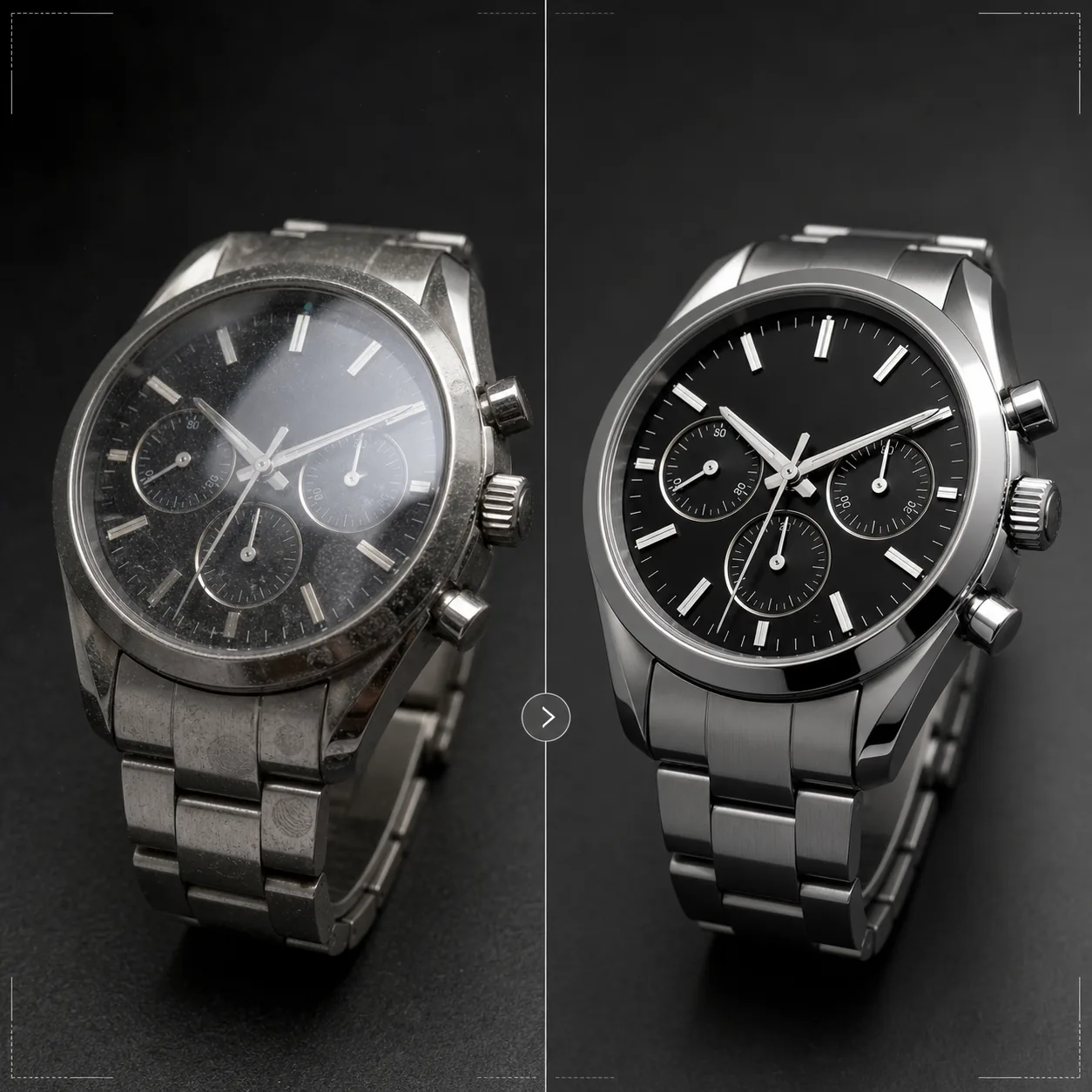
Trưng bày đồng hồ với độ chính xác mà chúng xứng đáng. Mẫu này làm sắc nét chi tiết mặt số và cọc số, kiểm soát phản chiếu trên mặt kính, tăng cường kết cấu kim loại của dây đeo và vỏ, loại bỏ bụi và dấu vân tay trên các bề mặt đánh bóng, đồng thời chuẩn bị hình ảnh cho danh sách thương mại điện tử cao cấp và sử dụng trong catalog.
Dùng thử mẫu này miễn phíE-commerce template preview
Mẫu này làm gì
Giải quyết những thách thức riêng của nhiếp ảnh đồng hồ, nơi từng chi tiết nhỏ có ý nghĩa vô cùng quan trọng với người mua. Mặt số đồng hồ chứa các chi tiết tinh xảo — cọc số, mặt số phụ, ô lịch ngày, chữ in — phải sắc nét tuyệt đối để hình ảnh truyền tải được chất lượng. Mẫu này dùng AI Enhance để làm sắc nét có chọn lọc các thành phần mặt số trong khi vẫn giữ tổng thể hình ảnh tự nhiên. Magic Eraser loại bỏ hạt bụi, dấu vân tay trên vỏ đánh bóng và những vết xước nhỏ trên mặt kính xuất hiện khi phóng to. Phản chiếu trên mặt kính được giảm bớt để nhìn rõ mặt số bên dưới, và kết cấu kim loại trên vỏ cũng như dây đeo được tăng cường để thể hiện rõ phần hoàn thiện đánh xước so với đánh bóng mà người mua đồng hồ đánh giá kỹ lưỡng.
Cài đặt mẫu
| Làm sắc nét mặt số | Tăng cường vi chi tiết có chọn lọc (cọc số, kim, chữ) |
| Phản chiếu mặt kính | Giảm chói và phản chiếu trên mặt kính sapphire/khoáng |
| Kết cấu kim loại | Tăng cường phân biệt bề mặt đánh xước và đánh bóng |
| Làm sạch bề mặt | Loại bỏ bụi, dấu vân tay và vết xước nhỏ |
| Độ phân giải đầu ra | 4000 × 4000 px (chi tiết macro để xem phóng to) |
| Nền | Trắng tinh, tối đặc hoặc chuyển sắc (tiêu chuẩn sản phẩm cao cấp) |
Cách sử dụng mẫu này
Tải lên ảnh đồng hồ của bạn
Tải lên ảnh sản phẩm của đồng hồ — ảnh đeo trên cổ tay, đặt phẳng hoặc bố cục studio trên đệm hay giá đỡ. Cũng hỗ trợ ảnh macro cận cảnh mặt số và góc cạnh của vỏ. Để có kết quả tốt nhất, hãy chụp đồng hồ ở vị trí kim 10:10, là tiêu chuẩn ngành giúp khung hình ôm trọn logo và tạo bố cục cân đối, đối xứng.
Tăng cường mặt số và chi tiết
AI Enhance làm sắc nét có chọn lọc mặt số — cọc giờ, kim, mặt số phụ, ô lịch ngày và chữ in trở nên rõ ràng, dễ đọc. Các chấm dạ quang trên cọc số được làm sáng nhẹ để thể hiện sự hiện diện của chúng. Quá trình tăng cường tôn trọng độ sâu trường ảnh trong ảnh gốc, giữ những vùng cố tình làm mờ vẫn mềm mại.
Làm sạch bề mặt và kiểm soát phản chiếu
Magic Eraser loại bỏ hạt bụi trên mặt số, dấu vân tay trên vỏ và dây đeo, cùng những vết xước nhỏ trên mặt kính. Phản chiếu mặt kính được giảm bớt để lộ rõ toàn bộ mặt số bên dưới trong khi vẫn giữ đủ phản chiếu để truyền tải sự hiện diện của kính — loại bỏ hoàn toàn phản chiếu khiến đồng hồ trông phẳng một cách thiếu chân thực.
Xuất ảnh cho danh sách hoặc catalog
Tải xuống ở 4000 × 4000 px cho danh sách thương mại điện tử có thể phóng to, hoặc ở độ phân giải in cho catalog và quảng cáo. Tùy chọn nền gồm trắng tinh cho danh sách trên sàn thương mại, tối đặc cho thẩm mỹ thương hiệu cao cấp và chuyển sắc cho mục đích biên tập.
Mẹo chuyên nghiệp để có kết quả tốt nhất
- ✓Chụp đồng hồ với kim đặt ở vị trí 10:10 hoặc 10:08 — vị trí này khung logo thương hiệu nằm giữa hai kim, cho thấy rõ cả ô lịch ngày lẫn mặt số phụ, và tạo bố cục cân đối về thị giác được dùng trên toàn ngành đồng hồ.
- ✓Dùng ống kính macro hoặc chế độ cận cảnh để ghi lại tối đa chi tiết mặt số. Mẫu này có thể làm sắc nét chi tiết sẵn có nhưng không thể tạo ra chi tiết chưa được ghi lại — ảnh gốc độ phân giải cao hơn với nhiều chi tiết mặt số sẽ cho kết quả tốt hơn đáng kể.
- ✓Đối với đồng hồ dây kim loại, hãy điều chỉnh ánh sáng để thể hiện sự khác biệt giữa bề mặt đánh xước và đánh bóng. Mẫu này tăng cường độ tương phản đó, nhưng bắt đầu với sự phân biệt bề mặt rõ ràng sẽ cho kết quả ấn tượng nhất.
- ✓Lau đồng hồ bằng vải sợi nhỏ ngay trước khi chụp. Dù Magic Eraser loại bỏ bụi và dấu vân tay, bắt đầu sạch sẽ đồng nghĩa với ít tái tạo bằng AI hơn và bảo toàn kết cấu kim loại chính xác hơn ở những vùng được làm sạch.
Công cụ
E-commerce workflow
Product photo hub
Use this template with the full ecommerce product photo workflow for marketplace backgrounds, cleanup, compression, resizing, and listing-ready exports.
View ecommerce product photo workflowCâu hỏi thường gặp
Mẫu này có sửa được ảnh mà mặt số bị che bởi phản chiếu không?
+
Có thể giảm phản chiếu vừa phải để lộ chi tiết mặt số bên dưới. Tuy nhiên, nếu phản chiếu mạnh đến mức không thấy chi tiết mặt số nào trong ảnh gốc, AI không thể tạo ra chi tiết chưa từng được ghi lại. Để có kết quả tốt nhất, hãy chụp với nguồn sáng được đặt sao cho giảm thiểu phản chiếu trực tiếp lên mặt kính.
Mẫu này có dùng được cho đồng hồ thông minh không?
+
Có. Màn hình đồng hồ thông minh được tăng cường với các thành phần giao diện sắc nét hơn và giảm dấu vân tay trên kính. Mẫu này nhận diện cả mặt số analog truyền thống lẫn màn hình kỹ thuật số và điều chỉnh cách làm sắc nét cho phù hợp.
Còn dây và quai đồng hồ thì sao?
+
Dây da được tăng cường kết cấu để thể hiện vân và chi tiết đường may. Dây NATO và dây vải được làm sắc nét kết cấu nhẹ nhàng. Dây kim loại được tăng cường bề mặt đánh xước/đánh bóng. Toàn bộ đồng hồ — vỏ, mặt kính, mặt số và dây — được xử lý như một sản phẩm hoàn chỉnh.
Mọi chi tiết đều quan trọng khi bán một chiếc đồng hồ
Tải lên ảnh đồng hồ và nhận chi tiết mặt số rõ nét như pha lê, phản chiếu được kiểm soát và chất lượng hình ảnh cấp trang sức cho danh sách của bạn.
Dùng thử miễn phíRelated templates
More e-commerce templates for your workflow.
Mẫu nền trắng tinh khiết cho ảnh sản phẩm. Amazon, Shopify và các cài đặt sẵn sàng cho thị trường để có hình ảnh sản phẩm rõ ràng, chuyên nghiệp có khả năng chuyển đổi.
Mẫu ảnh danh sách được tối ưu hóa Etsy. Chuyển đổi ảnh chụp phong cách sống sang nền trắng rõ nét ở 2000px, nâng cao chi tiết sản phẩm thủ công và đáp ứng các nguyên tắc về hình ảnh của Etsy.
Mẫu ảnh danh sách được eBay tối ưu hóa. Nền trắng cho hình ảnh thư viện, cải tiến tài liệu tình trạng và bố cục nhiều góc độ đáp ứng tiêu chuẩn hình ảnh của eBay.
Mẫu chụp ảnh trang sức chuyên nghiệp dành cho nhẫn, dây chuyền và đồng hồ. Kiểm soát phản xạ, tăng cường độ lấp lánh của đá quý và cung cấp hình ảnh sẵn sàng cho thị trường trên nền sạch.
Mẫu ảnh nội thất chuyên nghiệp dành cho danh sách trên thị trường. Loại bỏ sự lộn xộn trong phòng, hiển thị kích thước thực và trình bày các phần trên nền sạch sẽ hoặc trong bối cảnh căn phòng theo phong cách.
Làm sạch ảnh phẳng của quần áo với tính năng loại bỏ nếp nhăn, làm sạch xơ vải, nền trắng tinh và màu vải chính xác. Sẵn sàng cho Shopify, Amazon và các cửa hàng nhỏ.