
Khôi phục ảnh cổ điển
Hồi sinh những bức ảnh cũ quý giá. Mẫu này sửa chữa những hư hại mà nhiều thập kỷ gây ra cho ảnh in — loại bỏ vết trầy xước, nếp gấp và vết ố, phục hồi màu sắc từ những bản in phai màu, thậm chí chuyển ảnh gốc nâu đỏ hoặc đen trắng thành ảnh màu đầy đủ chân thực trong khi vẫn giữ được đặc trưng phù hợp với thời kỳ của hình ảnh.
Dùng thử mẫu này miễn phíRestoration template preview
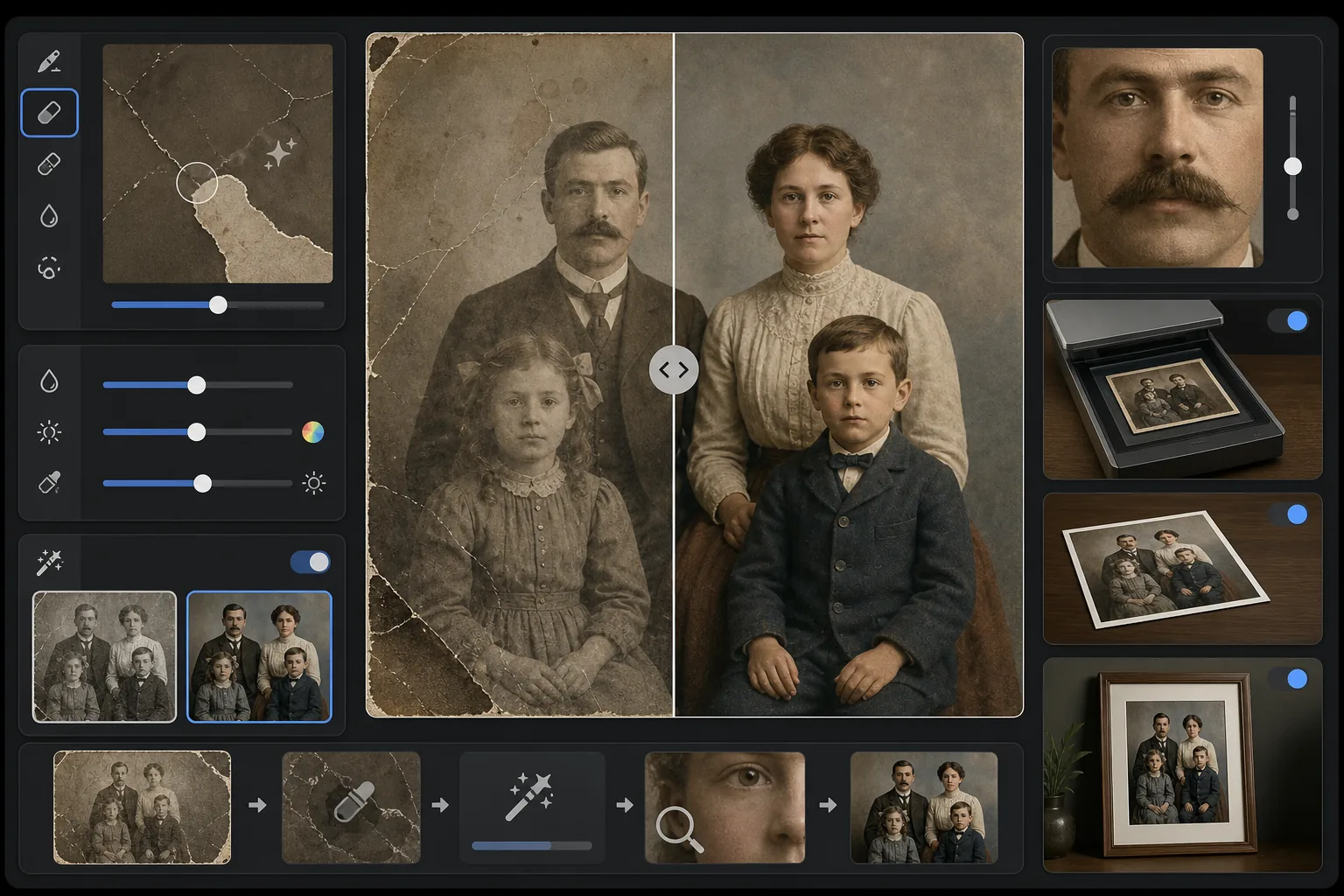
Mẫu này làm gì
Sửa chữa hư hại vật lý và các tác động của thời gian trên ảnh cổ điển đã quét. Magic Eraser loại bỏ vết trầy xước, nếp gấp, vết ố nước, đốm nấm mốc và mép rách bằng cách tái tạo nội dung hình ảnh bị mất từ bối cảnh xung quanh. AI Enhance phục hồi màu sắc đã bị lệch hoặc phai theo nhiều thập kỷ, làm sắc nét chi tiết bị mờ do thời gian, và có thể tô màu ảnh đen trắng hoặc nâu đỏ với màu chính xác theo thời kỳ, tôn trọng kỷ nguyên của hình ảnh gốc.
Cài đặt mẫu
| Sửa chữa hư hại | Mạnh mẽ — loại bỏ vết trầy xước, nếp gấp, vết ố và mép rách |
| Phục hồi màu sắc | Toàn phổ — khôi phục các sắc tố phai màu về độ sống động ban đầu |
| Chế độ tô màu | Tắt, Nhẹ hoặc Đầy đủ (cho ảnh gốc đen trắng và nâu đỏ) |
| Phục hồi chi tiết | Tái tạo khuôn mặt và các chi tiết tinh tế bị mờ do thời gian và độ phân giải quét thấp |
| Kích thước đầu ra | Khớp với kích thước quét gốc, tùy chọn phóng to 2× |
| Bảo tồn thời kỳ | Giữ lại kết cấu hạt và chất lượng tông màu phù hợp với thời kỳ |
Cách sử dụng mẫu này
Quét hoặc chụp ảnh bản gốc
Quét ảnh cổ điển ở 600 DPI trở lên để có chi tiết phục hồi tốt nhất. Nếu không thể quét, hãy chụp bản in trên bề mặt phẳng dưới ánh sáng đều, khuếch tán — tránh đèn flash vì nó tạo ra các đốm chói trên ảnh bóng.
Sửa chữa hư hại vật lý
Magic Eraser nhận diện và loại bỏ vết trầy xước, nếp gấp, hư hại do nước, đốm nấm mốc và cặn băng dính. AI tái tạo các vùng bị mất bằng cách phân tích nội dung hình ảnh xung quanh — lấp đầy góc rách, nối liền vết nứt trên khuôn mặt và loại bỏ vết ố đổi màu.
Phục hồi hoặc thêm màu
Đối với bản in màu đã phai, AI Enhance khôi phục bảng màu gốc bằng cách đảo ngược những cách thức cụ thể mà các lớp thuốc nhuộm khác nhau bị suy giảm theo thời gian. Đối với ảnh gốc đen trắng hoặc nâu đỏ, tùy chọn tô màu thêm màu sắc chân thực dựa trên các manh mối ngữ cảnh như tông màu da, cây cối, bầu trời và hoa văn vải.
Làm sắc nét và xuất
Tính năng phục hồi chi tiết làm sắc nét các đặc điểm khuôn mặt, văn bản và chi tiết tinh tế đã bị nhiều thập kỷ thời gian làm mờ. Xuất ở độ phân giải quét gốc hoặc phóng to 2× để in ở kích thước lớn hơn bản gốc.
Mẹo chuyên nghiệp để có kết quả tốt nhất
- ✓Quét ở độ phân giải cao nhất mà máy quét của bạn hỗ trợ — tối thiểu 600 DPI, tốt nhất là 1200 DPI. Càng nhiều chi tiết được ghi lại thì AI càng có nhiều dữ liệu để làm việc khi tái tạo các vùng hư hại.
- ✓Nếu ảnh bị kẹt trong khung hoặc album, hãy chụp tại chỗ thay vì mạo hiểm làm rách — mẫu có thể loại bỏ mép khung và các tạo tác của trang album.
- ✓Để tô màu ảnh lịch sử, hãy cung cấp bối cảnh về thời kỳ (thập kỷ) và địa điểm nếu có thể — màu quần áo, màu xe và vật liệu xây dựng thay đổi đáng kể theo từng thời kỳ và khu vực.
- ✓Hãy xử lý vùng hư hại nhất của ảnh trước như một thử nghiệm trước khi chạy khôi phục toàn bộ — điều này giúp bạn xác nhận chất lượng tái tạo đáp ứng kỳ vọng của mình.
Công cụ
Câu hỏi thường gặp
Nó có thể sửa ảnh bị mất các phần như góc bị xé rách không?
+
Có. AI tái tạo các vùng bị mất bằng ngữ cảnh từ hình ảnh xung quanh. Đối với nền như bầu trời, tường và cây cối, kết quả liền mạch. Đối với các phần khuôn mặt hoặc chi tiết quan trọng bị mất, việc tái tạo rất ấn tượng nhưng có thể cần điều chỉnh thủ công nhỏ cho các đặc điểm quan trọng.
Việc tô màu ảnh đen trắng chính xác đến mức nào?
+
Tô màu sử dụng phân tích ngữ cảnh để gán màu chân thực — tông màu da, màu xanh bầu trời, màu xanh cây cối và các màu vải phổ biến rất chính xác. Màu cụ thể của các vật thể mà AI không thể xác định từ ngữ cảnh (như sắc thái chính xác của một chiếc váy) sẽ hợp lý chứ không đảm bảo chính xác.
Việc khôi phục có làm mất đặc trưng cổ điển của ảnh không?
+
Không. Cài đặt bảo tồn thời kỳ giữ lại kết cấu hạt và chất lượng tông màu phù hợp với thời kỳ, vốn tạo nên đặc trưng cho ảnh cổ điển. Hư hại vật lý như vết trầy xước và vết ố được loại bỏ, nhưng chất lượng nhiếp ảnh của thời kỳ gốc vẫn được tôn trọng — một bức ảnh thập niên 1940 vẫn trông như ảnh thập niên 1940, chỉ là không còn hư hại.
Cứu lấy ký ức gia đình bạn
Tải lên bản quét của bất kỳ bức ảnh nào bị hư hỏng, phai màu hoặc cũ kỹ và xem nhiều thập kỷ hao mòn biến mất. Vết trầy xước biến mất, màu sắc được phục hồi, ký ức được lưu giữ.
Dùng thử miễn phí