
Sơ đồ mặt bằng bất động sản
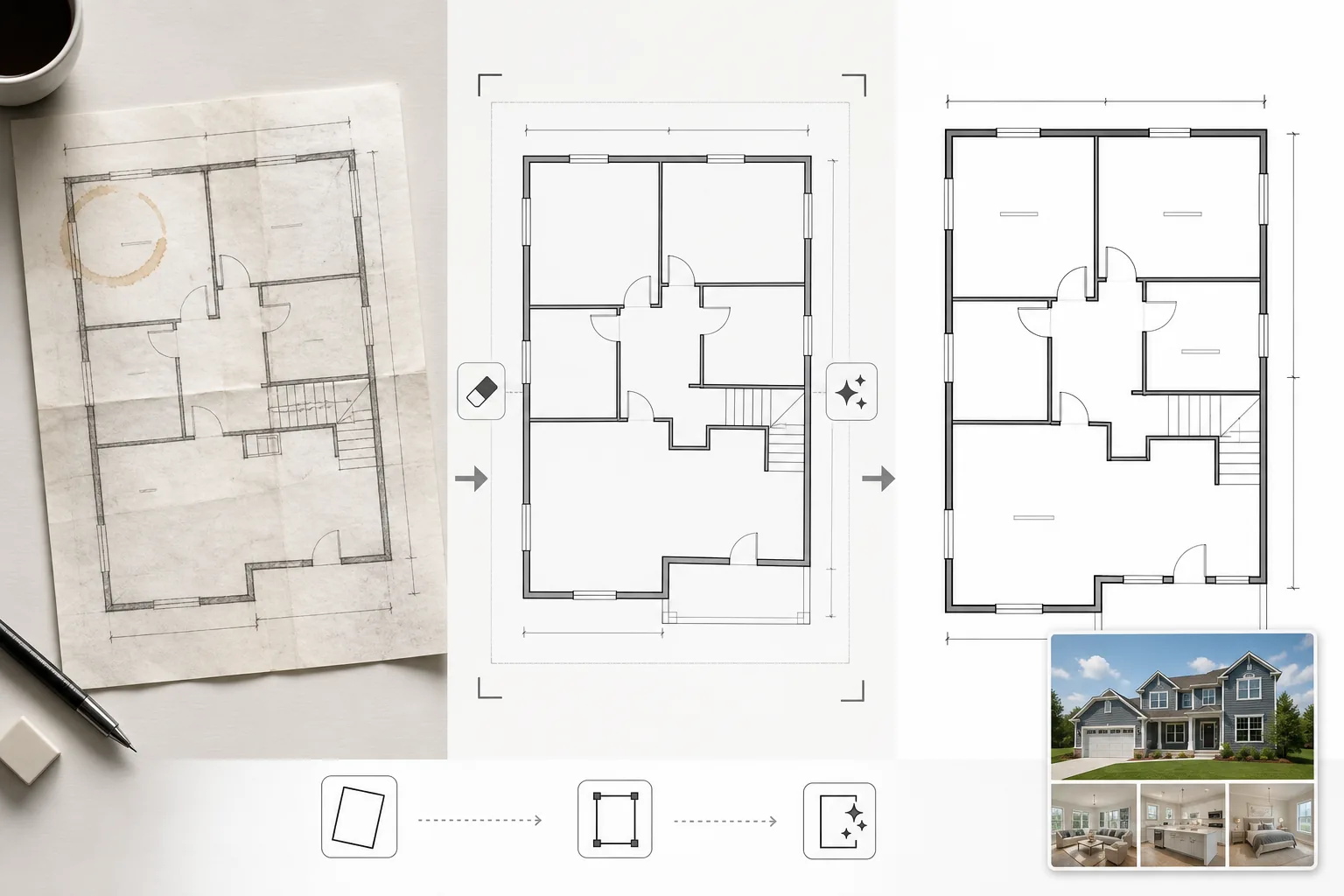
Biến sơ đồ mặt bằng được quét hoặc chụp ảnh thành sơ đồ rõ ràng, chuyên nghiệp phù hợp với danh sách MLS, tờ rơi bất động sản và tích hợp tham quan ảo. Mẫu này loại bỏ vết bẩn, bóng đổ và nếp gấp khỏi bản vẽ giấy, làm sắc nét đường tường và ghi chú kích thước, đồng thời chuẩn hóa phong cách hình ảnh để mọi sơ đồ mặt bằng trong danh mục của bạn trông nhất quán.
Dùng thử mẫu này miễn phíReal Estate template preview
Mẫu này làm gì
Làm sạch hình ảnh sơ đồ mặt bằng được chụp từ bản thiết kế giấy, xuất từ phần mềm CAD lỗi thời hoặc quét ở chất lượng thấp. Magic Eraser loại bỏ vết cà phê, ghi chú bút chì, nếp gấp và bóng đổ từ ảnh chụp bằng điện thoại của bản vẽ giấy. AI Enhance làm sắc nét đường tường, hướng mở cửa và văn bản kích thước để chúng vẫn dễ đọc khi thu nhỏ hiển thị trên web hoặc in trong tờ rơi. Góc nhìn được chỉnh sửa cho các sơ đồ chụp nghiêng thay vì quét phẳng. Màu nền được chuẩn hóa thành màu trắng sạch, và đường tường được làm đậm với độ dày nhất quán để có diện mạo đồng nhất trên tất cả các bản vẽ trong một danh sách.
Cài đặt mẫu
| Làm sạch nền | Loại bỏ vết bẩn, nếp gấp, bóng đổ và chuẩn hóa thành màu trắng sạch |
| Tăng cường đường nét | Làm sắc nét và làm đậm đường tường với độ dày nhất quán |
| Độ rõ văn bản | Tăng cường nhãn kích thước, tên phòng và ghi chú đo lường |
| Chỉnh sửa góc nhìn | Làm thẳng các bản vẽ chụp ảnh về góc nhìn từ trên xuống thực sự |
| Độ phân giải đầu ra | 3000×2000px (ngang) hoặc tùy chỉnh để khớp với tỷ lệ khung hình gốc |
Cách sử dụng mẫu này
Tải lên hình ảnh sơ đồ mặt bằng của bạn
Tải lên sơ đồ mặt bằng được quét, chụp ảnh hoặc kỹ thuật số. Mẫu này xử lý các bản vẽ giấy chụp bằng máy ảnh điện thoại, bản quét phẳng, tệp PDF xuất ra và ảnh chụp màn hình từ phần mềm kiến trúc. Biến dạng góc nhìn từ ảnh chụp nghiêng bằng điện thoại được chỉnh sửa tự động.
Loại bỏ tạp chất và vết bẩn
Magic Eraser nhận diện và loại bỏ vết cà phê, vết bút chì, nếp gấp, vệt quét và dải bóng đổ từ ánh sáng không đều. Nền được chuẩn hóa thành màu trắng sạch trong khi vẫn giữ nguyên tất cả đường nét kiến trúc và ghi chú.
Tăng cường đường nét và văn bản
AI Enhance làm sắc nét đường viền tường, cung mở cửa, ký hiệu cửa sổ và chỉ báo cầu thang. Văn bản kích thước và nhãn phòng được tăng cường để dễ đọc. Độ dày đường nét được chuẩn hóa để tường ngoài dày và vách ngăn trong mỏng hơn có thứ bậc hình ảnh nhất quán.
Xuất để đăng tin và in ấn
Tải xuống sơ đồ mặt bằng đã làm sạch ở độ phân giải cao để tải lên MLS, tờ rơi bất động sản và lớp phủ tham quan ảo. Phong cách hình ảnh chuẩn hóa đảm bảo tất cả sơ đồ mặt bằng trên các danh sách của bạn trông chuyên nghiệp và nhất quán.
Mẹo chuyên nghiệp để có kết quả tốt nhất
- ✓Khi chụp ảnh sơ đồ mặt bằng trên giấy, hãy đặt nó trên bề mặt phẳng và chụp thẳng từ trên xuống với ánh sáng đều. Chỉnh sửa góc nhìn xử lý được các góc vừa phải, nhưng điểm xuất phát gần như từ trên xuống tạo ra kết quả sắc nét nhất.
- ✓Loại bỏ giấy nhớ và kẹp giấy khỏi bản vẽ trước khi chụp ảnh. AI có thể xóa những thứ này, nhưng keo dính còn sót lại và bóng kẹp đôi khi để lại vết mờ cần dọn dẹp thêm.
- ✓Đối với bất động sản nhiều tầng, hãy xử lý từng tầng riêng biệt và sử dụng cùng cài đặt tăng cường. Điều này đảm bảo độ dày đường tường, kích thước văn bản và tông màu nền khớp nhau giữa các tầng để trình bày danh sách mạch lạc.
Công cụ
Câu hỏi thường gặp
Công cụ này có thể chuyển đổi bản phác thảo sơ sài thành sơ đồ mặt bằng chuyên nghiệp không?
+
Mẫu này làm sạch và tăng cường các bản vẽ sơ đồ mặt bằng hiện có — nó không tạo ra bản vẽ kiến trúc từ đầu. Một bản phác thảo sơ sài với các bức tường và hình dạng phòng được vẽ rõ ràng có thể được làm sạch và sắc nét, nhưng các đường cong và đường nét không đều vẽ tay sẽ vẫn giữ đặc tính vẽ tay, chỉ sạch hơn.
Văn bản kích thước có được giữ nguyên chính xác không?
+
Có. Tính năng tăng cường làm sắc nét các nhãn kích thước hiện có mà không thay đổi các con số. Nếu văn bản gốc quá mờ để đọc, AI sẽ cố gắng khôi phục khả năng đọc nhưng không thể đảm bảo độ chính xác trên văn bản bị xuống cấp nghiêm trọng — luôn xác minh kích thước với tài liệu nguồn.
Tôi có thể thêm nhãn phòng sau khi xử lý không?
+
Có. Nền trắng sạch và đường nét sắc nét giúp dễ dàng phủ nhãn phòng, biểu tượng nội thất hoặc mã màu bằng bất kỳ trình chỉnh sửa hình ảnh hoặc phần mềm đăng tin nào.
Trình bày mọi danh sách với sơ đồ mặt bằng sạch sẽ, chuyên nghiệp
Tải lên sơ đồ mặt bằng được quét hoặc chụp ảnh và nhận sơ đồ rõ ràng, sắc nét, sẵn sàng đăng tin trong vài giây.
Dùng thử miễn phíRelated templates
More real estate templates for your workflow.
Mẫu ảnh bất động sản chuyên nghiệp cho danh sách MLS. Cải tiến giống HDR, thay thế bầu trời, loại bỏ vật lộn xộn và hiệu chỉnh màu sắc để có ảnh bất động sản bán nhanh hơn.
Nâng cấp ảnh ngoại thất kiến trúc với hiệu chỉnh đường thẳng đứng, thay thế bầu trời, xóa ô tô và người đi bộ, cùng phối màu giờ vàng cho tin rao bán và hồ sơ năng lực.
Biến đổi các bức ảnh về Airbnb và nhà nghỉ cho thuê bằng tính năng làm sáng phòng, loại bỏ lộn xộn, Color correction và sửa méo ống kính góc rộng để có tỷ lệ đặt phòng cao hơn.
Nâng cao hình ảnh danh mục thiết kế nội thất bằng cách làm sáng căn phòng, loại bỏ sự lộn xộn, làm sắc nét kết cấu vật liệu và hiển thị màu sắc chính xác của các lớp hoàn thiện và vải.
Nâng cao khả năng chụp ảnh trên không bằng máy bay không người lái với tính năng thay thế bầu trời, làm nổi bật ranh giới bất động sản, độ sống động của màu sắc Boost và loại bỏ sự phân tâm cho các cuộc khảo sát đất đai và bất động sản.
Dàn dựng ảo các căn phòng trống với đồ nội thất, trang trí và ánh sáng chân thực. Giúp người mua hình dung không gian sống mà không tốn chi phí dàn dựng vật lý.