
Trình xoay sản phẩm 360
Tạo chế độ xem xoay sản phẩm 360 độ chuyên nghiệp từ ảnh chụp bàn xoay. Mẫu này xóa nền khỏi mọi góc xoay, đảm bảo ánh sáng và màu sắc nhất quán trên tất cả các khung hình, loại bỏ bụi và khuyết điểm bề mặt, đồng thời xuất ra một bộ ảnh đồng nhất sẵn sàng cho trình xem 360 tương tác trên trang sản phẩm của bạn.
Dùng thử mẫu này miễn phíE-commerce template preview
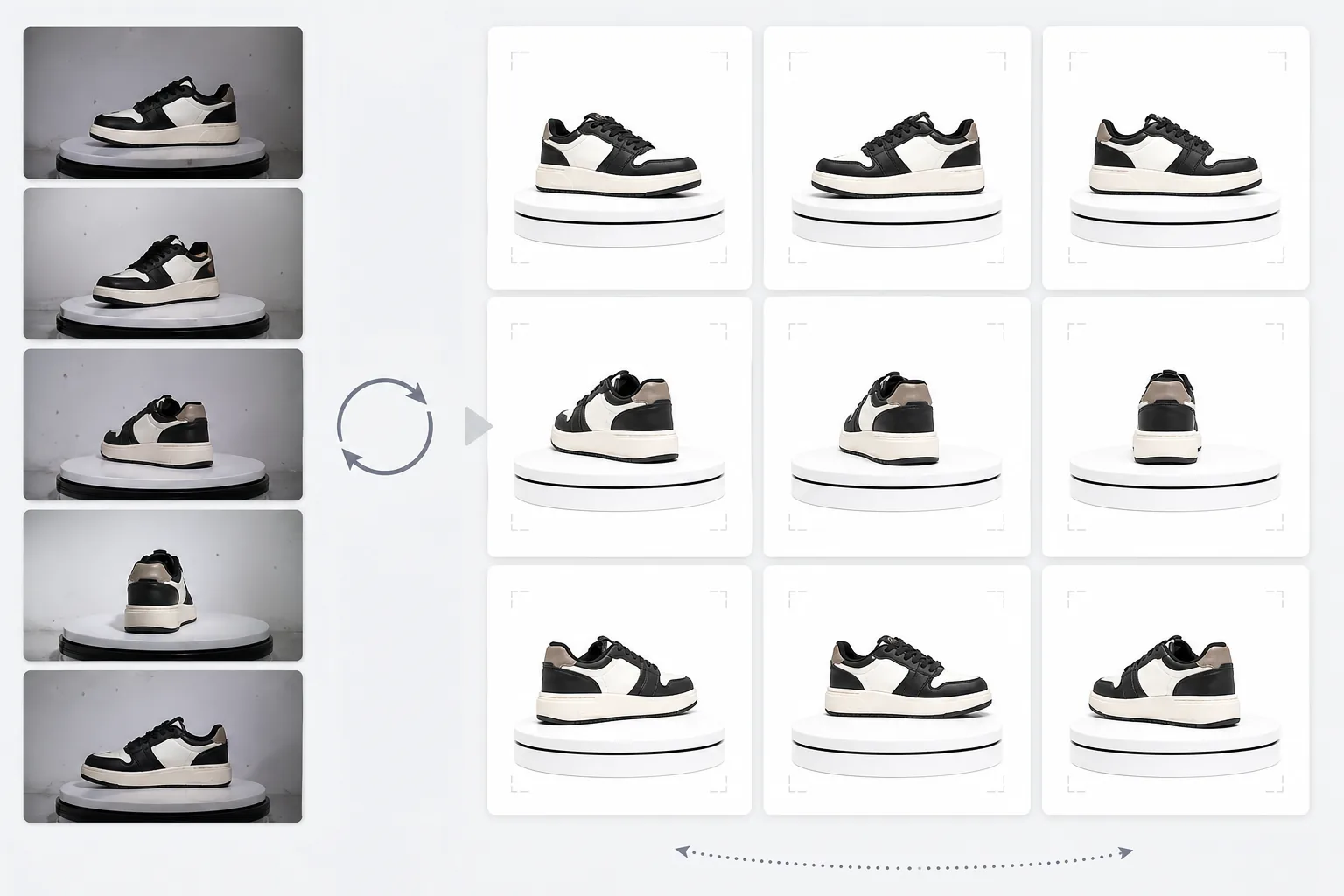
Mẫu này làm gì
Xử lý ảnh sản phẩm chụp nhiều góc thành một bộ nhất quán phù hợp cho trình xem xoay tương tác 360 độ trên các trang thương mại điện tử. Khi bạn chụp một sản phẩm trên bàn xoay từ 24 hoặc 36 góc, những điểm thiếu nhất quán nhỏ về nền, ánh sáng và bóng đổ tích tụ lại và tạo ra trải nghiệm xoay giật cục, thiếu chuyên nghiệp. Mẫu này sử dụng Background Eraser để tách sản phẩm khỏi mọi góc với cách xử lý viền nhất quán, chuẩn hóa ánh sáng và nhiệt độ màu trên tất cả khung hình để sản phẩm không nhấp nháy giữa tông ấm và lạnh khi xoay, và sử dụng Magic Eraser để loại bỏ bụi, dấu vân tay và khuyết điểm bề mặt vốn gây mất tập trung khi chúng xuất hiện ở khung hình này nhưng không có ở khung hình kế tiếp.
Cài đặt mẫu
| Nền | Trắng tinh (#FFFFFF) — nhất quán trên tất cả các khung xoay |
| Chuẩn hóa ánh sáng | Đồng nhất giữa các khung (loại bỏ hiện tượng nhấp nháy giữa các góc) |
| Làm sạch bề mặt | Loại bỏ bụi, dấu vân tay và phản chiếu trên từng khung hình |
| Căn giữa sản phẩm | Tự động căn giữa sản phẩm trong mỗi khung hình để trục xoay mượt mà |
| Kích thước đầu ra | 1500 × 1500 px mỗi khung (tối ưu cho trình xem 360 trên web) |
| Số lượng khung hình | Hỗ trợ chuỗi 12, 24 hoặc 36 khung hình |
Cách sử dụng mẫu này
Tải lên ảnh chụp bàn xoay của bạn
Tải lên toàn bộ bộ ảnh xoay (12, 24 hoặc 36 khung hình) được chụp trên bàn xoay với khoảng cách đều nhau. Đặt tên tệp theo thứ tự (001.jpg đến 036.jpg) để mẫu xử lý chúng theo đúng thứ tự xoay. Mẫu này xử lý được ảnh từ bất kỳ nền nào — phông trắng, xám hoặc có màu.
Xóa nền và đảm bảo nhất quán
Background Eraser xóa nền khỏi mọi khung hình bằng cùng một cài đặt phát hiện viền, đảm bảo đường viền sản phẩm nhất quán trên tất cả các góc. Sản phẩm được tự động căn giữa trong mỗi khung hình để trục xoay luôn ổn định và quá trình xoay không bị lung lay.
Chuẩn hóa giữa các khung hình
Ánh sáng, nhiệt độ màu và độ phơi sáng được chuẩn hóa trên tất cả các khung hình. Điều này loại bỏ những dao động tinh tế về độ sáng và màu sắc xảy ra khi ánh sáng của bàn xoay không hoàn toàn đều ở mọi góc. Các khuyết điểm bề mặt nhìn thấy ở một số góc được làm sạch để đảm bảo nhất quán.
Xuất chuỗi khung hình
Tải xuống toàn bộ chuỗi khung hình ở 1500 × 1500 px mỗi khung ở định dạng JPEG. Các tệp được đánh số theo thứ tự và sẵn sàng nhập trực tiếp vào các plugin xem 360 như Magic 360, Sirv hoặc Webrotate 360. Tổng dung lượng tệp được tối ưu để tải nhanh trên web.
Mẹo chuyên nghiệp để có kết quả tốt nhất
- ✓Hãy dùng bàn xoay thủ công có vạch chia độ thay vì xoay bằng tay. Khoảng cách 10 độ đều nhau (36 khung hình) tạo ra chuyển động xoay mượt nhất. Mẫu có thể xử lý những sai lệch xoay nhỏ, nhưng khoảng cách đều nhau sẽ cho kết quả mượt hơn rõ rệt.
- ✓Cố định máy ảnh trên chân máy và dùng cài đặt phơi sáng thủ công cho tất cả các khung hình. Phơi sáng tự động khiến máy ảnh điều chỉnh độ sáng khác nhau ở mỗi góc, tạo ra hiệu ứng nhấp nháy mà mẫu sau đó phải sửa lại. Cài đặt thủ công mang lại cho mẫu một điểm xuất phát sạch hơn.
- ✓Hãy lau chùi sản phẩm thật kỹ trước khi chụp — bụi và dấu vân tay dễ thấy và gây mất tập trung hơn trong chuyển động xoay 360 so với ảnh tĩnh đơn lẻ vì chúng xuất hiện và biến mất khi sản phẩm xoay. Mẫu loại bỏ những thứ này, nhưng bắt đầu với bề mặt sạch sẽ cho kết quả tốt hơn.
E-commerce workflow
Product photo hub
Use this template with the full ecommerce product photo workflow for marketplace backgrounds, cleanup, compression, resizing, and listing-ready exports.
View ecommerce product photo workflowCâu hỏi thường gặp
Tôi cần bao nhiêu khung hình?
+
36 khung hình (khoảng cách 10 độ) tạo ra chuyển động xoay mượt nhất cho hầu hết sản phẩm. 24 khung hình (khoảng cách 15 độ) chấp nhận được với các sản phẩm không có chi tiết tinh xảo. 12 khung hình (khoảng cách 30 độ) là mức tối thiểu để nhận biết được chuyển động xoay nhưng sẽ bị giật với các sản phẩm nhiều chi tiết như đồng hồ hoặc đồ điện tử.
Tôi có thể xử lý khung hình từ video không?
+
Có, nếu bạn trích xuất các khung hình từ video bàn xoay ở những khoảng cách đều nhau. Hãy xuất khung hình ở độ phân giải cao nhất có thể và đảm bảo phân bố góc đều quanh toàn bộ 360 độ. Khung hình từ video có thể có chất lượng thấp hơn ảnh tĩnh chuyên dụng do nhòe chuyển động và nén video.
Những plugin xem 360 nào tương thích?
+
Đầu ra JPEG theo thứ tự tương thích với tất cả các giải pháp xem 360 lớn bao gồm Magic 360, Sirv 360, Webrotate 360, jQuery Reel và các triển khai tùy chỉnh. Kích thước nhất quán và quy ước đặt tên giúp việc nhập trở nên đơn giản.
Mang đến cho người mua chế độ xem sản phẩm 360 mà họ mong đợi
Tải lên ảnh chụp bàn xoay và nhận chuỗi khung hình sạch, nhất quán, sẵn sàng cho trình xem xoay 360 tương tác trên trang sản phẩm của bạn.
Dùng thử miễn phíRelated templates
More e-commerce templates for your workflow.
Mẫu nền trắng tinh khiết cho ảnh sản phẩm. Amazon, Shopify và các cài đặt sẵn sàng cho thị trường để có hình ảnh sản phẩm rõ ràng, chuyên nghiệp có khả năng chuyển đổi.
Mẫu ảnh danh sách được tối ưu hóa Etsy. Chuyển đổi ảnh chụp phong cách sống sang nền trắng rõ nét ở 2000px, nâng cao chi tiết sản phẩm thủ công và đáp ứng các nguyên tắc về hình ảnh của Etsy.
Mẫu ảnh danh sách được eBay tối ưu hóa. Nền trắng cho hình ảnh thư viện, cải tiến tài liệu tình trạng và bố cục nhiều góc độ đáp ứng tiêu chuẩn hình ảnh của eBay.
Mẫu chụp ảnh trang sức chuyên nghiệp dành cho nhẫn, dây chuyền và đồng hồ. Kiểm soát phản xạ, tăng cường độ lấp lánh của đá quý và cung cấp hình ảnh sẵn sàng cho thị trường trên nền sạch.
Mẫu ảnh nội thất chuyên nghiệp dành cho danh sách trên thị trường. Loại bỏ sự lộn xộn trong phòng, hiển thị kích thước thực và trình bày các phần trên nền sạch sẽ hoặc trong bối cảnh căn phòng theo phong cách.
Làm sạch ảnh phẳng của quần áo với tính năng loại bỏ nếp nhăn, làm sạch xơ vải, nền trắng tinh và màu vải chính xác. Sẵn sàng cho Shopify, Amazon và các cửa hàng nhỏ.