
Sẵn sàng in ảnh phong cảnh
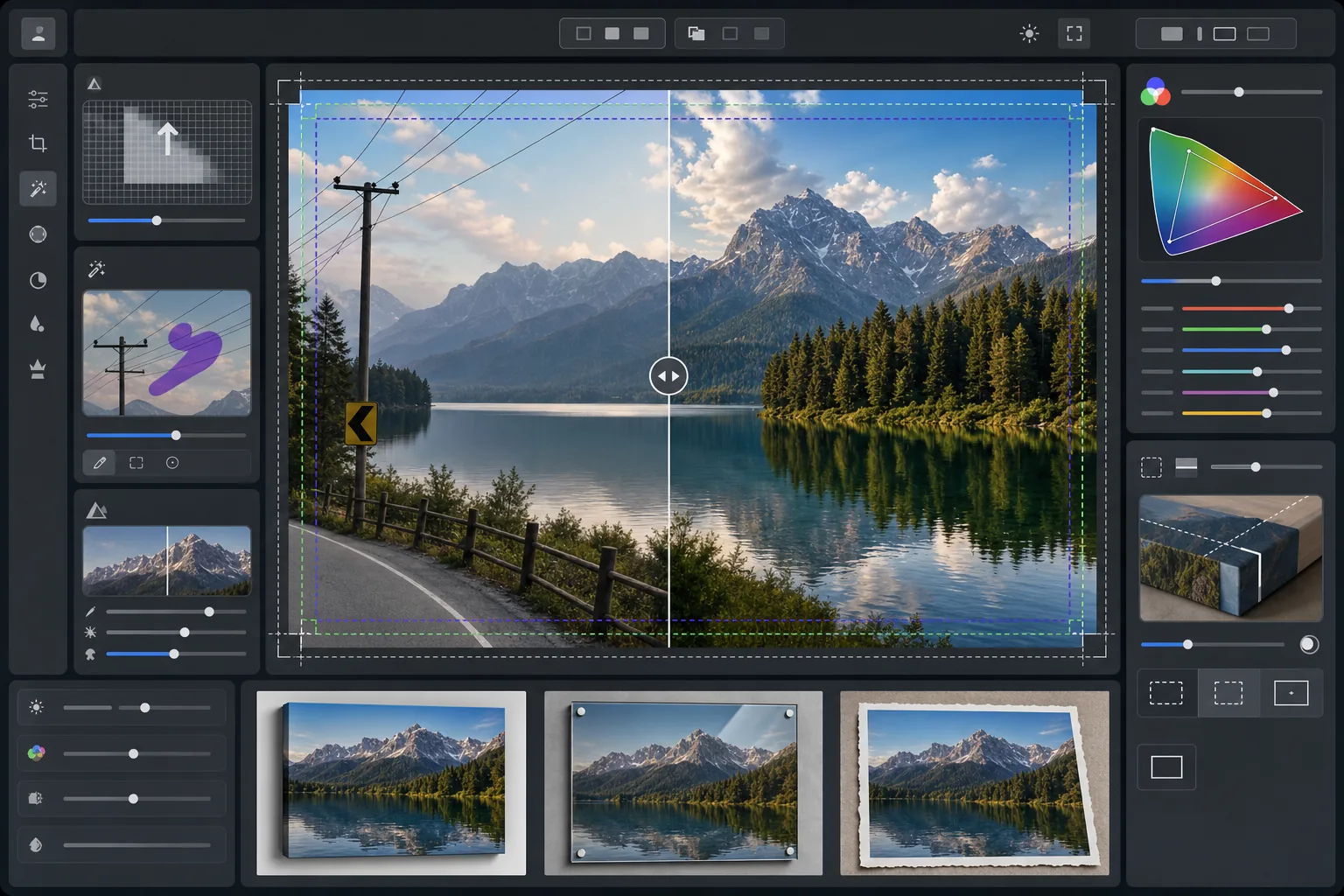
Biến ảnh phong cảnh thành tệp sẵn sàng in khổ lớn ở 300 DPI. Mẫu này nâng cấp hình ảnh để in cỡ 16x20 inch trở lên, đồng thời loại bỏ những chi tiết gây rối mắt như đường dây điện, biển báo giao thông và hàng rào làm phân tán khỏi cảnh thiên nhiên. Hiệu chỉnh màu được tối ưu cho các chất nền canvas, kim loại và giấy mỹ thuật.
Dùng thử mẫu này miễn phíPhotography template preview
Mẫu này làm gì
Chuẩn bị ảnh phong cảnh cho việc in khổ lớn chuyên nghiệp bằng cách nâng độ phân giải để đáp ứng yêu cầu 300 DPI ở cỡ 16x20 inch trở lên. AI Enhance tăng số lượng điểm ảnh mà không tạo ra hiện tượng nhiễu, giữ nguyên chi tiết tinh tế ở tán lá, kết cấu mặt nước và hình dạng đám mây. Magic Eraser loại bỏ đường dây điện, cột điện, biển báo giao thông, hàng rào và những yếu tố nhân tạo khác làm gián đoạn bố cục tự nhiên. Màu sắc được điều chỉnh cho dải màu rộng hơn và đặc tính phản xạ khác nhau của canvas bọc khung, bản in kim loại nhôm và giấy bông mỹ thuật.
Cài đặt mẫu
| Mục tiêu nâng cấp | Tối thiểu 6000×4000px (300 DPI ở 20×13 inch) |
| Làm sắc nét | Mặt nạ làm sắc nét tối ưu cho in (bán kính 1.2, mức 80%) |
| Hồ sơ màu | ProPhoto RGB (dải màu tối đa cho in mỹ thuật) |
| Dải tương phản động | Vùng tối +0.8 EV, khôi phục vùng sáng -0.3 EV |
| Giảm nhiễu | Theo độ sáng (giữ hạt trên bầu trời, làm mịn tán lá) |
| Định dạng đầu ra | TIFF 16-bit với hồ sơ ICC nhúng kèm |
Cách sử dụng mẫu này
Tải lên ảnh phong cảnh của bạn
Tải lên ảnh phong cảnh từ bất kỳ máy ảnh hoặc điện thoại nào. AI phân tích độ phân giải gốc và tính toán hệ số nâng cấp cần thiết để đạt 300 DPI ở kích thước in mục tiêu. Ngay cả ảnh điện thoại 12 megapixel cũng có thể được nâng cấp sạch sẽ để in cỡ 16x20.
Loại bỏ những chi tiết gây rối mắt
Magic Eraser nhận diện và loại bỏ đường dây điện, cột điện, biển báo giao thông, hàng rào, rác và các yếu tố nhân tạo khác làm phân tán khỏi cảnh thiên nhiên. AI tái tạo độ chuyển màu của bầu trời, đường viền hàng cây và kết cấu địa hình phía sau các đối tượng đã xóa.
Tăng cường cho đầu ra in
AI Enhance nâng cấp hình ảnh lên độ phân giải mục tiêu trong khi làm sắc nét cho khoảng cách xem khi in. Màu được chuyển sang dải ProPhoto RGB để giữ trọn dải màu xanh lá, xanh dương và tông hoàng hôn mà sRGB phổ thông bị cắt mất.
Xuất cho chất nền in của bạn
Tải xuống dưới dạng TIFF 16-bit với hồ sơ ICC nhúng kèm khớp với đầu ra của bạn — canvas bọc khung, bản in kim loại hoặc giấy mỹ thuật. Tệp bao gồm lề tràn và dấu cắt cần thiết cho hầu hết các xưởng in chuyên nghiệp.
Mẹo chuyên nghiệp để có kết quả tốt nhất
- ✓Với canvas bọc khung, thêm 1.5 inch tràn lề mỗi bên để hình ảnh bọc quanh thanh căng mà không cắt vào bố cục chính. Mẫu bao gồm hướng dẫn vùng an toàn bọc khung trong đầu ra.
- ✓Bản in kim loại phản xạ ánh sáng và khuếch đại độ tương phản, vì vậy hãy giảm thanh trượt tương phản 10-15% so với mức trông đẹp trên màn hình. Vùng tối có vẻ chi tiết trên màn hình có thể bị mất hoàn toàn trên chất nền nhôm.
- ✓Khi loại bỏ những đường dây điện dài chạy ngang toàn khung, AI xử lý chúng theo từng đoạn. Để có kết quả sạch nhất, hãy dùng ảnh gốc có bầu trời phía sau dây với độ chuyển màu mượt mà thay vì các họa tiết mây phức tạp.
- ✓Hãy xử lý ở kích thước lớn nhất mà bạn có thể in, ngay cả khi đơn hàng hiện tại nhỏ hơn. Giảm cỡ tệp 24x36 xuống 16x20 không mất chất lượng, nhưng bạn không thể nâng cấp tệp 16x20 lên 24x36 sau này mà không mất chất lượng.
Công cụ
Câu hỏi thường gặp
Tôi có thể in cỡ lớn đến mức nào từ ảnh điện thoại?
+
Một ảnh điện thoại 12 megapixel (4032x3024) có thể được nâng cấp sạch sẽ lên 8000x6000 điểm ảnh, hỗ trợ in 300 DPI ở cỡ 26x20 inch. Ở khoảng cách xem tiêu chuẩn cho bản in lớn (1-1.2 mét), ngay cả bản in 24x36 inch cũng trông sắc nét từ ảnh điện thoại được AI nâng cấp.
Việc loại bỏ đường dây điện có để lại dấu vết không?
+
AI tái tạo độ chuyển màu của bầu trời, mép đám mây và hàng cây phía sau đường dây đã xóa bằng cách dùng dữ liệu điểm ảnh xung quanh. Trong điều kiện bầu trời mượt, việc xóa hầu như không thể phát hiện. Bầu trời phức tạp với mây ấn tượng có thể cho thấy sự hòa trộn tinh tế khi soi rất gần, nhưng ở khoảng cách xem in bình thường thì kết quả sạch sẽ.
Tôi nên gửi định dạng tệp nào cho xưởng in?
+
Hầu hết các xưởng in chuyên nghiệp chấp nhận tệp TIFF 16-bit với hồ sơ ICC nhúng kèm, đây là đầu ra mặc định của mẫu này. Nếu xưởng yêu cầu JPEG, hãy xuất ở chất lượng 100 trong không gian màu Adobe RGB. Tránh sRGB cho bản in khổ lớn vì nó cắt mất màu xanh lá rực rỡ và xanh dương đậm thường thấy trong ảnh phong cảnh.
In phong cảnh của bạn ở mọi kích thước một cách tự tin
Tải lên ảnh phong cảnh và nhận tệp sẵn sàng in với đường dây điện đã xóa, độ phân giải đã nâng cấp và màu được tối ưu cho canvas, kim loại hoặc giấy mỹ thuật.
Dùng thử miễn phí