
Tạo kiểu chụp ảnh món ăn
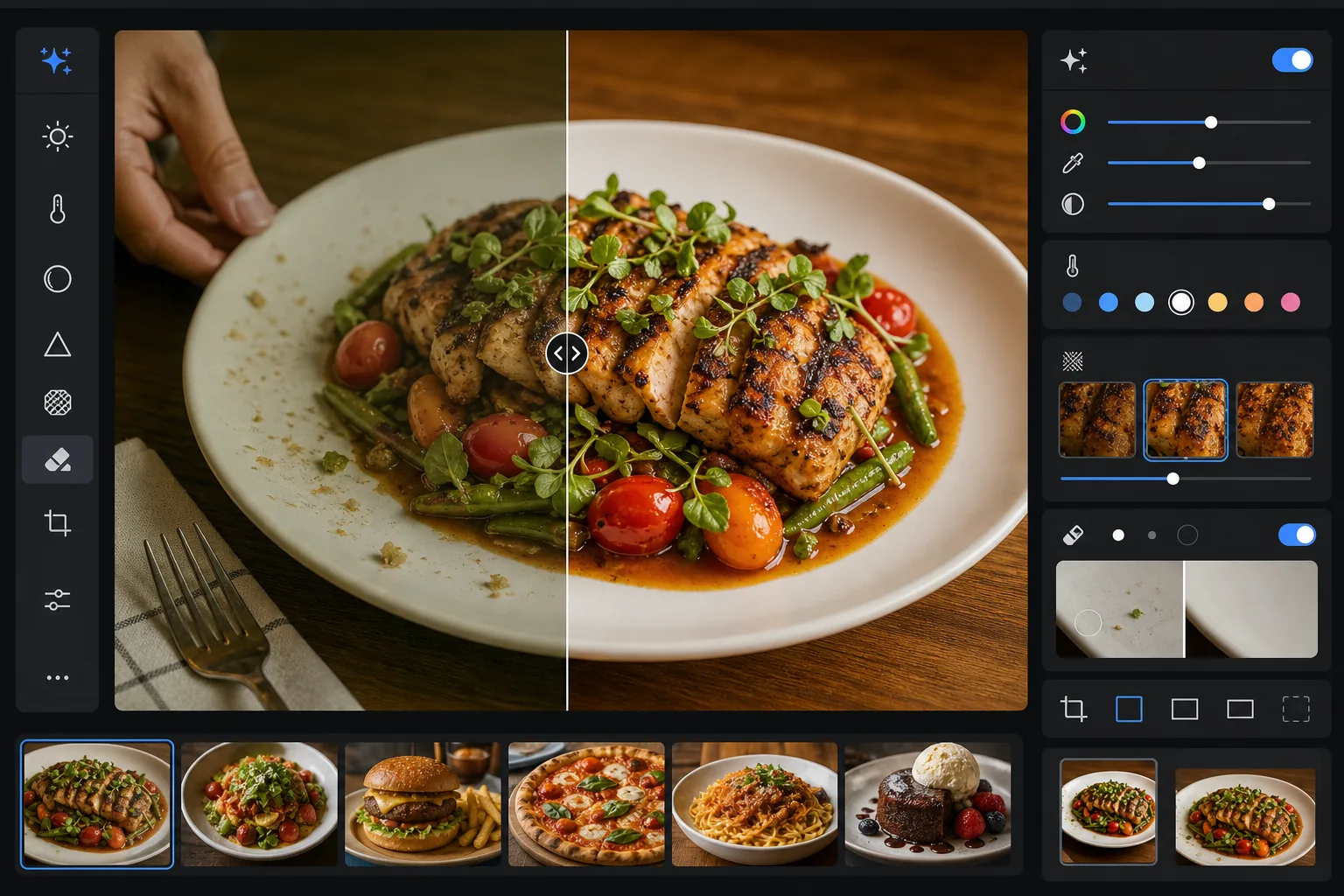
Làm cho các món ăn trông ngon miệng trong ảnh như khi bày trên đĩa. Mẫu này tăng cường độ sống động của màu sắc cho nước sốt, rau xanh và protein, loại bỏ dụng cụ bị lạc, dấu vân tay trên đĩa và bàn tay lộ ra, làm sắc nét họa tiết ở lớp vỏ và phần trang trí, đồng thời căn chỉnh hình ảnh theo tông màu ấm áp, hấp dẫn, thể hiện tốt trên Instagram và bảng thực đơn.
Dùng thử mẫu này miễn phíFood & Beverage template preview
Mẫu này làm gì
Giải quyết khoảng cách giữa cách món ăn trông ngoài đời và cách nó lên ảnh. Ánh sáng nhà hàng và ánh sáng từ trên cao thường tạo ra sắc vàng hoặc xanh khiến nguyên liệu tươi trông kém hấp dẫn. AI Enhance hiệu chỉnh cân bằng trắng để làm rau xanh sống động, màu đỏ đậm đà và màu trắng sạch sẽ mà không bão hòa quá mức đến mức trông giả tạo. Magic Eraser loại bỏ những yếu tố gây xao nhãng — một chiếc nĩa bỏ quên trong khung hình, bàn tay của người phục vụ ở rìa, vết nước trên viền đĩa, vụn bánh trên mặt bàn. Việc làm sắc nét chọn lọc làm nổi bật họa tiết của bề mặt nướng, lớp vỏ giòn và rau thơm tươi, khiến ảnh món ăn trông sống động như thật.
Cài đặt mẫu
| Độ sống động màu sắc | +15 độ sống động, +8 độ bão hòa (chọn lọc trên đỏ, xanh lá, vàng) |
| Cân bằng trắng | Trung tính tối ưu cho món ăn (loại bỏ sắc vàng, giữ lại tông ấm) |
| Làm sắc nét họa tiết | Nhận biết chi tiết (tăng cường lớp vỏ, vết nướng, chi tiết rau thơm) |
| Làm sạch đĩa | Tự động phát hiện vết bẩn, vết nhỏ giọt và dấu vân tay trên viền đĩa |
| Mức độ ấm | +5 độ ấm với đường cong tông màu kiểu giờ vàng |
| Đầu ra | 1080×1080px (Instagram), 2400×1600px (thực đơn/website) xuất kép |
Cách sử dụng mẫu này
Tải lên ảnh món ăn của bạn
Tải lên ảnh món ăn đã bày đĩa được chụp từ trên cao, góc 45 độ hoặc chính diện. Ánh sáng tự nhiên từ cửa sổ cho điểm khởi đầu tốt nhất, nhưng mẫu cũng xử lý được ánh sáng huỳnh quang trong nhà hàng và đèn bàn tungsten ấm.
Tăng cường màu sắc và họa tiết
AI Enhance hiệu chỉnh sắc màu sai lệch, tăng độ sống động một cách chọn lọc để màu xanh lá, đỏ và vàng nổi bật mà không trông như đèn neon, đồng thời làm sắc nét các họa tiết bề mặt như lớp nướng cháy cạnh, lớp đường tráng và lá rau thơm tươi. Mức độ ấm thêm cảm giác giờ vàng hấp dẫn.
Làm sạch khung hình
Magic Eraser loại bỏ dụng cụ bị lạc, góc khăn ăn, bàn tay lộ ra, dấu vân tay và vết sốt nhỏ giọt trên viền đĩa, vụn bánh trên bàn và bất kỳ đạo cụ nào làm rối bố cục. AI lấp đầy các vùng đã làm sạch bằng bề mặt bàn hoặc đĩa xung quanh.
Xuất cho nền tảng của bạn
Tải xuống ở một hoặc cả hai định dạng: 1080x1080px vuông cho Instagram và mạng xã hội, hoặc 2400x1600px ngang cho website nhà hàng, bảng thực đơn kỹ thuật số và danh sách trên ứng dụng giao đồ ăn. Cả hai đều được tối ưu màu để hiển thị trên màn hình ở chuẩn sRGB.
Mẹo chuyên nghiệp để có kết quả tốt nhất
- ✓Chụp trong vòng 90 giây đầu tiên sau khi bày đĩa. Rau xà lách héo, nước sốt đóng váng, đá tan và hơi nóng ngừng bốc lên rất nhanh. Nếu bạn bỏ lỡ khoảnh khắc đó, mẫu có thể tăng cường màu sắc và họa tiết nhưng không thể khôi phục lại đĩa salad héo hay kem đã tan.
- ✓Đối với ảnh chụp dàn phẳng từ trên cao, hãy đảm bảo nguồn sáng đặt ở một bên thay vì ngay phía trên. Ánh sáng nghiêng tạo ra những bóng nhỏ trên họa tiết món ăn mà thuật toán làm sắc nét sẽ khuếch đại — ánh sáng trực tiếp từ trên cao làm phẳng các bóng đó và khiến món ăn trông kém chiều sâu.
- ✓Khi loại bỏ chiếc nĩa hoặc dụng cụ chồng lên món ăn, AI sẽ tái tạo họa tiết món ăn phía sau. Để có kết quả sạch nhất, hãy đảm bảo dụng cụ đặt trên vùng đơn giản như viền đĩa hoặc khăn trải bàn thay vì vùi trong chính món ăn.
- ✓Đối với thực đơn nhà hàng, hãy xử lý tất cả ảnh món ăn trong một lô duy nhất để đảm bảo căn chỉnh màu và độ ấm nhất quán trên toàn bộ thực đơn. Nhiệt độ màu không nhất quán giữa các ảnh khiến thực đơn trông thiếu chuyên nghiệp ngay cả khi từng ảnh riêng lẻ trông đẹp.
Công cụ
Câu hỏi thường gặp
Điều này có làm món ăn của tôi trông bão hòa màu giả tạo không?
+
Tính năng tăng cường màu được hiệu chỉnh dành riêng cho chụp ảnh món ăn — nó nhắm vào các dải bão hòa mà món ăn tự nhiên rơi vào (màu xanh của rau thơm, màu đỏ của cà chua và thịt, tông vàng của bánh mì và đồ chiên) trong khi ít ảnh hưởng đến các màu khác. Kết quả trông ngon miệng và sống động mà không bị chuyển sang vùng neon hay trông như nhựa.
Tôi có thể dùng cho danh sách trên ứng dụng giao đồ ăn không?
+
Có. Đầu ra 2400x1600px vượt quá yêu cầu hình ảnh cho DoorDash, Uber Eats, Grubhub và các nền tảng giao hàng khác. Việc căn chỉnh màu và làm sắc nét được tối ưu cho việc xem trên màn hình nhỏ, nơi ảnh món ăn cần thu hút ánh nhìn ngay lập tức ở kích thước thu nhỏ.
Điều này có hiệu quả với đồ uống và cocktail không?
+
Có. Mẫu xử lý tốt chất lỏng, đồ thủy tinh và đồ trang trí. Tăng cường độ sống động màu sắc đặc biệt hiệu quả với cocktail có trang trí trái cây và màu sắc phân lớp. Việc làm sạch loại bỏ dấu vân tay trên bề mặt thủy tinh, vòng nước và dụng cụ pha chế còn sót trong khung hình.
Làm cho mọi ảnh món ăn trông được tạo kiểu chuyên nghiệp
Tải lên ảnh món ăn từ điện thoại hoặc máy ảnh của bạn và nhận hình ảnh sống động, sạch sẽ, sẵn sàng cho Instagram khiến người xem thèm thuồng.
Dùng thử miễn phíRelated templates
More food & beverage templates for your workflow.