
Thanh trượt Trước & Sau
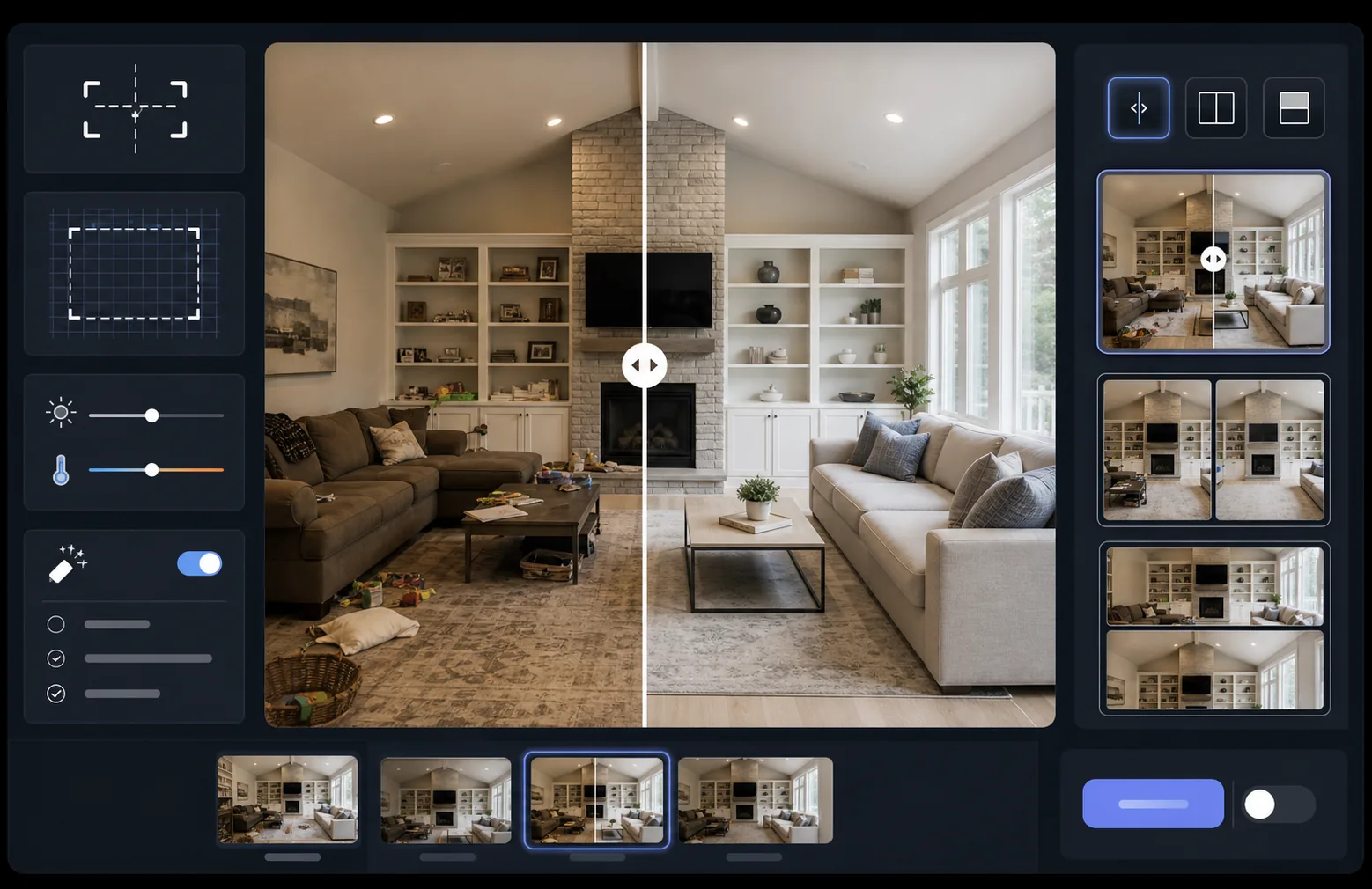
Thể hiện tác động từ công việc của bạn bằng những hình ảnh so sánh trước và sau được căn chỉnh hoàn hảo. Mẫu này tạo ra các cặp ảnh sẵn sàng trình diễn, giữ khung hình, cân bằng ánh sáng và kích thước nhất quán — lý tưởng cho portfolio, nghiên cứu điển hình, bằng chứng xã hội và tiếp thị sản phẩm, nơi sự chuyển đổi trực quan kể nên câu chuyện.
Dùng thử mẫu này miễn phíMarketing template preview
Mẫu này làm gì
Xử lý hai hình ảnh — một ảnh trước và một ảnh sau — thành một cặp so sánh được căn chỉnh hoàn hảo, sẵn sàng cho các tiện ích thanh trượt, bố cục cạnh nhau hoặc hiệu ứng hé lộ động. AI Enhance chuẩn hóa độ phơi sáng và cân bằng trắng giữa hai khung hình để sự chuyển đổi hiển thị rõ ràng mà không bị khác biệt ánh sáng làm rối phép so sánh. Magic Eraser có thể dọn dẹp những yếu tố gây xao nhãng tình cờ ở một trong hai khung hình mà không thuộc về sự chuyển đổi dự định.
Cài đặt mẫu
| Bố cục | Cặp sẵn sàng cho thanh trượt, cạnh nhau hoặc xếp dọc (có thể chọn) |
| Kích thước đầu ra | 1600×1200px mỗi khung (kích thước khớp nhau) |
| Căn chỉnh | Tự động canh chỉnh — khớp phối cảnh và khung hình giữa các ảnh chụp |
| Chuẩn hóa ánh sáng | Cân bằng độ phơi sáng và cân bằng trắng trên cả cặp |
| Lớp nhãn | Tùy chọn nhãn 'Before' / 'After' với vị trí tùy chỉnh |
| Viền | Đường phân chia xám trung tính 1px hoặc cạnh liền mạch (có thể chọn) |
Cách sử dụng mẫu này
Tải lên ảnh trước của bạn
Tải lên bức ảnh gốc, chưa chỉnh sửa thể hiện trạng thái ban đầu. Đó có thể là một căn phòng trước khi cải tạo, một sản phẩm trước khi nâng cấp, làn da trước khi điều trị, hoặc bất kỳ sự chuyển đổi trực quan nào bạn muốn minh họa.
Tải lên ảnh sau của bạn
Tải lên bức ảnh kết quả thể hiện sự chuyển đổi đã hoàn tất. Hãy cố gắng chụp từ cùng góc và khoảng cách như ảnh trước. Mẫu sẽ tự động canh chỉnh những khác biệt nhỏ về khung hình và phối cảnh.
Chuẩn hóa và căn chỉnh
Mẫu tự động canh khớp hai hình ảnh để các yếu tố tương ứng thẳng hàng theo từng điểm ảnh. Độ phơi sáng và cân bằng trắng được chuẩn hóa để khác biệt ánh sáng giữa các buổi chụp không làm xao nhãng khỏi sự chuyển đổi thực tế.
Xuất ảnh so sánh
Chọn định dạng đầu ra của bạn — cặp khớp nhau cho tiện ích thanh trượt, ảnh ghép cạnh nhau cho mạng xã hội, hoặc xếp dọc cho tiếp thị email. Thêm nhãn Before/After tùy chọn và xuất ở độ phân giải tối ưu cho web hoặc chất lượng in.
Mẹo chuyên nghiệp để có kết quả tốt nhất
- ✓Nếu có thể, hãy chụp ảnh trước và sau từ đúng cùng một vị trí — đánh dấu chỗ đặt chân máy hoặc đứng tại cùng một điểm. AI càng ít phải sửa căn chỉnh, phép so sánh càng sắc nét.
- ✓Dùng cùng một tiêu cự cho cả hai ảnh để tránh khác biệt về biến dạng phối cảnh khiến các ảnh so sánh đã căn chỉnh trông lệch một cách tinh vi.
- ✓Loại bỏ những thay đổi không liên quan giữa ảnh trước và sau bằng Magic Eraser — nếu một chậu cây bị xê dịch hoặc một vật thể mới xuất hiện, hãy xóa nó để người xem tập trung vào sự chuyển đổi dự định.
- ✓Đối với việc nhúng thanh trượt trên web, hãy xuất cả hai hình ảnh ở cùng kích thước và dùng PNG không mất dữ liệu để ngăn nhiễu nén dọc theo đường phân chia của thanh trượt.
Công cụ
Câu hỏi thường gặp
Nếu ảnh trước và sau được chụp từ những góc hơi khác nhau thì sao?
+
Hệ thống tự động canh chỉnh xử lý được những khác biệt vừa phải về góc máy, khoảng cách và khung hình. Nó nhận diện các điểm tham chiếu tương ứng trong cả hai hình ảnh và biến đổi chúng để khớp nhau. Để có kết quả tốt nhất, chênh lệch góc nên dưới 15 độ.
Tôi có thể dùng cái này cho hình thu nhỏ video thể hiện sự chuyển đổi không?
+
Có. Đầu ra ảnh ghép cạnh nhau lý tưởng cho hình thu nhỏ video trên YouTube và mạng xã hội. Bố cục chia đôi màn hình kèm nhãn truyền tải ngay câu chuyện chuyển đổi thu hút lượt nhấp.
Việc chuẩn hóa ánh sáng có làm thay đổi kết quả thực tế được hiển thị không?
+
Không. Việc chuẩn hóa ánh sáng chỉ điều chỉnh độ phơi sáng tổng thể và cân bằng trắng để cả hai khung hình trông như được chụp trong cùng điều kiện. Sự chuyển đổi thực tế — những thay đổi ở chủ thể — được giữ nguyên đúng như khi chụp.
Trình bày kết quả của bạn, cạnh nhau
Tải lên ảnh trước và sau của bạn và nhận một hình ảnh so sánh được căn chỉnh hoàn hảo, trình bày chuyên nghiệp chỉ trong vài giây. Hãy để sự chuyển đổi tự nói lên tất cả.
Dùng thử miễn phí