
ภาพแบนเนอร์ Twitch
ออกแบบแบนเนอร์ช่อง Twitch ระดับมืออาชีพที่ทำให้สตรีมของคุณดูเป็นที่ยอมรับตั้งแต่การเข้าชมครั้งแรก เทมเพลตนี้แยกภาพบุคคลของคุณออกจากพื้นหลังใดก็ได้ วางไว้บนพื้นหลังธีมเกมหรือสีของแบรนด์ และส่งออกในขนาดแบนเนอร์ที่แม่นยำของ Twitch พร้อมโซนปลอดภัยสำหรับการซ้อนทับของรูปโปรไฟล์และองค์ประกอบการนำทางของช่อง
ลองใช้เทมเพลตนี้ฟรีSocial Media template preview
เทมเพลตนี้ทำอะไร
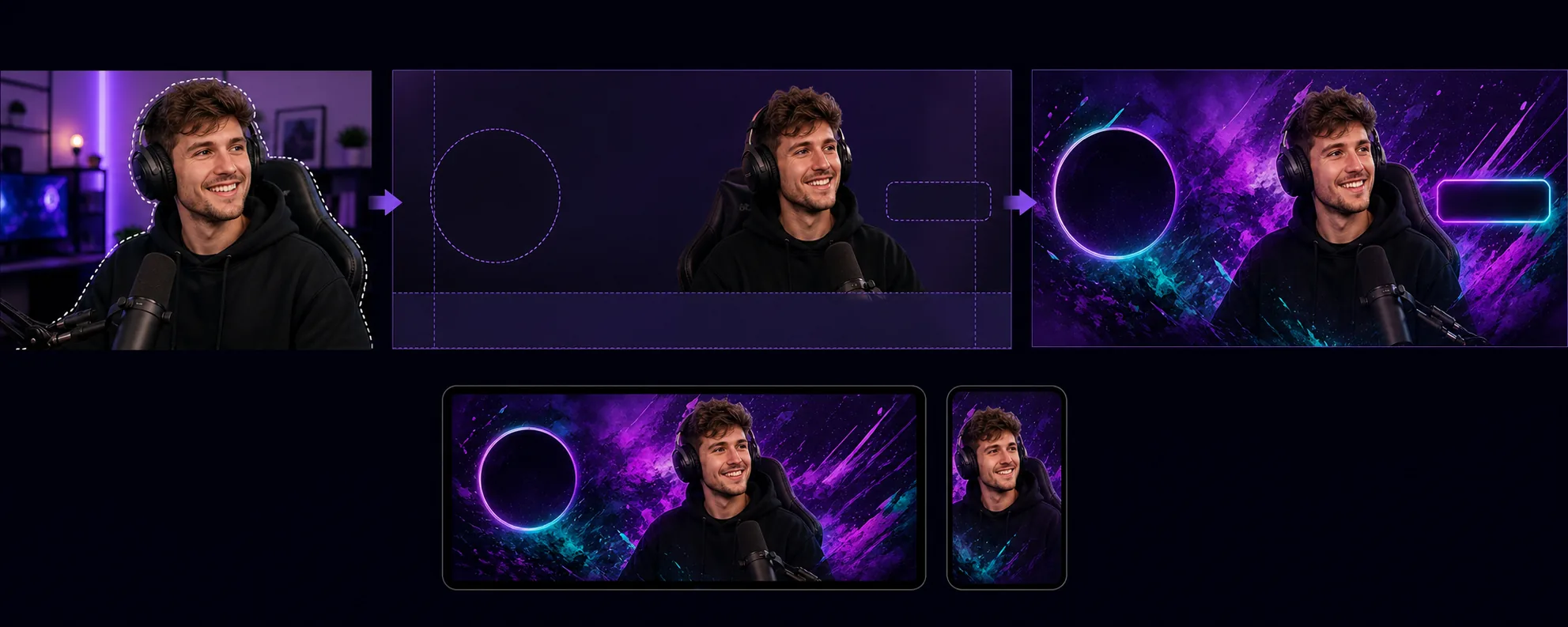
สร้างแบนเนอร์ช่องที่ปรับให้เหมาะกับข้อกำหนดเลย์เอาต์เฉพาะตัวของ Twitch ที่รูปโปรไฟล์ ปุ่มติดตาม และการนำทางของช่องซ้อนทับพื้นที่เฉพาะของแบนเนอร์ Background Eraser แยกภาพบุคคลของสตรีมเมอร์หรือภาพทีมของคุณออกจากสภาพแวดล้อมใดก็ได้ และวางไว้บนพื้นหลังที่เข้ากับเอกลักษณ์ทางภาพของช่องคุณ — สีแบรนด์ทึบ ไล่เฉดสี ธีมเกมเชิงนามธรรม หรือลวดลายเรียบง่าย เทมเพลตนี้เคารพโซนปลอดภัยของ Twitch เพื่อให้เนื้อหาภาพที่สำคัญไม่ถูกซ่อนหลังวงกลมรูปโปรไฟล์ (ด้านซ้าย) หรือปุ่มแต้มช่อง/สมัครสมาชิก (ด้านขวา) ผลลัพธ์มีขนาด 1200×480px (ขนาดแบนเนอร์ที่แนะนำ) และปรับให้มองเห็นได้ชัดเจนทั้งในมุมมองเบราว์เซอร์เดสก์ท็อปและส่วนหัวของแอปมือถือ ที่ซึ่งแบนเนอร์ถูกครอบตัดต่างกัน
การตั้งค่าเทมเพลต
| ขนาดแบนเนอร์ | 1200×480px (แบนเนอร์โปรไฟล์ที่ Twitch แนะนำ) |
| โซนปลอดภัย | ซ้าย 250px (การซ้อนทับโปรไฟล์), ขวา 200px (ปุ่ม), ล่าง 80px (แถบนำทาง) |
| พื้นหลัง | สีทึบ ไล่เฉดสี ลวดลายเกมเชิงนามธรรม หรือภาพที่กำหนดเอง |
| การวางภาพบุคคล | ขวา-กลางหรือกลาง โดยหลีกเลี่ยงโซนซ้อนทับของรูปโปรไฟล์ |
| ความสดของสี | เพิ่มความเข้มเพื่อให้มองเห็นได้ชัดบนอินเทอร์เฟซสีม่วงเข้มของ Twitch |
วิธีใช้เทมเพลตนี้
อัปโหลดภาพสตรีมเมอร์ของคุณ
อัปโหลดภาพของตัวคุณเอง ชุดอุปกรณ์สตรีมของคุณ หรือทีมของคุณ ภาพช่วงครึ่งตัวบนที่มีท่าทางสื่ออารมณ์เหมาะกับแบนเนอร์มากที่สุด เทมเพลตนี้รองรับภาพจากเว็บแคม เซลฟี่จากโทรศัพท์ และภาพถ่ายระดับมืออาชีพ
แยกและจัดตำแหน่ง
Background Eraser ลบพื้นหลังเดิมออกและจัดวางภาพบุคคลของคุณไว้ภายในโซนปลอดภัยของแบนเนอร์ พิกเซล 250 ทางซ้ายถูกเว้นว่างไว้สำหรับการซ้อนทับวงกลมรูปโปรไฟล์ และพิกเซล 80 ด้านล่างหลีกเลี่ยงแถบนำทาง ภาพของคุณถูกวางไว้ในจุดที่จะสร้างผลกระทบทางภาพสูงสุดทั้งบนเดสก์ท็อปและมือถือ
ใส่พื้นหลังและการสร้างแบรนด์
เลือกพื้นหลังที่เข้ากับเอกลักษณ์ของช่องคุณ การไล่เฉดสีที่โดดเด่นและลวดลายธีมเกมแสดงผลได้ดีบนพื้นสีม่วงเข้มของ Twitch หากช่องของคุณมีสีแบรนด์ที่กำหนดไว้แล้ว ให้ใช้สีเหล่านั้นเพื่อเสริมการจดจำเมื่อผู้ชมเข้ามายังหน้าช่องของคุณ
ส่งออกและอัปโหลด
ดาวน์โหลดที่ 1200×480px ซึ่งปรับให้เหมาะกับ Twitch ไฟล์มีขนาดต่ำกว่า 10MB (ขีดจำกัดของ Twitch) และถูกบีบอัดเพื่อให้โหลดได้รวดเร็วสำหรับผู้ชมที่มีการเชื่อมต่อช้ากว่า ดูตัวอย่างว่าแบนเนอร์มีลักษณะอย่างไรเมื่อมีรูปโปรไฟล์และการนำทางซ้อนทับก่อนอัปโหลดไปยังช่องของคุณ
เคล็ดลับมืออาชีพเพื่อผลลัพธ์ที่ดีที่สุด
- ✓ใช้ภาพที่มีท่าทางสื่ออารมณ์หรือเปี่ยมพลัง — ชี้ไปที่กล้อง เฉลิมฉลอง หรือโน้มตัวไปข้างหน้า ท่านิ่งจะจมหายไปในรูปแบบแบนเนอร์ที่แคบ ขณะที่ท่าทางแบบไดนามิกสร้างพลังทางภาพที่ทำให้ผู้ชมอยากอยู่ต่อ
- ✓ทดสอบแบนเนอร์ของคุณทั้งบนเดสก์ท็อปและมือถือ Twitch ครอบตัดแบนเนอร์ต่างกันบนมือถือ โดยแสดงส่วนกลางเป็นหลัก วางเนื้อหาภาพที่สำคัญที่สุดของคุณไว้ในพิกเซล 700 ตรงกลางเพื่อความเข้ากันได้ข้ามอุปกรณ์
- ✓จับคู่สีแบนเนอร์ของคุณกับการตั้งค่าสีเน้นของ Twitch เมื่อการไล่เฉดสีของแบนเนอร์เปลี่ยนเป็นสีเน้นเดียวกับที่ใช้กับปุ่มสมัครสมาชิกและข้อความที่ไฮไลต์ของช่องคุณ ทั้งหน้าจะดูกลมกลืนและมีการสร้างแบรนด์อย่างมืออาชีพ
เครื่องมือ
คำถามที่พบบ่อย
Twitch ต้องการขนาดเท่าใดสำหรับแบนเนอร์
+
Twitch แนะนำ 1200×480 พิกเซลสำหรับแบนเนอร์โปรไฟล์ ขนาดไฟล์สูงสุดคือ 10MB เทมเพลตนี้ส่งออกตามขนาดเหล่านี้พอดีพร้อมการบีบอัดที่เหมาะสม
ฉันสามารถใส่ข้อความบนแบนเนอร์ได้ไหม
+
เทมเพลตนี้สร้างเลย์เอาต์ภาพโดยไม่มีการซ้อนทับข้อความ คุณสามารถเพิ่มชื่อช่อง ตารางเวลา หรือบัญชีโซเชียลของคุณด้วยโปรแกรมแก้ไขภาพใดก็ได้ในภายหลัง เส้นแนะนำโซนปลอดภัยแสดงให้เห็นอย่างแม่นยำว่าข้อความจะยังคงมองเห็นได้ตรงไหนและจะไม่ถูกปกคลุมด้วยองค์ประกอบ UI ของ Twitch
สิ่งนี้ใช้ได้กับหน้าจอออฟไลน์ของ Twitch ด้วยไหม
+
เทมเพลตนี้มีขนาดสำหรับแบนเนอร์โปรไฟล์ ภาพหน้าจอออฟไลน์ของ Twitch ใช้อัตราส่วนภาพ 16:9 (1920×1080) คุณสามารถใช้ขั้นตอนการทำงานที่คล้ายกัน — แยกภาพบุคคล ใส่พื้นหลัง — แต่ควรเลือกขนาดหน้าจอออฟไลน์แยกต่างหาก
ทำให้ช่อง Twitch ของคุณดูเป็นที่ยอมรับตั้งแต่วันแรก
อัปโหลดภาพและรับแบนเนอร์ช่องระดับมืออาชีพที่เคารพเลย์เอาต์ของ Twitch และทำให้สตรีมของคุณโดดเด่น
ลองใช้ฟรีRelated templates
More social media templates for your workflow.
เทมเพลตการครอบตัดสี่เหลี่ยมที่ปรับให้เหมาะสมกับ Instagram ที่ 1080×1080px พื้นหลังที่สะอาดตา สีสันสดใส และรายละเอียดที่คมชัดที่โดดเด่นในฟีด
เทมเพลตแบนเนอร์ YouTube ที่ 2560×1440px พร้อมคำแนะนำโซนปลอดภัย ลบพื้นหลังออกอย่างสะอาดตาสำหรับรูปภาพของครีเอเตอร์ เลย์เอาต์ที่คำนึงถึงอุปกรณ์ และหน้าปกช่องที่สอดคล้องกับแบรนด์
เทมเพลตภาพหน้าปก Facebook ที่ 820×312px สำหรับเดสก์ท็อปและการครอบตัดบนมือถือ 640×360px ทำความสะอาดภาพลักษณ์ของแบรนด์ด้วยโซนปลอดภัยที่เหมาะสมสำหรับการทับซ้อนของภาพโปรไฟล์และการวางปุ่ม CTA
สร้างภาพส่วนหัว Twitter/X ระดับมืออาชีพในขนาด 1500×500px ที่แน่นอน บัญชีสำหรับภาพโปรไฟล์ทับซ้อนกัน ทำงานทั้งในโหมดมืดและโหมดสว่าง
ปรับปรุงรูปโปรไฟล์การออกเดทด้วยการปรับสีผิวให้เรียบเนียนเป็นธรรมชาติ การล้างพื้นหลัง การแก้ไขแสง และการไล่ระดับสีอย่างละเอียดที่ดูสมจริง — ไม่มีการกรอง
สร้างภาพพิน Pinterest ที่เลื่อนไม่สะดุดด้วยพื้นหลังที่สะอาดตา ขนาดแนวตั้ง 2:3 ที่เหมาะสม การปรับปรุงสีที่สดใส และองค์ประกอบที่พร้อมใช้หมุด