
ภาพส่วนหัว Twitter/X
ออกแบบภาพส่วนหัวที่ดูประณีตบนทุกอุปกรณ์และในทุกโหมด เทมเพลตนี้จัดการขนาด 1500×500px ที่แน่นอนตามที่ Twitter กำหนด คำนึงถึงโซนทับซ้อนของภาพโปรไฟล์เพื่อไม่ให้เนื้อหาสำคัญถูกบดบัง และทำให้แบนเนอร์ของคุณดูยอดเยี่ยมทั้งในโหมดมืดและโหมดสว่าง
ลองใช้เทมเพลตนี้ฟรีSocial Media template preview
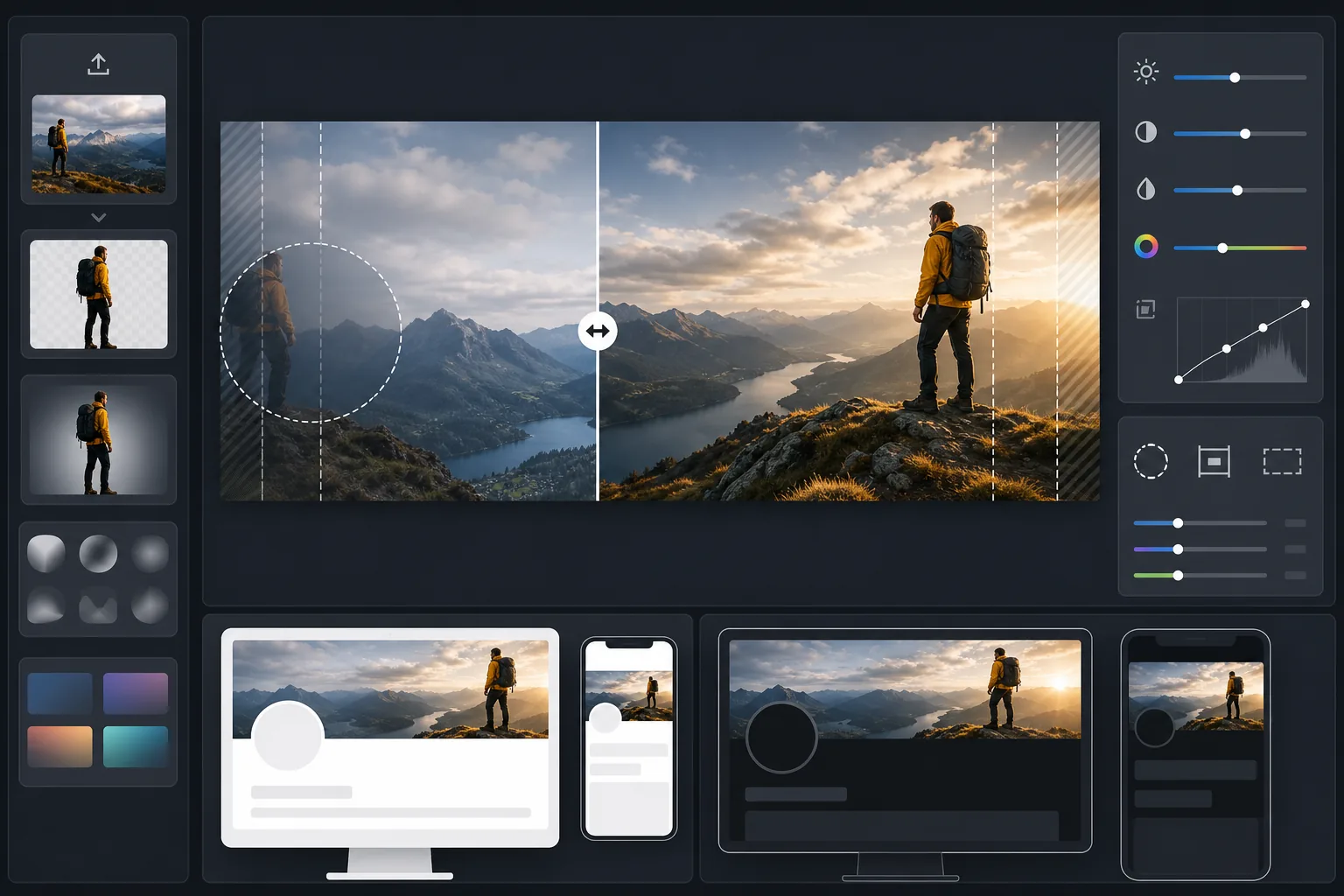
เทมเพลตนี้ทำอะไรได้บ้าง
ประมวลผลภาพถ่ายของคุณให้เป็นขนาดแบนเนอร์ 1500×500px ที่แม่นยำตามที่ Twitter/X กำหนด พร้อมการครอบตัดอัจฉริยะที่คงใบหน้าและเนื้อหาสำคัญไว้ในโซนปลอดภัยที่มองเห็นได้ Background Eraser สามารถแยกตัวแบบออกมาเพื่อองค์ประกอบที่สะอาดตา ขณะที่ AI Enhance ปรับคอนทราสต์และสีให้เหมาะกับพื้นหลังทั้งโหมดมืดและโหมดสว่างที่ผู้ติดตามของคุณจะได้เห็น
การตั้งค่าเทมเพลต
| ขนาดเอาต์พุต | 1500×500px (อัตราส่วนส่วนหัว Twitter/X 3:1) |
| โซนปลอดภัย | สงวนพื้นที่ด้านซ้าย 25% — หลีกเลี่ยงการทับซ้อนของภาพโปรไฟล์บนเดสก์ท็อปและมือถือ |
| การผสานขอบ | ค่อย ๆ จางไปสู่สีเข้มหรือสีอ่อน (ปรับตามโหมด) |
| การปรับสีให้เหมาะสม | ทดสอบคอนทราสต์สองชั้นสำหรับโหมดมืด (#15202B) และโหมดสว่าง (#FFFFFF) |
| รูปแบบไฟล์ | JPEG ที่คุณภาพ 92% (ต่ำกว่าขีดจำกัดการอัปโหลด 5MB ของ Twitter) |
| พื้นที่ปลอดภัยสำหรับข้อความ | แถบแนวนอนกลาง 50% — หลีกเลี่ยงการครอบตัดด้านบน/ล่างบนมือถือ |
วิธีใช้เทมเพลตนี้
อัปโหลดภาพต้นฉบับของคุณ
ใช้ภาพถ่ายหรือกราฟิกแนวนอน ภาพพาโนรามากว้าง ทิวทัศน์เมือง และองค์ประกอบแนวนอนได้ผลดีที่สุด เทมเพลตจะครอบตัดเป็นอัตราส่วน 3:1 ที่กว้างสุดขั้ว ดังนั้นควรหลีกเลี่ยงตัวแบบที่สูงหรือเนื้อหาที่จัดกึ่งกลางในแนวตั้ง
วางเนื้อหาสำคัญไว้ในโซนปลอดภัย
เทมเพลตจะกำหนดพื้นที่ด้านซ้าย 25% เป็นโซนทับซ้อนของภาพโปรไฟล์ และขอบด้านนอกเป็นโซนครอบตัดบนมือถือ เนื้อหาภาพที่สำคัญที่สุดของคุณควรอยู่บริเวณกลางขวาของแบนเนอร์
ปรับให้เหมาะกับโหมดมืดและโหมดสว่าง
AI Enhance จะปรับคอนทราสต์เพื่อให้แบนเนอร์หลีกเลี่ยงขอบที่แข็งกระด้างทั้งบนพื้นหลังเกือบดำของโหมดมืดและพื้นหลังขาวของโหมดสว่าง การผสานขอบสร้างการเปลี่ยนผ่านที่นุ่มนวลแทนที่จะเป็นการตัดอย่างแข็งกระด้าง
ส่งออกและอัปโหลด
ดาวน์โหลดไฟล์ JPEG ขนาด 1500×500px ที่ปรับให้เหมาะสมแล้ว และอัปโหลดไปยัง Twitter/X โดยตรง ขนาดไฟล์ถูกกำหนดให้อยู่ต่ำกว่าขีดจำกัด 5MB อย่างเหลือเฟือ ในขณะที่ยังคงรายละเอียดคมชัดบนจอแสดงผล retina
เคล็ดลับมืออาชีพเพื่อผลลัพธ์ที่ดีที่สุด
- ✓ดูตัวอย่างส่วนหัวของคุณทั้งบนโทรศัพท์และเดสก์ท็อปก่อนสรุปงาน — Twitter ครอบตัดขอบบนและล่างอย่างหนักกว่าบนมือถือ โดยตัดออกประมาณ 10% จากแต่ละขอบ
- ✓หลีกเลี่ยงการวางข้อความหรือใบหน้าไว้ในควอดแรนต์ล่างซ้าย ซึ่งภาพโปรไฟล์ ชื่อ และประวัติย่อของคุณจะซ้อนทับอยู่บนเดสก์ท็อป
- ✓ใช้สีที่ตัดกันทั้งกับ #15202B (โหมดมืด) และ #FFFFFF (โหมดสว่าง) ตามขอบแบนเนอร์ — สีน้ำเงิน เขียวโทนกลาง และเทาอุ่นทำงานได้ดีในทั้งสองบริบท
- ✓หากใช้ภาพที่มีบุคคล ให้วางบุคคลนั้นไว้ในส่วนหนึ่งในสามด้านขวาของเฟรม เพื่อให้ยังคงมองเห็นได้ข้างภาพโปรไฟล์ของคุณทางด้านซ้าย
เครื่องมือ
คำถามที่พบบ่อย
ภาพโปรไฟล์ทับซ้อนตรงไหนกันแน่
+
บนเดสก์ท็อป ภาพโปรไฟล์วงกลมของคุณจะทับซ้อนกับมุมล่างซ้ายของส่วนหัว ครอบคลุมประมาณ 60% ส่วนล่างของพื้นที่ 20% ซ้ายสุดของแบนเนอร์ บนมือถือการทับซ้อนคล้ายกันแต่เลื่อนไปเล็กน้อย โซนปลอดภัยของเทมเพลตคำนึงถึงทั้งสองเลย์เอาต์
ส่วนหัวของฉันจะดูดีในโหมดมืดหรือไม่
+
ใช่ เทมเพลตจะทดสอบแบนเนอร์ของคุณทั้งกับพื้นหลังโหมดมืด (#15202B) และพื้นหลังโหมดสว่าง (#FFFFFF) การผสานขอบช่วยให้การเปลี่ยนผ่านนุ่มนวลในทั้งสองโหมด คุณจึงหลีกเลี่ยงเอฟเฟกต์ขอบแข็งที่ดูสะดุดตาซึ่งพบในส่วนหัวที่ไม่ได้ปรับให้เหมาะสม
จะเกิดอะไรขึ้นหาก Twitter เปลี่ยนขนาดส่วนหัว
+
ข้อกำหนด 1500×500px มีความเสถียรมาตั้งแต่ปี 2017 และตลอดการรีแบรนด์เป็น X หากขนาดเปลี่ยนแปลง เราจะอัปเดตเทมเพลต เอาต์พุตปัจจุบันยังย่อขนาดได้อย่างหมดจดเป็นขนาดแบนเนอร์ที่เล็กกว่าใด ๆ
โดดเด่นในทุกการเข้าชมโปรไฟล์ Twitter
อัปโหลดภาพของคุณ แล้วรับส่วนหัว Twitter ที่มีขนาดสมบูรณ์แบบ พร้อมสำหรับโหมดมืดภายในไม่กี่วินาที ไม่ต้องใช้ Photoshop ไม่ต้องเดาขนาด
ลองใช้ฟรีRelated templates
More social media templates for your workflow.
เทมเพลตการครอบตัดสี่เหลี่ยมที่ปรับให้เหมาะสมกับ Instagram ที่ 1080×1080px พื้นหลังที่สะอาดตา สีสันสดใส และรายละเอียดที่คมชัดที่โดดเด่นในฟีด
เทมเพลตแบนเนอร์ YouTube ที่ 2560×1440px พร้อมคำแนะนำโซนปลอดภัย ลบพื้นหลังออกอย่างสะอาดตาสำหรับรูปภาพของครีเอเตอร์ เลย์เอาต์ที่คำนึงถึงอุปกรณ์ และหน้าปกช่องที่สอดคล้องกับแบรนด์
เทมเพลตภาพหน้าปก Facebook ที่ 820×312px สำหรับเดสก์ท็อปและการครอบตัดบนมือถือ 640×360px ทำความสะอาดภาพลักษณ์ของแบรนด์ด้วยโซนปลอดภัยที่เหมาะสมสำหรับการทับซ้อนของภาพโปรไฟล์และการวางปุ่ม CTA
ปรับปรุงรูปโปรไฟล์การออกเดทด้วยการปรับสีผิวให้เรียบเนียนเป็นธรรมชาติ การล้างพื้นหลัง การแก้ไขแสง และการไล่ระดับสีอย่างละเอียดที่ดูสมจริง — ไม่มีการกรอง
สร้างภาพพิน Pinterest ที่เลื่อนไม่สะดุดด้วยพื้นหลังที่สะอาดตา ขนาดแนวตั้ง 2:3 ที่เหมาะสม การปรับปรุงสีที่สดใส และองค์ประกอบที่พร้อมใช้หมุด
สร้างภาพหน้าปกวิดีโอ TikTok ที่สะดุดตาด้วยพื้นหลังที่สะอาดตา กรอบวัตถุตัวหนา และขนาดแนวตั้ง 9:16 ที่ปรับให้เหมาะสมเพื่อความสม่ำเสมอของตารางโปรไฟล์