
صورة غلاف Facebook
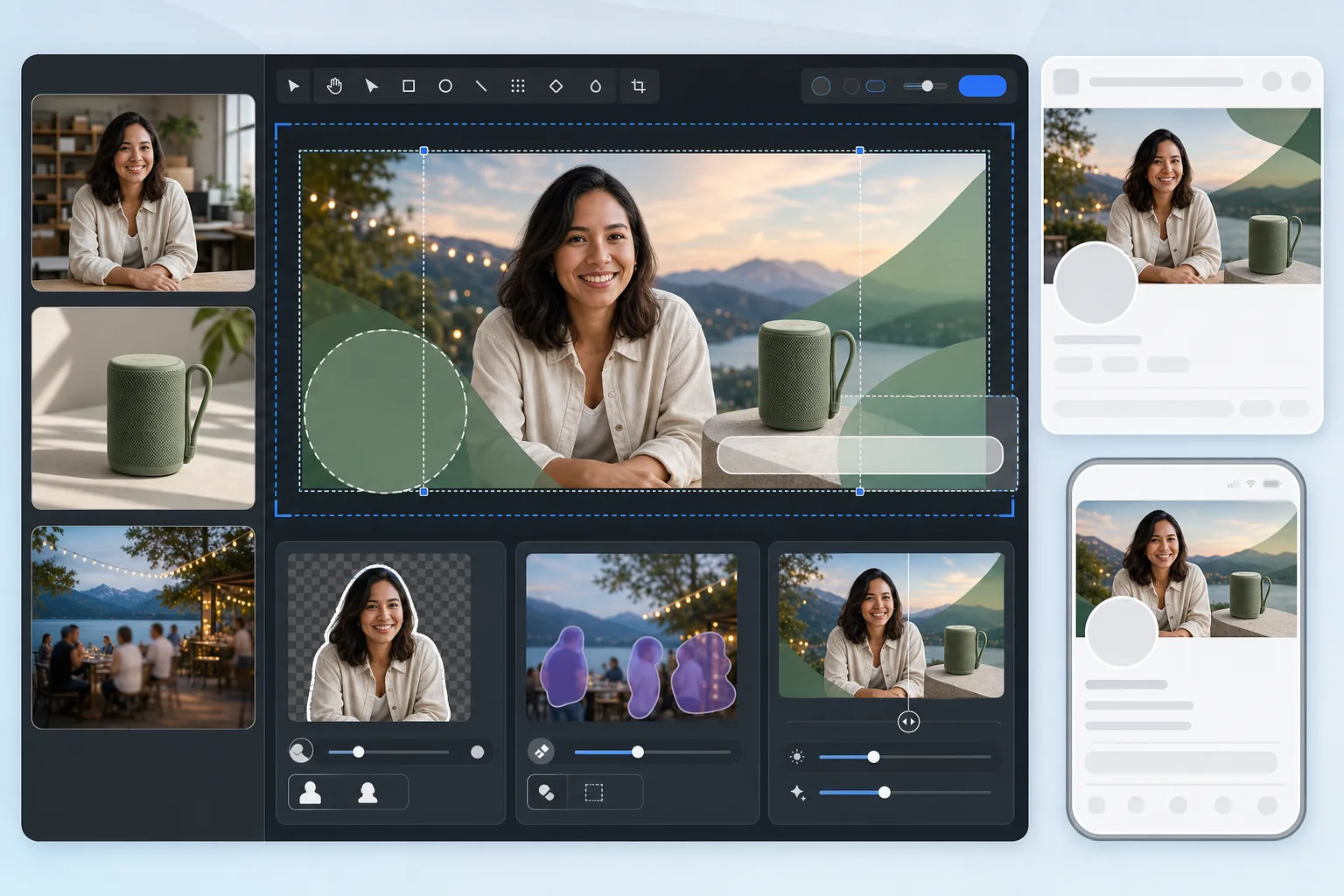
أنشئ صور غلاف Facebook تبدو متقنة على كل من سطح المكتب والهاتف المحمول. يتعامل هذا القالب مع الفرق الدقيق بين عرض سطح المكتب بدقة 820×312 بكسل واقتصاص الهاتف المحمول بدقة 640×360 بكسل — مما يضمن أن رسالة علامتك التجارية وصورك ودعوتك إلى اتخاذ إجراء مرئية على كل جهاز دون أن تختفي خلف صورة الملف الشخصي أو أزرار الإجراءات.
جرّب هذا القالب مجانًاSocial Media template preview
ماذا يفعل هذا القالب
ينتج صورة غلاف Facebook مُحسّنة للعرض على كل من سطح المكتب (820×312 بكسل) والهاتف المحمول (640×360 بكسل). يأخذ القالب في الاعتبار تداخل صورة الملف الشخصي على الجانب الأيسر، وأزرار الإجراءات على اليمين، ونسب العرض إلى الارتفاع المختلفة بين الأجهزة. يقوم Background Eraser باستخراج الأشخاص أو المنتجات بدقة للتركيب، ويزيل Magic Eraser العناصر المشتتة من الخلفيات الطبيعية، ويحافظ AI Enhance على وضوح الصورة بعد ضغط Facebook.
إعدادات القالب
| مساحة الرفع | 820×360 بكسل (تغطي اقتصاص سطح المكتب والهاتف المحمول معًا) |
| المنطقة المرئية على سطح المكتب | 820×312 بكسل (أعرض وأقصر) |
| المنطقة المرئية على الهاتف المحمول | 640×360 بكسل (أضيق وأطول — اقتصاص مركزي) |
| تداخل صورة الملف الشخصي | دائرة 170×170 بكسل في الزاوية السفلية اليسرى (سطح المكتب) |
| صيغة الملف | PNG للرسومات، JPEG بجودة 85% للصور (ضغط مسبق) |
| ملف تعريف الألوان | sRGB (يزيل Facebook ملفات التعريف الأخرى عند الرفع) |
كيفية استخدام هذا القالب
ارفع صورة الغلاف الخاصة بك
ابدأ بصورة أو رسم للعلامة التجارية أو صورة شخصية تريد تركيبها. تعمل الصور ذات الاتجاه الأفقي بعرض لا يقل عن 820 بكسل بشكل أفضل. سيرشدك القالب إلى الأماكن الآمنة لوضع المحتوى.
نظّف التكوين
استخدم Background Eraser لاستخراج الأشخاص أو المنتجات لوضعها فوق خلفية تحمل العلامة التجارية. يزيل Magic Eraser العناصر غير المرغوب فيها مثل المتطفلين على الصورة أو اللافتات أو الفوضى من صور المناظر الطبيعية أو الفعاليات.
ضع المحتوى في المناطق الآمنة
احتفظ بالمحتوى الأساسي — النص والوجوه والشعارات — في المنطقة المركزية المرئية على كل من سطح المكتب والهاتف المحمول. تجنّب الزاوية السفلية اليسرى (تداخل صورة الملف الشخصي على سطح المكتب) والحافة اليمنى (أزرار الإجراءات).
صدّر مع ضغط مسبق
يصدّر القالب بدقة 820×360 بكسل مع إعدادات ضغط مُحسّنة. يعيد Facebook ضغط جميع عمليات الرفع، لذا يطبّق التصدير زيادة طفيفة في الحدة مسبقًا وجودة JPEG دقيقة لتحمّل الضغط المزدوج دون تشكّل أشرطة أو ضبابية.
نصائح احترافية لأفضل النتائج
- ✓صمّم على مساحة 820×360 بكسل لكن ضع كل المحتوى المهم داخل منطقة مركزية بحجم 580×280 بكسل. هذه هي منطقة التداخل المرئية على كل من سطح المكتب والهاتف المحمول دون أي عائق من صور الملف الشخصي أو الأزرار.
- ✓تجنّب وضع نص أصغر من 24 بكسل على صورة الغلاف الخاصة بك. يضغط Facebook صور الغلاف بشدة، ويصبح النص الصغير ضبابيًا وغير قابل للقراءة بعد الرفع — خاصة على شاشات الهاتف المحمول.
- ✓بالنسبة لصفحات الأعمال، نسّق صورة الغلاف الخاصة بك مع زر CTA ('احجز الآن'، 'تسوّق الآن'، إلخ) الذي يظهر على الجانب الأيمن. اترك مساحة بصرية للزر حتى لا يتداخل مع تصميمك.
- ✓حدّث صورة الغلاف الخاصة بك للحملات أو المواسم أو الفعاليات. يعرض Facebook رفع الغلاف في الجدول الزمني لصفحتك كمنشور، مما يمنح التحديث وصولاً عضويًا إضافيًا يتجاوز رأس الصفحة فقط.
เครื่องมือ
الأسئلة الشائعة
لماذا تبدو صورة الغلاف الخاصة بي مختلفة على الهاتف المحمول؟
+
يقتصّ Facebook صور الغلاف بشكل مختلف حسب الجهاز. يعرض سطح المكتب 820×312 بكسل (عريض وقصير)، بينما يعرض الهاتف المحمول اقتصاصًا مركزيًا بدقة 640×360 بكسل (أضيق لكن أطول). يكون المحتوى عند الحافتين اليسرى واليمنى القصوى مرئيًا على سطح المكتب لكنه يُقتطع على الهاتف المحمول. يضمن دليل المنطقة الآمنة في القالب بقاء محتواك المهم في كلا الاقتصاصين.
هل سيجعل Facebook صورة الغلاف الخاصة بي ضبابية؟
+
يعيد Facebook ضغط كل صورة يتم رفعها. يتصدى القالب لذلك بتطبيق زيادة طفيفة في الحدة مسبقًا واستخدام مستوى جودة JPEG الأمثل الذي يتحمّل الضغط المزدوج. كما يساعد الرفع بصيغة PNG بدلاً من JPEG، لأن تحويل Facebook من جانب الخادم من PNG غالبًا ما ينتج نتائج أفضل من إعادة ضغط ملف JPEG مضغوط بالفعل.
هل يمكنني استخدام النص على صورة غلاف Facebook الخاصة بي؟
+
نعم، أزال Facebook 'قاعدة نسبة النص 20%' لصور الغلاف. ومع ذلك، اجعل النص كبيرًا (24 بكسل كحد أدنى) وعالي التباين بسبب ضغط Facebook. استخدم تراكب المنطقة الآمنة في القالب للتأكد من أن نصك لا يختفي خلف صورة الملف الشخصي على سطح المكتب أو يُقتطع على الهاتف المحمول.
أنشئ غلاف Facebook يعمل على كل جهاز
ارفع صورتك أو أصول علامتك التجارية واحصل على صورة غلاف مُحسّنة للعرض على سطح المكتب والهاتف المحمول في ثوانٍ.
جرّبه مجانًاRelated templates
More social media templates for your workflow.
เทมเพลตการครอบตัดสี่เหลี่ยมที่ปรับให้เหมาะสมกับ Instagram ที่ 1080×1080px พื้นหลังที่สะอาดตา สีสันสดใส และรายละเอียดที่คมชัดที่โดดเด่นในฟีด
เทมเพลตแบนเนอร์ YouTube ที่ 2560×1440px พร้อมคำแนะนำโซนปลอดภัย ลบพื้นหลังออกอย่างสะอาดตาสำหรับรูปภาพของครีเอเตอร์ เลย์เอาต์ที่คำนึงถึงอุปกรณ์ และหน้าปกช่องที่สอดคล้องกับแบรนด์
สร้างภาพส่วนหัว Twitter/X ระดับมืออาชีพในขนาด 1500×500px ที่แน่นอน บัญชีสำหรับภาพโปรไฟล์ทับซ้อนกัน ทำงานทั้งในโหมดมืดและโหมดสว่าง
ปรับปรุงรูปโปรไฟล์การออกเดทด้วยการปรับสีผิวให้เรียบเนียนเป็นธรรมชาติ การล้างพื้นหลัง การแก้ไขแสง และการไล่ระดับสีอย่างละเอียดที่ดูสมจริง — ไม่มีการกรอง
สร้างภาพพิน Pinterest ที่เลื่อนไม่สะดุดด้วยพื้นหลังที่สะอาดตา ขนาดแนวตั้ง 2:3 ที่เหมาะสม การปรับปรุงสีที่สดใส และองค์ประกอบที่พร้อมใช้หมุด
สร้างภาพหน้าปกวิดีโอ TikTok ที่สะดุดตาด้วยพื้นหลังที่สะอาดตา กรอบวัตถุตัวหนา และขนาดแนวตั้ง 9:16 ที่ปรับให้เหมาะสมเพื่อความสม่ำเสมอของตารางโปรไฟล์