
รูปโปรไฟล์ Tinder
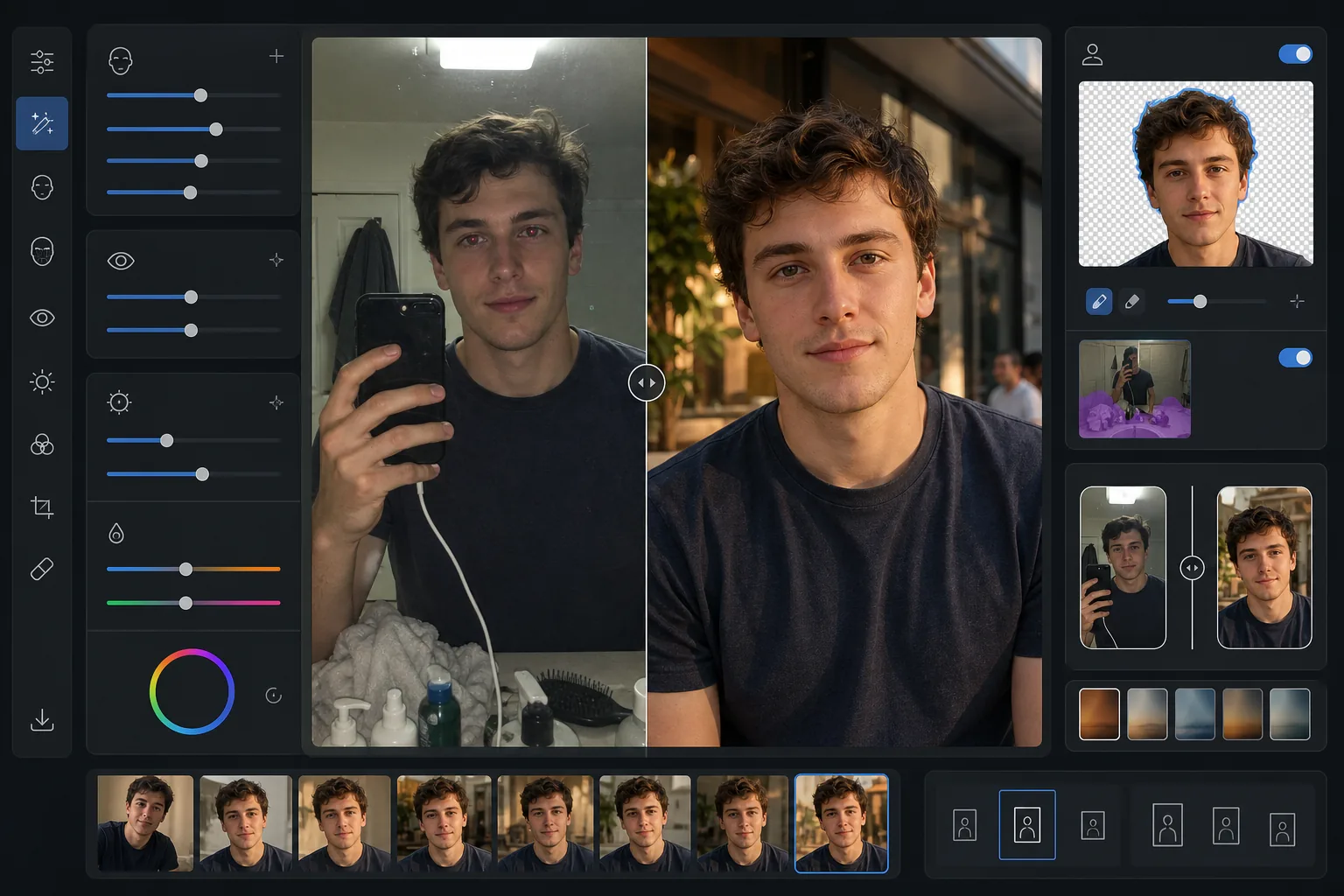
ทำให้รูปโปรไฟล์หาคู่ของคุณดูน่าดึงดูดอย่างเป็นธรรมชาติโดยไม่ดูแต่งภาพมากเกินไป เทมเพลตนี้ปรับปรุงแสงและสีผิว ลบพื้นหลังที่รบกวนสายตา แก้ไขตาแดงและเงาแข็งจากแฟลช และใช้การไล่ระดับสีอย่างละเอียดที่ช่วยเสริมให้ดูดีโดยไม่ดูเหมือนผ่านฟิลเตอร์
ลองใช้เทมเพลตนี้ฟรีSocial Media template preview
เทมเพลตนี้ทำอะไรได้บ้าง
ปรับแต่งรูปภาพให้เหมาะกับแอปหาคู่อย่าง Tinder, Bumble และ Hinge โดยเฉพาะ ซึ่งความประทับใจแรกเกิดขึ้นภายในไม่ถึงสองวินาที เทมเพลตนี้ใช้การปรับปรุงที่ดูเป็นธรรมชาติซึ่งทำให้คุณดูดีที่สุดโดยไม่มีลุคแบบผ่านฟิลเตอร์ที่ชัดเจนซึ่งส่อถึงความไม่จริงใจ AI Enhance ช่วยเพิ่มความสว่างใต้ดวงตา ปรับสีผิวให้สม่ำเสมอ และแก้ไขแสงแข็งจากแฟลชหรือหลอดฟลูออเรสเซนต์เหนือศีรษะ Background Eraser สามารถเปลี่ยนพื้นหลังเซลฟี่หน้ากระจกในห้องน้ำที่รกให้เป็นฉากที่สะอาดและเป็นกลางซึ่งทำให้โฟกัสอยู่ที่ตัวคุณ ผลลัพธ์ที่ได้ดูเหมือนภาพแคนดิดที่ยอดเยี่ยมซึ่งถ่ายในแสงธรรมชาติที่ช่วยเสริมให้ดูดี
การตั้งค่าเทมเพลต
| การปรับปรุงผิว | การปรับให้เรียบเนียนอย่างเป็นธรรมชาติ (คงรูขุมขนและเนื้อสัมผัส ลดจุดด่างพร้อย) |
| การปรับปรุงดวงตา | เพิ่มความสว่างอย่างละเอียด + แก้ไขตาแดง |
| การแก้ไขแสง | จำลองแสงเสริมช่วงโกลเดนอาวร์ (ความอบอุ่นนุ่มนวลแบบมีทิศทาง) |
| ตัวเลือกพื้นหลัง | ทำความสะอาดหรือเปลี่ยนเป็นฉากกลางแจ้ง/ในเมือง/เป็นกลาง |
| ขนาดเอาต์พุต | 1080 × 1350 px (แนวตั้ง 4:5 เหมาะสมที่สุดสำหรับแอปหาคู่) |
| การไล่ระดับสี | อบอุ่นเป็นธรรมชาติ (ละเอียด — ไม่เห็นลุคแบบฟิลเตอร์) |
วิธีใช้เทมเพลตนี้
อัปโหลดรูปภาพของคุณ
อัปโหลดเซลฟี่ ภาพพอร์ตเทรต หรือภาพเต็มตัว เทมเพลตทำงานได้ดีที่สุดกับรูปภาพที่เห็นใบหน้าของคุณชัดเจนและอยู่ในโฟกัส สามารถใช้รูปภาพหมู่ได้ — เลือกตัวคุณเอง แล้วเทมเพลตจะแยกคุณออกจากกลุ่มและปรับปรุงรูปภาพ
การปรับปรุงอย่างเป็นธรรมชาติ
AI Enhance ปรับสีผิวให้สม่ำเสมอ ลดจุดด่างพร้อยชั่วคราว เพิ่มความสว่างให้ดวงตาอย่างละเอียด และแก้ไขแสงแฟลชหรือแสงจากเหนือศีรษะที่ไม่ช่วยเสริมให้ดูดี การปรับปรุงนี้คงเนื้อสัมผัสผิวที่เป็นธรรมชาติไว้ รวมถึงรูขุมขนและริ้วรอยเล็ก ๆ — เป้าหมายคือให้ดูเหมือนตัวคุณในวันที่ดูดีที่สุด ไม่ใช่เหมือนคนอื่น
ทำความสะอาดหรือเปลี่ยนพื้นหลัง
เลือกทำความสะอาดพื้นหลังเดิมของคุณ (ลบความรก คนอื่น ความยุ่งเหยิง) หรือแทนที่ทั้งหมดด้วยฉากกลางแจ้ง คาเฟ่ หรือในเมืองที่สะอาด Background Eraser สร้างการเปลี่ยนผ่านขอบที่ดูเป็นธรรมชาติบริเวณเส้นขอบผมและเสื้อผ้า เพื่อให้การเปลี่ยนพื้นหลังดูแนบเนียน
ส่งออกสำหรับโปรไฟล์ของคุณ
ดาวน์โหลดที่ 1080 × 1350 px ในอัตราส่วนแนวตั้ง 4:5 ที่แอปหาคู่แสดงผลได้ดีที่สุด รูปภาพได้รับการปรับให้เหมาะกับหน้าจอมือถือซึ่งเป็นที่ที่มีการปัดมากที่สุด โดยคงรายละเอียดทั้งในส่วนสว่างและส่วนเงาไว้สำหรับการตั้งค่าความสว่างหน้าจอทุกระดับ
เคล็ดลับระดับมืออาชีพเพื่อผลลัพธ์ที่ดีที่สุด
- ✓ใช้รูปภาพที่ถ่ายในแสงธรรมชาติช่วงกลางวันใกล้หน้าต่างเพื่อจุดเริ่มต้นที่ช่วยเสริมให้ดูดีที่สุด เทมเพลตสามารถแก้ไขแสงประดิษฐ์ที่แข็งกระด้างได้ แต่รูปภาพที่ใช้แสงธรรมชาติต้องการการแก้ไขน้อยกว่าและให้ผลลัพธ์สุดท้ายที่ดูสมจริงที่สุด
- ✓หลีกเลี่ยงแว่นกันแดดทึบในรูปโปรไฟล์หลักของคุณ เทมเพลตสามารถเพิ่มความสว่างบริเวณดวงตาได้ แต่จะได้ผลเฉพาะเมื่อมองเห็นดวงตาเท่านั้น แว่นกันแดดยังทำให้คู่ที่มีโอกาสแมตช์รู้สึกถึงความเชื่อมโยงส่วนตัวได้ยากขึ้น
- ✓อัปโหลดรูปภาพเต็มตัวอย่างน้อยหนึ่งรูปควบคู่ไปกับรูปใบหน้า งานวิจัยเกี่ยวกับแอปหาคู่แสดงให้เห็นว่าโปรไฟล์ที่มีทั้งรูปใบหน้าและรูปเต็มตัวผสมกันได้รับการปัดขวามากกว่าโปรไฟล์ที่มีแต่เซลฟี่ระยะใกล้อย่างมีนัยสำคัญ
- ✓อย่าใช้รูปภาพหมู่เป็นรูปแรก แม้ว่าเทมเพลตจะสามารถแยกคุณออกจากกลุ่มได้ แต่การครอบตัดที่จำเป็นสำหรับเฟรมบุคคลเดียวอาจลดคุณภาพของรูปภาพเมื่อเทียบกับการเริ่มต้นด้วยรูปเดี่ยว
เครื่องมือ
คำถามที่พบบ่อย
การปรับปรุงจะดูชัดเจนไหม
+
ไม่ เทมเพลตได้รับการปรับเทียบมาเพื่อความละเอียดอ่อนโดยเฉพาะ มันคงเนื้อสัมผัสผิวที่เป็นธรรมชาติ รูขุมขน และริ้วรอยเล็ก ๆ ไว้ ขณะที่ลดเฉพาะจุดด่างพร้อยชั่วคราวและปรับแสงที่ไม่สม่ำเสมอให้เรียบเสมอกัน ผลลัพธ์ดูเหมือนรูปภาพที่ดีจริง ๆ ไม่ใช่รูปที่ผ่านการรีทัช
ฉันใช้เซลฟี่หน้ากระจกในห้องน้ำได้ไหม
+
ได้ เทมเพลตสามารถแทนที่พื้นหลังห้องน้ำด้วยฉากที่สะอาดกว่าได้ อย่างไรก็ตาม ท่าเซลฟี่หน้ากระจกและโทรศัพท์ในมือของคุณจะยังคงอยู่ — เพื่อผลลัพธ์ที่ดีที่สุด ให้ครอบตัดให้ชิดหรือใช้รูปภาพที่คนอื่นถ่ายให้หรือถ่ายด้วยตัวตั้งเวลา
ใช้ได้กับสีผิวทุกโทนไหม
+
โมเดลการปรับปรุงด้วย AI ได้รับการฝึกกับสีผิวที่หลากหลายและทำงานได้อย่างแม่นยำตลอดทุกช่วง การแก้ไขสีและการปรับผิวให้เรียบเนียนจะปรับตามโทนสีเฉพาะในรูปภาพของคุณ แทนที่จะใช้ฟิลเตอร์แบบเดียวกันกับทุกคน
ดูดีที่สุดอย่างเป็นธรรมชาติในทุกแอปหาคู่
อัปโหลดรูปภาพของคุณแล้วรับรูปโปรไฟล์ที่ปรับปรุงอย่างเป็นธรรมชาติและปรับพื้นหลังให้เหมาะสมที่สุด ซึ่งดึงดูดการแมตช์ได้มากขึ้น
ลองใช้ฟรีRelated templates
More social media templates for your workflow.
เทมเพลตการครอบตัดสี่เหลี่ยมที่ปรับให้เหมาะสมกับ Instagram ที่ 1080×1080px พื้นหลังที่สะอาดตา สีสันสดใส และรายละเอียดที่คมชัดที่โดดเด่นในฟีด
เทมเพลตแบนเนอร์ YouTube ที่ 2560×1440px พร้อมคำแนะนำโซนปลอดภัย ลบพื้นหลังออกอย่างสะอาดตาสำหรับรูปภาพของครีเอเตอร์ เลย์เอาต์ที่คำนึงถึงอุปกรณ์ และหน้าปกช่องที่สอดคล้องกับแบรนด์
เทมเพลตภาพหน้าปก Facebook ที่ 820×312px สำหรับเดสก์ท็อปและการครอบตัดบนมือถือ 640×360px ทำความสะอาดภาพลักษณ์ของแบรนด์ด้วยโซนปลอดภัยที่เหมาะสมสำหรับการทับซ้อนของภาพโปรไฟล์และการวางปุ่ม CTA
สร้างภาพส่วนหัว Twitter/X ระดับมืออาชีพในขนาด 1500×500px ที่แน่นอน บัญชีสำหรับภาพโปรไฟล์ทับซ้อนกัน ทำงานทั้งในโหมดมืดและโหมดสว่าง
สร้างภาพพิน Pinterest ที่เลื่อนไม่สะดุดด้วยพื้นหลังที่สะอาดตา ขนาดแนวตั้ง 2:3 ที่เหมาะสม การปรับปรุงสีที่สดใส และองค์ประกอบที่พร้อมใช้หมุด
สร้างภาพหน้าปกวิดีโอ TikTok ที่สะดุดตาด้วยพื้นหลังที่สะอาดตา กรอบวัตถุตัวหนา และขนาดแนวตั้ง 9:16 ที่ปรับให้เหมาะสมเพื่อความสม่ำเสมอของตารางโปรไฟล์