
صورة قناة YouTube
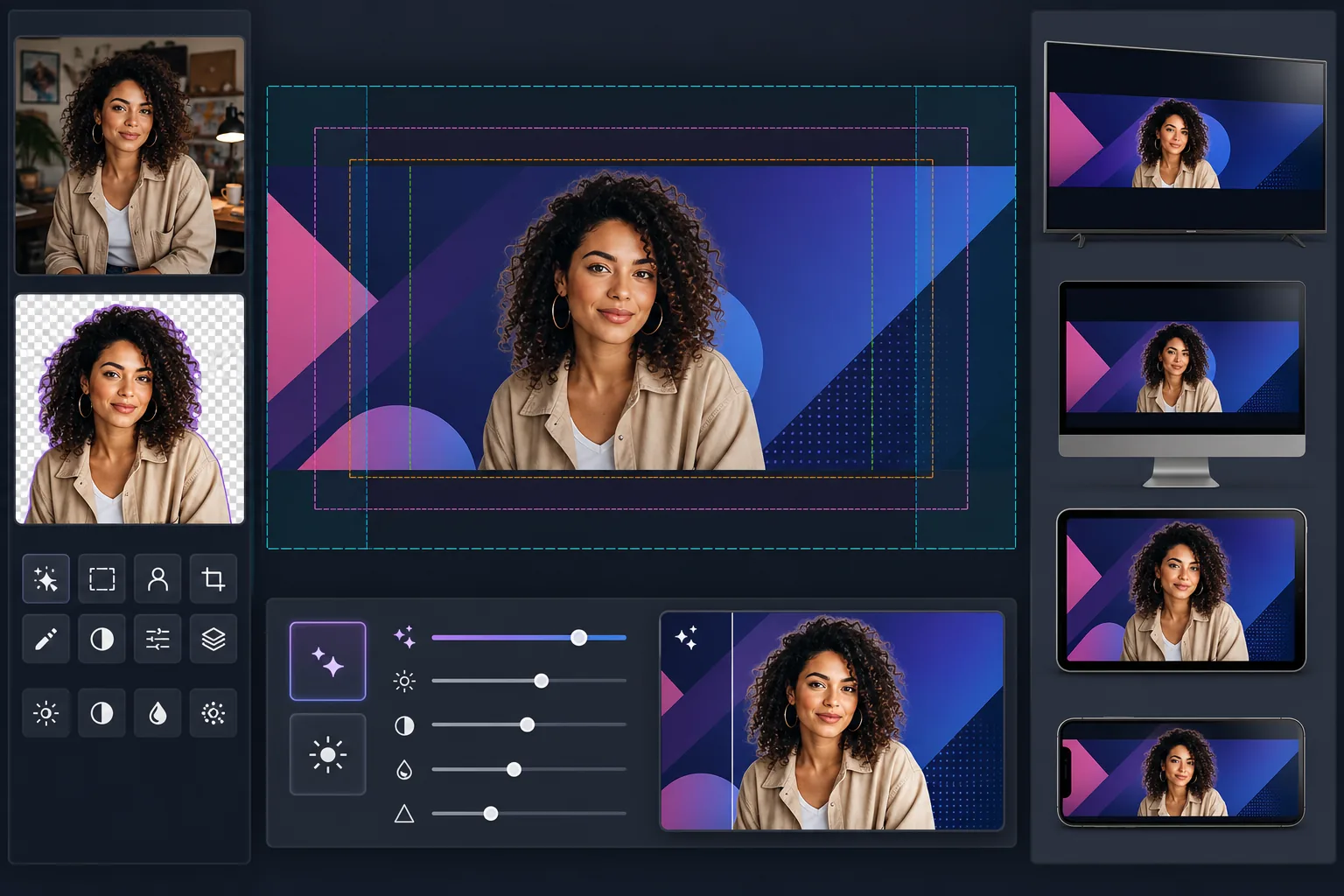
صمم لافتات قناة YouTube التي تبدو واضحة على كل شاشة — من شاشات سطح المكتب بدقة 2560px إلى الاقتصاص على الهواتف المحمولة. يتولى هذا القالب حسابات المنطقة الآمنة المعقدة بحيث تظهر علامتك التجارية ونصك وصورة منشئ المحتوى بشكل صحيح على التلفزيون وسطح المكتب والجهاز اللوحي والهاتف المحمول دون أن تُقتطع.
جرّب هذا القالب مجانًاSocial Media template preview
ما الذي يفعله هذا القالب
ينشئ صورة قناة YouTube بحجم لوحة كامل 2560×1440px مع وضع المحتوى ضمن المناطق الآمنة في YouTube. يستخرج Background Eraser صور منشئي المحتوى بدقة لتركيبها فوق خلفيات تحمل العلامة التجارية، ويضمن AI Enhance بقاء اللافتة النهائية واضحة عند حجم العرض عالي الدقة في YouTube. يأخذ القالب في الاعتبار مناطق الاقتصاص الأربع المختلفة التي يطبقها YouTube عبر التلفزيون وسطح المكتب والجهاز اللوحي والأجهزة المحمولة.
إعدادات القالب
| حجم اللوحة | 2560×1440px (حجم التحميل المطلوب من YouTube) |
| المنطقة الآمنة (جميع الأجهزة) | المنطقة المركزية 1546×423px (مرئية دائمًا) |
| المنطقة المرئية على سطح المكتب | 2560×423px (العرض الكامل، الشريط المركزي) |
| مساحة الألوان | sRGB (معيار الويب لعرض YouTube المتسق) |
| تنسيق الملف | PNG للرسومات/النصوص، JPEG 95% للافتات الفوتوغرافية |
| الحد الأقصى لحجم الملف | 6MB (حد التحميل في YouTube) |
كيفية استخدام هذا القالب
حمّل صورة منشئ المحتوى أو أصول علامتك التجارية
حمّل صورة شخصية أو شعارًا أو صورًا للعلامة التجارية. بالنسبة للقنوات التي تركز على منشئ المحتوى، تعمل صورة الوجه الواضحة أو صورة الجزء العلوي من الجسم بشكل أفضل. سيفصلك Background Eraser عن أي خلفية لوضع مرن.
استخرج موضوعك وضعه في مكانه
يزيل Background Eraser الخلفية الأصلية، مانحًا إياك اقتصاصًا نظيفًا. ضع صورة منشئ المحتوى أو الشعار ضمن المنطقة الآمنة 1546×423px — المنطقة المركزية المضمون ظهورها على كل جهاز، من الهواتف إلى أجهزة التلفزيون الذكية.
حسّن الدقة والوضوح
يقوم AI Enhance بتكبير التكوين النهائي وزيادة حدته ليبدو واضحًا بعرض 2560px. تبقى حواف النص حادة، وتبقى التدرجات سلسة، وتحافظ العناصر الفوتوغرافية على تفاصيلها الطبيعية عند دقة العرض الكاملة في YouTube.
المعاينة والتصدير
عاين كيف ستظهر اللافتة على الهاتف المحمول (اقتصاص 1546×423px)، وسطح المكتب (اقتصاص 2560×423px)، والتلفزيون (عرض كامل 2560×1440px). صدّر بتنسيق PNG للتصاميم الغنية بالنصوص أو JPEG للافتات الفوتوغرافية، مع البقاء ضمن حد حجم الملف 6MB في YouTube.
نصائح احترافية للحصول على أفضل النتائج
- ✓احتفظ بجميع العناصر الأساسية — وجهك واسم القناة والشعار النصي — ضمن المنطقة الآمنة المركزية 1546×423px. هذه هي المنطقة الوحيدة المضمون ظهورها على كل جهاز. أي شيء خارجها سيُقتطع على الهاتف المحمول.
- ✓تجنب وضع النصوص أو الشعارات في الزاوية اليمنى السفلية من اللافتة. يضع YouTube صورة ملفك الشخصي وزر الاشتراك فوق تلك المنطقة على سطح المكتب، مما قد يحجب محتواك.
- ✓استخدم ألوانًا عالية التباين وخطوطًا عريضة كبيرة لأي نص في لافتتك. يضغط YouTube صورة القناة بشكل كبير، ويصبح النص الرفيع أو منخفض التباين غير قابل للقراءة، خاصة على الأجهزة المحمولة.
- ✓صمم المناطق الخارجية (خارج المنطقة الآمنة) كامتداد لخلفيتك — تعمل الألوان الصلبة أو التدرجات أو النسخ المموهة من صورتك الرئيسية بشكل جيد. تظهر هذه المناطق على التلفزيون وشاشات سطح المكتب العريضة لكن لا ينبغي أن تحتوي على معلومات أساسية.
เครื่องมือ
الأسئلة الشائعة
لماذا يحتاج YouTube إلى صورة كبيرة كهذه للافتة رفيعة؟
+
يستخدم YouTube صورة واحدة عبر أجهزة مختلفة تمامًا. تعرض أجهزة التلفزيون اللوحة الكاملة 2560×1440px. يعرض سطح المكتب شريطًا أفقيًا 2560×423px. تعرض الأجهزة اللوحية أقل قليلًا، ويقتصر الهاتف المحمول على المنطقة المركزية 1546×423px فقط. تضمن اللوحة الكبيرة أن يبدو عملك الفني واضحًا على كل شاشة دون الحاجة إلى تحميلات منفصلة.
هل سيُقتطع اسم قناتي على الهاتف المحمول؟
+
ليس إذا أبقيته ضمن المنطقة الآمنة. يحدد القالب المنطقة المركزية 1546×423px المرئية على كل جهاز. ضع اسم قناتك وشعارك النصي وأي علامة تجارية مهمة ضمن هذه المنطقة، وسيظهر بشكل صحيح في كل مكان.
هل يمكنني تحديث صورة قناتي للحملات الموسمية؟
+
نعم. احتفظ بقالب أساسي بألوان علامتك التجارية وموضع الشعار، ثم استبدل صور الخلفية أو الألوان المميزة للتحديثات الموسمية أو إطلاق مقاطع الفيديو أو الإنجازات. يبقى وضع المنطقة الآمنة متسقًا عبر الإصدارات.
أنشئ لافتة YouTube تعمل على كل شاشة
حمّل صورتك أو أصول علامتك التجارية وأنشئ صورة قناة محسّنة للأجهزة في دقائق. لا حاجة إلى برامج تصميم.
جرّبه مجانًاRelated templates
More social media templates for your workflow.
เทมเพลตการครอบตัดสี่เหลี่ยมที่ปรับให้เหมาะสมกับ Instagram ที่ 1080×1080px พื้นหลังที่สะอาดตา สีสันสดใส และรายละเอียดที่คมชัดที่โดดเด่นในฟีด
เทมเพลตภาพหน้าปก Facebook ที่ 820×312px สำหรับเดสก์ท็อปและการครอบตัดบนมือถือ 640×360px ทำความสะอาดภาพลักษณ์ของแบรนด์ด้วยโซนปลอดภัยที่เหมาะสมสำหรับการทับซ้อนของภาพโปรไฟล์และการวางปุ่ม CTA
สร้างภาพส่วนหัว Twitter/X ระดับมืออาชีพในขนาด 1500×500px ที่แน่นอน บัญชีสำหรับภาพโปรไฟล์ทับซ้อนกัน ทำงานทั้งในโหมดมืดและโหมดสว่าง
ปรับปรุงรูปโปรไฟล์การออกเดทด้วยการปรับสีผิวให้เรียบเนียนเป็นธรรมชาติ การล้างพื้นหลัง การแก้ไขแสง และการไล่ระดับสีอย่างละเอียดที่ดูสมจริง — ไม่มีการกรอง
สร้างภาพพิน Pinterest ที่เลื่อนไม่สะดุดด้วยพื้นหลังที่สะอาดตา ขนาดแนวตั้ง 2:3 ที่เหมาะสม การปรับปรุงสีที่สดใส และองค์ประกอบที่พร้อมใช้หมุด
สร้างภาพหน้าปกวิดีโอ TikTok ที่สะดุดตาด้วยพื้นหลังที่สะอาดตา กรอบวัตถุตัวหนา และขนาดแนวตั้ง 9:16 ที่ปรับให้เหมาะสมเพื่อความสม่ำเสมอของตารางโปรไฟล์