
ภาพพิน Pinterest
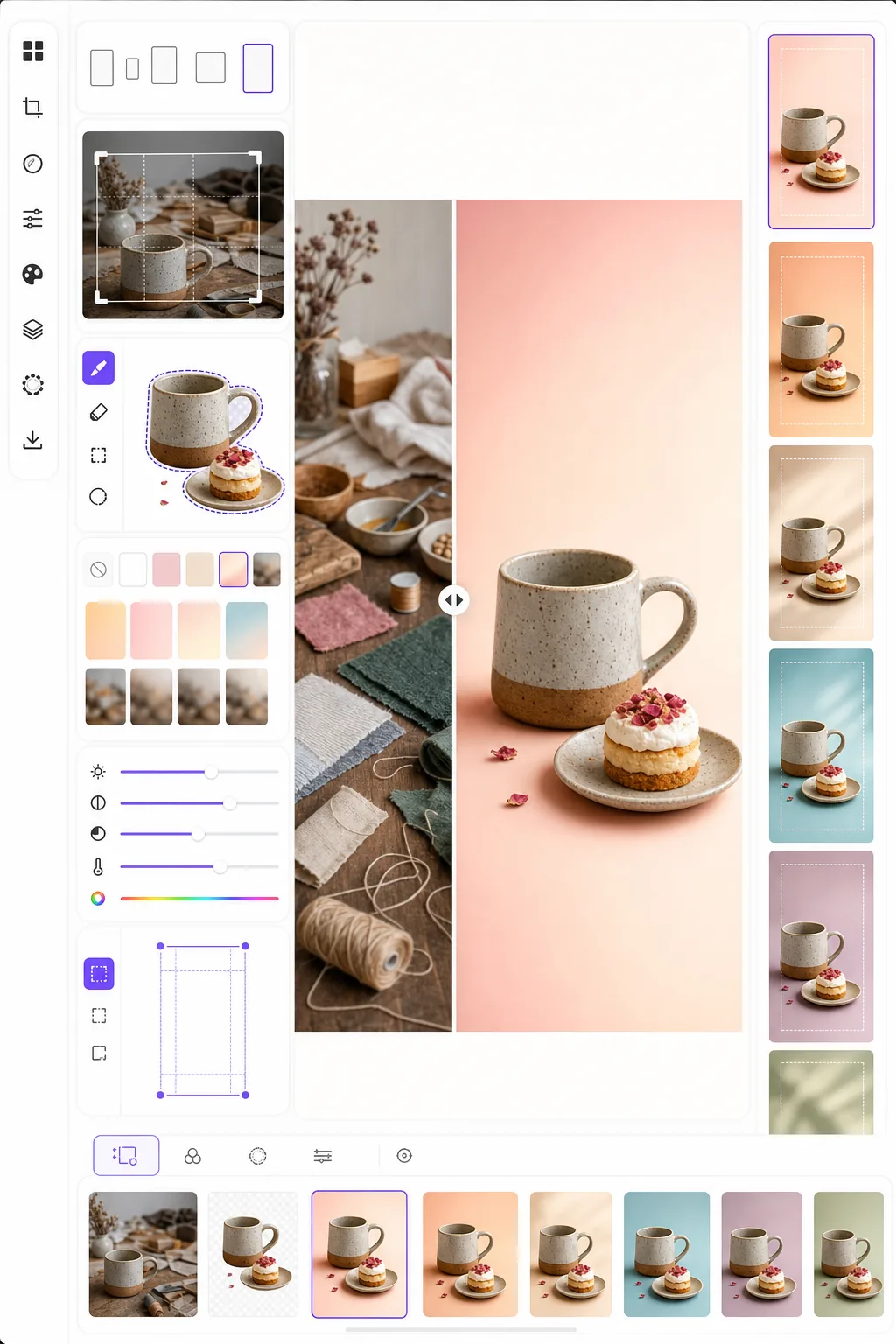
สร้างภาพพินที่ทำให้หยุดเลื่อนและกระตุ้นการบันทึก เทมเพลตนี้จัดรูปแบบภาพถ่ายให้เป็นอัตราส่วนแนวตั้ง 2:3 ที่เหมาะสมที่สุดของ Pinterest ลบพื้นหลังที่รกออกเพื่อองค์ประกอบที่สะอาดตาโดยเน้นที่ผลิตภัณฑ์ เพิ่มความสดใสของสีสำหรับฟีด Pinterest และส่งออกภาพที่พร้อมใช้พินซึ่งดูคมชัดทั้งบนมือถือและเดสก์ท็อป
ลองใช้เทมเพลตนี้ฟรีSocial Media template preview
เทมเพลตนี้ทำอะไร
ปรับภาพให้เหมาะสมเพื่อการมีส่วนร่วมสูงสุดบน Pinterest ที่ซึ่งพินแนวตั้งสูงและสะดุดตามีอัตราการบันทึกสูงกว่าภาพถ่ายแนวนอนมาตรฐานสามถึงห้าเท่า Background Eraser แยกวัตถุของคุณ — ผลิตภัณฑ์ จานอาหารตามสูตร ชุดแต่งตัว หรืองานฝีมือ — แล้ววางลงบนพื้นหลังที่สะอาดตา สีพื้น หรือไล่ระดับสีที่ทำให้วัตถุโดดเด่นในฟีดที่แออัด ความสดใสของสีถูกเพิ่มขึ้นเพื่อให้สอดคล้องกับแนวโน้มของอัลกอริทึม Pinterest ที่นิยมเนื้อหาที่สว่างและอิ่มตัว เทมเพลตส่งออกที่ขนาด 1000 × 1500 px ซึ่งเป็นขนาดที่ Pinterest แนะนำสำหรับพินมาตรฐานพอดี
การตั้งค่าเทมเพลต
| อัตราส่วนภาพ | 2:3 แนวตั้ง (1000 × 1500 px — มาตรฐาน Pinterest) |
| ตัวเลือกพื้นหลัง | ขาวสะอาดตา สีพื้น ไล่ระดับสีนุ่มนวล หรือต้นฉบับเบลอ |
| การเพิ่มสี | +20% ความอิ่มตัวเพื่อการมองเห็นในฟีด (ปรับได้) |
| การจัดวางกรอบวัตถุ | จัดกึ่งกลางอัตโนมัติพร้อมระยะขอบ 10% สำหรับพื้นที่ซ้อนทับข้อความ |
| รูปแบบไฟล์ส่งออก | PNG (สำหรับซ้อนทับข้อความ) หรือ JPEG (สำหรับอัปโหลดโดยตรง) |
วิธีใช้เทมเพลตนี้
อัปโหลดภาพต้นฉบับของคุณ
อัปโหลดภาพผลิตภัณฑ์ ภาพอาหาร ภาพชุดแต่งตัว หรือภาพใดๆ ที่คุณต้องการเปลี่ยนเป็นพิน Pinterest เทมเพลตรองรับภาพแนวนอน สี่เหลี่ยมจัตุรัส หรือแนวตั้ง และจะจัดกรอบใหม่เป็นอัตราส่วนแนวตั้ง 2:3 ที่เหมาะสมที่สุดด้วยการครอบตัดอัจฉริยะที่ทำให้วัตถุอยู่ตรงกลาง
พื้นหลังและองค์ประกอบ
Background Eraser แยกวัตถุของคุณและวางลงบนพื้นหลังที่สะอาดตา เลือกจากสีขาวบริสุทธิ์ สีแบรนด์พื้น ไล่ระดับสีนุ่มนวล หรือเวอร์ชันเบลอของพื้นหลังต้นฉบับ วัตถุจะถูกจัดวางอัตโนมัติเพื่อเว้นพื้นที่ด้านบนและด้านล่างสำหรับการซ้อนทับข้อความ
การปรับสีและความคมชัดให้เหมาะสม
สีถูกเพิ่มความอิ่มตัว 20% เพื่อให้โดดเด่นในฟีด Pinterest ที่ซึ่งภาพหม่นมักถูกเลื่อนผ่านไป ความคมชัดถูกเพิ่มให้กับวัตถุในขณะที่พื้นหลังยังคงนุ่มนวล สร้างความลึกทางสายตาที่ดึงดูดสายตาไปยังวัตถุหลัก
ส่งออกพินของคุณ
ดาวน์โหลดที่ขนาด 1000 × 1500 px เป็น PNG (หากคุณวางแผนจะเพิ่มการซ้อนทับข้อความใน Canva หรือโปรแกรมแก้ไขอื่น) หรือ JPEG (สำหรับอัปโหลดโดยตรงไปยัง Pinterest) โปรไฟล์สีถูกตั้งค่าเป็น sRGB เพื่อการแสดงผลที่ถูกต้องบนทุกอุปกรณ์และเบราว์เซอร์
เคล็ดลับระดับมืออาชีพเพื่อผลลัพธ์ที่ดีที่สุด
- ✓เว้นพื้นที่ส่วนบน 20% และส่วนล่าง 15% ของพินให้ค่อนข้างสะอาดตาสำหรับการซ้อนทับข้อความ เทมเพลตจัดวางวัตถุของคุณเพื่อเว้นพื้นที่นี้ แต่การเลือกพื้นหลังสีพื้นหรือไล่ระดับสีในบริเวณเหล่านี้ทำให้ข้อความอ่านง่ายกว่าพื้นหลังภาพถ่ายที่รก
- ✓ใช้พื้นหลังโทนอบอุ่น (ชมพูอ่อน ดินเผา ครีม) สำหรับพินไลฟ์สไตล์และอาหาร และโทนกลางเย็น (ขาว เทาอ่อน ฟ้าซีด) สำหรับพินผลิตภัณฑ์และเทคโนโลยี ข้อมูลการมีส่วนร่วมของ Pinterest แสดงให้เห็นอย่างสม่ำเสมอว่าพินที่มีจานสีที่ตั้งใจมีประสิทธิภาพดีกว่าพินที่มีพื้นหลังแบบสุ่ม
- ✓สร้างพินหลายเวอร์ชันสำหรับเนื้อหาเดียวกัน — วัตถุเดียวกันด้วยสีพื้นหลังและการครอบตัดที่แตกต่างกัน Pinterest ให้รางวัลกับความหลากหลายของเนื้อหา และการทดสอบการออกแบบพินสองถึงสามแบบต่อเนื้อหาแต่ละชิ้นช่วยระบุว่าสไตล์ภาพแบบใดที่เข้าถึงผู้ชมของคุณ
เครื่องมือ
คำถามที่พบบ่อย
ฉันสามารถเพิ่มข้อความลงในพินได้ไหม
+
เทมเพลตส่งออกภาพที่สะอาดตาซึ่งปรับให้เหมาะกับการซ้อนทับข้อความ แต่ไม่ได้เพิ่มข้อความโดยตรง ส่งออกเป็น PNG แล้วเพิ่มข้อความใน Canva, Photoshop หรือเครื่องมือออกแบบใดๆ วัตถุถูกจัดวางเพื่อเว้นพื้นที่สำหรับหัวเรื่องด้านบนและคำกระตุ้นการกระทำด้านล่าง
แล้ว Idea Pins (วิดีโอ) ล่ะ
+
เทมเพลตนี้สำหรับพินภาพนิ่งมาตรฐาน Idea Pins (เดิมคือ Story Pins) ใช้รูปแบบวิดีโอและหลายหน้าซึ่งต้องใช้เครื่องมือที่แตกต่างกัน ผลลัพธ์ของเทมเพลตใช้ได้ดีเป็นเฟรมปกสำหรับ Idea Pins หากคุณต้องการภาพขนาดย่อแบบนิ่ง
วิธีนี้ใช้ได้กับพินสไตล์อินโฟกราฟิกไหม
+
สำหรับพินอินโฟกราฟิก เทมเพลตใช้ได้ดีที่สุดในการเตรียมภาพแต่ละภาพหรือภาพผลิตภัณฑ์ที่คุณนำไปจัดเรียงในเลย์เอาต์อินโฟกราฟิกที่สูงขึ้น (1000 × 2100 px หรือสูงกว่า) แต่ละองค์ประกอบสามารถประมวลผลแยกกันแล้วนำไปรวมกันในเครื่องมือออกแบบ
สร้างพิน Pinterest ที่ทำให้หยุดเลื่อน
อัปโหลดภาพใดก็ได้และรับองค์ประกอบแนวตั้งที่พร้อมใช้พินพร้อมพื้นหลังที่สะอาดตาและสีที่ปรับให้เหมาะสมเพื่อการบันทึกและคลิกสูงสุด
ลองใช้ฟรีRelated templates
More social media templates for your workflow.
เทมเพลตการครอบตัดสี่เหลี่ยมที่ปรับให้เหมาะสมกับ Instagram ที่ 1080×1080px พื้นหลังที่สะอาดตา สีสันสดใส และรายละเอียดที่คมชัดที่โดดเด่นในฟีด
เทมเพลตแบนเนอร์ YouTube ที่ 2560×1440px พร้อมคำแนะนำโซนปลอดภัย ลบพื้นหลังออกอย่างสะอาดตาสำหรับรูปภาพของครีเอเตอร์ เลย์เอาต์ที่คำนึงถึงอุปกรณ์ และหน้าปกช่องที่สอดคล้องกับแบรนด์
เทมเพลตภาพหน้าปก Facebook ที่ 820×312px สำหรับเดสก์ท็อปและการครอบตัดบนมือถือ 640×360px ทำความสะอาดภาพลักษณ์ของแบรนด์ด้วยโซนปลอดภัยที่เหมาะสมสำหรับการทับซ้อนของภาพโปรไฟล์และการวางปุ่ม CTA
สร้างภาพส่วนหัว Twitter/X ระดับมืออาชีพในขนาด 1500×500px ที่แน่นอน บัญชีสำหรับภาพโปรไฟล์ทับซ้อนกัน ทำงานทั้งในโหมดมืดและโหมดสว่าง
ปรับปรุงรูปโปรไฟล์การออกเดทด้วยการปรับสีผิวให้เรียบเนียนเป็นธรรมชาติ การล้างพื้นหลัง การแก้ไขแสง และการไล่ระดับสีอย่างละเอียดที่ดูสมจริง — ไม่มีการกรอง
สร้างภาพหน้าปกวิดีโอ TikTok ที่สะดุดตาด้วยพื้นหลังที่สะอาดตา กรอบวัตถุตัวหนา และขนาดแนวตั้ง 9:16 ที่ปรับให้เหมาะสมเพื่อความสม่ำเสมอของตารางโปรไฟล์