
ภาพบล็อกท่องเที่ยว
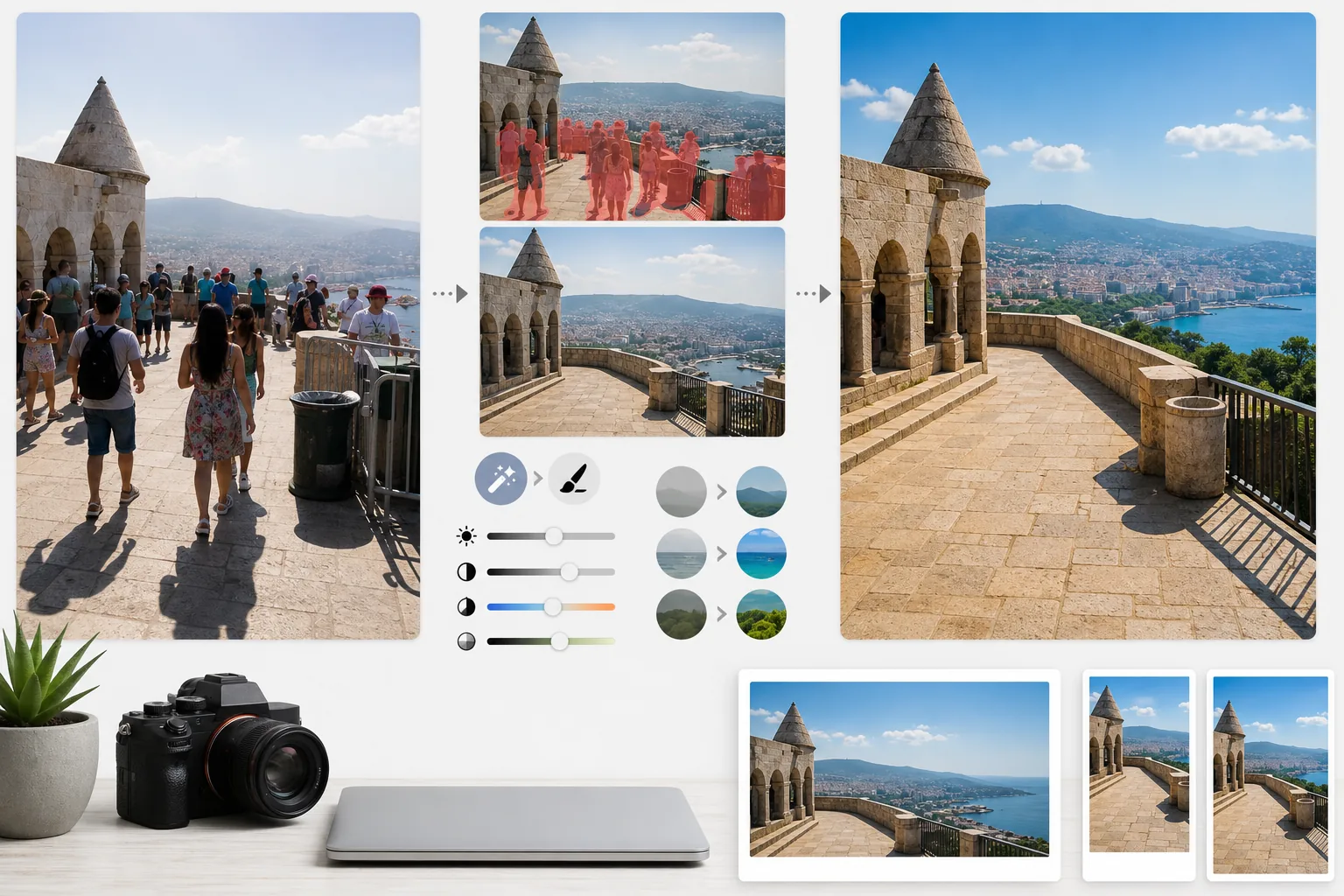
เปลี่ยนภาพถ่ายท่องเที่ยวที่เต็มไปด้วยผู้คนให้กลายเป็นภาพถ่ายจุดหมายปลายทางคุณภาพระดับตีพิมพ์ เทมเพลตนี้ลบนักท่องเที่ยว คนที่บังเฟรม และสิ่งรกตาออกจากภาพสถานที่สำคัญและทิวทัศน์ด้วย Magic Eraser จากนั้นใช้ AI Enhance เพื่อแก้ไขสภาพการเปิดรับแสงที่ยากซึ่งพบบ่อยในการถ่ายภาพท่องเที่ยว — แสงแดดจัดยามเที่ยง ภายในวัดที่มืดทึบ พระอาทิตย์ตกย้อนแสง — และเพิ่มความสดของสีตามธรรมชาติเพื่อภาพที่ทำให้ผู้อ่านอยากจองทริปทันที
ลองใช้เทมเพลตนี้ฟรีPersonal template preview
เทมเพลตนี้ทำอะไรได้บ้าง
แก้ปัญหาใหญ่ที่สุดสองข้อของการถ่ายภาพท่องเที่ยว นั่นคือผู้คนหนาแน่นและแสงที่ไม่ดี Magic Eraser ลบนักท่องเที่ยวที่ยืนอยู่หน้าอนุสรณ์สถาน คนที่เดินผ่านบังเฟรมของคุณ และสิ่งรกตา เช่น ถังขยะ แผงกั้นก่อสร้าง และป้ายชั่วคราวที่ทำลายบรรยากาศของสถานที่ AI สร้างสถาปัตยกรรม พื้นถนน และทิวทัศน์ที่อยู่ด้านหลังคนและวัตถุที่ลบออกขึ้นใหม่โดยอาศัยบริบทโดยรอบ จากนั้น AI Enhance จะจัดการกับความท้าทายด้านการเปิดรับแสงที่เป็นเอกลักษณ์ของการเดินทาง — ภาพภายในมหาวิหารและวัดที่หน้าต่างสว่างจ้าจนรายละเอียดหาย ส่วนเงาเป็นสีดำสนิท แสงแดดจัดยามเที่ยงที่ทำให้สีแบนราบในจุดหมายเขตร้อน และฉากพระอาทิตย์ตกย้อนแสงที่ฉากหน้ากลายเป็นเงาดำ สีจะได้รับการเพิ่มความสดเพื่อสะท้อนภาพที่จุดหมายปลายทางปรากฏต่อสายตามนุษย์จริง ๆ ซึ่งกล้องมักแสดงได้ไม่เต็มที่ในช่วงไดนามิกเรนจ์
การตั้งค่าเทมเพลต
| การลบนักท่องเที่ยว | ตรวจจับและลบผู้คนออกจากภาพสถานที่สำคัญและทิวทัศน์โดยอัตโนมัติ |
| การแก้ไขการเปิดรับแสง | กู้คืนส่วนสว่างและส่วนเงาแบบ HDR สำหรับสภาพแสงที่ยาก |
| การเพิ่มความสดของสี | เพิ่มความอิ่มตัวตามธรรมชาติ (ท้องฟ้า น้ำ ใบไม้) โดยไม่ดูเทียม |
| การลบหมอกควัน | ทะลุหมอกควันในชั้นบรรยากาศเพื่อทิวทัศน์ไกล ๆ ที่คมชัดขึ้น |
| ความละเอียดของไฟล์ส่งออก | ด้านยาว 4000px (ภาพหัวบทความบล็อกคุณภาพระดับเรตินา) |
วิธีใช้เทมเพลตนี้
อัปโหลดภาพถ่ายท่องเที่ยวของคุณ
อัปโหลดภาพถ่ายท่องเที่ยวใด ๆ ก็ได้ — สถานที่สำคัญที่แออัด ทิวทัศน์กว้างไกล ฉากท้องถนน สถาปัตยกรรมภายใน เทมเพลตนี้รองรับไฟล์ JPEG จากสมาร์ตโฟน กล้องมิเรอร์เลส และกล้องแอ็กชัน อีกทั้งยังรับไฟล์ RAW เพื่อความยืดหยุ่นในการแก้ไขสูงสุด
ลบผู้คนและสิ่งรกตา
Magic Eraser ตรวจจับผู้คนในเฟรมและลบออก คุณสามารถเลือกลบทุกคน เก็บบางคนไว้ (ตัวคุณเองหรือเพื่อนร่วมเดินทาง) หรือเลือกลบเฉพาะคนที่บังองค์ประกอบสถาปัตยกรรมหรือทิวทัศน์สำคัญ AI จะเติมเต็มพื้นที่ที่หายไปด้วยพื้น ผนัง และทิวทัศน์ที่สร้างขึ้นใหม่
เพิ่มความสดของแสงและสี
AI Enhance ใช้การประมวลผลแบบ HDR ที่กู้คืนท้องฟ้าที่สว่างจ้าจนรายละเอียดหายและดึงส่วนเงาที่ลึกให้สว่างขึ้น — ซึ่งพบบ่อยในภายในวัดและตรอกแคบ ๆ ในยุโรป สีจะได้รับการเพิ่มความสดให้ตรงกับที่ตาคุณเห็น ณ จุดหมายปลายทาง โดยเฉพาะสีฟ้าของท้องฟ้า สีเขียวอมฟ้าของทะเล และสีเขียวของใบไม้ หมอกควันในชั้นบรรยากาศจะลดลงเพื่อให้ทิวทัศน์ภูเขาและเมืองคมชัดยิ่งขึ้น
ส่งออกสำหรับบล็อกและโซเชียล
ดาวน์โหลดที่ด้านยาว 4000px สำหรับภาพหัวบทความบล็อกคุณภาพระดับเรตินา หรือในขนาดเฉพาะของแต่ละแพลตฟอร์มสำหรับ Instagram, Pinterest และ Facebook ไฟล์มีการเก็บรักษาข้อมูล EXIF ที่ปรับให้เหมาะสมสำหรับช่างภาพที่ติดพิกัดภูมิศาสตร์ในผลงานของตน
เคล็ดลับมืออาชีพเพื่อผลลัพธ์ที่ดีที่สุด
- ✓ถ่ายฉากเดียวกันหลายภาพห่างกันไม่กี่วินาที เมื่อนักท่องเที่ยวเคลื่อนที่ระหว่างเฟรม AI จะมีข้อมูลอ้างอิงเกี่ยวกับพื้นและผนังที่อยู่ด้านหลังพวกเขา ทำให้สร้างภาพขึ้นใหม่ได้สะอาดกว่าการใช้เพียงเฟรมเดียว
- ✓สำหรับภาพภายในโบสถ์ วัด และพิพิธภัณฑ์ ให้เปิดรับแสงเกินเล็กน้อยขณะถ่าย AI กู้คืนส่วนสว่างได้ง่ายกว่าการดึงส่วนเงาที่มืดมากให้สว่าง และภาพภายในมักจะเปิดรับแสงน้อยเกินไปโดยค่าเริ่มต้น
- ✓ถ่ายทิวทัศน์ในช่วงโกลเดนอาวร์หรือบลูอาวร์เมื่อทำได้ AI Enhance สามารถเพิ่มความสดของสีในแสงแบนราบยามเที่ยงได้ แต่แสงอุ่นแบบมีทิศทางของโกลเดนอาวร์สร้างเงาและมิติในทิวทัศน์ที่การปรับสีใด ๆ ก็ไม่อาจเลียนแบบได้
เครื่องมือ
คำถามที่พบบ่อย
ฉันสามารถเก็บตัวเองไว้ในภาพแต่ลบนักท่องเที่ยวคนอื่นออกได้ไหม
+
ได้ คุณสามารถทำเครื่องหมายตัวเองหรือเพื่อนร่วมเดินทางเป็นวัตถุที่ได้รับการปกป้อง AI จะลบคนอื่นทั้งหมดออกจากฉากในขณะที่ยังคงรักษาบุคคลที่ได้รับการปกป้องไว้ในตำแหน่ง แสง และเงาเดิมโดยไม่เปลี่ยนแปลง
วิธีนี้ได้ผลดีแค่ไหนกับฉากที่แออัดมาก
+
ได้ผลดีที่สุดเมื่อฝูงชนครอบคลุมพื้นที่น้อยกว่าประมาณ 40% ของเฟรม ฉากที่แออัดมาก — เช่น ลานกว้างที่เต็มไปด้วยผู้คนจนมองไม่เห็นพื้นระหว่างคน — มีข้อมูลอ้างอิงพื้นหลังน้อยเกินไปสำหรับการสร้างใหม่อย่างสะอาด ในกรณีเช่นนี้ การลบแถวหน้าออกบางส่วนมักให้ผลลัพธ์ที่น่าเชื่อถือ
การลบหมอกควันจะทำให้ภาพดูไม่เป็นธรรมชาติหรือไม่
+
การลดหมอกควันได้รับการปรับเทียบเพื่อให้ได้ผลลัพธ์ที่ดูเป็นธรรมชาติ มันจะลบการกระเจิงในชั้นบรรยากาศสีเทาอมฟ้าที่บดบังภูเขาและอาคารที่อยู่ไกล แต่ยังคงรักษาทัศนมิติทางอากาศอันละเอียดอ่อนที่ให้ความลึกแก่ภาพทิวทัศน์ ผลลัพธ์ดูเหมือนการถ่ายในวันที่อากาศแจ่มใสและสดใส ไม่ใช่ภาพที่ผ่านฟิลเตอร์หรือประมวลผลมากเกินไป
แสดงทุกจุดหมายปลายทางในมุมที่ดีที่สุดโดยปราศจากผู้คนแออัด
อัปโหลดภาพถ่ายท่องเที่ยวแล้วรับภาพที่ปราศจากนักท่องเที่ยวและมีสีสันสดใส ที่ทำให้ผู้อ่านของคุณอยากเก็บกระเป๋าออกเดินทาง
ลองใช้ฟรีRelated templates
More personal templates for your workflow.
สร้างภาพถ่ายติดบัตรที่สอดคล้องกับข้อกำหนดสำหรับวีซ่า ใบขับขี่ และบัตรประจำตัวประชาชน โดยมีสีพื้นหลัง ขนาดศีรษะ และการแสดงออกทางสีหน้าที่เหมาะสม
ปรับปรุงภาพถ่ายรับปริญญาด้วยการล้างพื้นหลัง หมวกและเสื้อคลุม Color correction ลบรอยตำหนิ และลับคมกรอบและประกาศพร้อมพิมพ์
ปรับปรุงภาพถ่ายคอนเสิร์ตและกิจกรรมด้วยการลดสัญญาณรบกวนในที่แสงน้อย การจัดแสงบนเวที การแก้ไขสี การกำจัดสิ่งรบกวนฝูงชน และการกู้คืนรายละเอียดจากภาพสถานที่มืด
สร้างภาพถ่ายการ์ดประกาศทารกแรกเกิดที่สวยงามด้วยพื้นหลังสีอ่อน การไล่ระดับสีที่นุ่มนวล การกำจัดสิ่งที่เกะกะในโรงพยาบาล และขนาดที่พร้อมพิมพ์สำหรับการส่งไปรษณีย์
เตรียมภาพถ่ายครอบครัวและภาพถ่ายบุคคลสำหรับการ์ดอวยพรวันหยุดที่มีพื้นหลังเทศกาล การไล่ระดับสีโทนอุ่น เอฟเฟกต์หิมะ และขนาดการ์ดมาตรฐานสำหรับการพิมพ์
คืนค่าและปรับปรุงภาพถ่ายไว้อาลัยด้วยการรีทัชอย่างอ่อนโยน ลดความซับซ้อนของพื้นหลัง การให้เกรดสีที่อบอุ่น และขนาดพร้อมพิมพ์สำหรับบริการ