
ภาพถ่ายคอนเสิร์ตและกิจกรรม
กู้คืนภาพถ่ายคอนเสิร์ตและกิจกรรมที่มืดและมีสัญญาณรบกวนให้กลายเป็นความทรงจำที่แชร์ได้ เทมเพลตนี้ลดสัญญาณรบกวนในที่แสงน้อยได้อย่างมาก กู้คืนรายละเอียดจากภาพที่แสงน้อยเกินไป แก้ไขสีเพี้ยนรุนแรงจากแสงไฟบนเวที ลบแขนและโทรศัพท์ที่บังมุมมองของคุณ และเพิ่มความคมชัดให้นักแสดงหรือวัตถุของกิจกรรม
ลองใช้เทมเพลตนี้ฟรีPersonal template preview
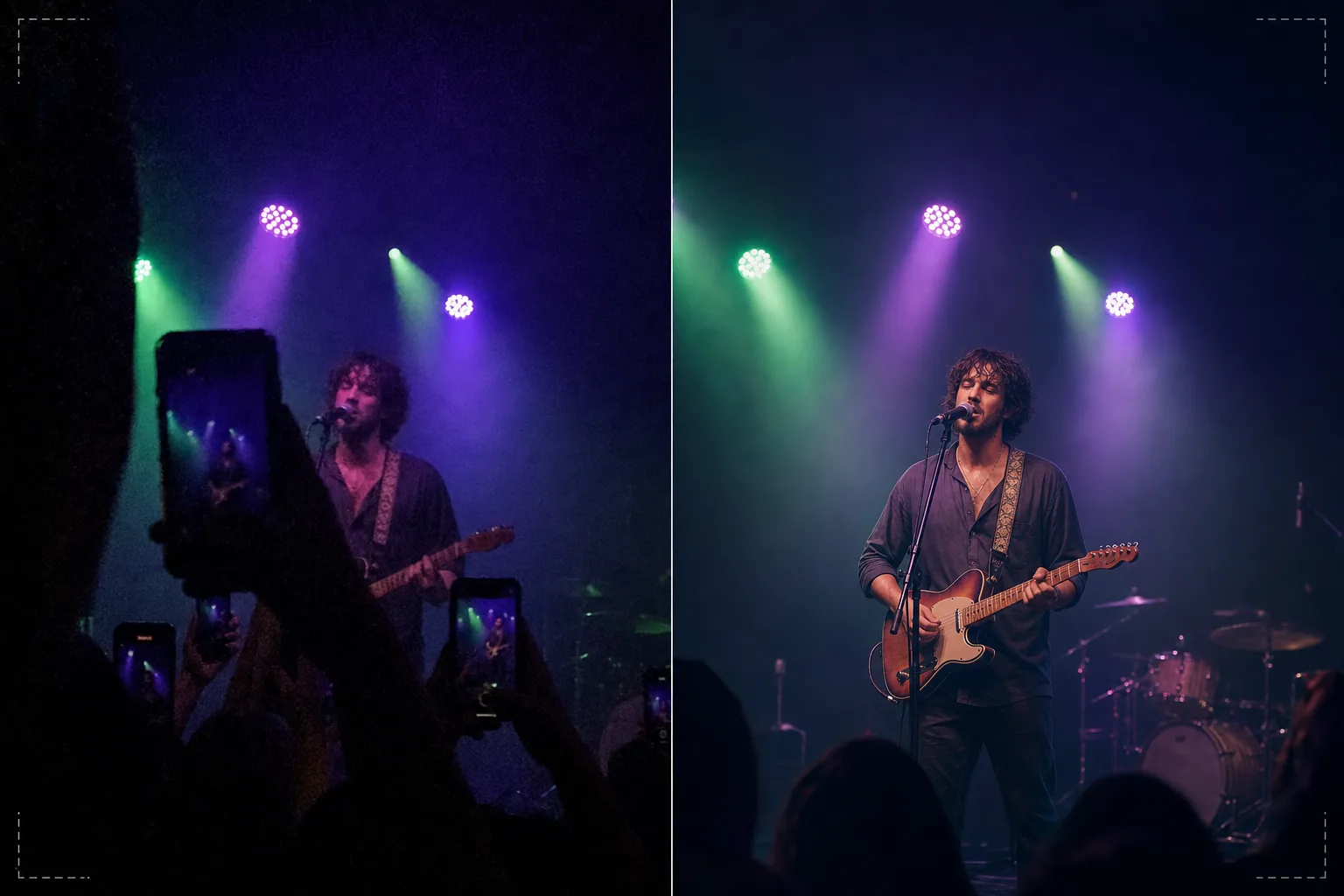
เทมเพลตนี้ทำอะไรได้บ้าง
กู้คืนภาพถ่ายที่ถ่ายยากในคอนเสิร์ต เทศกาล งานกีฬา และการแสดงในร่ม ที่สภาพแสงเอาชนะกล้องสมาร์ทโฟน ภาพถ่ายคอนเสิร์ตเป็นภาพที่ยากที่สุดในเชิงเทคนิคที่ผู้คนถ่ายกันเป็นประจำ — แสงที่น้อยมากบังคับให้ใช้ ISO สูงจนเกิดสัญญาณรบกวน แสงไฟเวทีหลากสีที่ผสมกันสร้างสีเพี้ยนแปลก ๆ และระยะห่างจากเวทีทำให้ใบหน้าและรายละเอียดเล็กและไม่คมชัด AI Enhance ใช้การลดสัญญาณรบกวนอัจฉริยะที่ลบรูปแบบเกรนพร้อมกู้คืนรายละเอียดที่ซ่อนอยู่ แก้ไขสีเพี้ยนสีม่วง เขียว และแดงจากแสงไฟเวทีเพื่อเผยโทนสีผิวและเครื่องดนตรีที่เป็นธรรมชาติ และเพิ่มความคมชัดให้นักแสดงเพื่อขับเน้นสีหน้าและรายละเอียดของเครื่องดนตรี Magic Eraser ลบแขนที่ยกขึ้น โทรศัพท์ และศีรษะของผู้ชมคนอื่นที่บังมุมมองของคุณ
การตั้งค่าเทมเพลต
| การลดสัญญาณรบกวน | การลดสัญญาณรบกวนด้วย AI (กู้คืนรายละเอียดจากเกรน ISO สูงได้ถึง ISO 12800) |
| การแก้ไขสี | การลบสีเพี้ยนจากแสงไฟเวที (ปรับสีม่วง เขียว แดง น้ำเงินให้เป็นกลาง) |
| การกู้คืนเงา | ยกพื้นที่ที่แสงน้อยเกินไปขึ้นได้สูงสุด 3 สต็อป |
| การลบฝูงชน | ลบแขนที่ยกขึ้น โทรศัพท์ และศีรษะที่บังมุมมอง |
| การเพิ่มความคมชัดของวัตถุ | การเพิ่มความคมชัดเฉพาะจุดให้นักแสดง/เวที (รักษาบรรยากาศโบเก้) |
วิธีใช้เทมเพลตนี้
อัปโหลดภาพคอนเสิร์ตของคุณ
อัปโหลดภาพจากโทรศัพท์หรือกล้องจากคอนเสิร์ต เทศกาล การแสดงละคร โชว์ตลก หรืองานกีฬา เทมเพลตจัดการกับสภาพสุดขั้วที่สถานที่เหล่านี้นำเสนอ — การเปิดรับแสงที่เกือบมืด แสงไฟเวทีสีเข้มจัด ภาพเบลอจากการเคลื่อนไหวของนักแสดงที่ขยับ และมุมมองที่ถูกผู้ชมบัง
การลดสัญญาณรบกวนและกู้คืนรายละเอียด
AI Enhance ลบเกรนสัญญาณรบกวน ISO สูงพร้อมรักษารายละเอียดภาพที่ซ่อนอยู่ เงาที่แสงน้อยเกินไปถูกยกขึ้นเพื่อเผยใบหน้า เครื่องดนตรี และองค์ประกอบบนเวทีที่แทบมองไม่เห็นในภาพต้นฉบับ การลดสัญญาณรบกวนได้รับการปรับเทียบเพื่อรักษาคุณภาพบรรยากาศของสถานที่แทนที่จะทำให้ภาพดูเรียบเนียนแบบเทียม
การแก้ไขสีและแสง
สีเพี้ยนรุนแรงจากแสงไฟเวทีได้รับการแก้ไขเพื่อให้โทนสีผิว เสื้อผ้า และเครื่องดนตรีปรากฏในสีที่จดจำได้ คุณสามารถเลือกปรับแสงไฟเวทีให้เป็นกลางทั้งหมดเพื่อให้ดูเป็นธรรมชาติ หรือแก้ไขบางส่วนเพื่อคงแสงสีที่สร้างบรรยากาศไว้บ้างพร้อมลดสีเพี้ยนที่รุนแรงที่สุด
ส่งออกความทรงจำที่ปรับปรุงแล้ว
ดาวน์โหลดภาพที่ปรับปรุงแล้วเพื่อแชร์บนโซเชียลมีเดีย เก็บเป็นคลังส่วนตัว หรือพิมพ์ ผลลัพธ์รักษาคุณภาพบรรยากาศของงานแสดงสดไว้พร้อมทำให้ภาพชัดพอที่ใบหน้า สีหน้า และช่วงเวลาต่าง ๆ มองเห็นได้และมีความหมายในฐานะของที่ระลึก
เคล็ดลับมืออาชีพเพื่อผลลัพธ์ที่ดีที่สุด
- ✓ถ่ายในช่วงที่แสงไฟเวทีสว่าง — สปอตไลต์ พลุไฟ การเปลี่ยนภาพบนจอ — แทนที่จะถ่ายในช่วงที่มืดและสร้างบรรยากาศ เทมเพลตสามารถกู้คืนรายละเอียดเงาได้มาก แต่ภาพที่ถ่ายในช่วงที่สว่างที่สุดมีข้อมูลพื้นฐานให้ใช้งานมากที่สุด
- ✓ใช้โหมดถ่ายต่อเนื่องเมื่อถ่ายนักแสดงที่กำลังเคลื่อนไหว ภาพเบลอจากการเคลื่อนไหวของท่ามือนักร้องหรือแขนที่ดีดสายของมือกีตาร์ไม่สามารถลบได้ภายหลัง แต่หนึ่งเฟรมในชุดถ่ายต่อเนื่องสิบเฟรมอาจจับช่วงเวลาที่คมชัดที่เทมเพลตสามารถปรับปรุงต่อได้
- ✓ถือโทรศัพท์ด้วยมือทั้งสองข้างและแนบข้อศอกไว้กับลำตัวเพื่อลดการสั่นไหวให้น้อยที่สุด การสั่นของกล้องเพิ่มความยากของการถ่ายภาพคอนเสิร์ตในที่แสงน้อย ภาพต้นฉบับที่นิ่งกว่าให้ข้อมูลที่สะอาดกว่าแก่อัลกอริทึมลดสัญญาณรบกวนและสร้างภาพสุดท้ายที่คมชัดกว่า
เครื่องมือ
คำถามที่พบบ่อย
สิ่งนี้แก้ไขภาพที่เกือบมืดสนิทได้ไหม?
+
เทมเพลตสามารถกู้คืนรายละเอียดจากภาพที่แสงน้อยเกินไป 2–3 สต็อป — ภาพที่คุณแทบมองเห็นวัตถุไม่ออก เกิน 3 สต็อปลงไป ข้อมูลเซ็นเซอร์ส่วนใหญ่เป็นสัญญาณรบกวนและภาพที่กู้คืนจะแสดงอาร์ติแฟกต์มาก ภาพต้นฉบับยิ่งสว่างผลลัพธ์ยิ่งดี
แล้วฟุตเทจวิดีโอคอนเสิร์ตล่ะ?
+
ดึงเฟรมนิ่งที่ดีที่สุดจากวิดีโอคอนเสิร์ตของคุณและประมวลผลทีละเฟรม เฟรมวิดีโอมีความละเอียดต่ำกว่าภาพนิ่งแต่ได้ประโยชน์อย่างมากจากการลดสัญญาณรบกวนและการแก้ไขสี ทำให้ได้ภาพที่แชร์ได้จากฟุตเทจที่มีสัญญาณรบกวนมากเกินไปเมื่อเป็นวิดีโอ
การลบสิ่งบังจากฝูงชนจะดูเป็นธรรมชาติไหม?
+
การลบโทรศัพท์ที่ยกขึ้น แขน และศีรษะจากฝูงชนที่อยู่ข้างหน้าคุณได้ผลดีเมื่อสิ่งบังครอบคลุมเฟรมเพียงส่วนเล็ก AI สร้างเวทีและพื้นหลังด้านหลังองค์ประกอบที่ถูกลบขึ้นใหม่ การลบสิ่งบังขนาดใหญ่ที่ครอบคลุมวัตถุส่วนใหญ่จะได้ผลน้อยกว่า
เปลี่ยนภาพคอนเสิร์ตที่มืดให้เป็นความทรงจำที่สดใส
อัปโหลดภาพถ่ายกิจกรรมของคุณและกู้คืนช่วงเวลาที่กล้องของคุณจับภาพได้ยากในสภาพแสงของสถานที่ที่ท้าทาย
ลองใช้ฟรีRelated templates
More personal templates for your workflow.
สร้างภาพถ่ายติดบัตรที่สอดคล้องกับข้อกำหนดสำหรับวีซ่า ใบขับขี่ และบัตรประจำตัวประชาชน โดยมีสีพื้นหลัง ขนาดศีรษะ และการแสดงออกทางสีหน้าที่เหมาะสม
ปรับปรุงภาพถ่ายรับปริญญาด้วยการล้างพื้นหลัง หมวกและเสื้อคลุม Color correction ลบรอยตำหนิ และลับคมกรอบและประกาศพร้อมพิมพ์
สร้างภาพถ่ายการ์ดประกาศทารกแรกเกิดที่สวยงามด้วยพื้นหลังสีอ่อน การไล่ระดับสีที่นุ่มนวล การกำจัดสิ่งที่เกะกะในโรงพยาบาล และขนาดที่พร้อมพิมพ์สำหรับการส่งไปรษณีย์
เตรียมภาพถ่ายครอบครัวและภาพถ่ายบุคคลสำหรับการ์ดอวยพรวันหยุดที่มีพื้นหลังเทศกาล การไล่ระดับสีโทนอุ่น เอฟเฟกต์หิมะ และขนาดการ์ดมาตรฐานสำหรับการพิมพ์
คืนค่าและปรับปรุงภาพถ่ายไว้อาลัยด้วยการรีทัชอย่างอ่อนโยน ลดความซับซ้อนของพื้นหลัง การให้เกรดสีที่อบอุ่น และขนาดพร้อมพิมพ์สำหรับบริการ
เปลี่ยนโฉมภาพถ่ายสัตว์เลี้ยงในสถานสงเคราะห์และช่วยเหลือด้วยการเปลี่ยนพื้นหลัง การแก้ไขแสง และการปรับปรุงรายละเอียดขน เพื่อช่วยให้สัตว์ต่างๆ หาบ้านได้เร็วขึ้น