
การ์ดประกาศทารกแรกเกิด
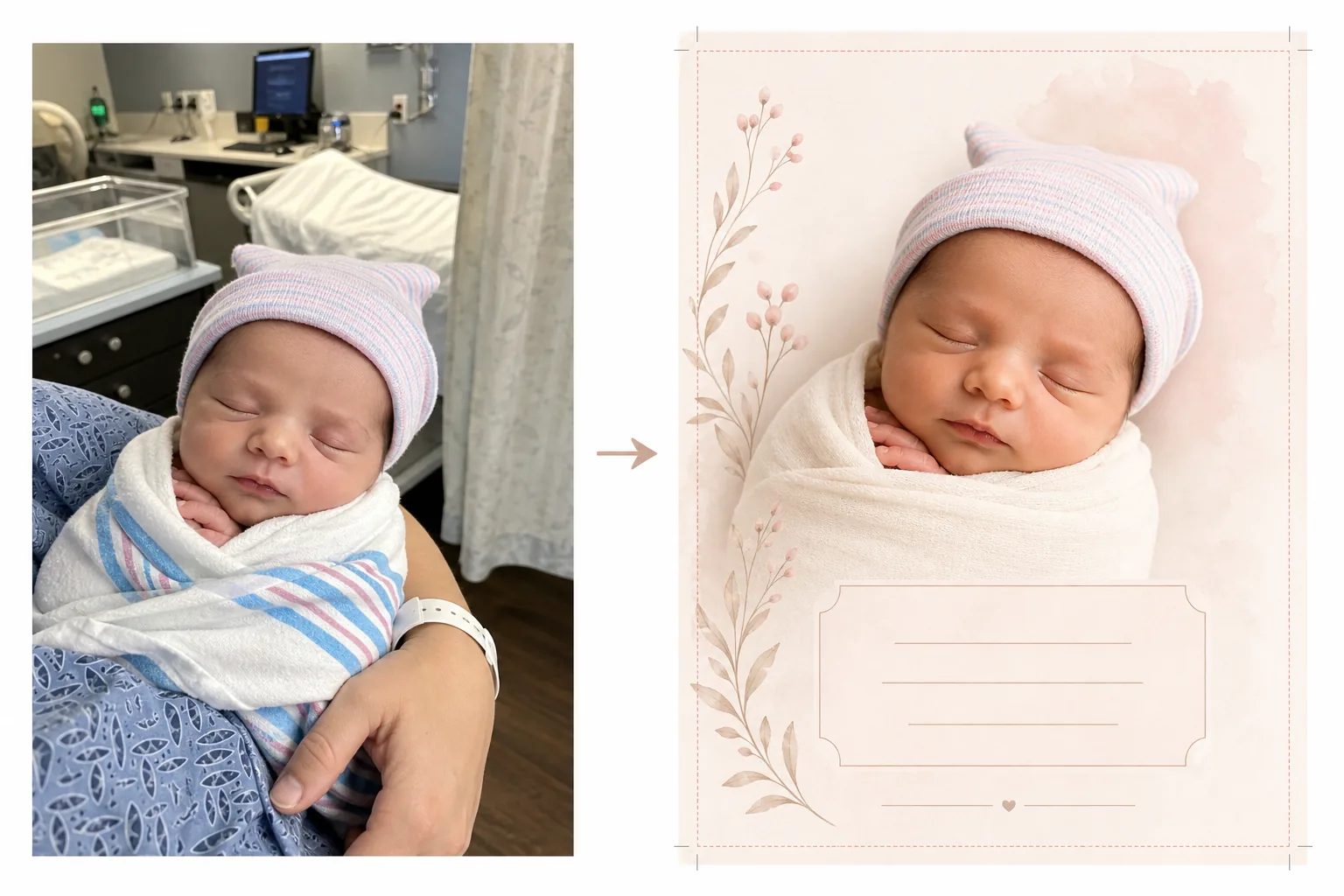
เปลี่ยนภาพถ่ายจากโรงพยาบาลและในวันแรกให้กลายเป็นภาพการ์ดประกาศที่สวยงาม เทมเพลตนี้จะกำจัดสิ่งที่เกะกะในพื้นหลังของโรงพยาบาล ใช้การไล่ระดับสีโทนอุ่นที่นุ่มนวล แยกทารกออกจากพื้นหลังที่สะอาดตาหรือสีพาสเทล และส่งออกภาพที่พร้อมพิมพ์ในขนาดการ์ดมาตรฐานสำหรับการส่งไปรษณีย์และการแชร์แบบดิจิทัล
ลองใช้เทมเพลตนี้ฟรีPersonal template preview
เทมเพลตนี้ทำอะไรได้บ้าง
เตรียมภาพถ่ายทารกแรกเกิดสำหรับการ์ดประกาศการเกิดโดยเปลี่ยนภาพถ่ายในห้องพักโรงพยาบาลให้กลายเป็นภาพที่สะอาดตาและอ่อนโยน เหมาะทั้งสำหรับการ์ดที่พิมพ์ออกมาและประกาศแบบดิจิทัล ห้องพักในโรงพยาบาลมีอุปกรณ์การแพทย์ แสงไฟฟลูออเรสเซนต์ และพื้นหลังที่ดูเป็นทางการซึ่งลดทอนความอบอุ่นใกล้ชิดของภาพถ่ายทารกแรกเกิด Background Eraser จะแยกทารกออกมาและแทนที่ฉากโรงพยาบาลด้วยพื้นหลังที่นุ่มนวลและสะอาดตาในโทนสีขาว ครีม หรือพาสเทล AI Enhance จะแก้ไขแสงไฟฟลูออเรสเซนต์ที่เย็นชาของโรงพยาบาลให้เป็นโทนอุ่นและนุ่มนวลที่ทำให้ผิวดูสุขภาพดีและเป็นธรรมชาติ ผลลัพธ์คือภาพถ่ายที่คู่ควรกับการประกาศซึ่งมุ่งเน้นไปที่สมาชิกใหม่อย่างเต็มที่โดยไม่มีบริบททางการแพทย์ที่มองเห็นได้
การตั้งค่าเทมเพลต
| พื้นหลัง | สีขาวนวล ครีม ชมพูอ่อน หรือเขียวเสจ (เหมาะสำหรับการ์ดประกาศ) |
| การไล่ระดับสี | โทนอุ่นที่นุ่มนวล (แก้ไขแสงฟลูออเรสเซนต์ของโรงพยาบาลให้เป็นความอบอุ่นตามธรรมชาติ) |
| โทนสีผิว | การปรับผิวทารกแรกเกิดให้เป็นธรรมชาติ (นุ่มนวล อบอุ่น สุขภาพดี) |
| ขนาดการ์ด | 5×7 in, 4×6 in หรือ A6 (ขนาดการ์ดประกาศมาตรฐาน) |
| ความละเอียดของไฟล์ที่ส่งออก | 300 DPI ที่ขนาดการ์ด (พร้อมสำหรับร้านพิมพ์และเครื่องพิมพ์ที่บ้าน) |
วิธีใช้เทมเพลตนี้
อัปโหลดภาพถ่ายทารกแรกเกิด
อัปโหลดภาพถ่ายของทารกแรกเกิด — ในเปลของโรงพยาบาล ในอ้อมแขนของพ่อแม่ หรือห่อตัวอยู่ในผ้าห่ม เทมเพลตนี้รองรับองค์ประกอบภาพที่หลากหลาย รวมถึงภาพใบหน้าระยะใกล้ ท่าห่อตัวแบบเต็มตัว และภาพถ่ายพ่อแม่กับลูก ชุดผู้ป่วยของโรงพยาบาล จอมอนิเตอร์ และสายรัดข้อมือที่มองเห็นบนตัวพ่อแม่จะถูกลบออกโดยอัตโนมัติ
การแปลงพื้นหลังและสี
Background Eraser จะลบห้องพักของโรงพยาบาลออกและแทนที่ด้วยพื้นหลังที่นุ่มนวลและสะอาดตาในสีที่คุณเลือก แสงไฟฟลูออเรสเซนต์ที่เย็นชาจะถูกแก้ไขให้เป็นโทนอุ่นและเป็นธรรมชาติ ผิวจะได้รับการปรับแต่งอย่างนุ่มนวลให้ดูสุขภาพดีและเป็นธรรมชาติด้วยประกายอุ่นที่นุ่มนวลซึ่งเป็นเอกลักษณ์ของการถ่ายภาพทารกแรกเกิด
การจัดรูปแบบการ์ด
ภาพจะถูกจัดรูปแบบตามขนาดการ์ดที่คุณเลือกพร้อมระยะตัดตกที่เหมาะสมสำหรับการพิมพ์ระดับมืออาชีพ มีการจัดสรรพื้นที่สำหรับการซ้อนข้อความ — ชื่อ วันที่ น้ำหนัก และความยาว — จัดวางตามเลย์เอาต์การ์ดประกาศมาตรฐานโดยมีภาพทารกเป็นจุดเด่นทางสายตา
ส่งออกเพื่อพิมพ์และแชร์
ดาวน์โหลดที่ 300 DPI ในขนาดการ์ดที่คุณเลือกเพื่อพิมพ์ที่ร้านพิมพ์ระดับมืออาชีพ บริการการ์ดออนไลน์ หรือเครื่องพิมพ์ที่บ้าน นอกจากนี้ยังมีเวอร์ชันที่ปรับให้เหมาะกับเว็บสำหรับการประกาศทางอีเมลและการแชร์บนโซเชียลมีเดีย
เคล็ดลับจากมืออาชีพเพื่อผลลัพธ์ที่ดีที่สุด
- ✓เพื่อให้ได้ภาพการ์ดประกาศที่ใช้งานได้ดีที่สุด ให้ถ่ายใบหน้าทารกแรกเกิดในระยะใกล้ขณะที่เขากำลังหลับ ทารกที่หลับจะมีสีหน้าผ่อนคลายและสงบซึ่งถ่ายออกมาสวยงามและใช้เป็นจุดเด่นของเลย์เอาต์การ์ดได้ดี
- ✓ห่อตัวทารกด้วยผ้าห่อสีขาวหรือสีอ่อนก่อนถ่ายภาพ วิธีนี้จะสร้างขอบเขตทางสายตาที่ชัดเจนระหว่างทารกกับพื้นหลังซึ่งช่วยให้ Background Eraser สร้างขอบที่สะอาดที่สุดเท่าที่จะเป็นไปได้ โดยเฉพาะรอบๆ นิ้วเล็กๆ และเส้นผมที่บางละเอียด
- ✓หากมองเห็นมือหรือแขนของพ่อแม่คนหนึ่งกำลังอุ้มทารกก็ไม่เป็นไร — เทมเพลตนี้ปรับโทนสีผิวของพ่อแม่ด้วย สายรัดข้อมือของโรงพยาบาลที่ข้อมือของพ่อแม่จะถูกลบออกโดยอัตโนมัติเพื่อให้ดูสะอาดตายิ่งขึ้น
- ✓ถ่ายหลายๆ ภาพแล้วเลือกภาพที่มีสีหน้าและตำแหน่งมือที่ดีที่สุด ทารกแรกเกิดเคลื่อนไหวอย่างคาดเดาไม่ได้ — การถ่ายหลายตัวเลือกช่วยให้แน่ใจว่าคุณมีเฟรมที่นิ้วเล็กๆ ปาก และดวงตาดูถ่ายติดสวยที่สุด
เครื่องมือ
คำถามที่พบบ่อย
สามารถลบอุปกรณ์ของโรงพยาบาลออกจากพื้นหลังได้หรือไม่
+
ได้ เทมเพลตนี้ออกแบบมาเพื่อจุดประสงค์นี้โดยเฉพาะ — มันจะลบเปลของโรงพยาบาล จอมอนิเตอร์ เสาน้ำเกลือ ม่าน และไฟฟลูออเรสเซนต์บนเพดาน แล้วแทนที่ด้วยพื้นหลังที่สะอาดตาและเหมาะกับการประกาศ ทารกและพ่อแม่ที่อุ้มอยู่จะถูกแยกออกจากสภาพแวดล้อมทางการแพทย์
มีขนาดการ์ดใดให้เลือกบ้าง
+
รองรับขนาดการ์ดประกาศมาตรฐาน: 5×7 นิ้ว (นิยมที่สุดสำหรับการประกาศที่ส่งทางไปรษณีย์), 4×6 นิ้ว (แบบโปสการ์ด) และ A6 (มาตรฐานสากล) ไฟล์ที่ส่งออกมีระยะตัดตกที่เหมาะสมสำหรับการพิมพ์ระดับมืออาชีพ
ฉันสามารถเพิ่มข้อความลงในการ์ดได้หรือไม่
+
เทมเพลตนี้จะเตรียมภาพโดยมีพื้นที่สำหรับการซ้อนข้อความแต่จะไม่เพิ่มข้อความโดยตรง ใช้ภาพที่ส่งออกใน Canva, Shutterfly, Minted หรือบริการออกแบบการ์ดใดๆ เพื่อเพิ่มชื่อทารก วันเกิด น้ำหนัก ความยาว และข้อความส่วนตัว
ประกาศการมาถึงของสมาชิกใหม่ด้วยภาพถ่ายที่สวยงาม
อัปโหลดภาพถ่ายจากโรงพยาบาลหรือในวันแรกแล้วรับภาพที่นุ่มนวล อบอุ่น และพร้อมพิมพ์ซึ่งเหมาะสำหรับการ์ดประกาศการเกิด
ลองใช้ฟรีRelated templates
More personal templates for your workflow.
สร้างภาพถ่ายติดบัตรที่สอดคล้องกับข้อกำหนดสำหรับวีซ่า ใบขับขี่ และบัตรประจำตัวประชาชน โดยมีสีพื้นหลัง ขนาดศีรษะ และการแสดงออกทางสีหน้าที่เหมาะสม
ปรับปรุงภาพถ่ายรับปริญญาด้วยการล้างพื้นหลัง หมวกและเสื้อคลุม Color correction ลบรอยตำหนิ และลับคมกรอบและประกาศพร้อมพิมพ์
ปรับปรุงภาพถ่ายคอนเสิร์ตและกิจกรรมด้วยการลดสัญญาณรบกวนในที่แสงน้อย การจัดแสงบนเวที การแก้ไขสี การกำจัดสิ่งรบกวนฝูงชน และการกู้คืนรายละเอียดจากภาพสถานที่มืด
เตรียมภาพถ่ายครอบครัวและภาพถ่ายบุคคลสำหรับการ์ดอวยพรวันหยุดที่มีพื้นหลังเทศกาล การไล่ระดับสีโทนอุ่น เอฟเฟกต์หิมะ และขนาดการ์ดมาตรฐานสำหรับการพิมพ์
คืนค่าและปรับปรุงภาพถ่ายไว้อาลัยด้วยการรีทัชอย่างอ่อนโยน ลดความซับซ้อนของพื้นหลัง การให้เกรดสีที่อบอุ่น และขนาดพร้อมพิมพ์สำหรับบริการ
เปลี่ยนโฉมภาพถ่ายสัตว์เลี้ยงในสถานสงเคราะห์และช่วยเหลือด้วยการเปลี่ยนพื้นหลัง การแก้ไขแสง และการปรับปรุงรายละเอียดขน เพื่อช่วยให้สัตว์ต่างๆ หาบ้านได้เร็วขึ้น