
ภาพถ่ายรำลึกอนุสรณ์
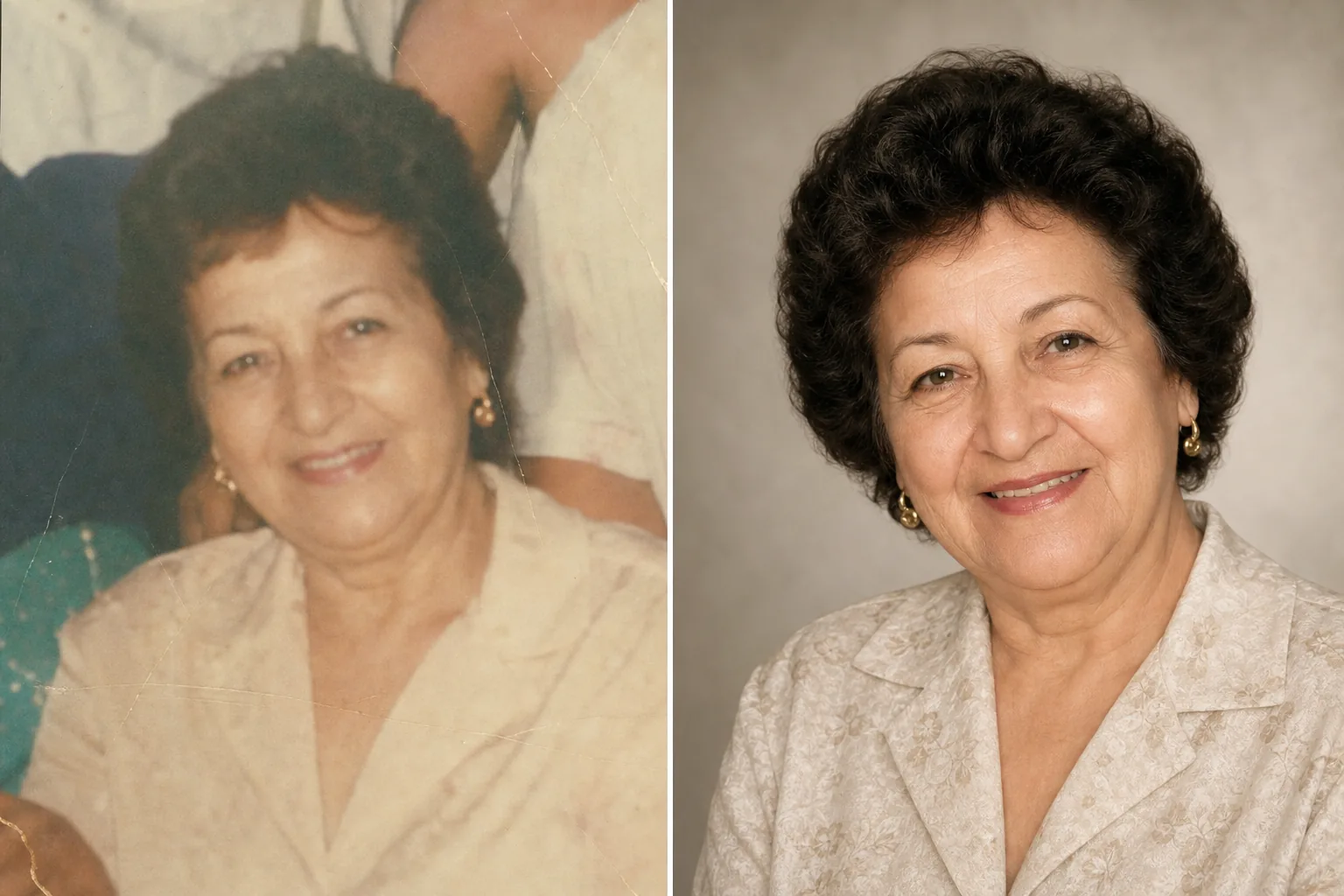
ให้เกียรติคนที่คุณรักด้วยภาพถ่ายไว้อาลัยที่ได้รับการปรับปรุงอย่างงดงาม เทมเพลตนี้ฟื้นฟูภาพถ่ายเก่าอย่างนุ่มนวล เพิ่มความคมชัดและสีสันจากต้นฉบับที่ซีดจาง ลบพื้นหลังที่รบกวนสายตา และส่งออกเป็นภาพบุคคลที่สง่างาม พร้อมพิมพ์ เหมาะสำหรับงานรำลึก คำไว้อาลัย และการจัดแสดงเพื่อระลึกถึงอย่างยั่งยืน
ลองใช้เทมเพลตนี้ฟรีPersonal template preview
เทมเพลตนี้ทำอะไร
เตรียมภาพถ่ายบุคคลสำหรับงานรำลึก คำไว้อาลัย กำหนดการงานศพ การจัดแสดงเพื่อระลึกถึง และมอนทาจไว้อาลัย ด้วยความใส่ใจและความเคารพที่โอกาสนี้พึงมี บ่อยครั้งภาพถ่ายที่ดีที่สุดของคนที่คุณรักถูกถ่ายไว้เมื่อหลายปีก่อน — อาจเป็นภาพสแน็ปแบบเป็นกันเอง ภาพหมู่ที่ต้องแยกบุคคลออกมา หรือภาพพิมพ์ที่ซีดจางและถูกสแกนไว้ AI Enhance ฟื้นฟูสีสันและความคมชัดของภาพเก่าหรือภาพซีดจาง ทำให้ภาพที่แสงน้อยสว่างขึ้น และเกลี่ยตำหนิเล็กน้อยอย่างนุ่มนวล ขณะที่ยังคงรักษาเค้าโครงหน้าตาที่แท้จริงของบุคคลไว้ Magic Eraser ลบสิ่งรบกวนในพื้นหลังและสามารถแยกบุคคลคนหนึ่งออกจากภาพหมู่ได้ โทนโดยรวมอบอุ่น สง่างาม และเปี่ยมความเคารพ — ไม่ปรับแต่งจนเกินงาม
การตั้งค่าเทมเพลต
| การฟื้นฟูภาพถ่าย | กู้คืนสีสันและรายละเอียดจากภาพที่ซีดจางหรือเก่า |
| พื้นหลัง | ไล่เฉดสีกลางอย่างนุ่มนวล สีพื้นทึบ หรือต้นฉบับที่ลดความซับซ้อน |
| การให้เกรดสี | อบอุ่น สง่างาม (โทนผิวที่เป็นธรรมชาติ ความอบอุ่นที่นุ่มนวล) |
| ระดับการปรับปรุง | ละมุนละไมและเปี่ยมความเคารพ (รักษาเค้าโครงที่แท้จริงไว้) |
| ขนาดไฟล์ส่งออก | 8×10 นิ้ว ที่ 300 DPI (ภาพบุคคลอนุสรณ์มาตรฐาน) หรือกำหนดเอง |
วิธีใช้เทมเพลตนี้
อัปโหลดภาพถ่ายบุคคล
อัปโหลดภาพถ่ายที่ดีที่สุดของบุคคลนั้น — ภาพบุคคลโดยเฉพาะ ส่วนที่ครอปมาจากภาพหมู่ หรือไฟล์สแกนจากภาพถ่ายที่พิมพ์ออกมา เทมเพลตนี้รองรับภาพถ่ายจากทุกยุคและทุกสภาพ รวมถึงภาพพิมพ์เก่าที่มีสีซีดจาง รอยพับ และความเสียหายเล็กน้อย
ฟื้นฟูและปรับปรุง
AI Enhance กู้คืนสีที่ซีดจาง เพิ่มความคมชัดให้รายละเอียดที่นุ่มเบลอ และแก้ไขโทนสีเหลืองหรือฟ้าที่เกิดขึ้นในภาพถ่ายที่เก่าลง สำหรับภาพที่สแกนมาจากภาพพิมพ์ จะลดสิ่งแปลกปลอมจากการสแกนและพื้นผิวกระดาษลง การปรับปรุงเป็นแบบละมุนละไมโดยเจตนา — เป้าหมายคือการนำเสนอบุคคลตามที่เขาเคยเป็น ด้วยความคมชัดและความอบอุ่น ไม่ใช่การเปลี่ยนแปลงรูปลักษณ์ของเขา
พื้นหลังและการจัดองค์ประกอบภาพ
พื้นหลังจะถูกแทนที่ด้วยตัวเลือกที่นุ่มนวลและเป็นกลาง — การไล่เฉดสีที่นุ่มนวล สีพื้นทึบที่นุ่มลง หรือฉากเดิมที่ปรับให้นุ่มลง หากภาพมาจากภาพหมู่ บุคคลจะถูกแยกออกมาและจัดองค์ประกอบเป็นภาพบุคคลเดี่ยว องค์ประกอบภาพจะถูกปรับให้เข้ากับสัดส่วนภาพบุคคลอนุสรณ์มาตรฐาน
ส่งออกสำหรับงานและการจัดแสดง
ดาวน์โหลดที่ขนาด 8×10 นิ้ว ที่ 300 DPI สำหรับการพิมพ์ที่สถานประกอบการจัดงานศพและในงานรำลึก หรือในขนาดกำหนดเองสำหรับสิ่งพิมพ์คำไว้อาลัย การ์ดที่ระลึก และการจัดแสดงไว้อาลัยแบบดิจิทัล ไฟล์ที่ได้เหมาะทั้งสำหรับการพิมพ์สีและขาวดำ
เคล็ดลับระดับมืออาชีพเพื่อผลลัพธ์ที่ดีที่สุด
- ✓เลือกภาพที่สีหน้าและบุคลิกของบุคคลฉายชัด แม้คุณภาพทางเทคนิคจะไม่สมบูรณ์แบบ เทมเพลตสามารถปรับปรุงคุณภาพของภาพได้อย่างมาก แต่ความผูกพันทางอารมณ์กับภาพนั้นสำคัญยิ่งกว่าความละเอียด
- ✓เมื่อสแกนภาพถ่ายที่พิมพ์ออกมา ให้ใช้ค่า DPI สูงสุดที่สแกนเนอร์ของคุณรองรับ (อย่างน้อย 600 DPI) และสแกนบนพื้นผิวที่สะอาดและเรียบ ไฟล์สแกนความละเอียดสูงจะให้ข้อมูลแก่เทมเพลตมากขึ้นในการฟื้นฟูรายละเอียดและแก้ไขความซีดจาง
- ✓หากไม่มีภาพบุคคลเดี่ยว เทมเพลตสามารถแยกบุคคลคนหนึ่งออกจากภาพหมู่ได้ เลือกภาพหมู่ที่ใบหน้าของบุคคลนั้นมองเห็นได้ชัดเจน ไม่มีอะไรบดบัง และหันเข้าหากล้อง เพื่อผลลัพธ์การแยกที่ดีที่สุด
- ✓พิจารณาทำทั้งเวอร์ชันสีและเวอร์ชันขาวดำ ภาพบุคคลอนุสรณ์ขาวดำมีคุณภาพที่เหนือกาลเวลาและสง่างาม และเหมาะอย่างยิ่งเมื่อภาพสีต้นฉบับมีความซีดจางมากหรือมีความเสียหายของสีที่ไม่สามารถฟื้นฟูได้ทั้งหมด
เครื่องมือ
คำถามที่พบบ่อย
เทมเพลตนี้ฟื้นฟูภาพที่เสียหายหนักได้ไหม?
+
เทมเพลตรองรับความเสียหายระดับปานกลาง — สีซีดจาง การเพี้ยนของสี รอยพับเล็กน้อย และความนุ่มเบลอจากอายุของภาพ ความเสียหายร้ายแรง เช่น รอยฉีกขนาดใหญ่ คราบน้ำหนัก หรือส่วนที่ขาดหายไปมาก จำเป็นต้องได้รับการฟื้นฟูด้วยมือโดยช่างรีทัชมืออาชีพ เทมเพลตจะได้ผลดีที่สุดเมื่อใบหน้าและลักษณะสำคัญในต้นฉบับมองเห็นได้และยังคงสมบูรณ์
ภาพที่ปรับปรุงแล้วจะดูเป็นธรรมชาติไหม?
+
ใช่ การปรับปรุงถูกปรับเทียบให้ละมุนละไมและเปี่ยมความเคารพ บุคคลจะดูเป็นตัวเขาเอง — ไม่ดูเด็กลง ไม่ดูแก่ลง ไม่ดูเปลี่ยนไป เป้าหมายคือการนำเสนอภาพราวกับว่าถ่ายด้วยแสงที่ดีกว่า กล้องที่ดีกว่า และในวันที่ดีกว่า ขณะที่ยังคงรักษาทุกแง่มุมของตัวตนของบุคคลนั้นไว้
ฉันใช้สิ่งนี้สำหรับสไลด์โชว์วิดีโอไว้อาลัยได้ไหม?
+
ได้ ประมวลผลภาพแต่ละภาพผ่านเทมเพลตด้วยการตั้งค่าพื้นหลังและสีที่สอดคล้องกันเพื่อให้ได้สไลด์โชว์ที่กลมกลืน การปรับแต่งที่สม่ำเสมอจะเชื่อมโยงภาพจากยุคและแหล่งที่มาต่าง ๆ เข้าด้วยกันเป็นการไว้อาลัยทางภาพที่เป็นหนึ่งเดียว
ภาพถ่ายไว้อาลัยที่งดงามดั่งความทรงจำ
อัปโหลดภาพถ่ายของคนที่คุณรักภาพใดก็ได้ แล้วรับภาพบุคคลที่ได้รับการฟื้นฟูอย่างนุ่มนวลและปรับปรุงอย่างอบอุ่น พร้อมสำหรับงานรำลึกและการระลึกถึงอย่างยั่งยืน
ลองใช้ฟรีRelated templates
More personal templates for your workflow.
สร้างภาพถ่ายติดบัตรที่สอดคล้องกับข้อกำหนดสำหรับวีซ่า ใบขับขี่ และบัตรประจำตัวประชาชน โดยมีสีพื้นหลัง ขนาดศีรษะ และการแสดงออกทางสีหน้าที่เหมาะสม
ปรับปรุงภาพถ่ายรับปริญญาด้วยการล้างพื้นหลัง หมวกและเสื้อคลุม Color correction ลบรอยตำหนิ และลับคมกรอบและประกาศพร้อมพิมพ์
ปรับปรุงภาพถ่ายคอนเสิร์ตและกิจกรรมด้วยการลดสัญญาณรบกวนในที่แสงน้อย การจัดแสงบนเวที การแก้ไขสี การกำจัดสิ่งรบกวนฝูงชน และการกู้คืนรายละเอียดจากภาพสถานที่มืด
สร้างภาพถ่ายการ์ดประกาศทารกแรกเกิดที่สวยงามด้วยพื้นหลังสีอ่อน การไล่ระดับสีที่นุ่มนวล การกำจัดสิ่งที่เกะกะในโรงพยาบาล และขนาดที่พร้อมพิมพ์สำหรับการส่งไปรษณีย์
เตรียมภาพถ่ายครอบครัวและภาพถ่ายบุคคลสำหรับการ์ดอวยพรวันหยุดที่มีพื้นหลังเทศกาล การไล่ระดับสีโทนอุ่น เอฟเฟกต์หิมะ และขนาดการ์ดมาตรฐานสำหรับการพิมพ์
เปลี่ยนโฉมภาพถ่ายสัตว์เลี้ยงในสถานสงเคราะห์และช่วยเหลือด้วยการเปลี่ยนพื้นหลัง การแก้ไขแสง และการปรับปรุงรายละเอียดขน เพื่อช่วยให้สัตว์ต่างๆ หาบ้านได้เร็วขึ้น