
การเพิ่มประสิทธิภาพภาพถ่ายรับปริญญา
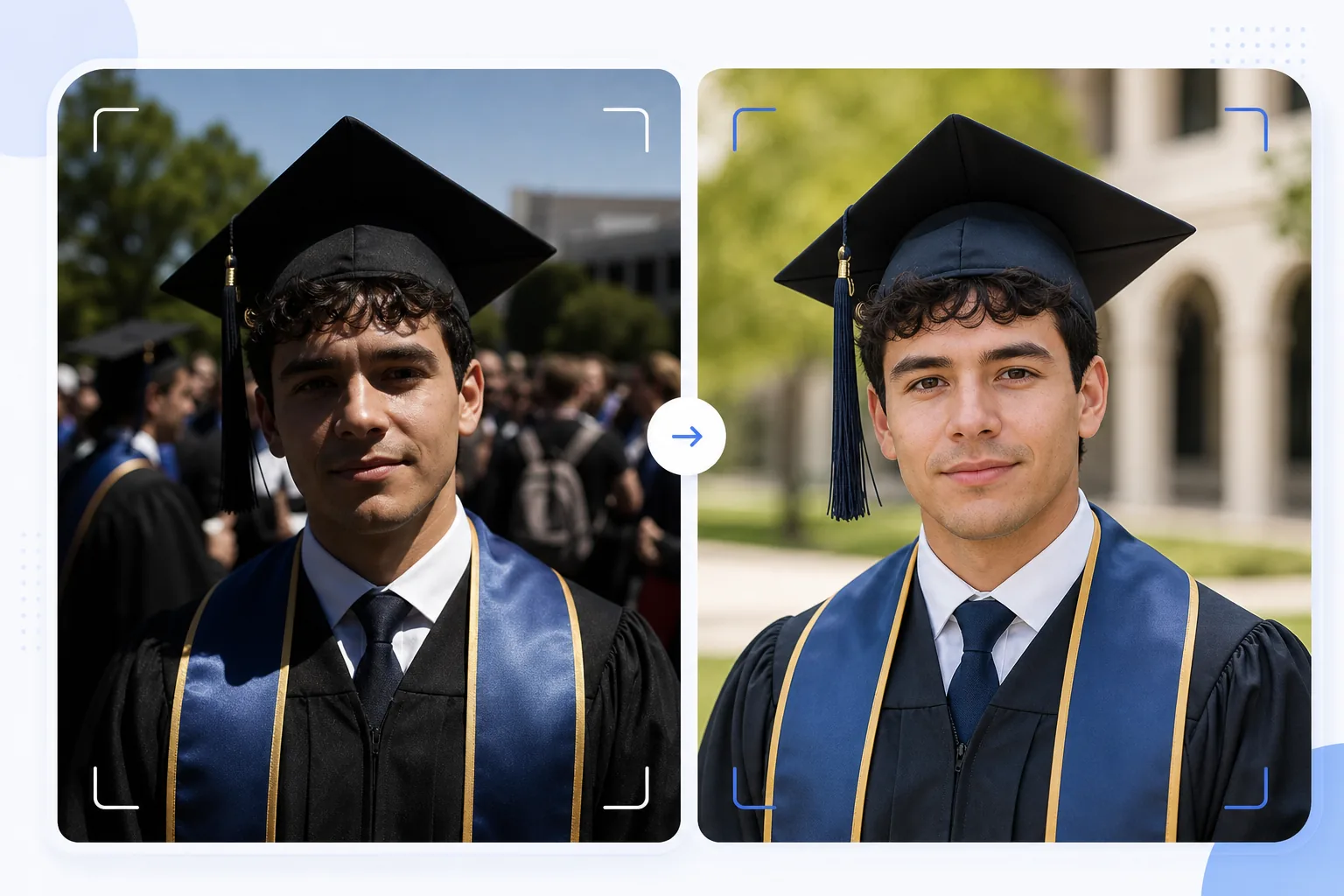
เปลี่ยนภาพถ่ายรับปริญญาที่ถ่ายแบบเป็นธรรมชาติให้กลายเป็นภาพเหมือนที่คู่ควรแก่การใส่กรอบ เทมเพลตนี้แก้ไขแสงกลางแจ้งที่จ้าซึ่งพบได้ทั่วไปในพิธีรับปริญญา ลบคนที่หลุดเข้ามาในเฟรมและความรกของฝูงชนด้านหลังบัณฑิต เพิ่มสีสันของหมวกและชุดครุย และทำให้ภาพคมชัดสำหรับพิมพ์ขนาดใหญ่เพื่อแขวนบนผนังและวางบนหิ้งเหนือเตาผิง
ลองใช้เทมเพลตนี้ฟรีPersonal template preview
เทมเพลตนี้ทำอะไรได้บ้าง
เปลี่ยนภาพถ่ายเร็วๆ ในวันรับปริญญาให้กลายเป็นภาพเหมือนที่ดูเนี้ยบ เหมาะสำหรับการใส่กรอบ ทำการ์ดประกาศ และแชร์บนโซเชียลมีเดีย พิธีรับปริญญาถ่ายภายใต้สภาพที่ท้าทาย — แดดจ้าตอนเที่ยงสร้างเงาคล้ายขอบตาดำใต้ปีกหมวก พื้นหลังที่เต็มไปด้วยฝูงชนดูวุ่นวาย และสีของชุดครุยดูซีดจางใต้แสงแดดโดยตรง AI Enhance แก้ไขการรับแสงเพื่อเติมเงาใต้หมวก คืนสีสันที่เข้มข้นให้กับชุดครุยและสายสะพาย และทำให้รายละเอียดใบหน้าที่ดูนุ่มเบลอในภาพที่ถ่ายอย่างรีบเร่งกลางฝูงชนคมชัดขึ้น Magic Eraser ลบคนที่หลุดเข้ามาในเฟรม ผู้คนในฝูงชนที่มองเห็นด้านหลังบัณฑิต ป้ายที่รบกวนสายตา และความรกอื่นๆ ของพิธี เพื่อแยกบัณฑิตให้โดดเด่นบนพื้นหลังที่สะอาดตายิ่งขึ้น
การตั้งค่าเทมเพลต
| การกู้คืนเงา | เติมเงาใต้หมวก (ทำให้ใบหน้าสว่างขึ้นโดยไม่ทำให้ส่วนสว่างเกิน) |
| การเพิ่มสีสันของชุดครุย | คืนสีผ้าสำหรับชุดครุยสีดำ น้ำเงินเข้ม แดงเลือดหมู และทอง |
| การปรับผิวให้เนียน | ลดตำหนิเล็กน้อยพร้อมคงเนื้อสัมผัสผิวที่เป็นธรรมชาติ |
| การล้างพื้นหลัง | ลบคนที่หลุดเข้ามาในเฟรมและผู้คนในฝูงชนด้านหลังบัณฑิต |
| ความละเอียดของไฟล์ที่ส่งออก | ด้านยาว 5000px (พร้อมพิมพ์ที่ 300 DPI ได้ถึง 16×12 นิ้ว) |
| การลับคมชัด | การลับคมชัดที่ปรับให้เหมาะกับภาพเหมือน (รายละเอียดใบหน้า + เนื้อสัมผัสผ้าชุดครุย) |
วิธีใช้เทมเพลตนี้
อัปโหลดภาพถ่ายรับปริญญาของคุณ
อัปโหลดภาพถ่ายพิธีรับปริญญาใดก็ได้ — ภาพเหมือนที่จัดท่า ภาพตอนเดินข้ามเวที ภาพโยนหมวก หรือช่วงเวลาฉลองแบบเป็นธรรมชาติ เทมเพลตนี้รองรับภาพถ่ายจากสมาร์ตโฟนและกล้อง DSLR ที่ถ่ายในทุกสภาพแสง ตั้งแต่แดดกลางแจ้งที่สว่างจ้าไปจนถึงหอประชุมในร่มที่แสงสลัว
แก้ไขแสงและสี
AI Enhance แก้ไขเงาที่จ้าซึ่งเกิดจากหมวกสี่เหลี่ยม ซึ่งมักทำให้ดวงตาและส่วนบนของใบหน้าบัณฑิตดูมืด สีของชุดครุยและสายสะพายจะถูกคืนสู่โทนสีเข้มข้นที่แท้จริง — ชุดครุยสีดำกลับมามีมิติแทนที่จะดูเป็นสีเทาเข้ม และสายสะพายเกียรติยศแสดงความอิ่มตัวของสีได้อย่างเต็มที่
ลบสิ่งรบกวน
Magic Eraser ลบผู้คนในฝูงชน บัณฑิตคนอื่นๆ เก้าอี้พับ และป้ายที่มองเห็นด้านหลังตัวแบบ AI จะสร้างพื้นหลังขึ้นใหม่ด้วยเวอร์ชันที่สะอาดตาของสถานที่ — สนามหญ้า ผนังอาคาร หรือผ้าม่าน — สร้างองค์ประกอบภาพแบบภาพเหมือนจากฉากที่เต็มไปด้วยฝูงชน
ส่งออกเพื่อพิมพ์และแชร์
ดาวน์โหลดที่ด้านยาว 5000px สำหรับงานพิมพ์ใส่กรอบได้ถึง 16×12 นิ้วที่ 300 DPI หรือที่ 2000px สำหรับโซเชียลมีเดียและการ์ดประกาศดิจิทัล โปรไฟล์สีถูกตั้งเป็น sRGB สำหรับการแสดงผลบนหน้าจอ หรือ Adobe RGB สำหรับการพิมพ์ระดับมืออาชีพ
เคล็ดลับจากมืออาชีพเพื่อผลลัพธ์ที่ดีที่สุด
- ✓หากวางแผนล่วงหน้าได้ ให้ถ่ายภาพเหมือนแบบทางการทันทีหลังพิธีในบริเวณที่มีร่มเงาแทนที่จะอยู่ใต้แดดโดยตรง ร่มเงาช่วยขจัดเงาที่จ้าจากหมวกซึ่งเป็นปัญหาที่แก้ไขได้ยากที่สุด เทมเพลตนี้แก้ไขเงาจากแดดได้ แต่ร่มเงาให้ผลลัพธ์ที่เป็นธรรมชาติที่สุด
- ✓ถ่ายทั้งภาพเหมือนที่จัดท่าแบบดั้งเดิมและช่วงเวลาฉลองแบบเป็นธรรมชาติ (กอดครอบครัว โยนหมวก) เทมเพลตนี้เพิ่มประสิทธิภาพได้ทั้งสองสไตล์ และการมีเวอร์ชันที่ดูเนี้ยบของแต่ละแบบช่วยให้คุณมีตัวเลือกระหว่างงานพิมพ์ใส่กรอบกับโพสต์โซเชียลมีเดีย
- ✓สำหรับภาพหมู่กับครอบครัว ให้จัดให้บัณฑิตอยู่ล้ำหน้ากลุ่มเล็กน้อย วิธีนี้สร้างการแยกระยะลึกที่เป็นธรรมชาติ ซึ่งช่วยให้ Magic Eraser แยกและลบสิ่งรบกวนในพื้นหลังได้โดยไม่กระทบสมาชิกในครอบครัว
เครื่องมือ
คำถามที่พบบ่อย
เทมเพลตนี้แก้ไขภาพถ่ายรับปริญญาที่เบลอได้ไหม
+
AI Enhance สามารถทำให้ภาพที่นุ่มเบลอเล็กน้อยจากการสั่นของมือเล็กน้อยหรือโฟกัสอัตโนมัติพลาดไปนิดหน่อยคมชัดขึ้นได้ อย่างไรก็ตาม ภาพที่เบลอมากจากการเคลื่อนไหวรุนแรง (เช่น ภาพตอนเดินข้ามเวทีที่ถ่ายจากระยะไกล) ไม่สามารถกู้คืนได้อย่างสมบูรณ์ — เทมเพลตเพิ่มรายละเอียดได้แต่ไม่สามารถสร้างความคมชัดที่ไม่เคยถูกบันทึกไว้ตั้งแต่แรก
แล้วภาพถ่ายพิธีในร่มล่ะ
+
ภาพถ่ายรับปริญญาในร่มที่มีแสงหอประชุม (สีเหลืองอุ่นหรือหลอดฟลูออเรสเซนต์ผสม) จะได้รับการแก้ไขอุณหภูมิสี เทมเพลตปรับสมดุลแสงขาวเพื่อให้โทนผิวดูเป็นธรรมชาติและสีของชุดครุยดูเป็นจริง สัญญาณรบกวนในที่แสงน้อยจากการตั้งค่า ISO สูงจะถูกลดลงพร้อมคงรายละเอียดใบหน้าไว้
ฉันลบพื้นหลังออกทั้งหมดได้ไหม
+
ได้ คุณสามารถใช้การล้างพื้นหลังเพื่อลบองค์ประกอบพื้นหลังทั้งหมดและแทนที่ด้วยสีทึบหรือไล่ระดับสีเพื่อให้ได้ลุคภาพเหมือนแบบสตูดิโอ วิธีนี้ได้ผลดีเมื่อพื้นหลังพิธีเดิมรกเกินไปจนไม่สามารถลบแบบเลือกเฉพาะส่วนได้
ภาพเหมือนรับปริญญาที่คู่ควรแก่การใส่กรอบจากภาพถ่ายในพิธี
อัปโหลดภาพถ่ายวันรับปริญญาของคุณ แล้วรับภาพเหมือนที่ปรับแต่งแล้ว พร้อมพิมพ์ ด้วยพื้นหลังที่สะอาดตาและสีหมวกและชุดครุยที่สดใส
ลองใช้ฟรีRelated templates
More personal templates for your workflow.
สร้างภาพถ่ายติดบัตรที่สอดคล้องกับข้อกำหนดสำหรับวีซ่า ใบขับขี่ และบัตรประจำตัวประชาชน โดยมีสีพื้นหลัง ขนาดศีรษะ และการแสดงออกทางสีหน้าที่เหมาะสม
ปรับปรุงภาพถ่ายคอนเสิร์ตและกิจกรรมด้วยการลดสัญญาณรบกวนในที่แสงน้อย การจัดแสงบนเวที การแก้ไขสี การกำจัดสิ่งรบกวนฝูงชน และการกู้คืนรายละเอียดจากภาพสถานที่มืด
สร้างภาพถ่ายการ์ดประกาศทารกแรกเกิดที่สวยงามด้วยพื้นหลังสีอ่อน การไล่ระดับสีที่นุ่มนวล การกำจัดสิ่งที่เกะกะในโรงพยาบาล และขนาดที่พร้อมพิมพ์สำหรับการส่งไปรษณีย์
เตรียมภาพถ่ายครอบครัวและภาพถ่ายบุคคลสำหรับการ์ดอวยพรวันหยุดที่มีพื้นหลังเทศกาล การไล่ระดับสีโทนอุ่น เอฟเฟกต์หิมะ และขนาดการ์ดมาตรฐานสำหรับการพิมพ์
คืนค่าและปรับปรุงภาพถ่ายไว้อาลัยด้วยการรีทัชอย่างอ่อนโยน ลดความซับซ้อนของพื้นหลัง การให้เกรดสีที่อบอุ่น และขนาดพร้อมพิมพ์สำหรับบริการ
เปลี่ยนโฉมภาพถ่ายสัตว์เลี้ยงในสถานสงเคราะห์และช่วยเหลือด้วยการเปลี่ยนพื้นหลัง การแก้ไขแสง และการปรับปรุงรายละเอียดขน เพื่อช่วยให้สัตว์ต่างๆ หาบ้านได้เร็วขึ้น