
เทมเพลตรูปถ่ายประจำตัว
สร้างรูปถ่ายติดบัตรที่สอดคล้องกับข้อกำหนดสำหรับวีซ่า ใบขับขี่ บัตรประจำตัวประชาชน และบัตรพนักงานจากภาพเซลฟีหรือภาพบุคคลใดก็ได้ เทมเพลตนี้จะแทนที่พื้นหลังด้วยสีทึบตามที่กำหนด ปรับขนาดและตำแหน่งของศีรษะให้ตรงตามข้อกำหนดทางการ แก้ไขแสงเพื่อให้ใบหน้าสว่างสม่ำเสมอ และส่งออกในขนาดพิมพ์ที่ต้องการอย่างแม่นยำ
ลองใช้เทมเพลตนี้ฟรีPersonal template preview
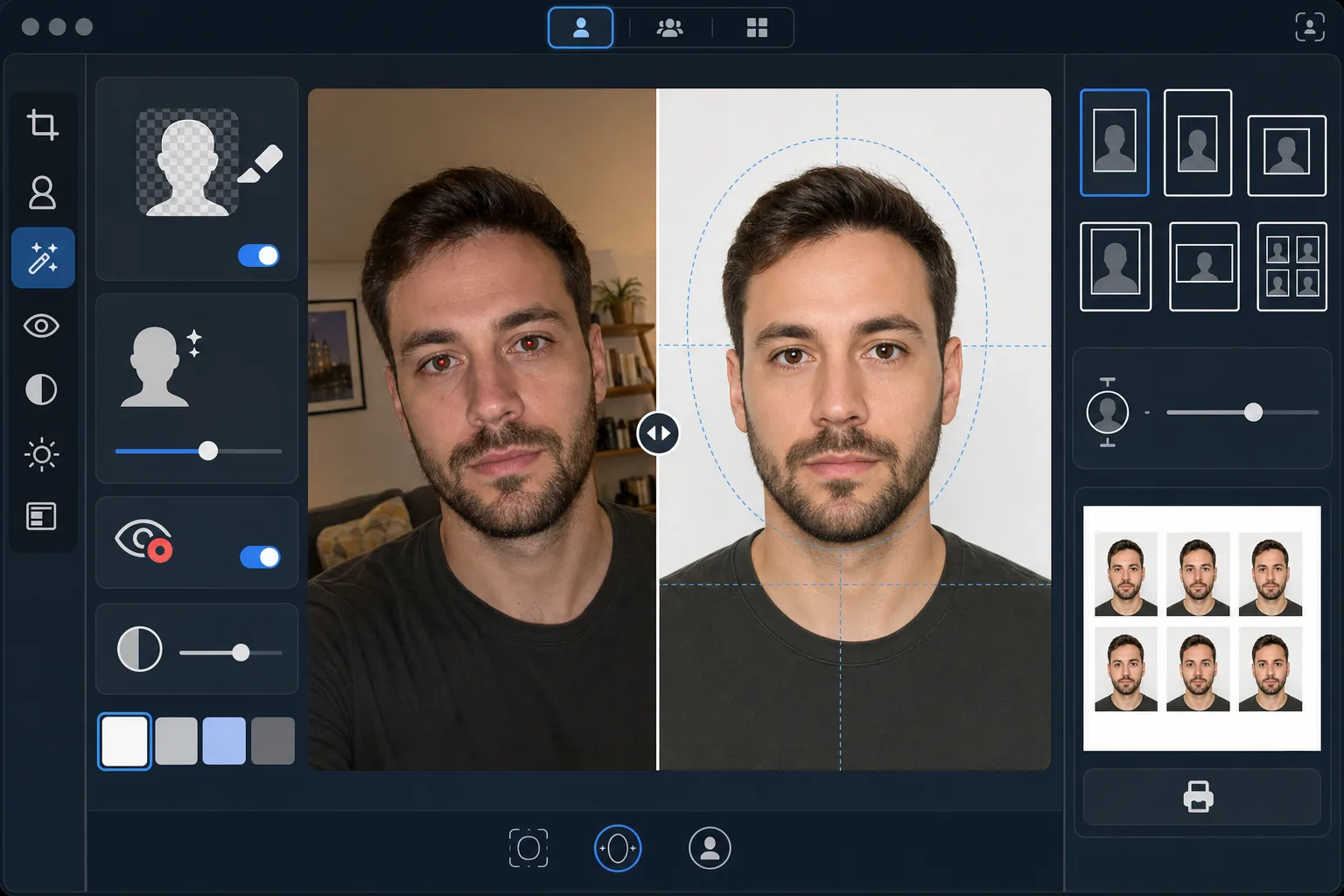
เทมเพลตนี้ทำอะไร
แปลงภาพบุคคลใดก็ได้ให้เป็นรูปถ่ายติดบัตรที่สอดคล้องกับข้อกำหนดของทางราชการ เอกสารแต่ละประเภทมีข้อกำหนดต่างกัน — หนังสือเดินทางสหรัฐฯ ต้องการพื้นหลังสีขาวโดยมีความสูงของศีรษะระหว่าง 25–35 มม. บนภาพพิมพ์ขนาด 2×2 นิ้ว ในขณะที่วีซ่าเชงเก้นต้องการพื้นหลังสีเทาอ่อนหรือสีขาวที่ขนาด 35×45 มม. เทมเพลตนี้จัดการมาตรฐานรูปถ่ายติดบัตรที่พบบ่อยที่สุดโดยอัตโนมัติ Background Eraser ลบพื้นหลังเดิมและแทนที่ด้วยสีทึบตามที่กำหนด AI Enhance แก้ไขแสงที่ไม่สม่ำเสมอ ลบตาแดงจากแฟลช และทำให้ใบหน้าได้รับแสงสม่ำเสมอโดยไม่มีเงาเข้มที่ด้านใดด้านหนึ่ง ซึ่งเป็นเหตุผลในการปฏิเสธที่พบบ่อยที่หน่วยงานราชการ
การตั้งค่าเทมเพลต
| สีพื้นหลัง | สีขาว (#FFFFFF) หรือสีเทาอ่อน (#E5E5E5) — เลือกได้ตามประเภทบัตร |
| ขนาดศีรษะ | ปรับความสูงของศีรษะให้พอดีกับ 70–80% ของกรอบโดยอัตโนมัติ (ปรับได้ตามมาตรฐาน) |
| ขนาดพิมพ์ | 2×2 in (สหรัฐฯ), 35×45 mm (อียู/เชงเก้น), 33×48 mm (สหราชอาณาจักร) — เลือกได้ |
| การแก้ไขแสง | แสงบนใบหน้าสม่ำเสมอ — ไม่มีเงาทั้งสองด้าน |
| ความละเอียดของผลลัพธ์ | 600 DPI สำหรับการพิมพ์ภาพ (รองรับตู้คีออสก์และเครื่องพิมพ์ที่บ้าน) |
วิธีใช้เทมเพลตนี้
อัปโหลดรูปถ่ายหน้าตรง
อัปโหลดภาพบุคคลหน้าตรงที่คมชัด ถ่ายในระดับสายตา ภาพควรแสดงใบหน้าทั้งหมดและส่วนบนของไหล่ โดยมีสีหน้าเป็นกลางและลืมตาทั้งสองข้าง ถอดแว่นตา หมวก และเครื่องสวมศีรษะ (ยกเว้นที่สวมด้วยเหตุผลทางศาสนา) ก่อนถ่ายภาพ
เลือกประเภทบัตรของคุณ
เลือกประเภทเอกสาร — หนังสือเดินทางสหรัฐฯ วีซ่าอียู/เชงเก้น หนังสือเดินทางสหราชอาณาจักร ใบขับขี่ หรือบัตรประจำตัวประชาชน เทมเพลตจะปรับสีพื้นหลัง ขนาดศีรษะ ขนาดพิมพ์ และอัตราส่วนภาพโดยอัตโนมัติให้ตรงตามข้อกำหนดทางการของเอกสารที่คุณเลือก
การแก้ไขพื้นหลังและแสง
Background Eraser ลบพื้นหลังเดิมและแทนที่ด้วยสีทึบตามที่กำหนด AI Enhance แก้ไขแสงที่ไม่สม่ำเสมอเพื่อให้ทั้งสองด้านของใบหน้าได้รับแสงสม่ำเสมอ และลบสีเพี้ยนใดๆ จากแสงประดิษฐ์ ตาแดงจากแฟลชจะถูกแก้ไขโดยอัตโนมัติ
ส่งออกเพื่อพิมพ์
ดาวน์โหลดที่ 600 DPI ในขนาดพิมพ์ที่ต้องการอย่างแม่นยำสำหรับประเภทเอกสารของคุณ ผลลัพธ์จัดรูปแบบสำหรับกระดาษภาพถ่ายมาตรฐานขนาด 4×6 นิ้ว โดยมีรูปถ่ายติดบัตรหลายรูปเรียงอยู่บนแผ่นเดียว เพื่อพิมพ์ที่บ้าน ที่ตู้คีออสก์พิมพ์ภาพในร้านขายยา หรือที่ร้านพิมพ์มืออาชีพ
เคล็ดลับมืออาชีพเพื่อผลลัพธ์ที่ดีที่สุด
- ✓ถ่ายภาพหน้ากำแพงเรียบในห้องที่มีแสงสว่างเพียงพอ โดยหันหน้าไปทางหน้าต่าง แม้ว่าเทมเพลตจะแทนที่พื้นหลัง แต่การเริ่มต้นด้วยแสงธรรมชาติที่สม่ำเสมอบนใบหน้าจะให้ผลลัพธ์ที่ดีกว่าการแก้ไขเงาเข้มจากแสงประดิษฐ์
- ✓รักษาสีหน้าเป็นกลาง ปิดปากและลืมตาทั้งสองข้าง ข้อกำหนดรูปถ่ายติดบัตรของทางราชการมักปฏิเสธภาพที่มีรอยยิ้ม ตาหรี่ หรืออ้าปากอยู่เสมอ — กฎเหล่านี้ถูกบังคับใช้โดยระบบตรวจสอบภาพอัตโนมัติที่หน่วยงานราชการหลายแห่ง
- ✓ตรวจสอบให้แน่ใจว่าไม่มีผมตกลงมาบนใบหน้าหรือบังคิ้ว ใบหน้าต้องมองเห็นได้ทั้งหมดตั้งแต่ใต้คางจนถึงด้านบนของหน้าผาก เก็บผมที่พาดผ่านใบหน้าให้เรียบร้อยก่อนถ่ายภาพ
- ✓สวมเสื้อที่ตัดกับสีพื้นหลัง หากพื้นหลังเป็นสีขาว ให้หลีกเลี่ยงเสื้อผ้าสีขาว — เสื้อสีเข้มหรือสีสันจะช่วยให้ขอบแยกออกอย่างชัดเจน และป้องกันไม่ให้ไหล่กลมกลืนไปกับพื้นหลัง
เครื่องมือ
คำถามที่พบบ่อย
ภาพนี้จะได้รับการยอมรับที่หน่วยงานราชการหรือไม่
+
เทมเพลตปฏิบัติตามข้อกำหนดทางการสำหรับเอกสารแต่ละประเภท (ICAO 9303 สำหรับเอกสารเดินทางระหว่างประเทศ ข้อกำหนดเฉพาะของแต่ละประเทศสำหรับบัตรในประเทศ) อย่างไรก็ตาม การยอมรับขั้นสุดท้ายขึ้นอยู่กับเจ้าหน้าที่ผู้ตรวจสอบ เทมเพลตรับประกันว่าขนาด สีพื้นหลัง ขนาดศีรษะ และแสงตรงตามข้อกำหนดที่เผยแพร่
ฉันสวมแว่นตาในภาพได้หรือไม่
+
ปัจจุบันประเทศส่วนใหญ่ (รวมถึงสหรัฐฯ ตั้งแต่ปี 2016) กำหนดให้ถอดแว่นตาสำหรับภาพถ่ายหนังสือเดินทางและวีซ่า เทมเพลตไม่ลบแว่นตาด้วยวิธีดิจิทัล — ให้ถอดออกก่อนถ่ายภาพต้นฉบับ เครื่องสวมศีรษะทางศาสนาได้รับอนุญาตในเขตอำนาจศาลส่วนใหญ่
ฉันจะพิมพ์ผลลัพธ์อย่างไร
+
เทมเพลตจะส่งออกแผ่นขนาด 4×6 นิ้ว ที่มีรูปถ่ายติดบัตรหลายรูปเรียงอยู่ในขนาดที่ถูกต้อง พิมพ์ที่ตู้คีออสก์พิมพ์ภาพในร้านขายยาใดก็ได้ (CVS, Walgreens, Boots) ที่บ้านบนกระดาษภาพถ่ายที่ 600 DPI หรือที่ร้านพิมพ์มืออาชีพ ใช้กระดาษภาพถ่ายแบบมันหรือแบบด้าน — ไม่ใช่กระดาษเครื่องพิมพ์ทั่วไป
รับรูปถ่ายติดบัตรที่สอดคล้องกับข้อกำหนดโดยไม่ต้องออกจากบ้าน
อัปโหลดภาพเซลฟีแล้วรับรูปถ่ายติดบัตรที่สอดคล้องกับข้อกำหนดของทางราชการ พร้อมพิมพ์ — สำหรับหนังสือเดินทาง วีซ่า ใบขับขี่ และอื่นๆ
ลองใช้ฟรีRelated templates
More personal templates for your workflow.
ปรับปรุงภาพถ่ายรับปริญญาด้วยการล้างพื้นหลัง หมวกและเสื้อคลุม Color correction ลบรอยตำหนิ และลับคมกรอบและประกาศพร้อมพิมพ์
ปรับปรุงภาพถ่ายคอนเสิร์ตและกิจกรรมด้วยการลดสัญญาณรบกวนในที่แสงน้อย การจัดแสงบนเวที การแก้ไขสี การกำจัดสิ่งรบกวนฝูงชน และการกู้คืนรายละเอียดจากภาพสถานที่มืด
สร้างภาพถ่ายการ์ดประกาศทารกแรกเกิดที่สวยงามด้วยพื้นหลังสีอ่อน การไล่ระดับสีที่นุ่มนวล การกำจัดสิ่งที่เกะกะในโรงพยาบาล และขนาดที่พร้อมพิมพ์สำหรับการส่งไปรษณีย์
เตรียมภาพถ่ายครอบครัวและภาพถ่ายบุคคลสำหรับการ์ดอวยพรวันหยุดที่มีพื้นหลังเทศกาล การไล่ระดับสีโทนอุ่น เอฟเฟกต์หิมะ และขนาดการ์ดมาตรฐานสำหรับการพิมพ์
คืนค่าและปรับปรุงภาพถ่ายไว้อาลัยด้วยการรีทัชอย่างอ่อนโยน ลดความซับซ้อนของพื้นหลัง การให้เกรดสีที่อบอุ่น และขนาดพร้อมพิมพ์สำหรับบริการ
เปลี่ยนโฉมภาพถ่ายสัตว์เลี้ยงในสถานสงเคราะห์และช่วยเหลือด้วยการเปลี่ยนพื้นหลัง การแก้ไขแสง และการปรับปรุงรายละเอียดขน เพื่อช่วยให้สัตว์ต่างๆ หาบ้านได้เร็วขึ้น