
قالب قصة وسائل التواصل الاجتماعي
صمّم قصصًا عمودية بنسبة 9:16 محسّنة لـ Instagram وTikTok وSnapchat وYouTube Shorts. يقوم هذا القالب باقتصاص الصور وإعادة وضعها للتنسيق العمودي الطويل، ويزيل الخلفيات أو يستبدلها لإحداث تأثير بصري، ويضمن وضع موضوعك داخل المناطق الآمنة للنص بحيث لا تحجب التراكبات والملصقات والتعليقات النقطة المحورية أبدًا.
جرّب هذا القالب مجانًاSocial Media template preview
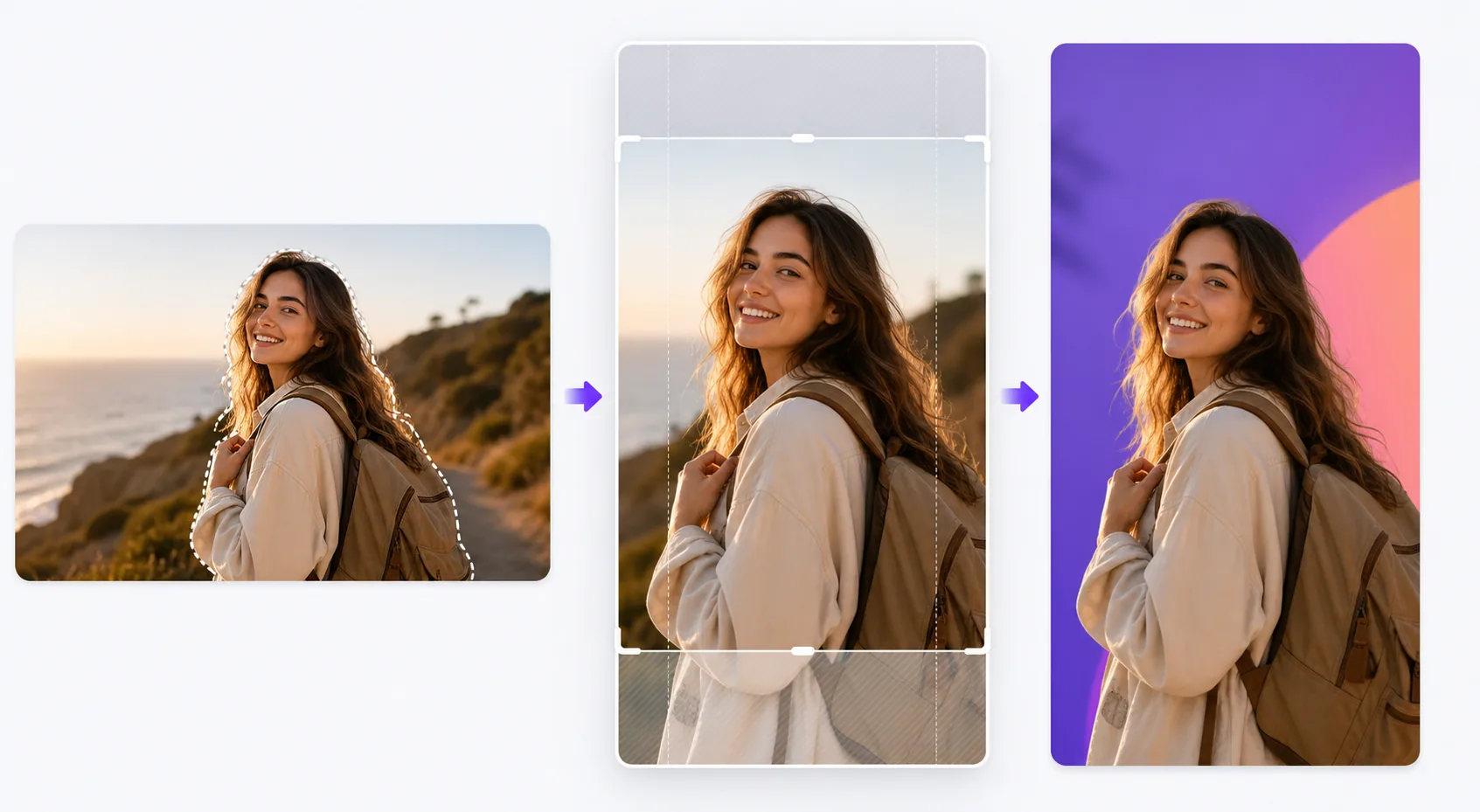
ماذا يفعل هذا القالب
يحل تحدي التنسيق الذي يقضي على التفاعل في منصات القصص: الصور الأفقية المحشورة في إطارات عمودية مع أشرطة سوداء، والمواضيع المقطوعة عند نقاط محرجة، والتفاصيل البصرية المهمة المخفية خلف عناصر الواجهة. يقتصّ القالب صورتك بذكاء إلى نسبة 9:16، ويضع الموضوع في المنتصف، ويطبّق إعادة تأطير مدعومة بالذكاء الاصطناعي عندما لا يتلاءم التكوين الأصلي جيدًا مع الوضع العمودي. يتيح لك Background Eraser وضع موضوعك على ألوان صلبة جريئة أو تدرجات لونية أو خلفيات بيئية مموّهة تجعل القصة تبرز في الخلاصة. تضمن أدلة المنطقة الآمنة بقاء الجزء العلوي 15% (حيث توجد أيقونات الملف الشخصي والطوابع الزمنية) والجزء السفلي 20% (حيث تظهر مطالبات التمرير لأعلى والتعليقات) خاليًا من المحتوى البصري المهم.
إعدادات القالب
| نسبة العرض إلى الارتفاع | 9:16 (1080×1920px) — أصلية لقصص Instagram وTikTok وSnapchat |
| نمط الخلفية | لون صلب أو تدرج لوني أو الأصل المموّه أو صورة مخصصة |
| تموضع الموضوع | إعادة تأطير بالذكاء الاصطناعي لوضع الموضوع في منتصف المنطقة الآمنة العمودية |
| المناطق الآمنة | يُحفظ الجزء العلوي 15% والسفلي 20% خاليًا لعناصر واجهة المنصة |
| تنسيق الإخراج | JPEG بجودة 95% أو PNG بشفافية لمزيد من التحرير |
كيفية استخدام هذا القالب
ارفع صورتك
ارفع أي صورة — أفقية أو عمودية أو مربعة. يكتشف الذكاء الاصطناعي الموضوع الرئيسي (شخص أو منتج أو نقطة محورية في المشهد) ويحدد أفضل اقتصاص عمودي يبقي الموضوع بارزًا والتكوين متوازنًا في إطار 9:16.
اختر معالجة الخلفية
احتفظ بالخلفية الأصلية (مقتصّة لتناسب)، أو استبدلها بلون صلب أو تدرج لوني لإحداث تأثير رسومي، أو موّه الخلفية لإنشاء فصل في العمق. يوفّر Background Eraser قصًّا نظيفًا إذا أردت دمج الموضوع على خلفية جديدة تمامًا.
ضع الموضوع داخل المناطق الآمنة
يوضّح لك القالب أين ستتراكب عناصر واجهة المنصة فوق الصورة — الطوابع الزمنية وأيقونات الملف الشخصي في الأعلى، ومطالبات التمرير لأعلى أو مناطق التعليقات في الأسفل. يوضع موضوعك تلقائيًا في المنطقة الآمنة الوسطى، ويمكنك تعديل الموضع إذا لزم الأمر.
صدّر للنشر
نزّل بدقة 1080×1920px، وهي الدقة الأصلية لتنسيقات القصص. الملف محسّن لتقليل عيوب الضغط إلى أدنى حد عندما تعيد المنصات ترميز التحميل. تصدير PNG متاح إذا أردت إضافة نص أو ملصقات أو إجراء تعديلات إضافية في تطبيق آخر قبل النشر.
نصائح احترافية لأفضل النتائج
- ✓استخدم ألوان خلفية جريئة ومتباينة خلف المواضيع المعزولة. تجعل خلفية مرجانية زاهية أو زرقاء كهربائية المنتج أو الشخص يبرز بصريًا مقابل الخلاصات المحايدة التي يتصفحها معظم المستخدمين، مما يزيد فرصة توقفهم عند قصتك.
- ✓اجعل الجزء السفلي 20% من الإطار بسيطًا بصريًا. على Instagram، يوجد شريط الرد ونص التعليق في هذه المنطقة. وضع محتوى بصري مهم هناك يضمن حجبه عندما يشاهد المشاهدون القصة.
- ✓بالنسبة لقصص العرض الدوّار، حافظ على نفس لون الخلفية وموضع الموضوع عبر جميع الإطارات. يجعل الاتساق البصري السلسلة تبدو مقصودة ومصقولة، مما يزيد معدل التمرير حتى النهاية.
เครื่องมือ
أسئلة شائعة
هل يمكنني استخدام صور أفقية بانورامية؟
+
نعم. يعيد الذكاء الاصطناعي تأطير التكوين عن طريق تحديد الموضوع الرئيسي والاقتصاص إلى شريحة عمودية تحافظ على التأثير البصري. بالنسبة للقطات البانورامية العريضة جدًا، قد يقتصّ إعادة التأطير بشكل كبير، لذا فإن الصور ذات الموضوع الموجود في المنتصف تعمل بشكل أفضل.
هل يعمل هذا مع صور مصغّرة للفيديو أيضًا؟
+
يعالج القالب الصور الثابتة. ومع ذلك، يمكنك استخدام الصورة المصدَّرة كإطار غلاف لقصة فيديو، تعرضها المنصات قبل تشغيل الفيديو وفي شبكات قصص أبرز اللقطات.
ما المنصات التي تستخدم تنسيق 9:16؟
+
تستخدم Instagram Stories وReels وTikTok وSnapchat وYouTube Shorts وFacebook Stories وPinterest Idea Pins وLinkedIn Stories جميعها التنسيق العمودي 9:16. إخراج 1080×1920px هو الدقة القياسية المقبولة لديها جميعًا.
اجعل كل قصة توقف الإبهام
ارفع أي صورة واحصل على صورة قصة عمودية منسّقة بشكل مثالي ومحسّنة للمنصات في ثوانٍ.
جرّبه مجانًاRelated templates
More social media templates for your workflow.
เทมเพลตการครอบตัดสี่เหลี่ยมที่ปรับให้เหมาะสมกับ Instagram ที่ 1080×1080px พื้นหลังที่สะอาดตา สีสันสดใส และรายละเอียดที่คมชัดที่โดดเด่นในฟีด
เทมเพลตแบนเนอร์ YouTube ที่ 2560×1440px พร้อมคำแนะนำโซนปลอดภัย ลบพื้นหลังออกอย่างสะอาดตาสำหรับรูปภาพของครีเอเตอร์ เลย์เอาต์ที่คำนึงถึงอุปกรณ์ และหน้าปกช่องที่สอดคล้องกับแบรนด์
เทมเพลตภาพหน้าปก Facebook ที่ 820×312px สำหรับเดสก์ท็อปและการครอบตัดบนมือถือ 640×360px ทำความสะอาดภาพลักษณ์ของแบรนด์ด้วยโซนปลอดภัยที่เหมาะสมสำหรับการทับซ้อนของภาพโปรไฟล์และการวางปุ่ม CTA
สร้างภาพส่วนหัว Twitter/X ระดับมืออาชีพในขนาด 1500×500px ที่แน่นอน บัญชีสำหรับภาพโปรไฟล์ทับซ้อนกัน ทำงานทั้งในโหมดมืดและโหมดสว่าง
ปรับปรุงรูปโปรไฟล์การออกเดทด้วยการปรับสีผิวให้เรียบเนียนเป็นธรรมชาติ การล้างพื้นหลัง การแก้ไขแสง และการไล่ระดับสีอย่างละเอียดที่ดูสมจริง — ไม่มีการกรอง
สร้างภาพพิน Pinterest ที่เลื่อนไม่สะดุดด้วยพื้นหลังที่สะอาดตา ขนาดแนวตั้ง 2:3 ที่เหมาะสม การปรับปรุงสีที่สดใส และองค์ประกอบที่พร้อมใช้หมุด