
ภาพถ่ายการรับเลี้ยงสัตว์เลี้ยง
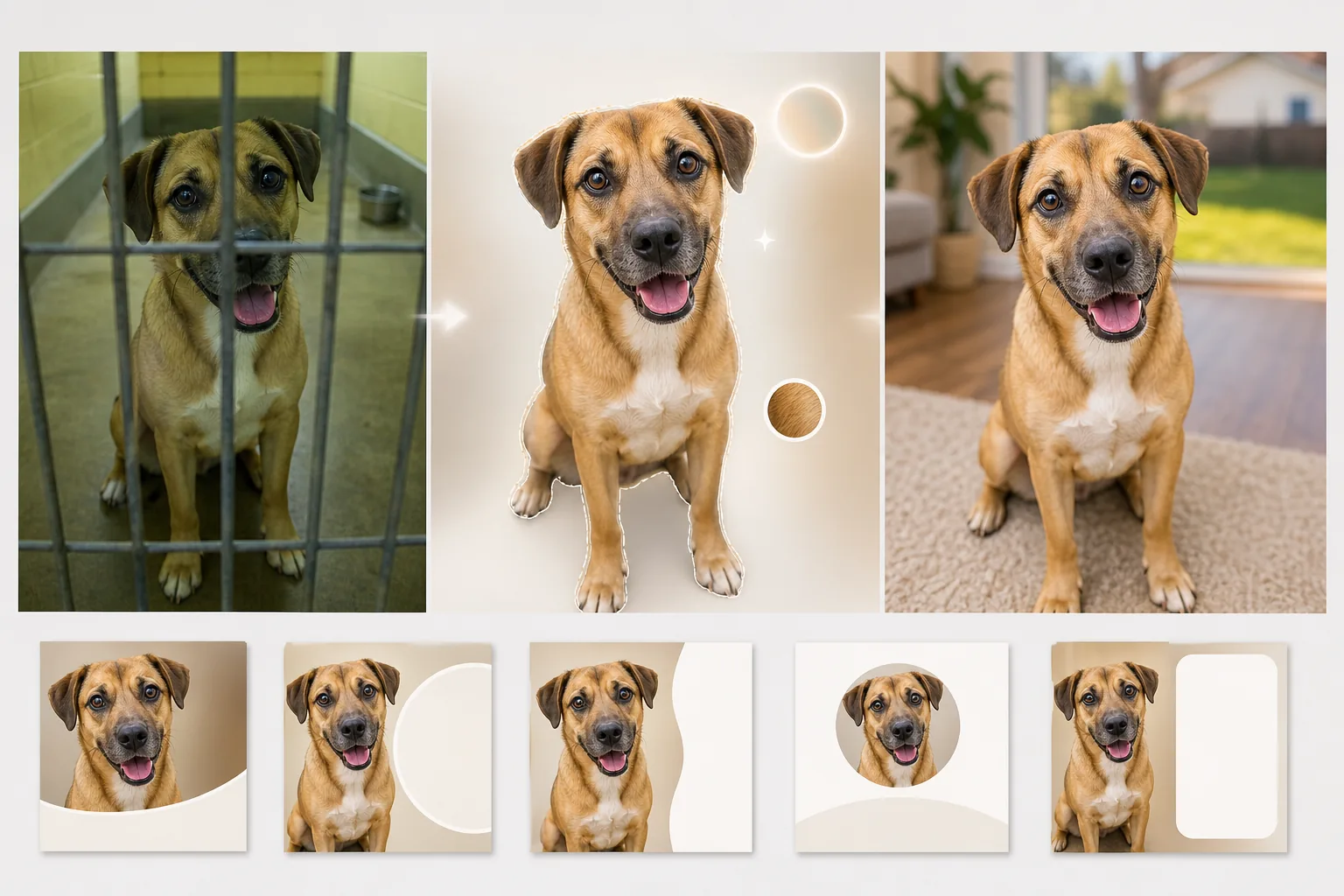
ช่วยให้สัตว์ในสถานสงเคราะห์ได้พบบ้านตลอดไปด้วยภาพถ่ายที่แสดงบุคลิกของพวกมันแทนกรงคอนกรีต เทมเพลตนี้ลบซี่กรง พื้นกรง และฉากหลังของสถานสงเคราะห์ออก แล้วแทนที่ด้วยสภาพแวดล้อมอบอุ่นเหมือนบ้านหรือฉากหลังสีพื้นที่สะอาดตา การแก้ไขแสงช่วยทำให้ภาพถ่ายในสถานสงเคราะห์ที่มืดสว่างขึ้น และการปรับปรุงรายละเอียดขนแสดงสีและเนื้อสัมผัสที่แท้จริงของขนสัตว์แต่ละตัว
ลองใช้เทมเพลตนี้ฟรีPersonal template preview
เทมเพลตนี้ทำอะไรได้บ้าง
จัดการกับความท้าทายเฉพาะของการถ่ายภาพในสถานสงเคราะห์ ซึ่งแสงไม่ดี ฉากหลังดูเป็นทางการแบบสถาบัน และสัตว์มักถูกถ่ายผ่านซี่กรงหรือในทางเดินคอนกรีตแคบ ๆ Background Eraser ลบซี่กรง รั้วตาข่ายลวด และสภาพแวดล้อมของสถานสงเคราะห์ออก แล้วแทนที่ด้วยฉากหลังที่อบอุ่นและน่าดึงดูด — สนามหญ้า พื้นห้องนั่งเล่นที่อบอุ่น หรือสีพื้นที่สะอาดตาที่ดึงความสนใจทั้งหมดไปที่สัตว์ AI Enhance แก้ไขการรับแสงน้อยที่พบบ่อยในการถ่ายภาพสถานสงเคราะห์ (ไฟฟลูออเรสเซนต์บนเพดาน ไม่มีหน้าต่าง) ทำให้ดวงตาที่มักหายไปในเงามืดสว่างขึ้น และดึงสีและเนื้อสัมผัสที่แท้จริงของขน ขนนก หรือเกล็ดออกมา เพื่อให้ผู้ที่อาจรับเลี้ยงเห็นว่าสัตว์ตัวนั้นมีหน้าตาอย่างไรจริง ๆ ภายใต้แสงธรรมชาติ
การตั้งค่าเทมเพลต
| ฉากหลัง | สนามหญ้า พื้นห้องนั่งเล่น สีพาสเทลพื้น หรือโปร่งใส |
| การลบซี่กรง | ตรวจจับและลบซี่กรง ตาข่ายลวด และรั้วลวดโดยอัตโนมัติ |
| การแก้ไขแสง | ทำให้ภาพถ่ายสถานสงเคราะห์ที่รับแสงน้อยสว่างขึ้นเทียบเท่าแสงธรรมชาติในเวลากลางวัน |
| การปรับปรุงดวงตา | ทำให้ดวงตาสว่างและคมชัดเพื่อแสดงบุคลิกและความตื่นตัว |
| รายละเอียดขน | ปรับปรุงเนื้อสัมผัสของขนและแก้ไขเฉดสีที่เพี้ยนจากแสงฟลูออเรสเซนต์ |
| ความละเอียดในการส่งออก | 2000×2000px (สี่เหลี่ยมจัตุรัสสำหรับ Petfinder, Adopt-a-Pet และโซเชียลมีเดีย) |
วิธีใช้เทมเพลตนี้
อัปโหลดภาพถ่ายสถานสงเคราะห์
อัปโหลดภาพถ่ายของสัตว์ที่ถ่ายในสถานสงเคราะห์ บ้านอุปถัมภ์ หรือกิจกรรมกลางแจ้ง ภาพที่ถ่ายผ่านซี่กรง ในกรงที่มืดสลัว และบนพื้นคอนกรีต ล้วนรองรับได้ทั้งหมด เทมเพลตนี้ใช้ได้กับสุนัข แมว กระต่าย นก และสัตว์อื่น ๆ ในสถานสงเคราะห์
ลบสภาพแวดล้อมของสถานสงเคราะห์
Background Eraser ลบกรง ซี่กรง พื้นคอนกรีต และฉากหลังของสถานสงเคราะห์ที่ดูเป็นทางการออก สัตว์จะถูกแยกออกด้วยการตรวจจับขอบที่รักษาเส้นขอบตามธรรมชาติของขน หนวด และหู — รวมถึงปลายขนที่บางเบาของสายพันธุ์ขนยาว
ปรับปรุงแสงและรายละเอียด
AI Enhance ทำให้ภาพสว่างขึ้นเพื่อจำลองแสงธรรมชาติในเวลากลางวัน แก้ไขเฉดสีเขียว-เหลืองจากแสงฟลูออเรสเซนต์ของสถานสงเคราะห์ และทำให้เนื้อสัมผัสของขนและรายละเอียดดวงตาคมชัด สีและลายขนที่แท้จริงของสัตว์จะปรากฏชัด และดวงตาของพวกมันจะได้แววตาที่สดใสตื่นตัวซึ่งดึงดูดผู้รับเลี้ยง
ส่งออกสำหรับประกาศรับเลี้ยง
ดาวน์โหลดที่ 2000×2000px ในรูปแบบสี่เหลี่ยมจัตุรัสที่ปรับให้เหมาะกับ Petfinder, Adopt-a-Pet และเว็บไซต์องค์กรช่วยเหลือสัตว์ รูปแบบนี้ยังใช้ได้โดยตรงกับโพสต์รับเลี้ยงบน Instagram และ Facebook โดยไม่ต้องครอบตัดเพิ่มเติม
เคล็ดลับจากมืออาชีพเพื่อผลลัพธ์ที่ดีที่สุด
- ✓ก้มลงให้อยู่ในระดับสายตาของสัตว์เมื่อถ่ายภาพ ภาพที่ถ่ายจากด้านบนมองลงมาทำให้สัตว์ดูเล็กลงและน่าสนใจน้อยลง ภาพในระดับสายตาสร้างความเชื่อมโยงระหว่างผู้ชมกับสัตว์ ซึ่งกระตุ้นให้เกิดการสอบถามเรื่องการรับเลี้ยง
- ✓ใช้ขนมหรือของเล่นถือไว้เหนือกล้องเล็กน้อยเพื่อจับภาพการแสดงออกที่ตื่นตัวและหูตั้งไปข้างหน้า AI สามารถทำให้ดวงตาที่ดูเฉื่อยชาสว่างขึ้นและปรับปรุงขนได้ แต่ไม่สามารถเปลี่ยนการแสดงออกที่ไม่สนใจให้กลายเป็นสนใจได้
- ✓สำหรับสุนัขและแมวสีดำ — ที่ลักษณะมักหายไปในภาพถ่ายสถานสงเคราะห์ — ตรวจสอบให้แน่ใจว่ามีแสงส่องมาที่ใบหน้าจากด้านหน้าบ้าง แม้แต่ไฟฉายโทรศัพท์ที่ถือไว้ด้านข้างก็สร้างมิติได้เพียงพอที่จะให้ AI กู้คืนรายละเอียดใบหน้าและความคมชัดของดวงตา
เครื่องมือ
คำถามที่พบบ่อย
สิ่งนี้สามารถลบซี่กรงที่อยู่ด้านหน้าสัตว์ได้หรือไม่?
+
ได้ AI ตรวจจับรูปแบบที่สม่ำเสมอของซี่กรงและรั้วตาข่ายลวดที่ทับอยู่บนสัตว์และลบออก พร้อมสร้างลายขนและลักษณะใบหน้าด้านหลังซี่กรงขึ้นใหม่ ซี่กรงหนาที่ปิดบังใบหน้าเป็นบริเวณกว้างอาจทิ้งร่องรอยเล็กน้อยที่ต้องแต่งด้วยมือเล็กน้อย
ภาพจะดูทำให้เข้าใจผิดเกี่ยวกับรูปลักษณ์ของสัตว์หรือไม่?
+
ไม่ เทมเพลตนี้แก้ไขแสงที่ไม่ดีในสถานสงเคราะห์และลบสภาพแวดล้อมแบบสถาบันออก แต่ไม่ได้เปลี่ยนแปลงลักษณะทางกายภาพ ลายขน ขนาด หรือสีของสัตว์ เป้าหมายคือการแสดงให้เห็นว่าสัตว์มีหน้าตาอย่างไรจริง ๆ ภายใต้แสงที่ดีและในสภาพแวดล้อมปกติ
สถานสงเคราะห์สามารถใช้สิ่งนี้ได้ฟรีหรือไม่?
+
แพ็กเกจฟรีมีปริมาณการประมวลผลเพียงพอสำหรับอาสาสมัครบ้านอุปถัมภ์รายบุคคลและองค์กรช่วยเหลือสัตว์ขนาดเล็ก สถานสงเคราะห์ที่มีปริมาณงานสูงสามารถติดต่อเราเพื่อขอราคาสำหรับองค์กรไม่แสวงหากำไรในการประมวลผลแบบกลุ่มได้
ช่วยให้สัตว์ในสถานสงเคราะห์ทุกตัวได้แสดงตัวตนที่ดีที่สุด
อัปโหลดภาพถ่ายสถานสงเคราะห์แล้วรับภาพการรับเลี้ยงที่อบอุ่นและน่าดึงดูดซึ่งแสดงบุคลิกที่แท้จริงของสัตว์แต่ละตัว
ลองใช้ฟรีRelated templates
More personal templates for your workflow.
สร้างภาพถ่ายติดบัตรที่สอดคล้องกับข้อกำหนดสำหรับวีซ่า ใบขับขี่ และบัตรประจำตัวประชาชน โดยมีสีพื้นหลัง ขนาดศีรษะ และการแสดงออกทางสีหน้าที่เหมาะสม
ปรับปรุงภาพถ่ายรับปริญญาด้วยการล้างพื้นหลัง หมวกและเสื้อคลุม Color correction ลบรอยตำหนิ และลับคมกรอบและประกาศพร้อมพิมพ์
ปรับปรุงภาพถ่ายคอนเสิร์ตและกิจกรรมด้วยการลดสัญญาณรบกวนในที่แสงน้อย การจัดแสงบนเวที การแก้ไขสี การกำจัดสิ่งรบกวนฝูงชน และการกู้คืนรายละเอียดจากภาพสถานที่มืด
สร้างภาพถ่ายการ์ดประกาศทารกแรกเกิดที่สวยงามด้วยพื้นหลังสีอ่อน การไล่ระดับสีที่นุ่มนวล การกำจัดสิ่งที่เกะกะในโรงพยาบาล และขนาดที่พร้อมพิมพ์สำหรับการส่งไปรษณีย์
เตรียมภาพถ่ายครอบครัวและภาพถ่ายบุคคลสำหรับการ์ดอวยพรวันหยุดที่มีพื้นหลังเทศกาล การไล่ระดับสีโทนอุ่น เอฟเฟกต์หิมะ และขนาดการ์ดมาตรฐานสำหรับการพิมพ์
คืนค่าและปรับปรุงภาพถ่ายไว้อาลัยด้วยการรีทัชอย่างอ่อนโยน ลดความซับซ้อนของพื้นหลัง การให้เกรดสีที่อบอุ่น และขนาดพร้อมพิมพ์สำหรับบริการ