
ภาพถ่ายกิจกรรมของคริสตจักร
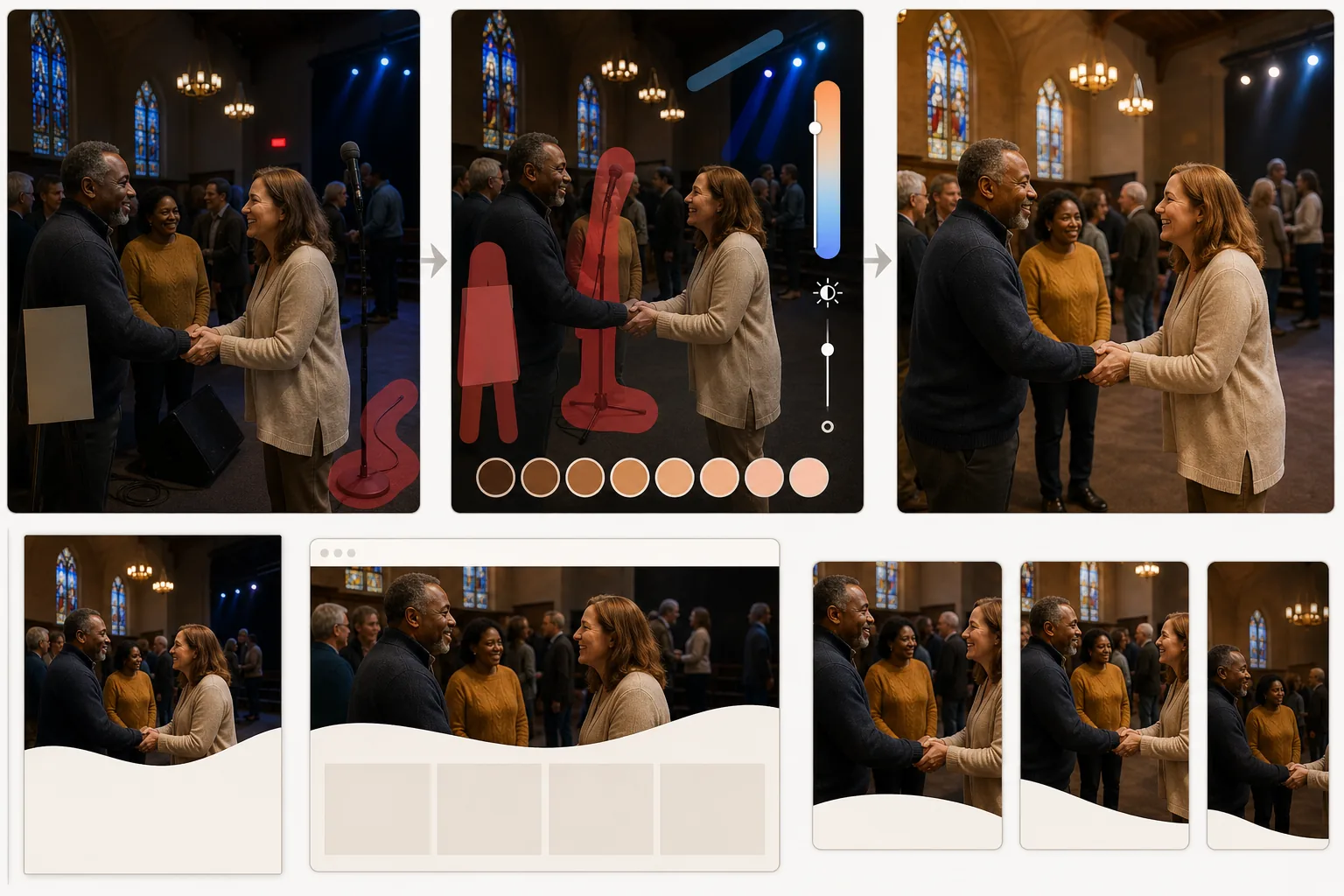
เปลี่ยนภาพถ่ายกิจกรรมคริสตจักรและชุมชนที่มีแสงสลัวให้เป็นภาพที่อบอุ่นและน่าดึงดูดสำหรับกระดานข่าว เว็บไซต์ และโซเชียลมีเดีย เทมเพลตนี้แก้ไขแสงภายในอาคารที่ท้าทายในสถานที่ประกอบศาสนกิจ — อุณหภูมิสีที่ผสมผสานจากกระจกสี ไฟเวที และโคมไฟเพดาน — ในขณะที่ Magic Eraser ลบสิ่งรบกวนทางสายตา เช่น ขาตั้งไมค์ สายเคเบิล และป้ายชั่วคราวที่ทำให้ช่วงเวลานั้นด้อยลง
ทดลองใช้เทมเพลตนี้ฟรีPersonal template preview
เทมเพลตนี้ทำอะไร
แก้ไขความท้าทายในการถ่ายภาพที่เป็นเอกลักษณ์ของพื้นที่คริสตจักรและชุมชนศรัทธา พื้นที่ประกอบศาสนกิจผสมผสานโคมไฟระย้าหลอดไส้โทนอุ่น ไฟเวที LED โทนเย็น และแสงสีจากหน้าต่างกระจกสี ทำให้เกิดสีเหลือบที่ผสมกันซึ่งทำให้ผิวของผู้คนดูไม่เป็นธรรมชาติในภาพถ่าย AI Enhance ปรับแหล่งกำเนิดแสงที่ผสมกันเหล่านี้ให้เป็นมาตรฐานเพื่อสร้างโทนผิวที่อบอุ่นและน่ามอง ในขณะที่ยังคงรักษาคุณภาพบรรยากาศของพื้นที่ไว้ Magic Eraser ลบองค์ประกอบที่รบกวนสมาธิ — ขาตั้งไมโครโฟน มอนิเตอร์ลำโพง สายต่อพ่วงที่พาดผ่านทางเดิน ป้ายแบนเนอร์ชั่วคราว และป้ายทางออก — ที่ดึงความสนใจไปจากผู้คนและช่วงเวลานั้น โทนสีโดยรวมอบอุ่นและน่าดึงดูด สะท้อนถึงจิตวิญญาณของชุมชนในกิจกรรม
การตั้งค่าเทมเพลต
| การแก้ไขแสง | การปรับแหล่งกำเนิดแสงในร่มที่ผสมกันให้เป็นมาตรฐานโดยให้ความสำคัญกับโทนผิวอุ่น |
| อุณหภูมิสี | ชุมชนโทนอุ่น (3800K–4200K ปรับสมดุลเพื่อผิวที่น่ามอง) |
| การกำจัดสิ่งรบกวน | ขาตั้งไมค์ สายเคเบิล ป้ายทางออก และป้ายชั่วคราว |
| การกู้คืนเงา | เพิ่มความสว่างให้บริเวณมืดในขณะที่ยังคงรักษาแสงสร้างบรรยากาศ |
| ความละเอียดของไฟล์ส่งออก | 3000×2000px (3:2 สำหรับกระดานข่าว เว็บไซต์ และโซเชียลมีเดีย) |
วิธีใช้เทมเพลตนี้
อัปโหลดภาพถ่ายกิจกรรมของคุณ
อัปโหลดภาพถ่ายจากพิธีนมัสการ กิจกรรมกลุ่มเยาวชน งานเลี้ยงอาหารค่ำของชุมชน การเฉลิมฉลองเทศกาล พิธีบัพติศมา หรือการรวมตัวของชุมชนคริสตจักรใดๆ เทมเพลตนี้รองรับสภาพแสงภายในอาคารที่หลากหลายซึ่งพบได้ในสถานที่ประกอบศาสนกิจ ห้องโถงสามัคคีธรรม และบริเวณกลางแจ้งของคริสตจักร
แก้ไขแสงและสี
AI Enhance วิเคราะห์แหล่งกำเนิดแสงที่ผสมกันในภาพและปรับให้เป็นมาตรฐาน สีเหลือบจากไฟเวทีได้รับการแก้ไข บริเวณที่นั่งของผู้ร่วมพิธีที่แสงน้อยถูกเพิ่มความสว่าง และโทนผิวถูกปรับให้อบอุ่นเป็นโทนที่เป็นธรรมชาติและน่ามอง คุณภาพบรรยากาศของแสงเทียนและแสงกระจกสีได้รับการรักษาไว้ในขณะที่ลบการเปลี่ยนสีที่ไม่น่ามองซึ่งเกิดขึ้นบนใบหน้า
ลบสิ่งรบกวน
Magic Eraser ลบขาตั้งไมโครโฟน มอนิเตอร์ลำโพง สายเคเบิลและสายต่อพ่วง ป้ายแบนเนอร์กิจกรรมชั่วคราว ป้ายทางออก และองค์ประกอบที่ใช้งานทั่วไปอื่นๆ ที่ทำให้เฟรมรกรุงรัง AI สร้างผนัง พื้น หรือม้านั่งโบสถ์ที่อยู่ด้านหลังวัตถุที่ถูกลบขึ้นใหม่เพื่อผลลัพธ์ที่สะอาดตา
ส่งออกสำหรับการสื่อสารของคริสตจักร
ดาวน์โหลดที่ 3000×2000px สำหรับกระดานข่าวคริสตจักร ส่วนหัวเว็บไซต์ และบทความจดหมายข่าว มีไฟล์ส่งออกที่ปรับให้เหมาะกับเว็บในขนาดที่เล็กกว่าสำหรับแคมเปญอีเมลและโพสต์โซเชียลมีเดีย โทนสีอบอุ่นช่วยให้ภาพดูน่าดึงดูดบนทุกแพลตฟอร์ม
เคล็ดลับจากมืออาชีพเพื่อผลลัพธ์ที่ดีที่สุด
- ✓ถ่ายภาพจากตำแหน่งที่แหล่งกำเนิดแสงหลักอยู่ด้านหลังหรือด้านข้างของคุณ การถ่ายไปทางหน้าต่างที่สว่างหรือไฟเวทีจะทำให้ใบหน้าเป็นเงาดำ และแม้ว่า AI จะกู้คืนรายละเอียดเงาได้บ้าง แต่ใบหน้าที่ได้รับแสงจากด้านหน้าหรือด้านข้างจะให้ผลลัพธ์ที่ดีกว่าเสมอ
- ✓บันทึกช่วงเวลาแห่งความผูกพันที่เป็นธรรมชาติ — การจับมือ เสียงหัวเราะของกลุ่ม เด็กๆ ที่จดจ่อกับกิจกรรม ปฏิสัมพันธ์ที่แท้จริงเหล่านี้สื่อถึงความอบอุ่นของชุมชนได้อย่างมีประสิทธิภาพมากกว่าภาพหมู่ที่จัดท่าสำหรับการตลาดของคริสตจักร
- ✓สำหรับภาพหมู่ขนาดใหญ่ในห้องโถงสามัคคีธรรม ให้เปิดไฟทุกดวงที่มีก่อนถ่ายภาพ AI จัดการอุณหภูมิสีที่ผสมกันได้ดี แต่สภาพแวดล้อมที่มืดมากจะทำให้เกิดสัญญาณรบกวนในภาพซึ่งจำกัดระดับการปรับปรุงที่เป็นไปได้
เครื่องมือ
คำถามที่พบบ่อย
สีของหน้าต่างกระจกสีจะถูกรักษาไว้หรือไม่
+
ใช่ เทมเพลตนี้แยกแยะระหว่างแสงสีที่ตั้งใจให้มีจากกระจกสี (ซึ่งรักษาไว้เป็นองค์ประกอบสร้างบรรยากาศ) และสีเหลือบที่ไม่น่ามองซึ่งแสงนั้นสร้างขึ้นบนใบหน้าและพื้นผิวที่อยู่ใกล้เคียง (ซึ่งแก้ไข) คุณจะได้ความงามของหน้าต่างโดยปราศจากโทนผิวสีเขียวหรือสีน้ำเงินที่อาจเกิดขึ้น
ฉันสามารถลบคนที่ไม่ควรอยู่ในภาพได้หรือไม่
+
ได้ Magic Eraser สามารถลบบุคคลที่ระบุออกจากภาพหมู่ได้หากจำเป็น AI สร้างม้านั่งโบสถ์ เก้าอี้ หรือพื้นหลังด้านหลังบุคคลที่ถูกลบขึ้นใหม่ สิ่งนี้มีประโยชน์สำหรับภาพที่มีคนออกจากชุมชนไปแล้วหรือเพื่อเหตุผลด้านความเป็นส่วนตัว
วิธีนี้ใช้ได้กับกิจกรรมคริสตจักรกลางแจ้งหรือไม่
+
ได้ กิจกรรมกลางแจ้งอย่างการปิกนิก เทศกาล และพิธีกลางแจ้งมีความท้าทายเฉพาะตัว — แดดจ้า ร่มเงาที่ไม่สม่ำเสมอ และท้องฟ้าสว่างด้านหลังกลุ่ม เทมเพลตนี้แก้ไขปัญหาการเปิดรับแสงกลางแจ้งเหล่านี้ได้อย่างมีประสิทธิภาพเช่นเดียวกับปัญหาแสงภายในอาคาร
แบ่งปันช่วงเวลาของชุมชนคุณในแสงที่อบอุ่นที่สุด
อัปโหลดภาพถ่ายกิจกรรมคริสตจักรและรับภาพที่มีแสงสวยงามและปราศจากสิ่งรบกวนสำหรับกระดานข่าว เว็บไซต์ และโซเชียลมีเดีย
ทดลองใช้ฟรีRelated templates
More personal templates for your workflow.
สร้างภาพถ่ายติดบัตรที่สอดคล้องกับข้อกำหนดสำหรับวีซ่า ใบขับขี่ และบัตรประจำตัวประชาชน โดยมีสีพื้นหลัง ขนาดศีรษะ และการแสดงออกทางสีหน้าที่เหมาะสม
ปรับปรุงภาพถ่ายรับปริญญาด้วยการล้างพื้นหลัง หมวกและเสื้อคลุม Color correction ลบรอยตำหนิ และลับคมกรอบและประกาศพร้อมพิมพ์
ปรับปรุงภาพถ่ายคอนเสิร์ตและกิจกรรมด้วยการลดสัญญาณรบกวนในที่แสงน้อย การจัดแสงบนเวที การแก้ไขสี การกำจัดสิ่งรบกวนฝูงชน และการกู้คืนรายละเอียดจากภาพสถานที่มืด
สร้างภาพถ่ายการ์ดประกาศทารกแรกเกิดที่สวยงามด้วยพื้นหลังสีอ่อน การไล่ระดับสีที่นุ่มนวล การกำจัดสิ่งที่เกะกะในโรงพยาบาล และขนาดที่พร้อมพิมพ์สำหรับการส่งไปรษณีย์
เตรียมภาพถ่ายครอบครัวและภาพถ่ายบุคคลสำหรับการ์ดอวยพรวันหยุดที่มีพื้นหลังเทศกาล การไล่ระดับสีโทนอุ่น เอฟเฟกต์หิมะ และขนาดการ์ดมาตรฐานสำหรับการพิมพ์
คืนค่าและปรับปรุงภาพถ่ายไว้อาลัยด้วยการรีทัชอย่างอ่อนโยน ลดความซับซ้อนของพื้นหลัง การให้เกรดสีที่อบอุ่น และขนาดพร้อมพิมพ์สำหรับบริการ