
Фото часов для каталога
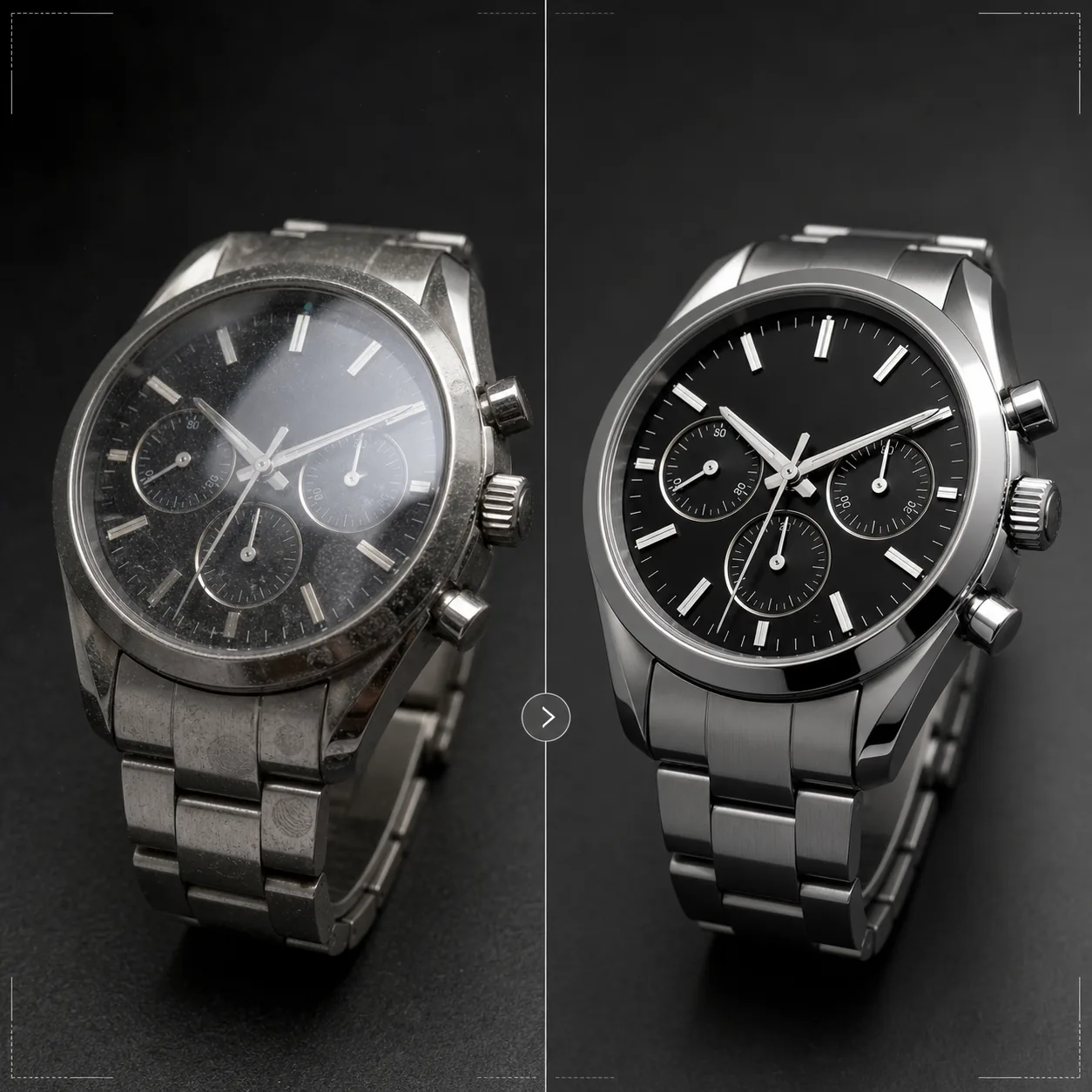
Представьте часы с той точностью, которой они заслуживают. Этот шаблон повышает резкость деталей циферблата и меток, контролирует блики на стекле, подчёркивает металлические текстуры браслета и корпуса, удаляет пыль и отпечатки пальцев с полированных поверхностей и готовит изображение для премиальных карточек товаров e-commerce и каталогов.
Попробовать этот шаблон бесплатноE-commerce template preview
Что делает этот шаблон
Решает специфические задачи съёмки часов, где мельчайшие детали чрезвычайно важны для покупателей. Циферблаты часов содержат сложные детали — метки, дополнительные циферблаты, окошки даты, печатный текст — которые должны быть предельно резкими, чтобы изображение передавало качество. Этот шаблон использует AI Enhance для выборочного повышения резкости элементов циферблата, сохраняя естественность изображения в целом. Magic Eraser удаляет частицы пыли, отпечатки пальцев на полированных корпусах и мелкие царапины на стёклах, заметные при сильном увеличении. Блики на стекле уменьшаются, чтобы циферблат под ним был хорошо виден, а металлические текстуры корпусов и браслетов подчёркиваются, чтобы показать разницу между матовой и полированной отделкой, которую покупатели часов тщательно оценивают.
Настройки шаблона
| Резкость циферблата | Выборочное усиление микродеталей (метки, стрелки, текст) |
| Блики на стекле | Уменьшение бликов и отражений на сапфировом/минеральном стекле |
| Металлическая текстура | Усиление различия между матовыми и полированными поверхностями |
| Очистка поверхности | Удаление пыли, отпечатков пальцев и мелких царапин |
| Разрешение вывода | 4000 × 4000 px (макродетали для просмотра с увеличением) |
| Фон | Чисто белый, сплошной тёмный или градиент (стандарт премиальных товаров) |
Как использовать этот шаблон
Загрузите фото ваших часов
Загрузите фотографию часов — на запястье, в раскладке flat lay или студийную съёмку на подушке либо подставке. Также поддерживаются макроснимки циферблата крупным планом и виды корпуса сбоку. Для лучшего результата снимайте часы в положении стрелок 10:10 — это отраслевой стандарт, который обрамляет логотип и создаёт сбалансированную, симметричную композицию.
Усиление циферблата и деталей
AI Enhance выборочно повышает резкость циферблата — часовые метки, стрелки, дополнительные циферблаты, окошко даты и печатный текст становятся чёткими и читаемыми. Люминесцентные точки на метках слегка подсвечиваются, чтобы подчеркнуть их присутствие. Усиление учитывает глубину резкости вашего исходного снимка, оставляя намеренно размытые области мягкими.
Очистка поверхности и контроль бликов
Magic Eraser удаляет частицы пыли на циферблате, отпечатки пальцев на корпусе и браслете, а также мелкие царапины на поверхности стекла. Блики на стекле уменьшаются, чтобы открыть весь циферблат под ним, сохраняя при этом достаточно отражения, чтобы передать присутствие стекла — полное удаление бликов делает часы неестественно плоскими.
Экспорт для карточки или каталога
Скачайте в 4000 × 4000 px для карточек e-commerce с возможностью увеличения или в разрешении для печати для каталогов и рекламы. Варианты фона включают чисто белый для карточек на маркетплейсах, сплошной тёмный для эстетики премиальных брендов и градиенты для редакционного использования.
Профессиональные советы для лучших результатов
- ✓Снимайте часы со стрелками, установленными на 10:10 или 10:08 — это положение обрамляет логотип бренда между стрелками, чётко показывает и окошко даты, и дополнительные циферблаты, и создаёт визуально сбалансированную композицию, используемую во всей часовой индустрии.
- ✓Используйте макрообъектив или режим крупного плана, чтобы запечатлеть максимум деталей циферблата. Шаблон может повысить резкость существующих деталей, но не может создать деталь, которая не была снята — исходное изображение с более высоким разрешением и большим количеством деталей циферблата даёт заметно лучший результат.
- ✓Для часов на металлическом браслете направьте свет так, чтобы показать разницу между матовыми и полированными поверхностями. Шаблон усиливает этот контраст, но если начать с уже видимого различия поверхностей, результат получается наиболее впечатляющим.
- ✓Протрите часы салфеткой из микрофибры непосредственно перед съёмкой. Хотя Magic Eraser удаляет пыль и отпечатки пальцев, чистая исходная поверхность означает меньше восстановления ИИ и более точное сохранение металлической текстуры в очищенных областях.
Инструменты
E-commerce workflow
Product photo hub
Use this template with the full ecommerce product photo workflow for marketplace backgrounds, cleanup, compression, resizing, and listing-ready exports.
View ecommerce product photo workflowЧастые вопросы
Можно ли исправить фото, где циферблат скрыт бликом?
+
Умеренные блики можно уменьшить, чтобы открыть детали циферблата под ними. Однако если блик настолько сильный, что на исходном фото не видно ни одной детали циферблата, ИИ не сможет создать деталь, которая никогда не была снята. Для лучшего результата снимайте, расположив источник света так, чтобы свести к минимуму прямое отражение на стекле.
Подходит ли это для смарт-часов?
+
Да. Экраны смарт-часов улучшаются за счёт повышения резкости элементов интерфейса и уменьшения отпечатков пальцев на стекле. Шаблон распознаёт как традиционные аналоговые циферблаты, так и цифровые дисплеи и соответственно корректирует подход к повышению резкости.
А как насчёт ремешков и браслетов часов?
+
Кожаные ремешки получают усиление текстуры, показывающее зернистость и детали строчки. Ремешки NATO и тканевые получают деликатное повышение резкости текстуры. Металлические браслеты получают усиление матовой/полированной поверхности. Часы целиком — корпус, стекло, циферблат и ремешок — обрабатываются как единый готовый продукт.
При продаже часов важна каждая деталь
Загрузите фотографии часов и получите кристально чёткие детали циферблата, контролируемые блики и качество изображения ювелирного уровня для ваших карточек товаров.
Попробовать бесплатноRelated templates
More e-commerce templates for your workflow.
Чисто белый фоновый шаблон для фотографий продукта. Amazon, Shopify и готовые к использованию настройки для рынка для чистых, профессиональных изображений продуктов, которые конвертируются.
Шаблон фотографии объявления, оптимизированный для Etsy. Преобразует снимки образа жизни в чистый белый фон с разрешением 2000 пикселей, улучшает детализацию изделий ручной работы и соответствует рекомендациям Etsy по изображениям.
Шаблон фотографии объявления, оптимизированный для eBay. Белый фон для изображений галереи, улучшение документации по условиям и макеты под разными углами, соответствующие стандартам изображений eBay.
Профессиональный шаблон для фотографии ювелирных изделий: колец, ожерелий и часов. Управляет отражениями, усиливает блеск драгоценных камней и обеспечивает готовые к использованию изображения на чистом фоне.
Профессиональный шаблон фотографий мебели для объявлений на рынке. Устраните беспорядок в комнате, покажите истинные размеры и представьте предметы на чистом фоне или в стилизованном контексте комнаты.
Очистите фотографии одежды в плоском виде с помощью удаления складок, удаления ворса, чистого белого фона и точного цвета ткани. Готов для Shopify, Amazon и бутиков.