
Реставрация старинных фотографий
Верните к жизни дорогие сердцу старые фотографии. Этот шаблон устраняет повреждения, которые десятилетия наносят печатным снимкам: удаляет царапины, заломы и пятна, восстанавливает цвет с выцветших отпечатков и даже преобразует оригиналы в сепии или черно-белые в реалистичный полный цвет, сохраняя при этом соответствующий эпохе характер изображения.
Попробовать этот шаблон бесплатноRestoration template preview
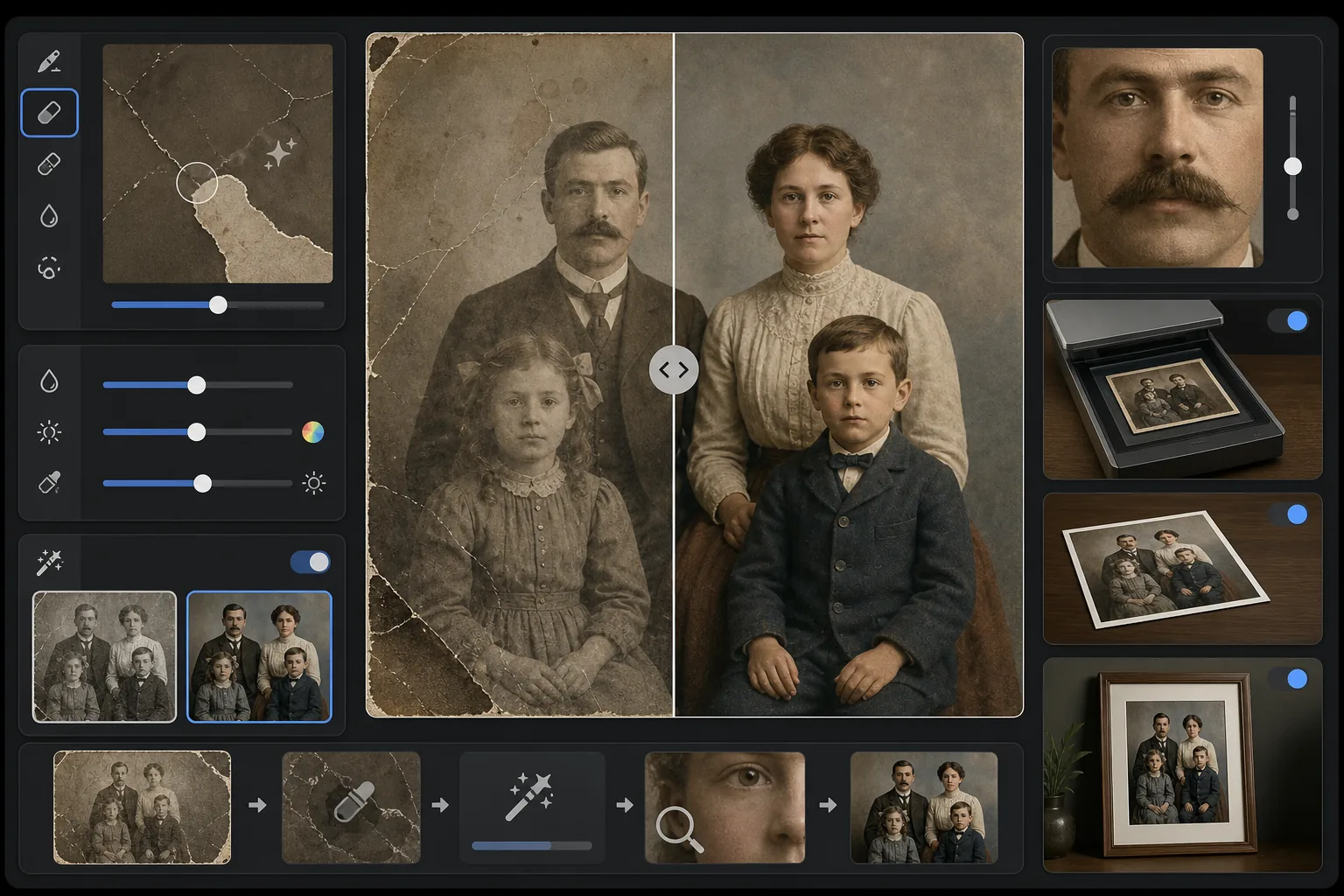
Что делает этот шаблон
Устраняет физические повреждения и следы старения на отсканированных старинных фотографиях. Magic Eraser удаляет царапины, заломы, следы воды, пятна плесени и рваные края, восстанавливая отсутствующее содержимое изображения из окружающего контекста. AI Enhance восстанавливает цвет, который сместился или выцвел за десятилетия, повышает резкость деталей, смягчившихся со временем, и может раскрашивать черно-белые или сепийные фотографии цветом, точно соответствующим эпохе оригинального изображения.
Настройки шаблона
| Устранение повреждений | Агрессивное — удаляет царапины, заломы, пятна и рваные края |
| Восстановление цвета | Полный спектр — возвращает выцветшим пигментам первоначальную насыщенность |
| Режим раскрашивания | Выкл., Деликатное или Полное (для черно-белых и сепийных оригиналов) |
| Восстановление деталей | Реконструирует лица и мелкие детали, смягченные возрастом и низким разрешением сканирования |
| Размер вывода | Соответствует исходным размерам скана с дополнительным увеличением 2× |
| Сохранение эпохи | Сохраняет характерную для эпохи текстуру зерна и тональное качество |
Как использовать этот шаблон
Отсканируйте или сфотографируйте оригинал
Отсканируйте старинную фотографию с разрешением 600 DPI или выше, чтобы получить максимум восстанавливаемых деталей. Если сканирование недоступно, сфотографируйте отпечаток на плоской поверхности при ровном рассеянном свете — избегайте вспышки, которая создает блики на глянцевых отпечатках.
Устраните физические повреждения
Magic Eraser определяет и удаляет царапины, заломы, повреждения от воды, пятна плесени и следы скотча. ИИ реконструирует отсутствующие области, анализируя окружающее содержимое изображения — заполняя рваные углы, соединяя трещины на лицах и устраняя обесцвечивание от пятен.
Восстановите или добавьте цвет
Для выцветших цветных отпечатков AI Enhance восстанавливает исходную цветовую палитру, обращая вспять конкретные способы, которыми различные слои красителя деградируют со временем. Для черно-белых или сепийных оригиналов дополнительное раскрашивание добавляет реалистичный цвет на основе контекстных подсказок, таких как тона кожи, листва, небо и узоры тканей.
Повысьте резкость и экспортируйте
Восстановление деталей повышает резкость черт лица, текста и мелких деталей, которые десятилетия старения смягчили. Экспортируйте в исходном разрешении скана или увеличьте до 2× для печати в размерах, превышающих оригинал.
Профессиональные советы для лучших результатов
- ✓Сканируйте с самым высоким разрешением, которое поддерживает ваш сканер — минимум 600 DPI, предпочтительно 1200 DPI. Чем больше захваченных деталей, тем больше материала у ИИ для реконструкции поврежденных областей.
- ✓Если фотография застряла в рамке или альбоме, сфотографируйте ее на месте, а не рискуйте порвать — шаблон может удалить края рамки и артефакты страниц альбома.
- ✓Для раскрашивания исторических фотографий по возможности укажите контекст об эпохе (десятилетии) и месте — цвета одежды, автомобилей и строительных материалов значительно различались в зависимости от периода и региона.
- ✓Сначала обработайте самую поврежденную область фотографии в качестве теста перед запуском полной реставрации — это позволит убедиться, что качество реконструкции соответствует вашим ожиданиям.
Инструменты
Частые вопросы
Может ли он восстановить фотографии с недостающими частями, например оторванными углами?
+
Да. ИИ реконструирует недостающие области, используя контекст окружающего изображения. Для фонов, таких как небо, стены и листва, результаты безупречны. Для недостающих частей лиц или важных деталей реконструкция впечатляет, но может потребовать незначительной ручной корректировки критически важных элементов.
Насколько точно раскрашивание черно-белых фотографий?
+
Раскрашивание использует контекстный анализ для назначения реалистичных цветов — тона кожи, синева неба, зелень листвы и распространенные цвета тканей очень точны. Конкретные цвета объектов, которые ИИ не может определить из контекста (например, точный оттенок платья), будут правдоподобными, но не гарантированно точными.
Удалит ли реставрация винтажный характер фотографии?
+
Нет. Настройка сохранения эпохи сохраняет характерную для эпохи текстуру зерна и тональное качество, которые придают старинным фотографиям их характер. Физические повреждения, такие как царапины и пятна, удаляются, но фотографическое качество оригинальной эпохи сохраняется — фотография 1940-х годов по-прежнему выглядит как фотография 1940-х годов, только без повреждений.
Спасите воспоминания вашей семьи
Загрузите скан любой поврежденной, выцветшей или стареющей фотографии и наблюдайте, как исчезают десятилетия износа. Царапины удалены, цвет восстановлен, воспоминания сохранены.
Попробовать бесплатно