
Фото для блога о путешествиях
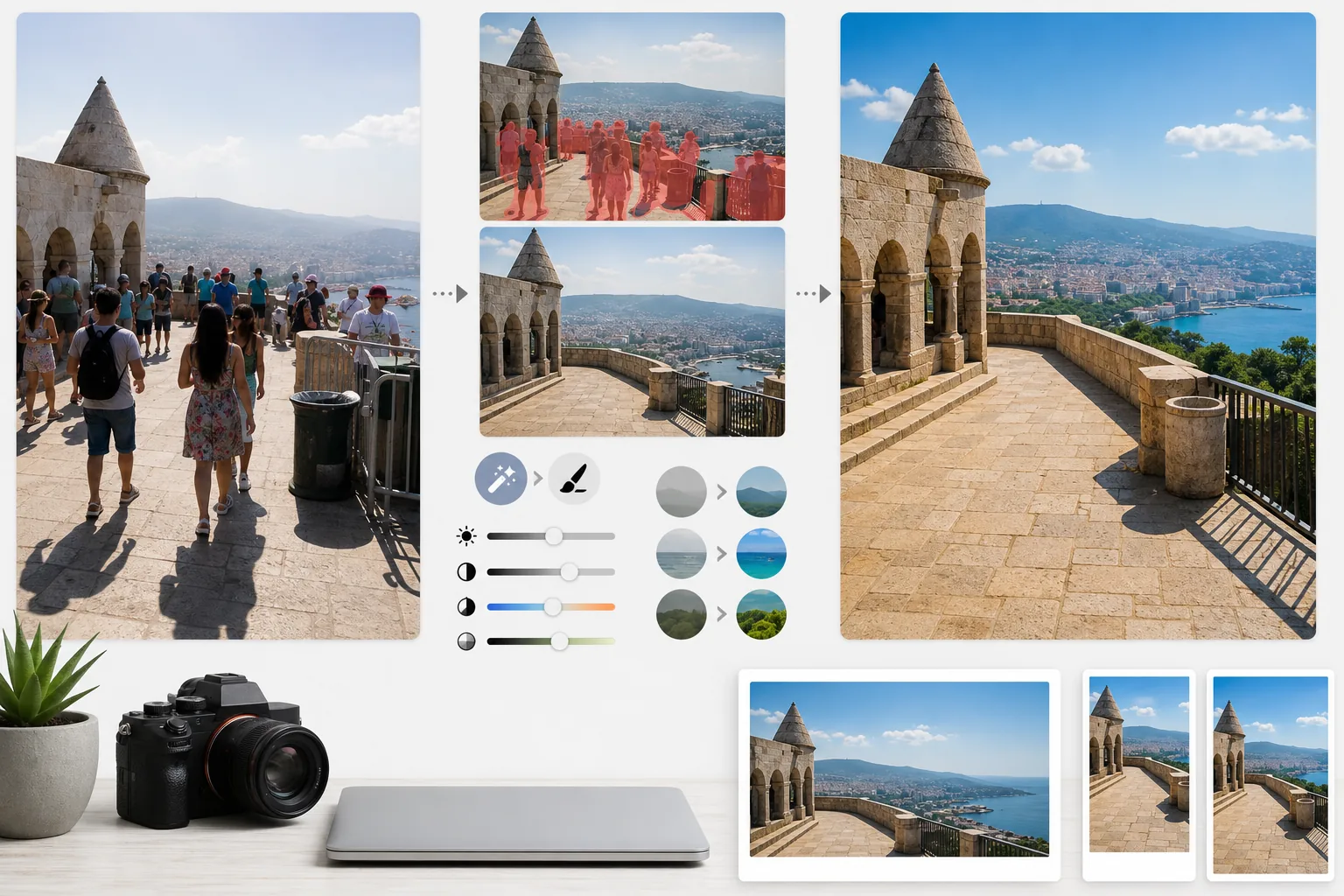
Превратите перегруженные туристами снимки из поездок в фотографии достопримечательностей издательского качества. Этот шаблон удаляет туристов, случайных людей в кадре и визуальный мусор со снимков достопримечательностей и пейзажей с помощью Magic Eraser, а затем применяет AI Enhance для коррекции сложных условий экспозиции, типичных для тревел-фотографии, — резкого полуденного солнца, тёмных интерьеров храмов, закатов в контровом свете — и усиливает естественные цвета, создавая снимки, после которых читателям хочется забронировать поездку.
Попробовать этот шаблон бесплатноPersonal template preview
Что делает этот шаблон
Решает две главные проблемы тревел-фотографии: толпы и плохой свет. Magic Eraser удаляет туристов, стоящих перед памятниками, случайных людей, проходящих через кадр, и визуальный мусор вроде урн, строительных ограждений и временных вывесок, разрушающих атмосферу места. ИИ восстанавливает архитектуру, мостовую и пейзаж за удалёнными людьми и объектами, опираясь на окружающий контекст. Затем AI Enhance справляется с уникальными для путешествий задачами экспозиции — интерьеры соборов и храмов, где окна засвечены, а тени черны, резкое полуденное солнце, обесцвечивающее краски в тропических направлениях, и закатные сцены в контровом свете, где передний план превращается в силуэт. Цвета усиливаются, чтобы отразить, как место на самом деле выглядит для человеческого глаза, что камеры стабильно недопередают в динамическом диапазоне.
Настройки шаблона
| Удаление туристов | Автоматическое обнаружение и удаление людей со снимков достопримечательностей и пейзажей |
| Коррекция экспозиции | Восстановление светов и теней в стиле HDR для сложного освещения |
| Усиление цвета | Усиление естественной насыщенности (небо, вода, листва) без искусственного вида |
| Удаление дымки | Пробивает атмосферную дымку для более чётких дальних пейзажей |
| Разрешение на выходе | 4000px по длинной стороне (заглавные изображения блога в качестве Retina) |
Как использовать этот шаблон
Загрузите своё тревел-фото
Загрузите любое тревел-фото — переполненные достопримечательности, широкие пейзажи, уличные сцены, интерьерную архитектуру. Шаблон работает с JPEG со смартфонов, беззеркальных и экшн-камер. Также принимаются файлы RAW для максимальной гибкости редактирования.
Удалите толпы и лишние детали
Magic Eraser обнаруживает людей в кадре и удаляет их. Вы можете удалить всех людей, оставить определённых (себя или спутников по поездке) либо выборочно удалить только тех, кто закрывает ключевые архитектурные или пейзажные элементы. ИИ заполняет недостающие области восстановленной землёй, стенами и пейзажем.
Усильте свет и цвет
AI Enhance применяет обработку в стиле HDR, восстанавливающую засвеченное небо и высветляющую глубокие тени — типичные для интерьеров храмов и узких европейских улочек. Цвета усиливаются, чтобы соответствовать тому, что видели ваши глаза на месте, особенно синева неба, бирюза океана и зелень листвы. Атмосферная дымка уменьшается для более чётких горных и городских панорам.
Экспортируйте для блога и соцсетей
Скачивайте в 4000px по длинной стороне для заглавных изображений блога в качестве Retina или в размерах, специфичных для Instagram, Pinterest и Facebook. Файл сохраняет оптимизированные данные EXIF для фотографов, добавляющих геометки к своим работам.
Профессиональные советы для лучшего результата
- ✓Делайте несколько снимков одной и той же сцены с интервалом в несколько секунд. Когда туристы перемещаются между кадрами, у ИИ появляется справочная информация о земле и стенах за ними, что даёт более чистое восстановление, чем один кадр.
- ✓Для интерьеров церквей, храмов и музеев слегка переэкспонируйте фото при съёмке. ИИ проще восстановить яркие света, чем высветлить чрезвычайно тёмные тени, а интерьерные снимки по умолчанию обычно недоэкспонированы.
- ✓По возможности снимайте пейзажи в золотой или синий час. AI Enhance может усилить цвета в плоском полуденном свете, но направленный тёплый свет золотого часа создаёт в пейзажах тени и объём, которые не воспроизвести никакой цветокоррекцией.
Инструменты
Частые вопросы
Могу ли я остаться на фото, но удалить других туристов?
+
Да. Вы можете отметить себя или своих спутников как защищаемые объекты. ИИ удаляет из сцены всех остальных, сохраняя защищённых людей на месте с их исходным положением, освещением и тенью.
Насколько хорошо это работает с очень переполненными сценами?
+
Лучше всего работает, когда толпа занимает менее примерно 40% кадра. Чрезвычайно переполненные сцены — например, забитая площадь, где между людьми не видно земли, — дают слишком мало фоновых ориентиров для чистого восстановления. В таких случаях частичное удаление передних рядов часто даёт убедительный результат.
Сделает ли удаление дымки фото неестественным?
+
Уменьшение дымки откалибровано для естественного результата. Оно убирает сине-серое атмосферное рассеяние, скрывающее далёкие горы и здания, но сохраняет тонкую воздушную перспективу, придающую глубину пейзажным фото. Результат выглядит как съёмка в ясный, прозрачный день, а не как фильтрованное или чрезмерно обработанное изображение.
Покажите каждое место назначения в его лучшем виде, без толп
Загрузите тревел-фото и получите изображения без туристов с усиленными цветами, после которых вашим читателям захочется собирать чемоданы.
Попробовать бесплатноRelated templates
More personal templates for your workflow.
Создавайте фотографии, соответствующие требованиям для виз, водительских прав и национальных удостоверений личности, с правильным цветом фона, размером головы и требованиями к выражению лица.
Улучшите выпускные фотографии с помощью очистки фона, кепки и мантии Color correction, удаления дефектов и повышения резкости рамок и объявлений перед печатью.
Улучшайте фотографии концертов и мероприятий с помощью подавления шума при слабом освещении, освещения сцены цветокоррекции, устранения отвлекающих факторов толпы и восстановления деталей из снимков в темных местах.
Создавайте красивые фотографии открыток для новорожденных с мягким фоном, нежной цветокоррекцией, устранением беспорядка в больнице и готовыми к печати размерами для отправки по почте.
Подготовьте семейные и портретные фотографии для праздничных поздравительных открыток с праздничным фоном, теплой цветовой градацией, эффектами снега и стандартными размерами открыток для печати.
Восстанавливайте и улучшайте памятные фотографии с помощью нежной ретуши, упрощения фона, теплой уважительной цветокоррекции и готовых к печати размеров для услуг.