
Пейзаж, готовый к печати
Превратите пейзажные фотографии в готовые к широкоформатной печати файлы с разрешением 300 DPI. Этот шаблон увеличивает масштаб изображений для отпечатков размером 16x20 дюймов и больше, удаляя при этом визуальный мусор, такой как линии электропередач, дорожные знаки и заборы, отвлекающие от природного пейзажа. Цветокоррекция оптимизирована для холста, металла и художественной бумаги.
Попробовать этот шаблон бесплатноPhotography template preview
Что делает этот шаблон
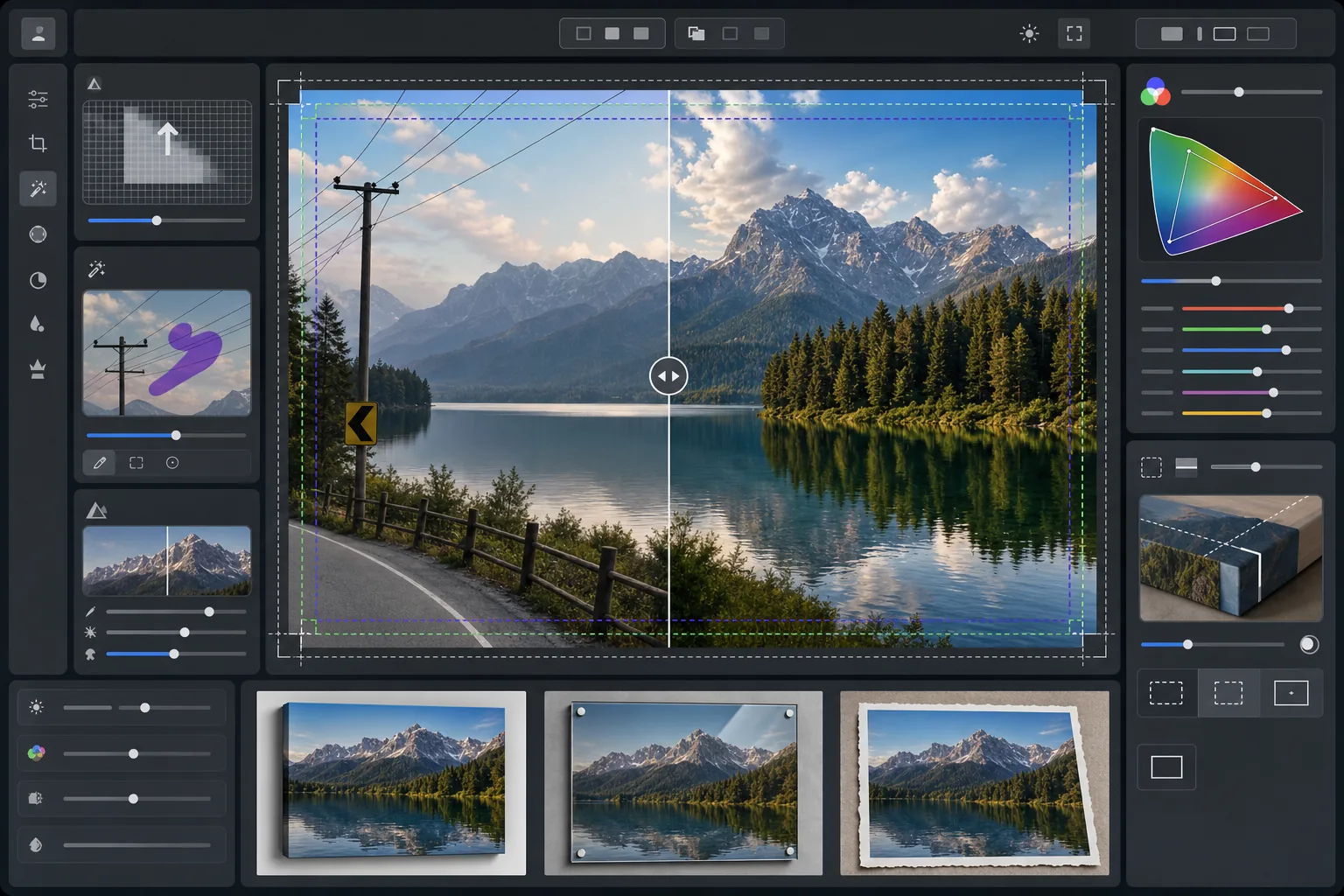
Подготавливает пейзажные фотографии к профессиональной широкоформатной печати, увеличивая разрешение до требований 300 DPI при размере 16x20 дюймов и больше. AI Enhance увеличивает количество пикселей без появления артефактов, сохраняя мелкие детали листвы, текстуры воды и облачные образования. Magic Eraser удаляет линии электропередач, столбы, дорожные знаки, заборы и другие искусственные помехи, нарушающие естественную композицию. Цвет настраивается под более широкий охват и разные отражающие свойства холста на подрамнике, алюминиевых металлических отпечатков и художественной хлопковой бумаги.
Настройки шаблона
| Цель увеличения | Минимум 6000×4000px (300 DPI при 20×13 дюймах) |
| Резкость | Оптимизированная для печати нерезкая маска (радиус 1,2, величина 80%) |
| Цветовой профиль | ProPhoto RGB (максимальный охват для художественной печати) |
| Динамический диапазон | Тени +0,8 EV, восстановление светов -0,3 EV |
| Шумоподавление | С учетом яркости (сохраняет зерно на небе, сглаживает листву) |
| Формат вывода | 16-битный TIFF со встроенным профилем ICC |
Как использовать этот шаблон
Загрузите вашу пейзажную фотографию
Загрузите пейзажное изображение с любой камеры или смартфона. ИИ анализирует исходное разрешение и рассчитывает коэффициент увеличения, необходимый для достижения 300 DPI при целевом размере печати. Даже 12-мегапиксельные фотографии со смартфона можно чисто увеличить для отпечатков 16x20.
Удалите визуальные помехи
Magic Eraser распознает и удаляет линии электропередач, столбы, дорожные знаки, заборы, мусор и другие искусственные элементы, отвлекающие от природной сцены. ИИ восстанавливает градиенты неба, кромки деревьев и текстуры рельефа за удаленными объектами.
Улучшите для вывода на печать
AI Enhance увеличивает изображение до целевого разрешения, повышая резкость с учетом расстояния просмотра отпечатка. Цвет переводится в охват ProPhoto RGB, чтобы сохранить полный диапазон зеленых, синих и закатных тонов, которые обрезает потребительский sRGB.
Экспортируйте для вашей основы печати
Скачайте 16-битный TIFF со встроенным профилем ICC, соответствующим вашему выводу — холст на подрамнике, металлический отпечаток или художественная бумага. Файл включает поля под обрез и метки реза, необходимые большинству профессиональных типографий.
Профессиональные советы для лучших результатов
- ✓Для холста на подрамнике добавьте по 1,5 дюйма припуска под обрез с каждой стороны, чтобы изображение оборачивалось вокруг брусков подрамника, не врезаясь в основную композицию. Шаблон включает в вывод направляющую безопасной зоны для галерейной натяжки.
- ✓Металлические отпечатки отражают свет и усиливают контраст, поэтому уменьшите ползунок контраста на 10-15% по сравнению с тем, что хорошо выглядит на экране. Тени, кажущиеся детализированными на мониторе, на алюминиевой основе могут полностью заплыть.
- ✓При удалении длинных линий электропередач, пересекающих весь кадр, ИИ обрабатывает их по сегментам. Для самого чистого результата используйте исходное фото, где небо за линиями имеет плавный градиент, а не сложные облачные узоры.
- ✓Обрабатывайте в самом большом размере, который вы когда-либо можете напечатать, даже если ваш текущий заказ меньше. Понижение разрешения файла 24x36 до 16x20 происходит без потерь, но вы не сможете позже увеличить файл 16x20 до 24x36 без потери качества.
Инструменты
Частые вопросы
Какого размера я могу напечатать с фотографии со смартфона?
+
12-мегапиксельную фотографию со смартфона (4032x3024) можно чисто увеличить до 8000x6000 пикселей, что поддерживает печать с разрешением 300 DPI при размере 26x20 дюймов. На стандартных расстояниях просмотра больших отпечатков (1–1,2 метра) даже отпечатки 24x36 дюймов выглядят четко из увеличенных ИИ оригиналов со смартфона.
Останутся ли видимые следы после удаления линий электропередач?
+
ИИ восстанавливает градиент неба, кромки облаков и линию деревьев за удаленными линиями электропередач, используя данные окружающих пикселей. При ровном небе удаление практически незаметно. Сложное небо с эффектными облаками может показывать едва заметное смешивание при очень близком рассмотрении, но на обычных расстояниях просмотра отпечатка результат чистый.
Какой формат файла отправить в типографию?
+
Большинство профессиональных типографий принимают 16-битные файлы TIFF со встроенными профилями ICC, что является выводом по умолчанию для этого шаблона. Если ваша типография запрашивает JPEG, экспортируйте с качеством 100 в цветовом пространстве Adobe RGB. Избегайте sRGB для широкоформатной печати, так как он обрезает яркие зеленые и глубокие синие тона, распространенные в пейзажной фотографии.
Печатайте свои пейзажи любого размера с уверенностью
Загрузите пейзажную фотографию и получите готовый к печати файл с удаленными линиями электропередач, увеличенным разрешением и цветом, оптимизированным для холста, металла или художественной бумаги.
Попробовать бесплатно