
Фотография продукта сумки
Создавайте фотографии продукта класса люкс для сумок, клатчей, кошельков и кожаных изделий. Этот шаблон отделяет сумку от любой поверхности, заменяет фон чистой студийной или лайфстайл-обстановкой, подчёркивает зернистость кожи и детали строчки, а также делает чётче элементы фурнитуры, такие как молнии, застёжки и пряжки, чтобы покупатели могли оценить мастерство изготовления со всех ракурсов.
Попробовать этот шаблон бесплатноE-commerce template preview
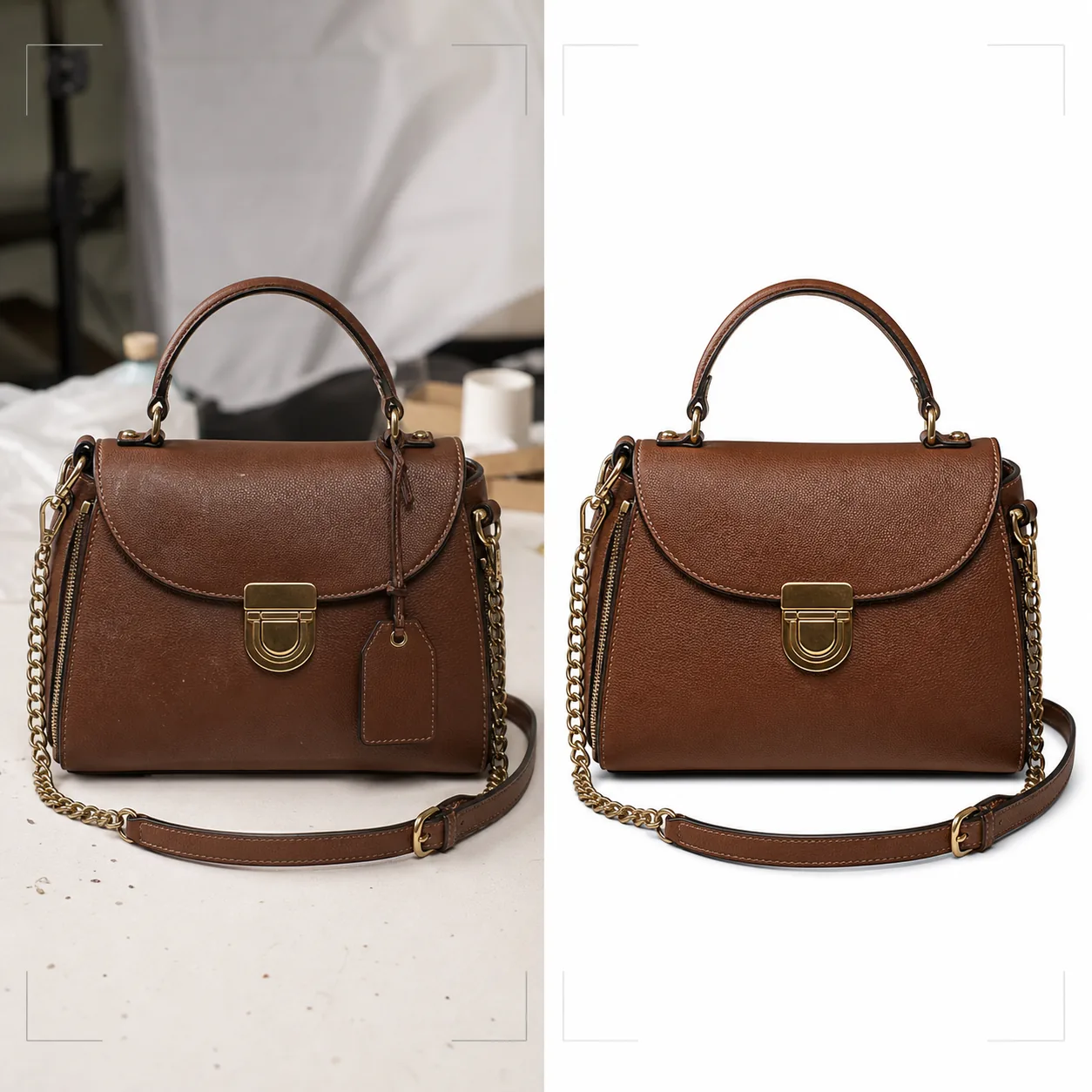
Что делает этот шаблон
Обеспечивает визуальный стандарт, который требуют бренды сумок класса люкс и среднего сегмента для онлайн-розницы. Background Eraser отделяет сумку от столешниц, съёмочных поверхностей и студийного беспорядка, заменяя окружение чисто белым фоном для соответствия требованиям маркетплейсов или стилизованными фонами, отвечающими эстетике бренда. Magic Eraser удаляет частицы пыли, отпечатки пальцев на фурнитуре и ценники, упущенные во время съёмки. Улучшение с помощью ИИ подчёркивает зернистость кожи, плетение холста или текстуру ткани, которые передают качество, а элементы фурнитуры — молнии, застёжки, цепочные ремни и логотипные таблички — делаются чётче, чтобы покупатели могли оценить качество отделки, как если бы держали сумку в бутике.
Настройки шаблона
| Фон | Чисто белый, кремовый или стилизованная поверхность (мрамор, лён, деревянная полка) |
| Улучшение кожи | Повышение чёткости текстуры зернистости с сохранением естественного блеска |
| Детализация фурнитуры | Повышение чёткости молний, застёжек, пряжек и металлических логотипных табличек |
| Удаление пыли и отпечатков пальцев | Автоматическое обнаружение и удаление частиц на поверхности и пятен на фурнитуре |
| Стиль тени | Естественная падающая тень или отражённая тень на белом фоне |
| Разрешение вывода | 3000×3000px (1:1 для маркетплейсов) или 2400×3200px (3:4 для сайтов брендов) |
Как использовать этот шаблон
Загрузите фотографию вашей сумки
Загрузите фотографию продукта сумки — анфас, под углом для передачи объёма или в раскладке с открытой сумкой. Включите снимки с нескольких ракурсов для полного описания товара. Шаблон обрабатывает фотографии с камер телефонов, студийных установок и зеркальных систем.
Очистите фон и удалите дефекты
Background Eraser отделяет сумку от съёмочной поверхности с помощью определения краёв, которое сохраняет мягкие кожаные края, свисающие ремни и детали цепочки. Magic Eraser удаляет пылинки на коже, пятна от отпечатков пальцев на полированной фурнитуре и любые ценники или защитные датчики, ещё прикреплённые к изделию.
Улучшите материалы и фурнитуру
Текстура кожи делается чётче, выявляя рисунки зернистости и строчку. Элементы фурнитуры улучшаются для большей ясности — покупатели могут увидеть, являются ли молнии YKK, выполнены ли застёжки из массивной латуни или покрытия, и насколько строчка ровная и плотная. Цветокоррекция обеспечивает отображение кожи в её истинном оттенке окраски.
Экспортируйте для электронной коммерции
Скачайте в 3000×3000px для Amazon, eBay и Poshmark или в пользовательских пропорциях для сайта вашего бренда. Версия с чисто белым фоном соответствует требованиям к изображениям маркетплейсов. Версии с лайфстайл-фоном подходят для социальных сетей и email-кампаний.
Профессиональные советы для лучших результатов
- ✓Перед съёмкой набейте сумку папиросной бумагой, чтобы придать ей задуманную форму и структуру. Пустая сумка проседает и складывается так, что выглядит менее премиально, чем вживую.
- ✓Снимайте крупные планы фурнитуры отдельно. Хотя шаблон улучшает фурнитуру на снимках всей сумки, отдельный крупный план застёжки, бегунка молнии и логотипной таблички даёт покупателям опыт детального осмотра, который они получают в физическом магазине.
- ✓Перед съёмкой протрите фурнитуру салфеткой из микрофибры. Шаблон удаляет отпечатки пальцев цифровым способом, но сильные загрязнения на полированной золотой или серебряной фурнитуре могут снизить чёткость нижележащего металлического покрытия даже после очистки ИИ.
Инструменты
E-commerce workflow
Product photo hub
Use this template with the full ecommerce product photo workflow for marketplace backgrounds, cleanup, compression, resizing, and listing-ready exports.
View ecommerce product photo workflowЧастые вопросы
Справится ли это с сумками из холста или нейлона?
+
Да. Шаблон определяет тип материала и соответственно настраивает улучшение текстуры. Текстуры холщового плетения и нейлона рипстоп делаются чётче иначе, чем зернистость кожи, чтобы подчеркнуть характерные качества каждого материала.
Сохранится ли деталь цепочного ремня при удалении фона?
+
Да. Определение краёв откалибровано для тонких металлических деталей, таких как звенья цепи, тонкие кожаные ремешки и свисающие бегунки молний. Эти элементы сохраняются с чистыми краями на новом фоне.
Могу ли я добавить отражённую тень на белом фоне?
+
Да. Шаблон предлагает как естественную падающую тень (как будто сумка стоит на белой поверхности, освещённой сверху), так и отражённую тень (зеркальное затухание под сумкой), часто используемую в съёмке продуктов класса люкс.
Представьте каждую сумку с детализацией бутикового уровня
Загрузите фотографии сумок и получите изображения продукта класса люкс с улучшенной текстурой кожи, чёткой фурнитурой и чистым фоном.
Попробовать бесплатноRelated templates
More e-commerce templates for your workflow.
Чисто белый фоновый шаблон для фотографий продукта. Amazon, Shopify и готовые к использованию настройки для рынка для чистых, профессиональных изображений продуктов, которые конвертируются.
Шаблон фотографии объявления, оптимизированный для Etsy. Преобразует снимки образа жизни в чистый белый фон с разрешением 2000 пикселей, улучшает детализацию изделий ручной работы и соответствует рекомендациям Etsy по изображениям.
Шаблон фотографии объявления, оптимизированный для eBay. Белый фон для изображений галереи, улучшение документации по условиям и макеты под разными углами, соответствующие стандартам изображений eBay.
Профессиональный шаблон для фотографии ювелирных изделий: колец, ожерелий и часов. Управляет отражениями, усиливает блеск драгоценных камней и обеспечивает готовые к использованию изображения на чистом фоне.
Профессиональный шаблон фотографий мебели для объявлений на рынке. Устраните беспорядок в комнате, покажите истинные размеры и представьте предметы на чистом фоне или в стилизованном контексте комнаты.
Очистите фотографии одежды в плоском виде с помощью удаления складок, удаления ворса, чистого белого фона и точного цвета ткани. Готов для Shopify, Amazon и бутиков.