
Фото для модного лукбука
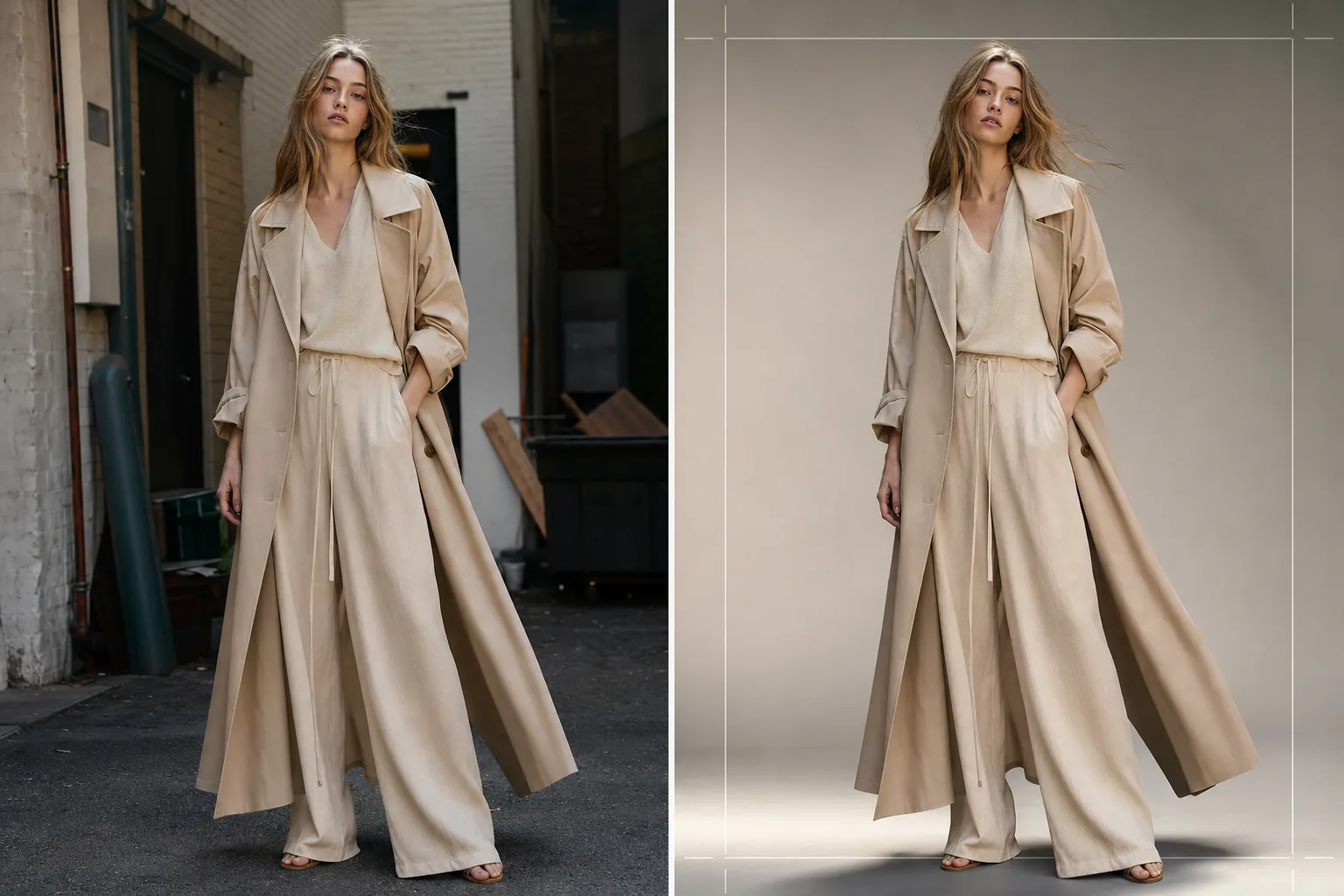
Создавайте изображения для лукбука редакционного качества для сезонных коллекций, оптовых презентаций и кампаний электронной коммерции. Этот шаблон удаляет фоны съёмочных локаций и заменяет их чистыми студийными задниками или тщательно подобранными редакционными окружениями, применяет цветокоррекцию модного уровня, которая подчёркивает ткани, и улучшает кожу естественной ретушью, сохраняя акцент на одежде.
Попробовать этот шаблон бесплатноFashion template preview
Что делает этот шаблон
Оптимизирует весь процесс постобработки лукбука — от исходной съёмки на локации или в студии до безупречных, единых по стилю бренда изображений. Background Eraser отделяет модель и одежду от любого окружения и предлагает замену на сплошные студийные цвета, градиентные переходы или подобранные редакционные задники, такие как бетонные стены, природная зелень или городские уличные сцены. AI Enhance применяет цветокоррекцию, адаптированную к типам тканей — тёплые тона для льна и шерсти землистых оттенков, более холодные тона для денима и технических тканей — чтобы текстура и драпировка одежды стали визуальным центром. Ретушь кожи лёгкая и редакционная, выравнивает временные несовершенства, не удаляя веснушки, родинки или естественные черты, которые сохраняют подлинность модели.
Настройки шаблона
| Стиль фона | Студийный белый, бесшовный серый, градиентный переход или редакционное окружение |
| Цветокоррекция | Модная редакционная (адаптивная к ткани: тёплая для натуральных, холодная для технических) |
| Ретушь кожи | Лёгкая редакционная (удаление недостатков, выравнивание тона, сохранение естественных черт) |
| Улучшение ткани | Повышение резкости текстуры и акцент на драпировке для видимости деталей одежды |
| Кадрирование и компоновка | В полный рост, по три четверти или крупный план с безопасным отступом для наложения текста |
| Разрешение вывода | 4000×6000px (вертикальная ориентация, готово к печати при 300 DPI) |
Как использовать этот шаблон
Загрузите фото для лукбука
Загрузите снимок модели в полный рост или по три четверти в представленной одежде. Подходят фотографии со студийных съёмок, уличных локаций и шоурумов. Шаблон обрабатывает RAW-конвертации, JPEG и TIFF высокого разрешения.
Замените или доработайте фон
Background Eraser отделяет модель с обнаружением краёв, достаточно точным для сохранения свободных краёв ткани, развевающихся волос и полупрозрачных материалов, таких как шифон. Замените фон на студийный цвет, соответствующий рекомендациям вашего бренда, или выберите редакционное окружение, дополняющее настроение коллекции.
Примените цветокоррекцию и улучшение
AI Enhance применяет цветокоррекцию, которая подчёркивает текстуру ткани и истинный цвет одежды. Ретушь кожи применяется с редакционной интенсивностью — выравнивает покраснения и временные недостатки, не сглаживая кожу и не удаляя естественные черты. Повышение резкости ткани выявляет узоры плетения, строчки и линии драпировки.
Экспортируйте для лукбука и электронной коммерции
Скачивайте в 4000×6000px для печатных лукбуков и PDF-файлов лайншитов или в оптимизированных для веба размерах для Shopify, оптовых порталов и социальных сетей. Шаблон может выводить единообразные кадрирования по всей коллекции для целостной вёрстки лукбука.
Профессиональные советы для лучших результатов
- ✓По возможности снимайте одежду на модели, а не на манекене. Удаление фона и ретушь кожи ИИ дают самые естественные результаты с реальными человеческими формами, и покупатели реагируют более положительно на изображения, показывающие, как ткань драпируется на теле.
- ✓Используйте резинку или заколку, чтобы убрать длинные волосы от линии горловины топов и жакетов во время съёмки. Удаление фона хорошо справляется с распущенными волосами, но волосы, закрывающие детали воротника и конструкцию горловины, скрывают именно те особенности, которые оценивают покупатели.
- ✓Сохраняйте единое направление освещения на всех кадрах коллекции. Когда ИИ применяет одну и ту же цветокоррекцию и направление света одинаково, лукбук воспринимается как целостная редакционная история, а не лоскутное одеяло из разных съёмок.
Инструменты
Частые вопросы
Можно ли использовать это для плоских снимков одежды?
+
Этот шаблон оптимизирован для съёмки на модели. Для плоских снимков одежды на столах или подвешенных композиций шаблон Clothing Flat Lay Cleanup обрабатывает такие композиции эффективнее, поскольку понимает геометрию ткани, разложенной плоско, а не задрапированной на теле.
Сохранятся ли полупрозрачные ткани, такие как шифон?
+
Да. Обнаружение краёв в Background Eraser сохраняет полупрозрачные края ткани. Заменяющий фон виден сквозь тонкий материал, как и оригинальное окружение, сохраняя задуманный силуэт и эффект наслоения одежды.
Можно ли подобрать фон точно под HEX-цвет моего бренда?
+
Да. Вы можете указать точный HEX-код для сплошного цвета фона, и ИИ создаст бесшовный задник этого цвета с соответствующим затуханием тени под ногами модели для устойчивого, реалистичного вида.
Создавайте безупречный лукбук с любой съёмочной локации
Загружайте снимки моделей и получайте единые по стилю бренда изображения лукбука редакционного качества, готовые для печати, веба и оптовых презентаций.
Попробовать бесплатно