
Улучшение стоматологической улыбки
Создавайте профессиональные стоматологические маркетинговые изображения «до и после», демонстрирующие работу вашей клиники. Этот шаблон применяет естественно выглядящее отбеливание зубов, удаляет клинический беспорядок на фоне, стандартизирует портретные фоны пациентов и сбалансирует жёсткое верхнее освещение, типичное для фотографий из кабинета.
Попробовать этот шаблон бесплатноProfessional template preview
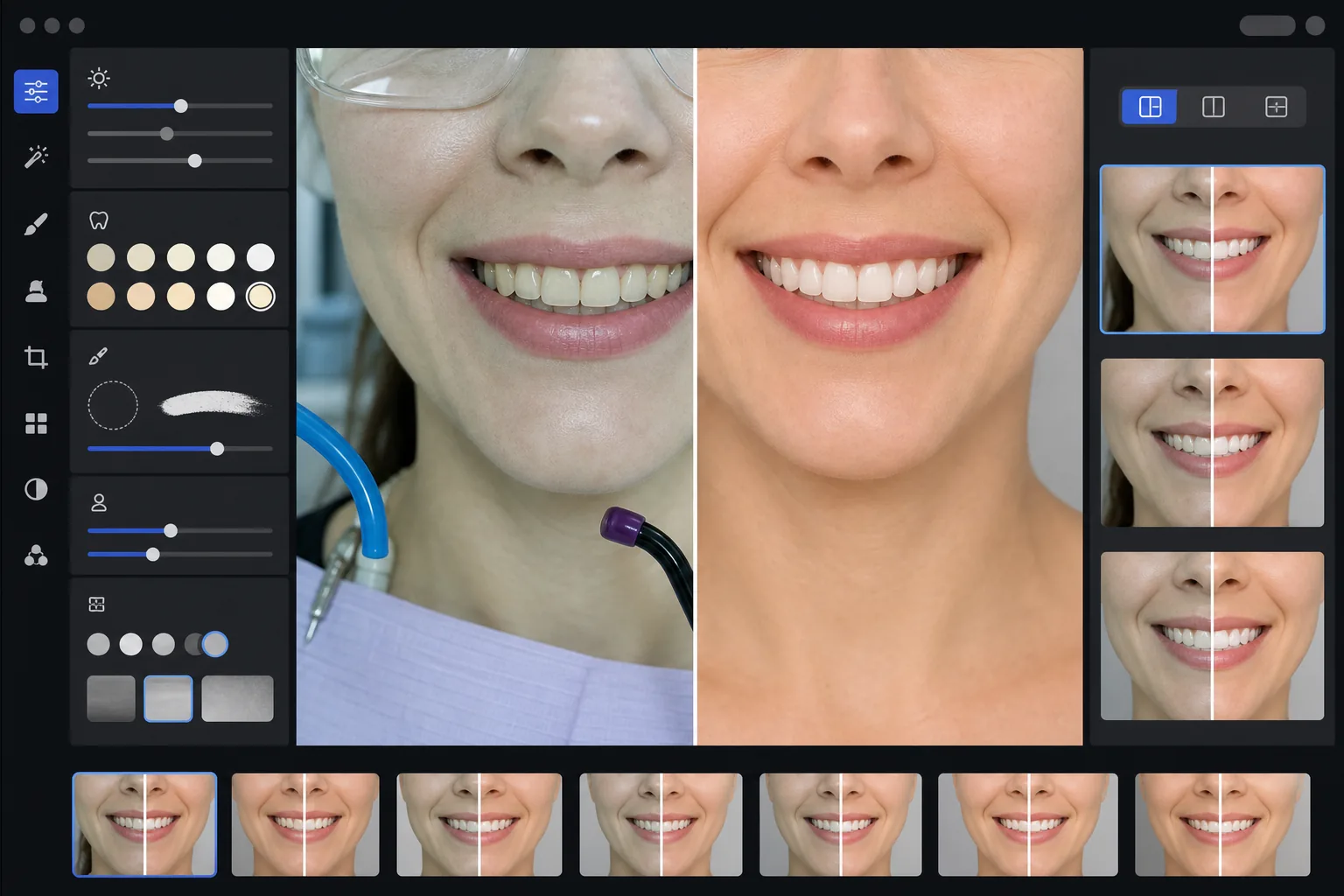
Что делает этот шаблон
Превращает клинические стоматологические фотографии в отточенные маркетинговые изображения для сайтов клиник, социальных сетей и материалов для информирования пациентов. AI Enhance исправляет невыгодный зелёно-белый оттенок освещения стоматологического кабинета и применяет тонкое отбеливание зубов, которое выглядит естественно, — осветляя зубы на 2–3 тона, не делая их искусственными. Magic Eraser удаляет клинические элементы фона, такие как отсасывающие шланги, фотополимеризационные лампы, следы артикуляционной бумаги на губах и защитные очки. Портретные фоны пациентов стандартизируются до чистого, единообразного фона по всей вашей галерее случаев.
Настройки шаблона
| Отбеливание зубов | Естественное осветление на +2…+3 тона (сохраняет прозрачность и текстуру эмали) |
| Коррекция освещения | Баланс дневного света стоматологического кабинета (удаляет зелёно-белый клинический оттенок) |
| Фон | Единообразный нейтрально-серый или белый фон с мягким виньетированием |
| Тон кожи | Коррекция теплоты вокруг рта (уменьшает бледность от стоматологического освещения) |
| Цвет губ | Естественное восстановление насыщенности (компенсирует выцветшее клиническое освещение) |
Как использовать этот шаблон
Загрузите клинические фотографии
Загрузите крупные планы улыбки, портретные фотографии «до и после» или внутриротовые снимки, сделанные в вашем кабинете. Шаблон работает с фотографиями со специализированных стоматологических камер, зеркальных камер с кольцевыми вспышками и снимками со смартфонов, сделанными под освещением кабинета.
Исправьте клиническое освещение
AI Enhance нейтрализует зелёно-белый цветовой оттенок от верхних ламп стоматологической установки, придаёт теплоту тонам кожи вокруг рта и восстанавливает естественный цвет губ. Цвет зубов слегка осветляется, чтобы показать результат наилучшим образом, оставаясь реалистичным и честным.
Очистите фон и отвлекающие элементы
Magic Eraser удаляет видимые шланги, наконечники фотополимеризационных ламп, зажимы для нагрудников, пятна артикуляционной бумаги на губах и клиническое оборудование на фоне. Фон заменяется единообразным нейтральным фоном, который совпадает во всех ваших парах «до и после».
Экспортируйте для маркетинга
Скачайте отдельные улучшенные изображения или коллажи «до и после» бок о бок. Результат масштабирован для галерей на сайтах, публикаций в Instagram, Google Business Profile и печатных брошюр для пациентов с разрешением, подходящим для печати размером 8x10 дюймов.
Профессиональные советы для лучших результатов
- ✓Для пар «до и после» фотографируйте изображения как до, так и после лечения с одного и того же угла, расстояния и положения освещения. Шаблон может исправить различия в экспозиции между ними, но сохранение исходного угла камеры даёт наиболее убедительное сравнение.
- ✓Отбеливание зубов намеренно сдержанное — оно осветляет на 2–3 тона vita, а не делает зубы бумажно-белыми. Это выглядит более естественно и убедительно для потенциальных пациентов. Если ваш реальный клинический результат впечатляющий, честная фотография с лёгким улучшением убедительнее, чем чрезмерно обработанное изображение.
- ✓Используйте щёчный ретрактор для внутриротовых снимков улыбки, чтобы получить наиболее полный вид стоматологической работы. Шаблон справляется с несколько клиническим видом снимков с ретрактором, придавая теплоту тонам кожи и кадрируя изображение для фокуса на зоне улыбки.
- ✓Обрабатывайте всю вашу галерею случаев в одном пакете, чтобы обеспечить единообразный цвет фона, яркость и теплоту во всех парах «до и после». Несовпадающее освещение между случаями на вашем сайте подрывает профессиональное впечатление.
Инструменты
Частые вопросы
Считается ли это вводящей в заблуждение стоматологической рекламой?
+
Улучшение отбеливания ограничено 2–3 тонами vita и сохраняет естественную прозрачность и поверхностную текстуру эмали. Это вполне укладывается в то, на что естественным образом влияют профессиональное фотоосвещение и баланс белого. Шаблон не изменяет форму зубов, выравнивание или контур десны — он только исправляет невыгодные цветовые эффекты клинического освещения, из-за которых результаты выглядят на фотографиях хуже, чем вживую.
Можно ли создать коллажи «до и после» бок о бок?
+
Да. Шаблон может выводить отдельные улучшенные изображения или создавать коллаж бок о бок с центральным разделителем, единообразным фоном и метками «до/после». Оба изображения в паре получают одинаковую обработку фона, поэтому сравнение выглядит визуально чистым и профессиональным.
Работает ли это с фотографиями внутриротовых камер?
+
Да. Изображения внутриротовых камер обычно имеют очень жёсткое, прямое освещение, которое обесцвечивает поверхностную текстуру. Шаблон восстанавливает детали эмали, исправляет экстремальный белый оттенок и регулирует контраст, чтобы естественно показать анатомию зуба. Результат более детализирован и выглядит естественнее, чем необработанный внутриротовой снимок.
Покажите свою стоматологическую работу с помощью профессиональных маркетинговых фотографий
Загрузите клинические фотографии и получите естественно улучшенные, единообразно оформленные изображения «до и после», готовые для вашего сайта, социальных сетей и брошюр для пациентов.
Попробовать бесплатноRelated templates
More professional templates for your workflow.
Профессиональный шаблон для LinkedIn. Чистый фон, естественное улучшение кожи и безупречный вид, который увеличивает количество просмотров профиля в 14 раз.
Создайте соответствующие фотографии на паспорт и визу дома. Белый фон, правильное соотношение размеров головы, стандарт США 2×2 дюйма и разрешение 600 точек на дюйм, соответствующее требованиям Государственного департамента.
Профессиональный шаблон для портретов актеров и моделей. Соответствуйте стандартам директора по кастингу благодаря готовым к печати материалам размером 8×10, естественной ретуши и чистому фону для заявок агентства.