
Удаление отражений с фотографий
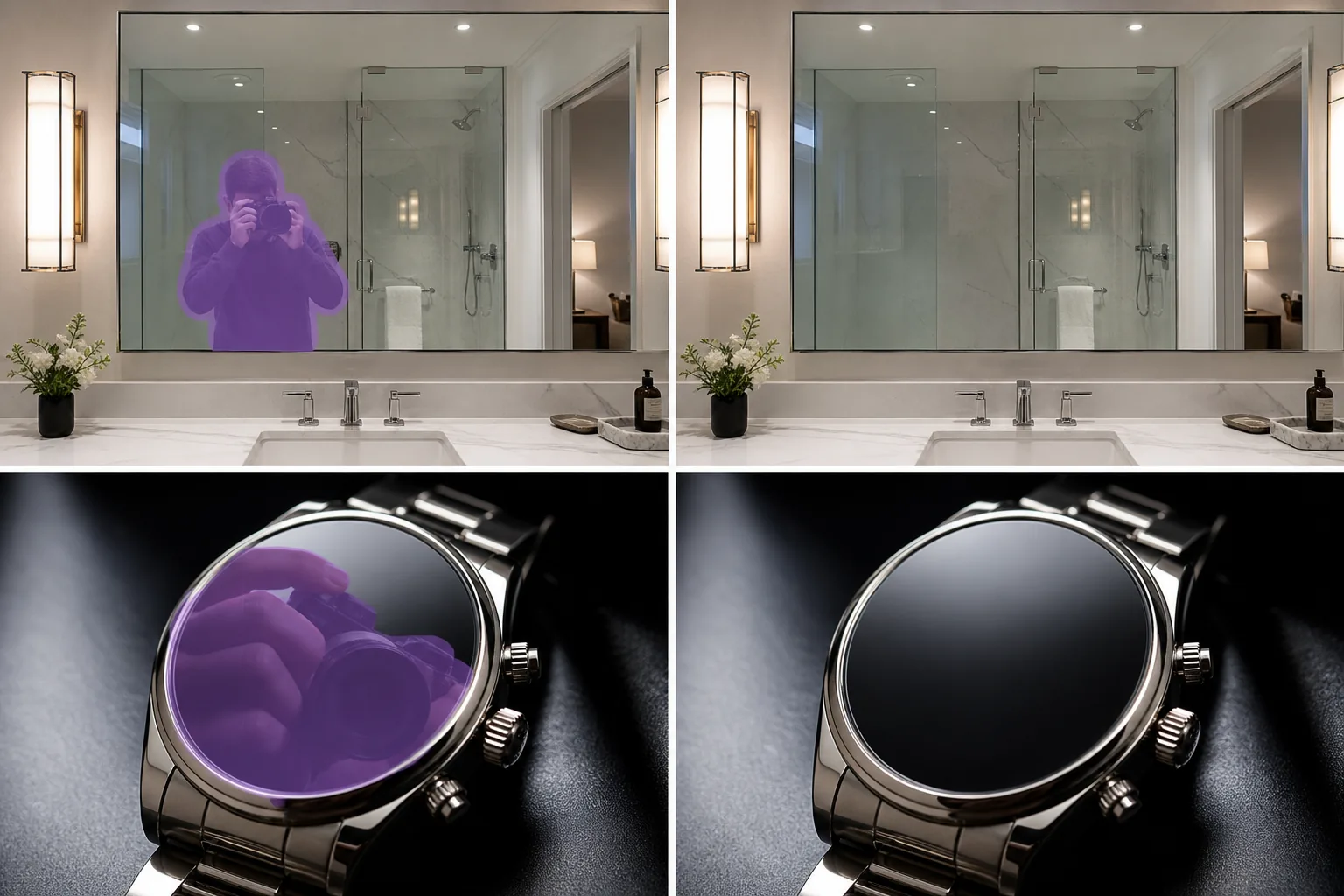
Избавьтесь от фотографа в зеркале в ванной, от камеры, отражающейся на циферблате, от комнаты, видимой в стекле фоторамки, от улицы, виднеющейся через витрину магазина. Magic Eraser AI Fill восстанавливает зеркало, стекло или полированную поверхность под нежелательным отражением за считанные секунды. Review edges and preserve realistic lighting because results vary by image.
Последнее обновление
Как убрать блик с фотографии
Soften distracting reflections by masking the reflected shape and edge transition, then review the surface texture before export. Keep some natural reflection on glossy glass, water, metal, or screens when it helps the photo stay believable. Чтобы убрать отражение с фотографии, откройте Magic Eraser в браузере, на iOS или Android, загрузите снимок, закрасьте кистью отражение — в зеркале, окне, очках или на глянцевой поверхности — и позвольте AI-функции Fill восстановить то, что на самом деле должно быть видно на этой поверхности. Это бесплатно и без регистрации. Это работает именно с отражениями (лицо или комната, отображённые на стекле) — что отличается от бликов, ярких белых засветов в местах, где свет попал прямо в объектив. Лучший результат получается, когда вокруг отражения остаётся часть настоящей поверхности, на которую AI может опереться; отражение, закрывающее всё стекло целиком, будет правдоподобно реконструировано, а не точно восстановлено. В сложных случаях закрашивайте кистью по частям и запускайте обработку повторно. Блики — это локальная передержка: датчик камеры записывает чистый белый цвет там, где свет отражается от поверхности. Отражение — это противоположная проблема: камера видит точное изображение того, чего она не должна видеть, например, фотографа, корпуса камеры, комнаты или улицы, нанесенного на зеркало или стеклянную поверхность. Ручное редактирование здесь необычайно сложно, поскольку в отражении есть реальные детали (лица, пальцы, логотипы брендов на корпусе камеры), которые штамп-клон не может легко заменить правдоподобным окружающим содержимым. AI Fill предсказывает, как должна выглядеть поверхность без отражения — посеребренная подложка зеркала, прозрачность стекла для всего, что находится за ним, полированная поверхность циферблата или чайника — и восстанавливает это на основе окружающего контекста.
Удалить отражение за три шага
- 1
Загрузите свою фотографию
Откройте Magic Eraser в Интернете, на iOS или Android и добавьте снимок в зеркало, фотографию в стеклянной рамке или фотографию продукта с нежелательным отражением. Поддерживаются JPEG, PNG, HEIC и WebP.
- 2
Нанесите кисть на отражение
Закрасьте фотографа, камеру, комнату, вид на улицу или руку, видимую на отражающей поверхности. Будьте щедры: кисть немного большего размера, чем само отражение, дает ИИ более четкие края для работы, чем плотный контур, прорисовывающий каждый палец и линзу.
- 3
Нажмите «Заполнить и уточнить».
AI Fill восстанавливает зеркало, стекло или полированную поверхность за считанные секунды. Осмотрите результат. Повторно обработайте оставшиеся ореолы или швы с помощью кисти для ретуши, а затем экспортируйте в полном разрешении для листинговой платформы, портфолио или каталога продуктов. Review edges, surface texture, and lighting before export.
Лучшее для
- Снимки зеркала в ванной и спальне, на которых в отражении виден фотограф или телефон.
- Объявления о недвижимости, где агент, камера или другая комната видны в зеркальных или стеклянных поверхностях.
- Фотографии часов и ювелирных изделий, на которых рука или камера фотографа отражаются на лице или ремешке.
- Произведения искусства, фотографии и плакаты в стеклянных рамах, изображающие комнату или фотографа в рамке.
- Снимки витрины и витрины, на которых на дисплее отражается уличное движение или пешеходы.
- Глянцевая керамика, полированные чайники, зеркальные солнцезащитные очки и хромированная бытовая техника со студийным оборудованием.
- Снимки экрана телефона, на которых на выключенном дисплее видны следы пальцев, блики экрана или комната позади.
- Фотографии автомобилей, на которых фотограф и окрестности видны в лакокрасочном покрытии или ободах колес.
Крайние случаи и советы
Reflection cleanup works best as reduction. Mask only the distracting reflection, preserve useful shine, and compare the result against the original so glass, water, or polished products do not look artificial. Удаление отражений работает лучше всего, когда за отражающей поверхностью имеется однородная подложка или сцена — посеребренное зеркало, равномерно тонированное окно, полированная поверхность продукта. Два типа сцен сложнее. Во-первых: когда отражение находится поверх деталей, которые на самом деле есть на поверхности (выгравированный текст на циферблате, выгравированный логотип на телефоне, декоративный узор на чайнике), ИИ может сгладить как отражение, так и лежащие под ним детали; кисть небольшими проходами и использование инструмента ретуши для восстановления утраченных деталей с использованием исходных цветов обычно решают эту проблему. Во-вторых: когда отражение — это весь объект фотографии (витрина магазина, где отражение — единственная видимая вещь, потому что внутри темно), за ним нет поверхности, которую ИИ мог бы восстановить, и правильный ответ — переснять под другим углом, а не бороться с существующими пикселями. Для коммерческой работы с высокими ставками, такой как каталоги продуктов, материалы MLS и редакционные фотографии, раскрывайте фотографии, очищенные искусственным интеллектом, в соответствии с соответствующим отраслевым стандартом (FTC для рекламных изображений, статья 12 Кодекса этики NAR для объявлений о недвижимости).
Часто задаваемые вопросы
- Бесплатно ли удалить отражение с фотографии?
- Да. Уровень бесплатного пользования Magic Eraser включает удаление отражений с помощью AI Fill с ежедневными ограничениями на использование. Обновление до Premium (29,99 долларов США в год) снимает ограничения и открывает возможность экспорта с более высоким разрешением, что полезно для каталогов продуктов, материалов MLS и печатных портфолио.
- Можно ли полностью убрать фотографа с зеркального снимка?
- Да, включая камеру и телефон в руках. Проведите кистью по всей отраженной фигуре — телу, рукам, камере, телефону, аксессуарам — и AI Fill восстановит поверхность зеркала там, где они были. Результат выглядит так, как будто комната была полностью сфотографирована снаружи зеркала. Для снимков зеркала в полный рост на объектах недвижимости, где фотограф неизбежен, это один из самых рентабельных вариантов редактирования фотографий с использованием искусственного интеллекта.
- А как насчет отражений на часах, чайниках или хромированных изделиях?
- Да, AI Fill хорошо с ними справляется, если основная поверхность продукта однородна — плоская полированная поверхность, равномерный хромированный изгиб, однотонная металлическая отделка. Нанесите кисть на отражение, и модель восстановит полированную поверхность, используя окружающие пиксели в качестве эталона. Выгравированные или вытравленные детали под отражением могут нуждаться в подкраске для восстановления.
- Будет ли очищенная поверхность выглядеть явно отредактированной?
- На большинстве фотографий нет — ИИ подбирает освещение, цветовую температуру и отражающий характер исходной поверхности. Места, которые он может показывать, — это поверхности с сильными направленными отражениями (зеркало, расположенное под определенным углом к окну, циферблат с единственным ярким бликом), где перестроенная область может не иметь такого же направления; Эту проблему обычно решает ретушь с помощью кисти с небольшим градиентом.
- Подходит ли это для фотографии автомобилей с отраженным окружением?
- Он работает с небольшими отражающими элементами (фотограф на дверной панели, штатив на ободе колеса), но сложнее на больших отражающих поверхностях автомобиля, где вся окружающая среда отображается на краске. Для автомобильной фотографии лучший рабочий процесс — снимать под углами, где отражения минимальны (рано утро, пасмурный свет, в помещении) и использовать AI Fill для очистки оставшихся небольших отражений, а не пытаться устранить полностью отраженную покраску.