
Как придать фотографии винтажный вид
Теплые тона, блеклые блики и зернистость пленки — винтажная эстетика никогда не выходит из моды. AI-фильтры Magic Eraser преобразуют современные цифровые фотографии в аутентичные старинные изображения, передающие характер аналоговой фотографии.
Last updated
Применить винтажный фильтр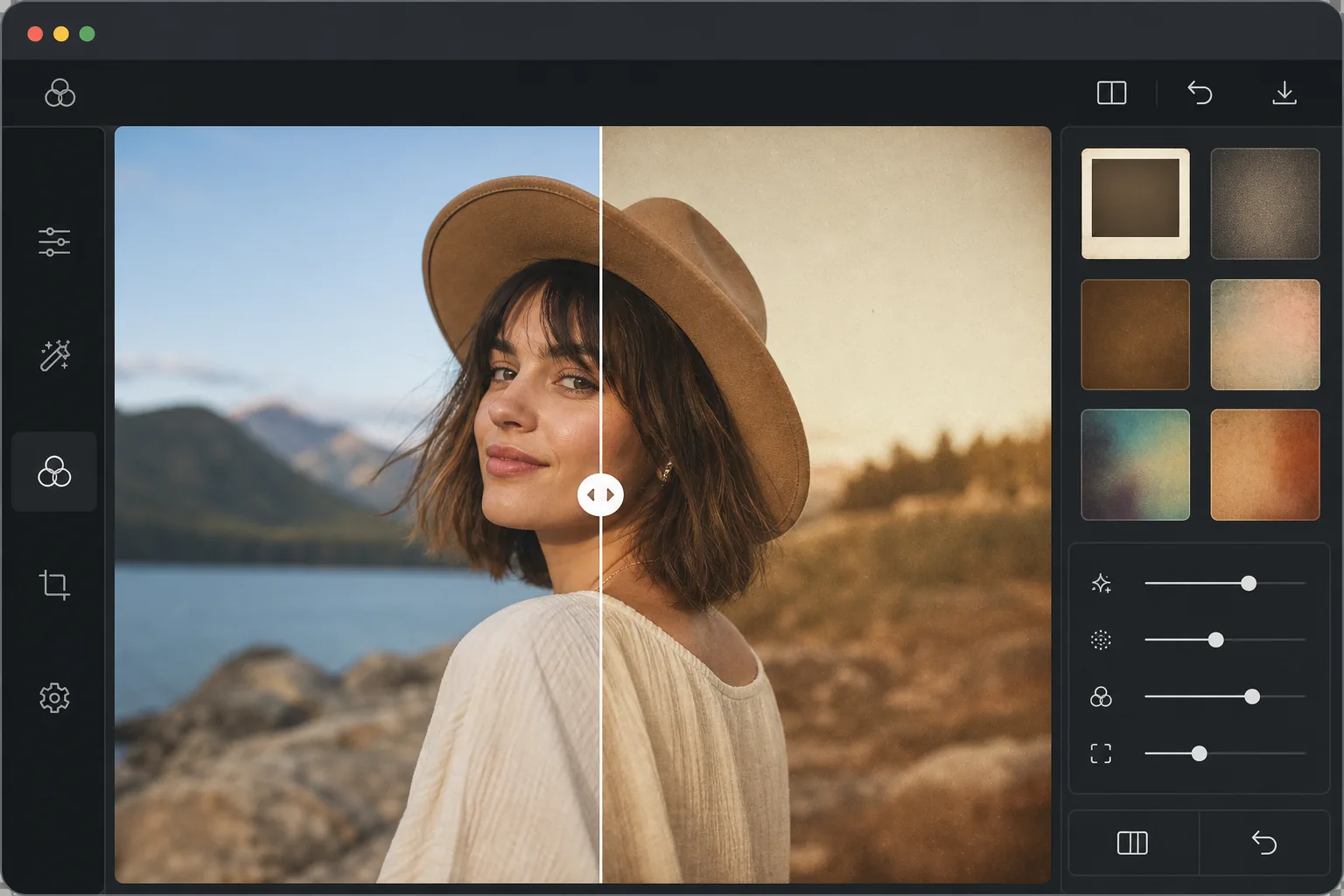
Что делает фотографию по-настоящему винтажной
Чтобы придать фото винтажный вид, откройте Magic Eraser в браузере, на iOS или Android, выберите AI-фильтр, загрузите снимок и выберите винтажный пресет — Polaroid 1970-х, 35-мм плёнку, выцветший отпечаток, сепию или кросс-процесс — а затем настройте силу эффекта по своему вкусу. Это бесплатно и без регистрации. Каждый пресет сразу применяет тёплый сдвиг цвета, приподнятые тени, плёночное зерно и мягкое выцветание аналоговой плёнки — всё вместе, а не по одному эффекту. Лучше всего подходят снимки с современных смартфонов: чистый цифровой исходник даёт фильтру больше материала для работы. Винтажный вид — это не просто один фильтр, это сочетание характеристик аналоговой фотографии. Кинопленка имела ограниченный динамический диапазон, создавая приподнятые тени и сжатые светлые участки. Цветовая химия привела к характерным изменениям: Kodak Portra стал теплым и розовым, Fuji Superia — зелено-голубым, а выцветшие отпечатки неравномерно потеряли насыщенность. Физическое старение добавило желтого оттенка, утечки света из-за поврежденной задней пленки и виньетирования от старых объективов. Винтажные фильтры искусственного интеллекта моделируют эти характеристики целостно, а не суммируют простые настройки, создавая результаты, которые выглядят подлинно аналоговыми, а не обработанными в цифровом формате.
Before you start
Создайте винтажный образ за три шага
Start with загрузите свою фотографию. The result preview above and tips below use this guide's existing content; no separate before-and-after proof is assumed.
- 1
Загрузите свою фотографию
Откройте Magic Eraser в Интернете, iOS или Android и выберите AI Filter. Загрузите любую фотографию — современные снимки со смартфона отлично подойдут, потому что чистая цифровая отправная точка дает больше возможностей для работы с винтажным фильтром.
- 2
Выбирайте винтажный стиль
Просмотрите настройки винтажных фильтров: Polaroid 1970-х годов (теплый, мягкий фокус, белая рамка), 35-миллиметровая пленка (тонкая зернистость, естественный цветовой сдвиг), «Выцветшая печать» (ненасыщенный, пожелтевший), «Сепия» (классический коричневый тон) и «Кросс-обработка» (резкие цветовые сдвиги). Каждый фильтр воссоздает определенную эпоху и технику аналоговой фотографии.
- 3
Отрегулируйте интенсивность и экспортируйте
Настройте интенсивность фильтра — 100 % для полного винтажного эффекта или ниже для легкого намека на ностальгию. Отрегулируйте степень зернистости, силу смещения цвета и глубину виньетки индивидуально. Экспортируйте в предпочитаемый вами формат.
Лучшее для
- Создатели Instagram поддерживают единую винтажную эстетику в своей ленте
- Свадебные фотографы, предлагающие клиентам романтический стиль монтажа в стиле фильма.
- Посты в социальных сетях на ностальгическую тематику и ретроспективный контент
- Музыканты и группы создают рекламные фотографии и обложки альбомов в стиле ретро.
- Дизайнеры интерьеров и лайфстайл-блогеры используют теплые, живые визуальные тона.
Советы для достижения наилучших результатов
Винтажный вид лучше всего смотрится на фотографиях с теплым естественным освещением: снимки золотого часа, окружающее освещение в помещении и пасмурные дни прекрасно сочетаются. Резкое полуденное солнце дает менее убедительные винтажные результаты. Чтобы получить аутентичный вид 1970-х годов, объедините фильтр с небольшой передержкой: старинные камеры часто измеряют неточно. Портреты выигрывают от более легкого винтажного применения (интенсивность 50–70%), чтобы сохранить точность тона кожи, в то время как пейзажи и уличные сцены хорошо справляются с полной интенсивностью. Последовательность имеет значение: выберите один винтажный стиль и примените его ко всей серии, чтобы создать целостный образ.
Часто задаваемые вопросы
- Добавляет ли это зернистость пленки?
- Да. Искусственный интеллект добавляет зернистость пленки, соответствующую выбранному винтажному стилю: мелкая зернистость для стиля Portra, более крупная зернистость для пленки с высоким ISO или отсутствие зернистости для чистого вида Polaroid. Зерно органично и случайно, а не повторяющийся узор.
- Могу ли я воспроизвести конкретную пленку?
- Предустановленные фильтры вдохновлены популярными кинопленками и винтажными техниками. Хотя они не являются точными научными копиями, они отражают суть каждого стиля — теплоту Portra, зелень Superia, насыщенность Velvia и контрастность Tri-X.
- Винтажный фильтр бесплатен?
- Да. Функции AI-фильтра, включая винтажные пресеты, доступны на бесплатном уровне с ежедневными ограничениями на использование. Премиум-версия устраняет ограничения и обеспечивает пакетную обработку для единообразного винтажного вида во всех наборах фотографий.
- В чём разница между винтажем, ретро и сепией?
- Сепия — это один конкретный эффект: тёплый коричневый монохром, как у старого отпечатка. Ретро обычно означает насыщенные, яркие цвета и стилистику определённого десятилетия (например, неон 1980-х или оранжево-коричневые тона 1970-х). Винтажные пресеты здесь шире: они воссоздают весь характер аналоговой плёнки — сдвиг цвета, приподнятые тени, зерно и выцветание вместе — а сепия входит в них лишь как один из вариантов. Выбирайте сепию для классического коричневого тона или плёночный пресет для более полного аналогового ощущения.
- Как сделать эффект сдержанным и естественным, а не как явный фильтр?
- Снизьте интенсивность примерно до 40–60%, а не до 100%, держите зерно лёгким и начинайте с хорошо освещённого фото (золотой час или мягкий свет в помещении выглядят более плёночно, чем жёсткое полуденное солнце). Цель — правдоподобное аналоговое ощущение, а не тяжёлый оверлей: мягкий тёплый сдвиг с лёгким зерном почти всегда смотрится естественнее, чем эффект на максимуме.