
Как создать фотомонтаж
Объедините несколько фотографий в одну творческую композицию — вырезайте объекты, располагайте их на общем фоне и создавайте повествовательные визуальные эффекты. Инструменты искусственного интеллекта Magic Eraser делают профессиональные фотомонтажи доступными каждому.
Last updated
Создайте монтаж прямо сейчас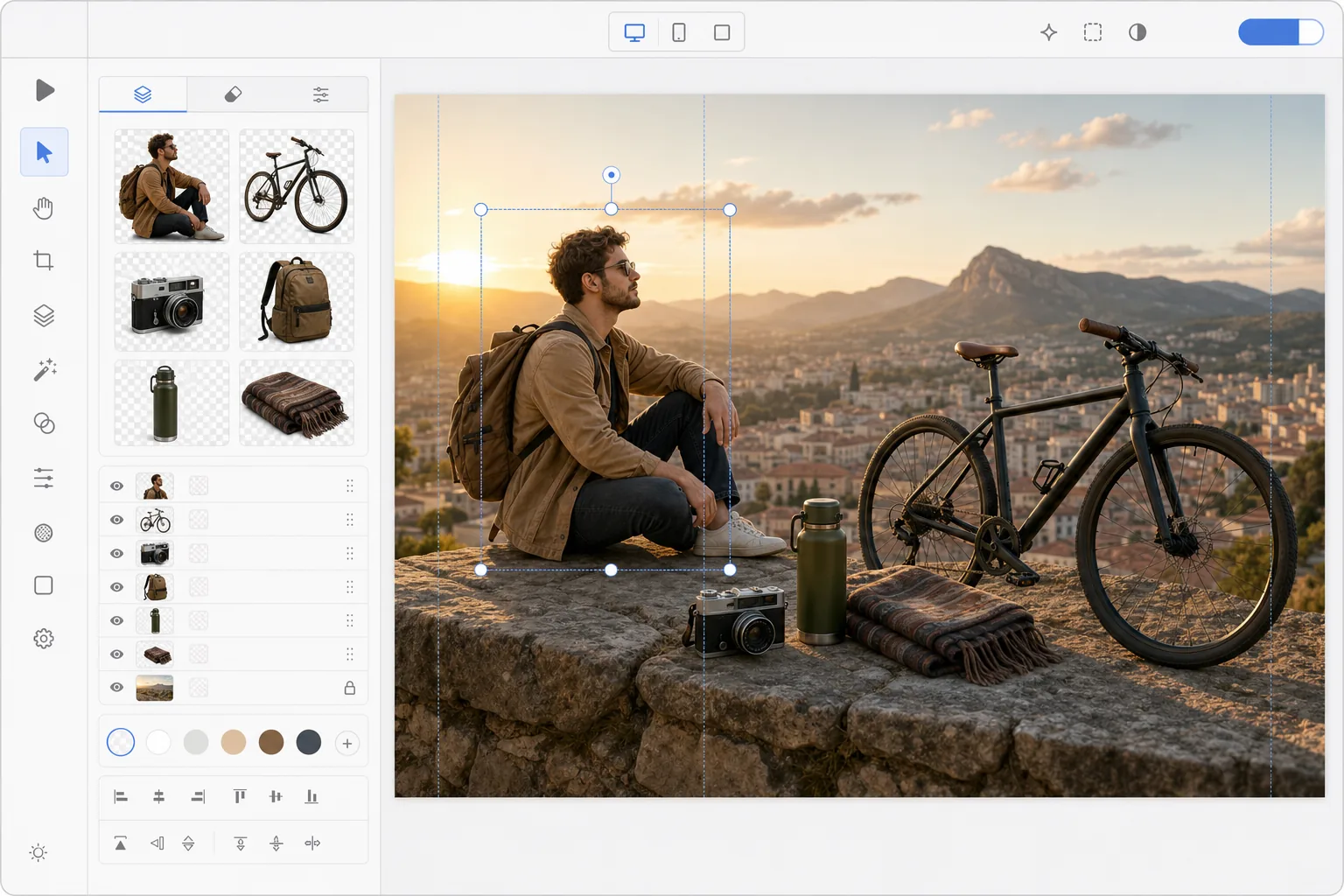
Как создать фотоколлаж
Чтобы создать фотомонтаж, откройте Magic Eraser в браузере, на iOS или Android, с помощью «Ластика фона» вырежьте каждый объект из своей фотографии, затем перейдите в инструмент «Дизайн», перенесите вырезанные фрагменты на общий холст и добавьте фон — фотографию, цвет или сцену, сгенерированную ИИ. Это бесплатно и без регистрации. В отличие от коллажа, где целые фотографии располагаются рядом, в монтаже вырезанные элементы сливаются так, будто они находятся в одной сцене. Чтобы результат выглядел правдоподобно, согласуйте направление света и масштаб объектов и добавьте под каждым из них мягкую тень. Фотомонтаж объединяет элементы нескольких изображений в единую композицию, которая рассказывает историю, показывает прогресс или создает сюрреалистическое визуальное искусство. В отличие от коллажей (в которых целые фотографии размещаются рядом), монтажи плавно смешивают элементы — предметы, вырезанные из разных фотографий, кажутся сосуществующими в общей сцене. Создание традиционного монтажа требует продвинутых навыков работы с Photoshop: точное маскирование, подбор цветов, выравнивание перспективы и рисование теней. Инструменты искусственного интеллекта значительно упрощают этот рабочий процесс: автоматическое удаление фона аккуратно извлекает объекты, генеративная заливка создает связный фон, а интеллектуальная композиция согласовывает освещение между элементами. То, что заняло часы, теперь занимает минуты.
Before you start
Создайте фотомонтаж за три шага
Start with извлекайте объекты из ваших фотографий. The result preview above and tips below use this guide's existing content; no separate before-and-after proof is assumed.
- 1
Извлекайте объекты из ваших фотографий
Откройте Magic Eraser в Интернете, iOS или Android. Используйте Background Eraser, чтобы удалить фон из каждой фотографии, создавая прозрачные вырезы объектов, которые вы хотите объединить. Экспортируйте каждый вырез как прозрачный PNG.
- 2
Разместить на общем холсте
Переключитесь на инструмент «Дизайн» и создайте новый холст желаемых размеров. Импортируйте вырезанные PNG-файлы и расположите их в композиции. Накладывайте объекты спереди назад, изменяйте их размер для обеспечения единообразия перспективы и располагайте их так, чтобы создать естественную или намеренно сюрреалистическую сцену.
- 3
Добавьте фон и последние штрихи
Выберите или создайте фон: используйте фотографию, градиент, сплошной цвет или сцену, созданную искусственным интеллектом. Добавляйте наложения текста, корректируйте композицию и экспортируйте. В результате получается безупречный фотомонтаж, подходящий для социальных сетей, маркетинга или творческих проектов.
Лучшее для
- Создатели социальных сетей создают составные изображения для историй и публикаций.
- Маркетинговые команды создают визуальные эффекты для кампании на основе нескольких фотографий продуктов
- Организаторы мероприятий разрабатывают рекламную графику с фотографиями места проведения и исполнителей.
- Художники и любители, создающие сюрреалистические или фантастические композиции.
- Преподаватели и учащиеся создают визуальные презентации из нескольких исходных изображений.
Советы для достижения наилучших результатов
Наиболее убедительные монтажи сохраняют одинаковое направление освещения для всех элементов — если один объект освещен слева, все остальные тоже должны быть освещены. Масштабируйте предметы пропорционально: человек должен быть подходящего размера относительно зданий, мебели и других людей. Добавьте тонкие тени под каждым объектом, чтобы закрепить их на сцене. Для сюрреалистических или художественных монтажей намеренные несоответствия (невозможный масштаб, смешанные перспективы) становятся творческим выбором, а не ошибкой. Для маркетинговых монтажей держите композицию чистой, оставляя не более 3–5 ключевых элементов, конкурирующих за внимание.
Часто задаваемые вопросы
- Чем отличается монтаж от коллажа?
- В коллаже целые фотографии размещаются рядом в сетке или в виде перекрытия. Монтаж извлекает элементы из разных фотографий и объединяет их в одну сцену, где предметы кажутся сосуществующими — для этого требуется вырезать объекты и скомпоновать их на общем фоне.
- Могу ли я использовать ИИ для создания фона для монтажа?
- Да. Используйте AI Create или AI Fill, чтобы создать собственную фоновую сцену, а затем наложите извлеченные объекты поверх нее. Это идеальный вариант, когда ни одна фотография не обеспечивает подходящего фона.
- Создание фотомонтажа бесплатно?
- Да. Удаление фона и инструмент дизайна доступны на бесплатном уровне с ежедневными ограничениями на использование. Премиум снимает ограничения на создание сложных монтажей с множеством элементов.
- Как сделать фотомонтаж на телефоне?
- Откройте Magic Eraser в любом мобильном браузере или в приложении для iOS или Android, загрузите каждую фотографию из галереи и с помощью «Ластика фона» вырежьте объекты. Затем откройте инструмент «Дизайн», добавьте холст и перетащите на него прозрачные вырезанные фрагменты — щипком пальцев меняйте размер и положение каждого. Добавьте фон и экспортируйте; готовый монтаж сохранится обратно в галерею. Всё работает так же, как в версии для компьютера, и если вы используете браузер, устанавливать приложение не нужно.
- Как сделать так, чтобы монтаж выглядел реалистично, а не как наспех склеенный?
- Реалистичность создаёт согласованность, а не только качество вырезки. Согласуйте направление света для всех объектов — если один освещён слева, осветите слева их все — и подберите масштаб каждого элемента так, чтобы размеры выглядели логично по отношению друг к другу. Добавьте под каждым объектом мягкую тень, чтобы он «опирался» на фон, и сохраняйте единую перспективу (уровень глаз и линию горизонта). Если же хочется сюрреализма, нарушайте эти правила намеренно — тогда невозможный масштаб и смешанная перспектива будут восприниматься как творческий приём.