
AI 도구를 사용한 졸업 앨범 사진 편집
졸업 앨범 사진에는 일관된 배경, 고른 조명, 깔끔한 인물 사진이 필요합니다. Magic Eraser은 비용이 많이 드는 리터칭 워크플로 없이 학교, 스튜디오 및 부모가 전문적인 결과를 얻을 수 있도록 도와줍니다.
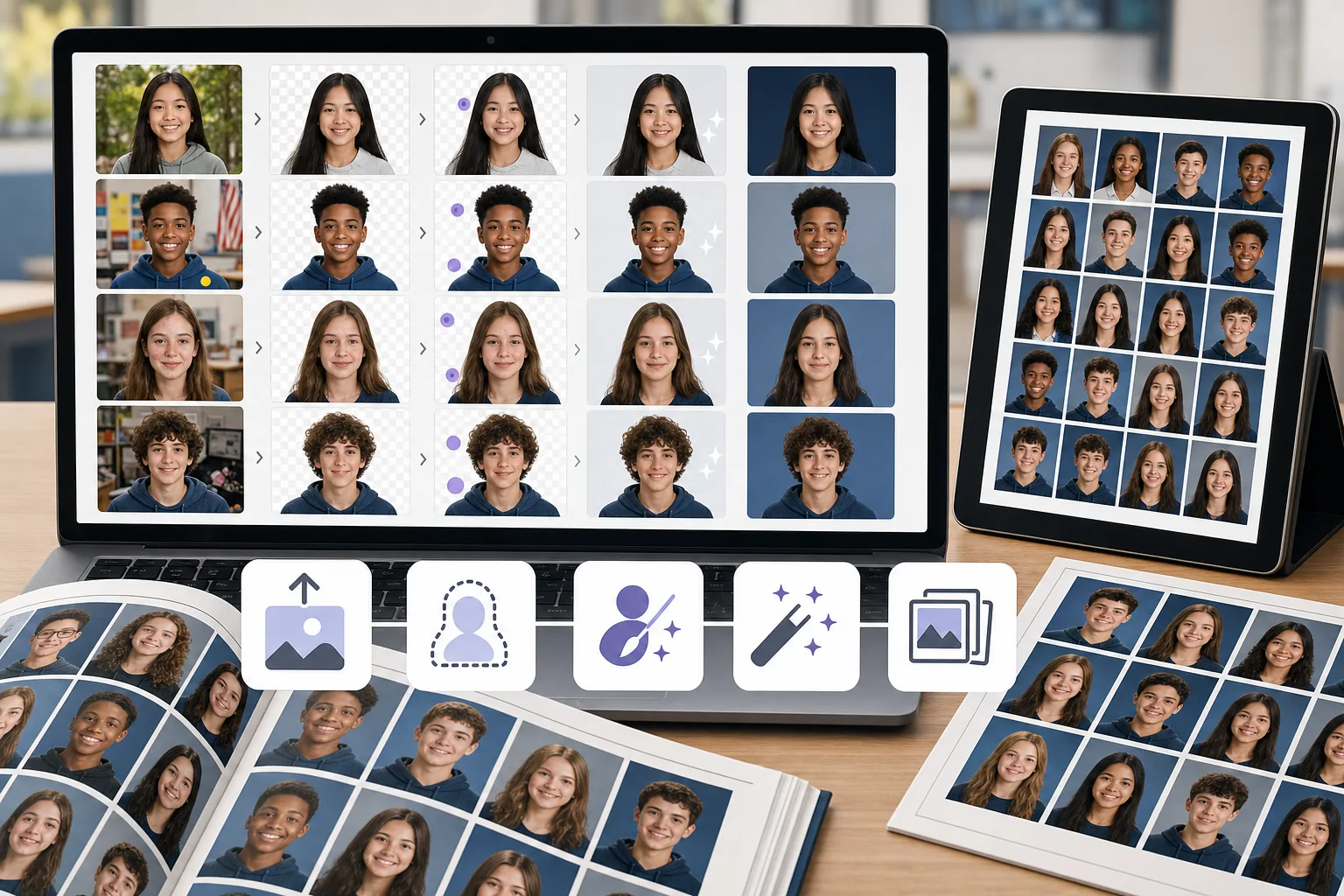
사진 전체에서 배경이 일관되지 않음
서로 다른 학생들이 서로 다른 장소에서 또는 서로 다른 날짜에 촬영한다는 것은 배경의 색상, 질감 및 조명이 다양하다는 것을 의미합니다. 수동으로 표준화하는 데는 시간이 많이 걸립니다.
인물 사진의 결점과 방해 요소
세련된 졸업 앨범 초상화를 만들려면 흩어진 머리카락, 피부 잡티, 옷에 붙은 스티커, 배경 물체 등을 모두 정리해야 합니다.
마감 기한이 촉박한 대규모 배치 크기
졸업 앨범 팀은 마감일에 맞춰 수백 장의 인물 사진을 처리합니다. 이미지당 편집 병목 현상은 전체 학급 명단에 걸쳐 증가합니다.
Magic Eraser이 졸업앨범 사진에 어떻게 도움이 되나요?
초상화 업로드
Magic Eraser을 열고 정리가 필요한 학생 사진이나 사진 모음을 업로드하세요.
배경 제거 또는 교체
배경 제거를 사용하여 주제를 분리한 다음 깨끗하고 일관된 앨범 배경에 배치합니다.
방해 요소를 정리하세요
AI 지우개 도구를 사용하여 흠집, 흩어진 물체 또는 고르지 않은 조명 아티팩트를 지웁니다.
강화 및 내보내기
AI Enhancement를 적용하여 인물 사진을 선명하게 하고 노출 균형을 맞춘 다음 인쇄 해상도로 내보냅니다.
자주 묻는 질문
Magic Eraser으로 앨범 사진 배경을 바꿀 수 있나요?
+
예. 배경 제거를 사용하여 학생을 분리한 다음 일관된 앨범 모양을 위해 단색 배경이나 브랜드 배경에 초상화를 배치합니다.
학교 앨범 팀에 적합합니까?
+
예. Magic Eraser은 전문적인 편집 경험이 없어도 앨범 위원회 구성원과 학부모 자원봉사자가 쉽게 사용할 수 있습니다.
학생 사진의 흠집을 제거할 수 있나요?
+
예. 지우개 도구는 인물 사진에서 피부 잡티, 스티커, 작은 방해 요소를 제거하는 데 효과적입니다.
Magic Eraser은(는) 단체 사진에도 작동하나요?
+
예. 산만한 배경을 제거하고, 조명을 강화하고, 구도 문제를 수정하여 그룹 사진을 정리할 수 있습니다.
졸업 앨범 사진을 어떤 해상도로 내보낼 수 있나요?
+
사용 가능한 내보내기 크기는 선택한 향상 기능과 계정 옵션에 따라 달라집니다. 파일을 제출하기 전에 다운로드한 이미지의 픽셀 크기가 졸업 앨범 인쇄업체의 크기 및 DPI 요구 사항에 맞는지 확인하세요.
가장 멋진 졸업 앨범 초상화를 얻으세요
값비싼 소프트웨어 없이도 Magic Eraser 자유롭고 깨끗한 배경을 사용하고 방해 요소를 수정하며 학생 사진을 향상시켜 보세요.
Magic Eraser을 무료로 사용해 보세요관련 사용 사례
전문가들이 실제 워크플로에서 이러한 도구를 어떻게 활용하는지 확인하세요.
개인 물품, 주차된 차량, 공사 장비가 잔뜩 찍힌 매물 사진은 매수자의 관심을 떨어뜨립니다. Magic Eraser는 AI로 매물 사진을 즉시 깔끔하게 만들어 줍니다 — 포토샵 기술 불필요.
지저분한 배경과 정리되지 않은 상품 사진은 매일 매출을 갉아먹습니다. Magic Eraser로 몇 초 만에 프로 수준의 상품 이미지를 만들 수 있습니다. 포토샵 실력이 필요 없습니다. 업로드하고, 불필요한 부분을 지우고, 바로 등록하세요.
여권 및 비자 사무소는 매일 수천 장의 사진을 배경 불량으로 반려합니다. Magic Eraser는 모든 배경을 제거하고 흰색, 밝은 회색 또는 파란색 등 필요한 색상으로 몇 초 만에 교체합니다.
관련 비교
Magic Eraser와 유사한 도구의 비교를 확인하세요.
TouchRetouch는 객체 및 결점 제거에 특화된 인기 유료 모바일 앱입니다. Magic Eraser는 설치 없이 모든 기기에서 무료 AI 편집을 제공합니다. 기능, 가격, 사용 편의성을 비교해 보세요.
Cleanup.pictures는 빠른 객체 제거를 위한 무료 웹 도구입니다. Magic Eraser는 8가지 AI 편집 도구, 모바일 앱, 고급 처리 기능을 제공합니다. 두 도구를 비교해 보세요.
remove.bg는 강력한 API와 Photoshop, Figma 플러그인을 제공하는 배경 제거 시장 리더입니다. Magic Eraser는 객체 제거, 생성 채우기, AI 향상, 디자인 등 8가지 AI 도구를 하나의 편집기에서 제공합니다.
서로 다른 강점을 가진 두 가지 강력한 AI 사진 편집기. Magic Eraser는 더 넓은 범위의 생성형 AI 도구를 제공하고, Photoroom은 이커머스 상품 사진과 일괄 처리에 뛰어납니다. 어떤 것이 내 워크플로우에 맞는지 확인해 보세요.
관련 가이드
이 워크플로와 관련된 더 많은 가이드와 에디토리얼 콘텐츠를 확인하세요.