
結婚式の写真の強化
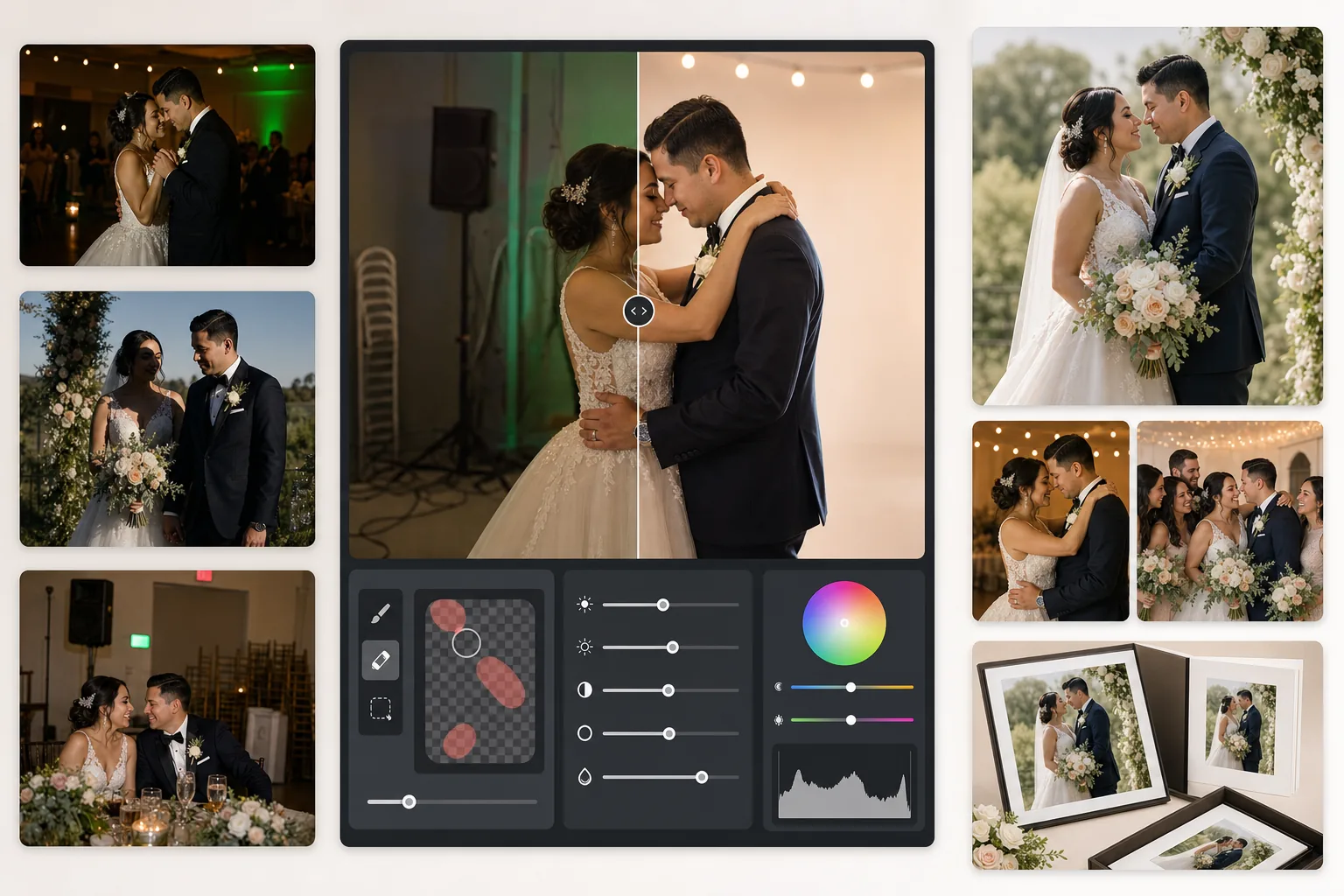
暗い披露宴の写真を救い出し、気が散る背景を取り除き、肌の色合いを調整して、アルバムにふさわしい結婚式の画像に仕上げます。このテンプレートは、挙式や披露宴の難しい照明条件——薄暗い会場、DJ照明による混合カラーキャスト、新郎新婦から注意をそらす雑然とした背景——のために設計されています。
このテンプレートを無料で試すEvents template preview
このテンプレートの機能
結婚式写真で最もよくある問題を補正します。露出不足の披露宴ショット、オレンジ色のタングステンや緑色の蛍光灯によるカラーキャスト、強いフラッシュの影、そして非常口標識・積み重ねられた椅子・ケータリング機材といった気が散る背景要素です。AI Enhance は暗いダンスフロアの写真からディテールを復元し、混合照明のバランスを整えます。一方、Magic Eraser は痕跡を残さずに不要な被写体を取り除きます。肌の色合いは、過度に滑らかにすることなく、自然で温かみのある仕上がりに調整されます。
テンプレート設定
| 露出復元 | ハイライトを保持しながら +1.5 EV のシャドウ持ち上げ |
| ホワイトバランス | 混合光の自動補正(タングステン/蛍光灯/昼光) |
| 肌の色合いモード | 自然な温かみ(+5 温かみ、+3 滑らかさ、ディテール保持) |
| 出力解像度 | 長辺4000px(300 DPI で 13×19 まで印刷対応) |
| カラープロファイル | Adobe RGB(プロ印刷向けの広い色域) |
| ノイズ除去 | 高ISO適応型(持ち上げたシャドウのディテールを保持) |
このテンプレートの使い方
結婚式の写真をアップロード
披露宴のショット、挙式の画像、ゲストがスマートフォンで撮った写真をアップロードします。このテンプレートは、プロのDSLRからRAW書き出しされたJPEGから圧縮されたスマホ写真まで、あらゆるものに対応し、AIがソース品質に基づいて強化の強さを調整します。
照明と色を補正
AI Enhance は暗い披露宴のシーンを持ち上げ、会場の混合照明によるオレンジ・緑のカラーキャストを中和し、フラッシュで照らされた前景と環境光の背景のバランスを整えます。肌の色合いは、ドレスの白や装飾の色に影響を与えることなく、自然な温かみへと調整されます。
気が散る要素を除去
Magic Eraser は非常口標識、消火器、積み重ねられた椅子、ケータリングカート、床の電源ケーブル、背景に写り込んだゲストを取り除きます。AIは取り除いた被写体の背後の背景パターンを自然に再構築します。
アルバムや印刷用に書き出し
プロの写真ラボ印刷には Adobe RGB の長辺4000pxで、デジタル共有やオンラインギャラリーには sRGB でダウンロードします。出力は 300 DPI で最大 13×19 インチの印刷に対応したサイズです。
最良の結果を得るためのプロのヒント
- ✓暗い披露宴のダンスフロアのショットでは、このテンプレートは約1.5段分のシャドウディテールを復元できます。元の写真がほぼ真っ黒な場合、強化によってノイズが生じることがあります——少なくとも被写体がうっすら見える写真から始めてください。
- ✓肌の色合い補正は結婚式写真の温かみに合わせて調整されており、ニュートラルよりわずかに温かく、混合照明下でほとんどの肌の色合いを引き立てます。すでに良好な自然光のある屋外の挙式写真では、補正は控えめになります。
- ✓背景の被写体を取り除く際は、最も自然な結果を得るために一度に1つの領域ずつ作業してください。非常口標識、スプリンクラー、壁のコンセントは、一度で綺麗に除去できるほど小さいです。積み重ねられた椅子のような大きな被写体は、いくつかの部分に分けて除去すると良いでしょう。
- ✓まず新郎新婦のポートレートを処理し、次に集合写真、その後スナップを処理してください。これにより、最も重要な写真全体で一貫したカラーグレーディングの基準を確立してから、二次的な画像へ進むことができます。
よくある質問
ぼやけた披露宴の写真を修正できますか?
+
AI Enhance は低速シャッターによる軽度のソフトさをシャープにし、シャドウディテールを大幅に復元できますが、被写体が明らかに流れて写っている激しい動きのブレは修正できません。手ブレによるわずかなブレやピントの軽度の甘さがある写真は、大幅に改善します。
花嫁の白いドレスのディテールは失われますか?
+
トーンマッピングアルゴリズムは、白色のハイライトディテールを特に保護します。同じ画像内でシャドウを持ち上げても、ドレスの質感、レースの模様、生地のひだは保持されます。結果として、明るい白から深い影まで完全な階調を維持します。
印刷アルバムに十分な品質ですか?
+
はい。300 DPI での4000px出力は最大 13×19 インチの印刷に対応します。Adobe RGB カラープロファイルは、プロの写真ラボが使用するより広い色域を保持します。標準的な 8×10 のアルバムページであれば、解像度は鮮明な印刷に必要な水準をはるかに上回ります。
すべての結婚式の写真をアルバムにふさわしい画像に
披露宴や挙式の写真をアップロードすれば、数秒でプロ品質に強化された印刷対応の画像が手に入ります。プロのカメラ写真にもスマートフォン写真にも対応します。
無料で試すRelated templates
More events templates for your workflow.