
イベント写真の明るさ補正
コンサート、ガラ、誕生日パーティー、企業イベントで撮影した暗い会場の写真からディテールを復元します。このテンプレートは露出を最大+2 EVまで引き上げ、強いフラッシュの影を補正し、赤目を除去し、元のシーンの雰囲気を高めるため、イベント写真がその瞬間に感じたとおり鮮やかに見えます。
このテンプレートを無料で試すEvents template preview
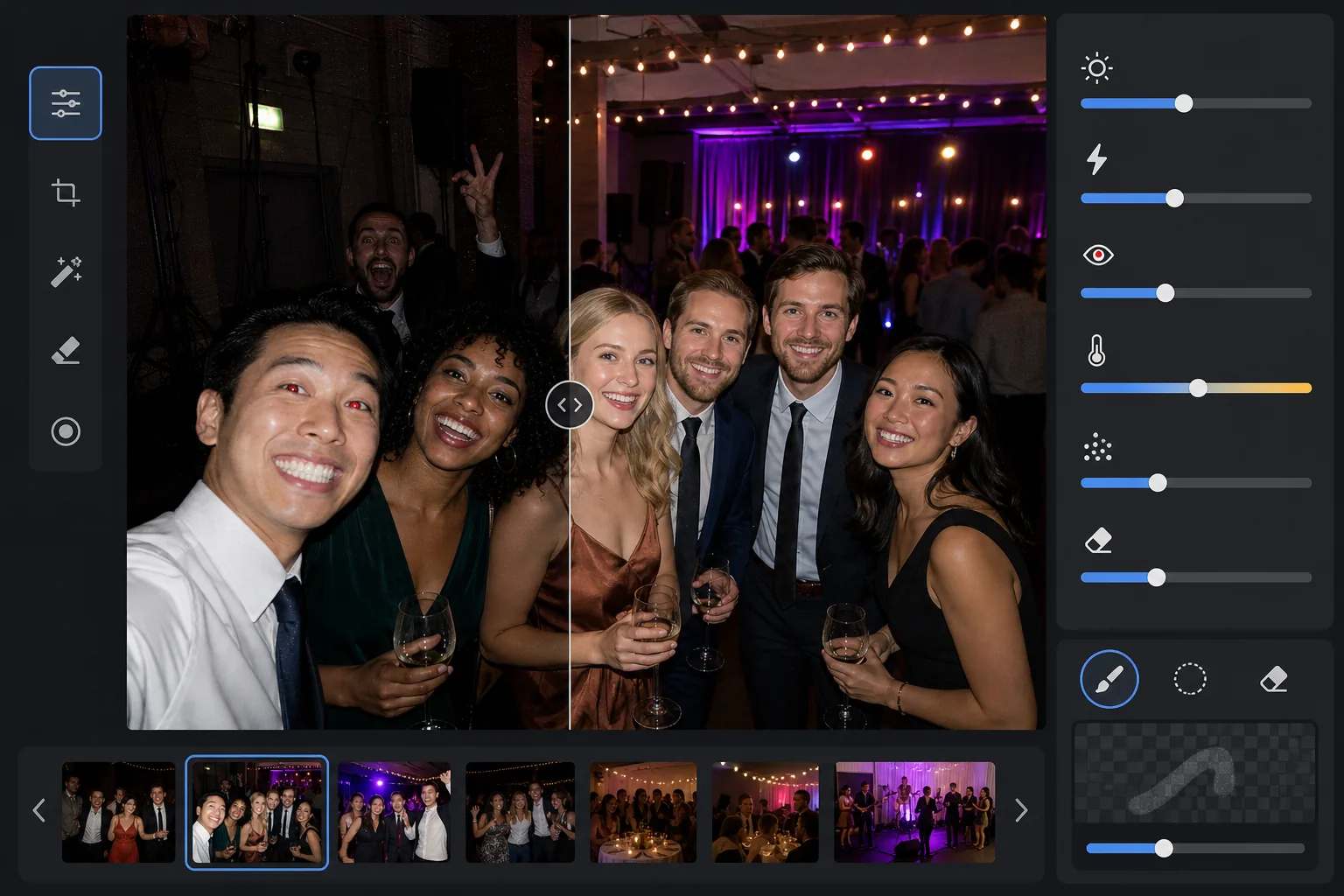
このテンプレートの機能
薄暗い宴会場、色付きステージ照明のあるコンサート会場、屋外の夜のパーティー、地下のレクリエーションルームなど、難しい低照度環境で撮影したイベント写真を救済します。AI Enhanceは最大2段分のシャドウディテールを復元しつつ、色付き照明や装飾の雰囲気を保ちます。前景の強い影、赤目、白飛びした顔などフラッシュによる不具合を自動補正します。Magic Eraserは写り込んだ人物、非常口の標識、積み重ねた機材など、イベント特有の邪魔なものを除去します。
テンプレート設定
| 露出の引き上げ | 雰囲気を保つ+2.0 EVの適応型シャドウ復元 |
| フラッシュ補正 | 前景の影をやわらげ、フラッシュが当たった肌のハイライトを抑制 |
| 赤目除去 | 自動検出と虹彩の色の再構築 |
| ホワイトバランス | 混合光源への適応(DJライト、タングステン、蛍光灯、キャンドル) |
| 雰囲気モード | 暖かい雰囲気の強調(背景に暖かみ+8、鮮やかさ+5) |
このテンプレートの使い方
イベント写真をアップロード
コンサート、結婚式、誕生日パーティー、企業ガラ、裏庭の集まりなど、あらゆるイベントの写真をアップロードします。テンプレートは照明環境を自動検出し、元の写真がどれだけ露出不足かに応じて補正の強さを調整します。
露出を復元しフラッシュを補正
AI Enhanceはシャドウ部分を最大+2 EVまで引き上げ、暗闇で失われた顔やディテールを浮かび上がらせます。前景の被写体でフラッシュにより白飛びしたハイライトを抑えて肌の質感を復元し、フラッシュが当たった被写体の背後の強い落ち影をやわらげて自然になじませます。
赤目と邪魔なものを除去
直接フラッシュによる赤目を自動検出し、自然な虹彩の色に置き換えます。Magic Eraserは写り込んだ見知らぬ人、スピーカーの山やケーブルといった目立つ機材、非常口の標識、その瞬間を損なうその他の雑然としたものを除去します。
補正した写真を書き出し
SNSでの共有、印刷、保存のために、明るくしたイベント写真を元の解像度でダウンロードします。出力は元のシーンの雰囲気——暖かいキャンドルの灯り、カラフルなステージ照明、きらめくイルミネーション——を保ちつつ、顔やディテールをはっきりと見えるようにします。
最良の結果を得るためのプロのコツ
- ✓+2 EVの復元は、元の写真で被写体が少なくともかすかに見える場合に最も効果を発揮します。いくつかの光源以外が完全に真っ黒な写真では、復元したシャドウに大きなノイズが含まれます。シルエットが判別できる写真から始めましょう。
- ✓劇的な色付きステージ照明のあるコンサート写真では、ホワイトバランス補正は色味を中和せず芸術的なカラーキャストを保ちます。青やマゼンタのステージ照明を維持しつつ、ステージ近くの被写体の肌の色を補正します。
- ✓同じイベントの写真をまとめて処理する場合は、まず代表的な暗い写真1枚とフラッシュ写真1枚でテストしてください。これにより、全体に適用する前に明るさと暖かみが適切かを確認できます。
- ✓赤目補正は人間とペットの両方の目に対応します。イベントでのペット写真では、カメラのフラッシュで動物に生じる緑や黄色の目の反射をAIが処理し、自然な暗い瞳孔に置き換えます。
よくある質問
完全に真っ黒な写真も修正できますか?
+
テンプレートは最大+2 EVのシャドウディテールを復元します。これはおおよそ写真を4倍明るくするのに相当します。元の写真に被写体のかすかな輪郭でも写っていれば、復元で使える結果が得られます。点光源だけが見える完全に真っ黒なフレームには、通常、意味のあるディテールを復元するのに十分なセンサーデータが含まれていません。
明るくすると写真がざらついて見えますか?
+
深いシャドウを引き上げる際にある程度のノイズは避けられませんが、適応型ノイズ低減は引き上げた領域を特に対象とします。フレーム内の十分に明るい部分の細部は保たれ、復元したシャドウのノイズは滑らかにされます。結果は、基本的な写真編集ソフトで単に明るさを上げるよりもはるかに優れています。
ステージ照明のあるコンサート写真でも機能しますか?
+
はい。テンプレートは混合光源や色付き照明に対応するよう設計されています。青、赤、マゼンタ、緑のステージ照明は、補正すべきカラーキャストではなくシーンの芸術的要素として保たれます。ステージ近くの被写体の顔には選択的なホワイトバランス調整が適用され、背景の照明の雰囲気は維持されます。
Related templates
More events templates for your workflow.