
不動産バーチャルステージング
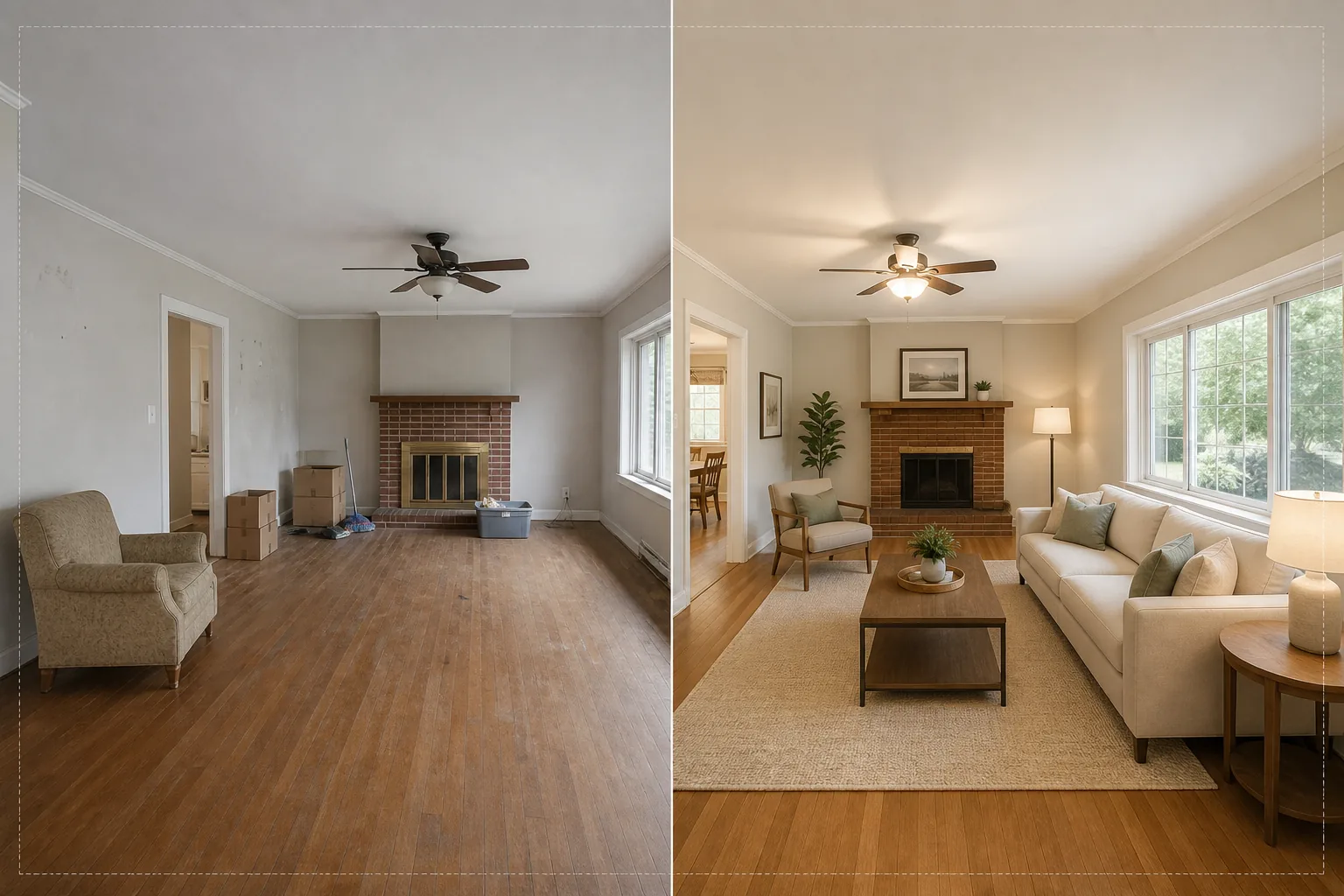
実物の家具を一切動かすことなく、写真のようにリアルな家具と装飾で空室を演出します。このテンプレートは AI Fill を使ってソファ、テーブル、ラグ、アート作品を空室に配置し、その前に Magic Eraser が既存の散らかり、古い家具、私物を取り除きます。その結果、購入者が自分自身がその空間で暮らす様子をイメージできる、温かく魅力的な物件写真が完成します。
このテンプレートを無料で試すReal Estate template preview
このテンプレートでできること
不動産写真における最大の課題、つまり空室や散らかった部屋を我が家のように見せることを解決します。Magic Eraser がまず既存の散らかり——古い家具、引っ越し用の段ボール、私物、壁の汚れ、床の擦り傷——を取り除きます。次に AI Fill が、清掃された部屋に文脈に合った家具を配置し、スタイルを建築様式に合わせます。モダンなロフトにはインダストリアルなアクセントを効かせたミッドセンチュリーモダンの家具が、伝統的なコロニアル様式の家にはクラシックな張り地の家具と温かみのある木のトーンが配置されます。バーチャル家具の照明と影は写真内の既存の窓明かりから計算されるため、ステージングは貼り付けたように見えるのではなく、実際にそこに存在しているように見えます。
テンプレート設定
| ステージングスタイル | モダン、トラディショナル、スカンジナビアン、ミッドセンチュリー、またはコースタル |
| 部屋のタイプ | 自動検出(リビング、寝室、ダイニング、書斎、キッチン) |
| 散らかりの除去 | ステージング前に段ボール、私物、古い家具を自動で除去 |
| 影のレンダリング | 既存の窓明かりの方向と強さに合わせて調整 |
| 出力解像度 | 4000×3000px(300 DPI で MLS 対応) |
| 色温度 | 暖色系の室内(一般的な室内照明に合わせて 3200K~4000K) |
このテンプレートの使い方
空室または散らかった部屋の写真をアップロード
部屋の広角写真をアップロードします。最もリアルなステージングのために、コーナーから撮影して2つの壁と床を捉えましょう。このテンプレートはスマートフォン、デジタル一眼レフ、超広角レンズを含むプロ向け不動産カメラの写真に対応しています。
既存の散らかりを除去
Magic Eraser が引っ越し用の段ボール、古い家具、壁の個人写真、床の散らかりを自動的に検出して除去します。AI は除去した物の背後にある床材、壁の塗装、巾木を再構築するため、部屋は清潔で空室の状態に見えます。
バーチャル家具で演出
AI Fill が検出された部屋のタイプと選択したスタイルに合った家具を配置します。リビングにはソファ、コーヒーテーブル、ラグ、サイドテーブル、壁掛けアートが入ります。寝室にはベッド、ナイトスタンド、ランプ、アクセントクッションが配置されます。家具は部屋の寸法に合わせて拡縮され、リアルな影を落とします。
MLS や物件掲載用にエクスポート
演出した写真を 4000×3000px でダウンロードでき、MLS への登録、Zillow、Realtor.com、印刷用パンフレットにそのまま使えます。画像には掲載管理システムでの整理を容易にするメタデータタグが含まれています。
最良の結果を得るためのプロのヒント
- ✓高さ約1.2メートルのコーナーから撮影しましょう——これにより2つの壁と十分な床面積が捉えられ、AI が正しい遠近感と接地影で家具を配置できます。
- ✓撮影前に部屋のすべての照明をつけましょう。AI は目に見える光源と窓のハイライトを利用して、演出された家具にどこに影が落ちるべきかを計算します。
- ✓複数の部屋がある物件では、すべての部屋で同じステージングスタイルを使い、本物のデコレーターが家全体を整えたかのような一貫したデザインストーリーを作りましょう。
よくある質問
バーチャルステージングは MLS のルールに準拠していますか?
+
ほとんどの MLS システムは、その旨が明記されていればバーチャルステージング写真を許可しています。このテンプレートは自動でラベルを追加しません——お住まいの地域の MLS ルールを確認し、アップロード時に「バーチャルステージング済み」のような開示キャプションを追加してください。
屋外のパティオやバルコニーを演出できますか?
+
はい。このテンプレートは屋外の生活空間を検出し、適切なパティオ家具、プランター、屋外ラグで演出します。照明計算は室内の環境光ではなく、開けた空と直射日光を考慮します。
家具はどれくらいリアルですか?
+
演出された家具は部屋の既存の光の方向に合った影を落とし、正しい遠近感で床面に置かれ、周囲の壁から環境色を反射します。通常の視聴距離では、ステージングは実際に家具が置かれた写真と見分けがつきません。
Related templates
More real estate templates for your workflow.
MLSリスティング向けのプロ仕様の不動産写真テンプレート。HDRのような補正、空の置き換え、雑然とした要素の除去、色補正により、物件写真をより早く売れるものにします。
垂直線補正、空の置き換え、車や歩行者の除去、ゴールデンアワーのカラーグレーディングで建築外観写真を、物件掲載やポートフォリオ向けに仕上げます。
部屋を明るくし、散らかったものを取り除き、Color correction、広角レンズの歪みを修正して、Airbnb や民泊の写真を変換し、予約率を高めます。
部屋を明るくし、散らかったものを取り除き、素材の質感を鮮明にし、仕上げや生地を正確に色再現することで、インテリア デザインのポートフォリオ写真を強化します。
空の置き換え、敷地境界線の強調表示、色彩の鮮やかさ Boost、および不動産や土地の調査のための邪魔な要素の除去により、ドローン空撮を強化します。
汚れの除去、線の鮮明化、一貫したスタイルを使用して、不動産物件のフロア プラン画像をクリーンアップ、強化、標準化します。