
不動産平面図
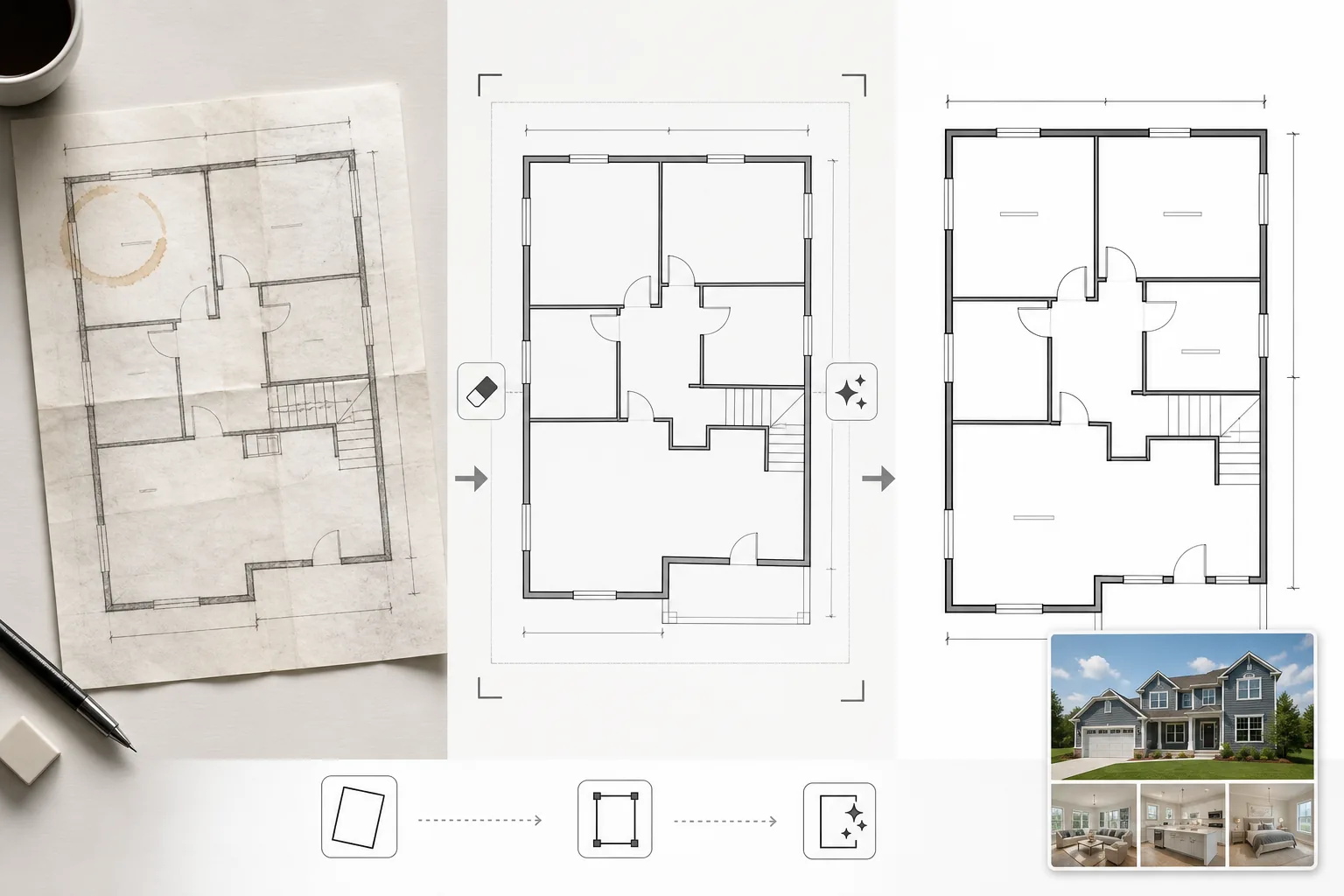
スキャンまたは撮影した平面図を、MLSリスティング、物件パンフレット、バーチャルツアー連携に適したクリーンでプロフェッショナルな図面に変換します。このテンプレートは紙の図面から汚れ、影、折り目を除去し、壁線や寸法注記を鮮明にして、リスティングポートフォリオ内のすべての平面図が一貫して見えるように視覚スタイルを標準化します。
このテンプレートを無料で試すReal Estate template preview
このテンプレートの機能
紙の青写真から撮影されたり、古いCADソフトウェアからエクスポートされたり、低品質でスキャンされた平面図画像をクリーンアップします。Magic Eraserは、紙の図面のスマホ写真からコーヒーの染み、鉛筆の注記、折り目、影のアーティファクトを除去します。AI Enhanceは壁線、ドアの開閉、寸法テキストを鮮明にし、Web表示用に縮小したりパンフレットに印刷したりしても判読可能に保ちます。平面的にスキャンするのではなく斜めから撮影された平面図に対しては遠近補正が行われます。背景色はクリーンな白に正規化され、壁線は一貫した太さに濃くされて、リスティング内のすべての図面で統一感のある見た目になります。
テンプレート設定
| 背景のクリーンアップ | 染み、折り目、影を除去し、クリーンな白に正規化 |
| 線の強調 | 壁線を鮮明にし、一貫した太さに濃くする |
| テキストの明瞭さ | 寸法ラベル、部屋名、計測注記を強調 |
| 遠近補正 | 撮影した図面を真上からの正確なビューに補正 |
| 出力解像度 | 3000×2000px(横向き)または元のアスペクト比に合わせてカスタム |
このテンプレートの使い方
平面図画像をアップロード
スキャン、撮影、またはデジタルの平面図をアップロードします。このテンプレートは、スマホカメラで撮影した紙の図面、フラットベッドスキャン、PDFエクスポート、建築ソフトウェアのスクリーンショットに対応します。斜めから撮影したスマホ写真の遠近歪みは自動的に補正されます。
アーティファクトと染みを除去
Magic Eraserはコーヒーの染み、鉛筆の跡、折り目、スキャナーの筋、不均一な照明による影のグラデーションを識別して除去します。すべての建築線と注記を保持しながら、背景はクリーンな白に正規化されます。
線とテキストを強調
AI Enhanceは壁の輪郭、ドアの円弧、窓記号、階段表示を鮮明にします。寸法テキストと部屋ラベルは判読性のために強調されます。線の太さが正規化され、太い外壁と細い内部の仕切りが一貫した視覚的階層を持つようになります。
リスティングと印刷用にエクスポート
クリーンアップした平面図を高解像度でダウンロードし、MLSアップロード、物件パンフレット、バーチャルツアーオーバーレイに使用できます。標準化された視覚スタイルにより、リスティング全体のすべての平面図がプロフェッショナルで一貫したものになります。
最良の結果を得るためのプロのヒント
- ✓紙の平面図を撮影する際は、平らな面に置き、均一な照明で真上から直接撮影してください。遠近補正は中程度の角度に対応しますが、ほぼ真上からの開始点が最も鮮明な結果を生み出します。
- ✓撮影前に図面から付箋やクリップを取り除いてください。AIはこれらを消去できますが、粘着剤の残留物やクリップの影が時折わずかな跡を残し、追加のクリーンアップが必要になることがあります。
- ✓複数階の物件では、各階を個別に処理し、同じ強調設定を使用してください。これにより、壁線の太さ、テキストサイズ、背景のトーンが階をまたいで一致し、まとまりのあるリスティング表示になります。
よくある質問
これでラフなスケッチをプロフェッショナルな平面図に変換できますか?
+
このテンプレートは既存の平面図の図面をクリーンアップして強調するものであり、建築図面をゼロから生成するものではありません。壁と部屋の形がはっきりと描かれたラフなスケッチはクリーンアップして鮮明にできますが、手描きの曲線や不均一な線は手描きの特徴を保ったまま、よりきれいになるだけです。
寸法テキストは正確に保持されますか?
+
はい。強調処理は数字を変更せずに既存の寸法ラベルを鮮明にします。元のテキストが判読できないほどぼやけている場合、AIは判読性の復元を試みますが、著しく劣化したテキストの正確性は保証できません。寸法は常にソース文書と照合してください。
処理後に部屋ラベルを追加できますか?
+
はい。クリーンな白い背景と鮮明な線により、任意の画像編集ソフトやリスティングソフトを使って部屋ラベル、家具アイコン、色分けを簡単に重ねることができます。
Related templates
More real estate templates for your workflow.
MLSリスティング向けのプロ仕様の不動産写真テンプレート。HDRのような補正、空の置き換え、雑然とした要素の除去、色補正により、物件写真をより早く売れるものにします。
垂直線補正、空の置き換え、車や歩行者の除去、ゴールデンアワーのカラーグレーディングで建築外観写真を、物件掲載やポートフォリオ向けに仕上げます。
部屋を明るくし、散らかったものを取り除き、Color correction、広角レンズの歪みを修正して、Airbnb や民泊の写真を変換し、予約率を高めます。
部屋を明るくし、散らかったものを取り除き、素材の質感を鮮明にし、仕上げや生地を正確に色再現することで、インテリア デザインのポートフォリオ写真を強化します。
空の置き換え、敷地境界線の強調表示、色彩の鮮やかさ Boost、および不動産や土地の調査のための邪魔な要素の除去により、ドローン空撮を強化します。
リアルな家具、装飾、照明で空室をバーチャルに演出します。物理的なステージング費用をかけずに、購入者が生活空間をイメージできるようにします。