
メニューボードデザイン
ご自身の料理写真からプロ仕様のメニューボードグラフィックを作成します。このテンプレートは、テーブルセッティングや雑然とした背景から個々の料理を切り抜き、すべての料理の見た目を統一して一貫性のあるメニューに仕上げ、デジタルメニューボード、印刷メニュー、DoorDash・Uber Eats・Grubhub などの配達プラットフォーム掲載向けに最適化されたレイアウト対応画像を書き出します。
このテンプレートを無料で試すFood template preview
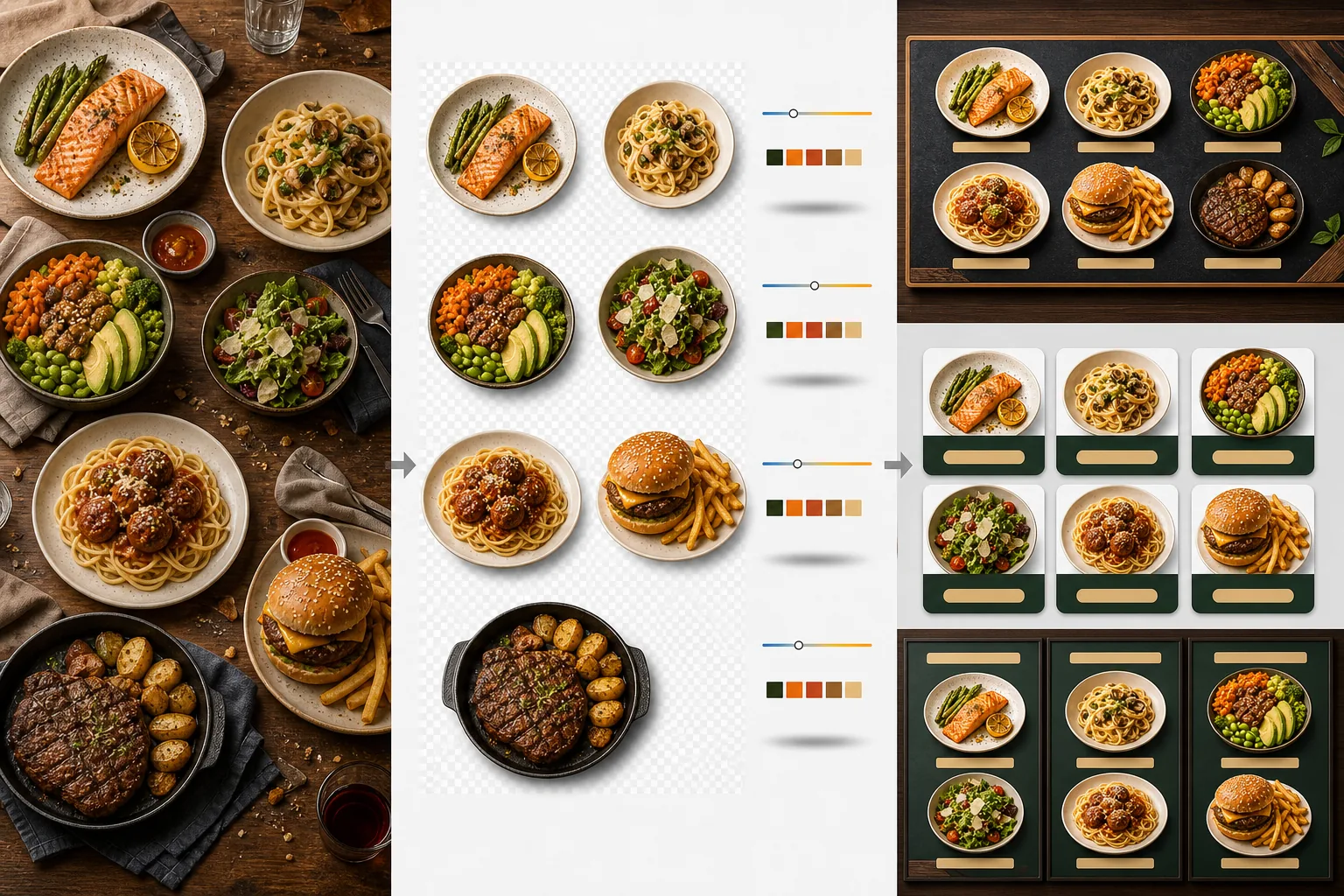
このテンプレートの機能
異なる時間帯、異なる照明、異なるテーブルで撮影されたばらつきのある料理写真を、メニューに使える統一された画像セットに変換します。Background Eraser は各料理 — 皿、ボウル、パッケージ — を元のテーブルセッティングから切り抜き、背景をレストランのブランディングに合った一貫した色やテクスチャに置き換えます。色温度はすべての料理で正規化されるため、暖色のタングステン光、寒色の LED パネル、自然な窓の光の下で撮影した写真もすべて統一感のある仕上がりになります。料理の色は、非現実的にならない範囲で食欲をそそるよう強調されます — 緑は鮮やかに、肉は温かみがありジューシーに、ソースは艶やかに。その結果、ランダムなスマホ写真の寄せ集めではなく、統一されたビジュアルメニューシステムとして機能する画像セットが得られます。
テンプレート設定
| 背景 | 単色(ブランドに合わせた色)、木目テクスチャ、スレート、または透明 |
| 色温度の正規化 | すべての料理を 5000K の昼光ホワイトバランスに統一 |
| 料理の色強調 | 食欲をそそるブースト(温かみのあるタンパク質、鮮やかな緑、艶やかなソース) |
| 影のスタイル | 単色背景に奥行きを出す控えめなドロップシャドウ |
| 出力サイズ | 1200×1200px(配達プラットフォーム)、800×600px(デジタルメニューボード)、カスタム |
このテンプレートの使い方
料理写真をアップロード
個々のメニュー項目の写真をアップロードします。営業中に撮ったスマホ写真、本格的な料理撮影、配達プラットフォーム掲載用の写真、いずれも使用できます。テンプレートは各料理を個別に処理し、メニュー全体で一貫した結果を実現します。
料理を背景から切り抜く
Background Eraser は各料理をテーブル、ランチョンマット、カウンターの表面から切り離します。エッジ検出は皿の縁、ボウルの端、パッケージの輪郭を正確になぞります。皿の縁からはみ出す飾りやトッピング — パセリの小枝、ソースのひと垂らし — も保持されます。
色とスタイルを統一する
色温度が正規化され、すべての料理が同じ一貫した照明の下にあるように見えます。料理の色は食欲をそそるよう強調されます。各料理の下に控えめな影が加えられ、新しい背景の上で安定した立体的な見た目になります。
メニューとプラットフォーム向けに書き出す
DoorDash、Uber Eats、Grubhub の掲載用に 1200×1200px でダウンロードします。デジタルメニューボードや TV ディスプレイ用には 800×600px で書き出します。透過 PNG での書き出しも可能で、カスタムの印刷メニューやサイネージを制作するグラフィックデザイナーに対応します。
最良の結果を得るためのプロのヒント
- ✓料理は真上から(フラットレイ)または 45 度の角度で撮影してください。この 2 つの角度は皿の輪郭が完全に見えるため最もきれいに背景を除去でき、AI が料理とテーブルを正確に分離できます。
- ✓撮影前に皿の縁をきれいに拭いてください。皿の端に付いたソースの汚れやくずは切り抜き画像の一部となり、新しいきれいな背景の上では雑然として見えます。
- ✓すべてのメニュー項目を同じ設定で一括処理してください。すべての料理写真にわたる一貫性こそがメニューをプロらしく見せる要素です — 色温度や背景の色合いが揃っていないと、素晴らしい料理でも素人っぽく見えてしまいます。
よくある質問
飲み物やドリンクにも使えますか?
+
はい。グラス、カップ、ボトル、カクテルも盛り付けた料理と同じ精度で切り抜かれます。水、ワイン、透明なカクテルなどの透き通った飲み物は、新しい背景の上でも透明感を保ちます。
料理が人工的に加工されたように見えませんか?
+
色の強調は、非現実的にならない範囲で料理が最も食欲をそそるように見えるよう調整されています。きつい蛍光灯の下で撮った料理と、自然光の下で撮った料理の違いだと考えてください — テンプレートはすべての料理を理想的な条件で撮影したかのように見せます。
配達プラットフォームのメニュー写真にも使えますか?
+
はい。1200×1200px の正方形出力は DoorDash、Uber Eats、Grubhub、Postmates の画像要件を満たします。配達プラットフォームでプロらしいメニュー写真を掲載しているレストランは、未加工のスマホ写真を使っている店より一貫して高い注文率を得ています。
すべての料理を魅力的に見せるメニューを作ろう
料理写真をアップロードして、デジタルボード、印刷メニュー、配達プラットフォーム向けに使える一貫性のある食欲をそそるメニュー画像を手に入れましょう。
無料で試すRelated templates
More food templates for your workflow.