
料理本レシピ写真
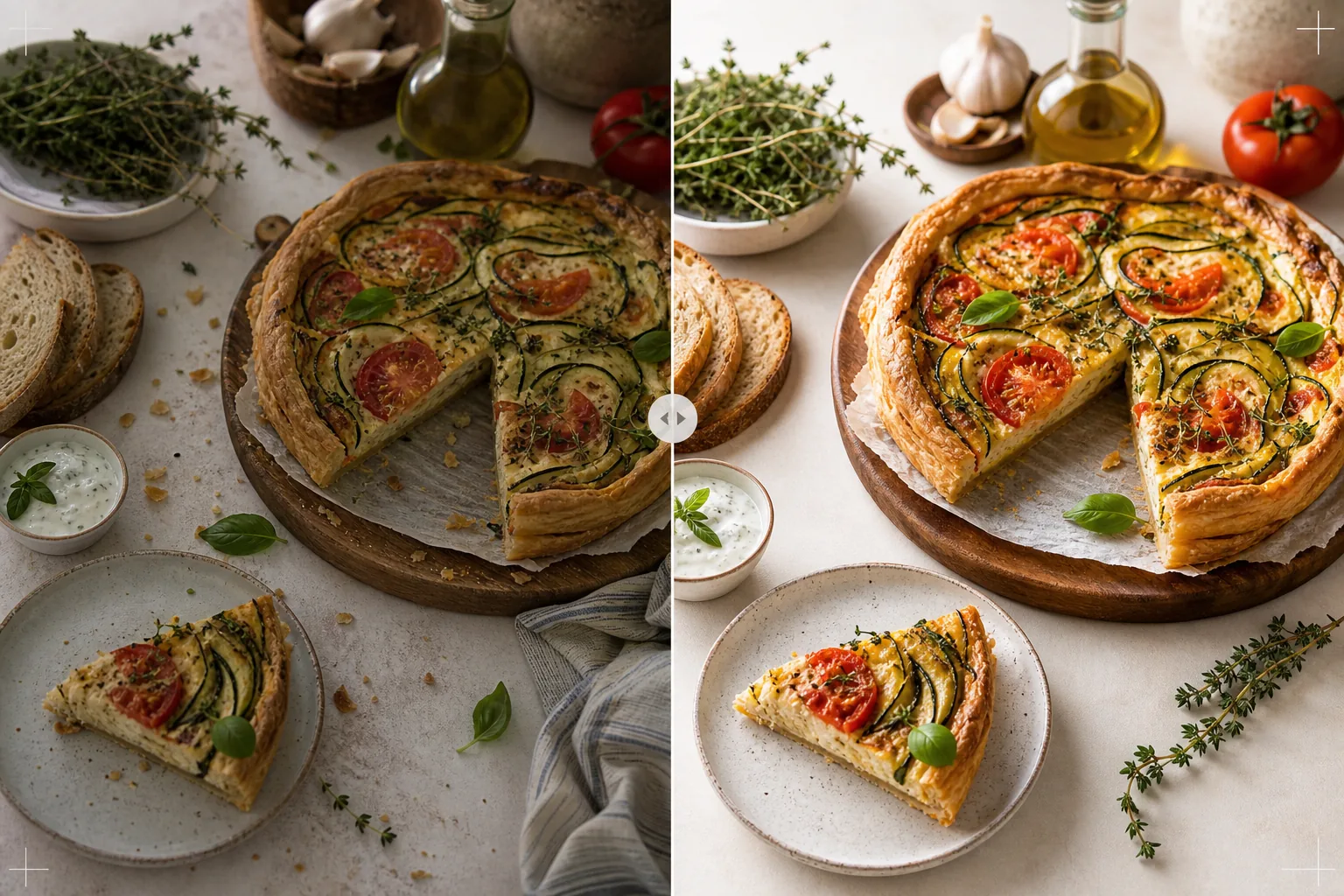
家庭料理のレシピ写真を料理本レベルの品質基準まで引き上げます。このテンプレートは、印刷精度のために食材の色を強調し、高解像度再現のために食品のテクスチャをシャープにし、スタイリングされたシーンから不要な要素を取り除き、料理本・食べ物ブログ・レシピカード向けに印刷グレードの解像度で出力します。
このテンプレートを無料で試すFood template preview
このテンプレートの機能
家庭のキッチンで撮影したレシピ写真を、出版された料理本やプロの食べ物ブログにふさわしい画像へと変換します。料理本の写真はソーシャルメディアよりも高い基準が求められます。色は印刷で正確である必要があり(画面で魅力的なだけでは不十分)、テクスチャは大きなサイズの300 DPI印刷に耐えるほどシャープでなければならず、スタイリングされたシーンは雑然とした要素が見えず意図的に見える必要があります。AI Enhanceは印刷向けに調整された色補正を適用し、食材の色が画面だけでなく紙の上でも正確に再現されることを保証します。Magic Eraserは、背景の散らかり、置き忘れた調理器具、シーンに写り込んだ汚れた皿、そして印刷解像度でより目立つようになる食品スタイリングの欠点を取り除きます。その結果は、食品スタイリングの経験を何年も積んだ料理本の写真家が撮影したかのように見えます。
テンプレート設定
| カラープロファイル | 印刷用のAdobe RGBまたはデジタル用のsRGB(選択可能) |
| 食品のテクスチャ | サクサク感、パンくず、つやのための高周波ディテールのシャープ化 |
| シーンのクリーンアップ | 置き忘れた調理器具、パンくず、背景の散らかりを除去 |
| 色の精度 | 印刷向けに調整(紙の上で正確な緑・赤・茶色) |
| 出力解像度 | 長辺6000px(料理本の見開き全ページ向け300 DPI) |
このテンプレートの使い方
レシピ写真をアップロード
スタイリングされたレシピの写真をアップロードします。真上からのフラットレイ、45度の角度、または完成した料理のクローズアップなど。意図した構図の一部である食材・調理器具・布などの小道具を含めてください。テンプレートは意図的なスタイリングを保ちながら、不要な要素を取り除きます。
色とテクスチャの強調
AI Enhanceは印刷精度のために色温度を補正し、食品のテクスチャをシャープにします。パンの皮のパリパリ感、チョコレートガナッシュのつや、断面のはっきりとした層など。色の調整により、画面上で正確に見える緑・赤・黄金色の茶色が、紙に印刷されたときにも正確に再現されることを保証します。
シーンの仕上げ
Magic Eraserは構図に役立たない要素を取り除きます。意図した範囲の外にあるパンくず、端から覗き込むふきんの角、フレームの周辺に見える背景の散らかり、小道具や表面の汚れなど。スタイリングされたシーンは、意図的で洗練されたものに仕上げられます。
印刷用またはデジタル用にエクスポート
料理本の見開き全ページまでの300 DPI印刷向けにAdobe RGBで長辺6000px、または食べ物ブログやレシピサイト用途向けにsRGBでダウンロードします。高解像度により、読者が個々のハーブの葉、種のテクスチャ、ソースの濃度を印刷拡大時に見られるだけの十分なディテールが保たれます。
最良の結果を得るためのプロのヒント
- ✓一方向からの自然な窓の光で撮影し、影側に白いレフ板を置きます。これにより、プロの食品写真を特徴づける柔らかな指向性の照明が生まれます。テンプレートは人工照明を補正できますが、自然光は最初から最も本物に近い食品の色を生み出します。
- ✓まずメインの料理を盛り付け、テクスチャと色が最高の状態である5分以内に撮影します。その後、手順ごとのプロセス写真を撮影します。テンプレートは湯気や水分などの新鮮さの手がかりを強調しますが、長時間放置された食品を元に戻すことはできません。
- ✓最も視覚的にバランスの取れた構図のために、奇数の小道具(食材3つ、調理器具1つ、布1枚)を使用します。テンプレートはシーンを整えますが、既存の構図の範囲内で機能します。よく構成された出発点ほど、よりプロらしい最終画像が得られます。
- ✓断面の写真(切ったケーキ、スライスしたパン、割ったペストリー)には、非常に鋭利なナイフを使い、撮影の直前に切ります。テンプレートは層の定義とパンくずのテクスチャをシャープにしますが、内部構造を覆い隠すぎざぎざの切り口を直すことはできません。
よくある質問
これはプロの食品写真家の代わりになりますか?
+
テンプレートは、自費出版の料理本、食べ物ブログ、レシピカードに適したレベルまで、家庭で撮影したレシピ写真を引き上げます。厳格な視覚基準を持つ大手出版社の料理本には、プロの写真家とスタイリストの方が優れた結果を生み出しますが、テンプレートは独立した著者やコンテンツクリエイターにとって優れた選択肢です。
手順ごとのプロセス写真はどうですか?
+
プロセス写真(混ぜる、刻む、注ぐ)も同じ色補正とクリーンアップの恩恵を受けます。テンプレートは、動いている手や調理器具の自然なぼけを保ちながら食品を選択的にシャープにすることで、アクション写真によくある被写体ぶれを処理します。
印刷の色調整はどのように機能しますか?
+
Adobe RGB出力はsRGBよりも広い色域を含み、sRGB変換で失われる緑と赤の微妙な色の違いを保持します。調整された印刷機で印刷すると、これらの色はより正確に再現されます。家庭での印刷では、ほとんどの一般的なプリンターでsRGB出力の方が良い結果を生み出します。
Related templates
More food templates for your workflow.