
フードフォトのスタイリング
皿の上で見えるのと同じくらい、写真でも料理を美味しそうに見せます。このテンプレートは、ソース・葉物野菜・タンパク質の色の鮮やかさを高め、はみ出した食器・皿の指紋・写り込んだ手を取り除き、衣やあしらいのテクスチャを鮮明にし、Instagram やメニューボードで映える温かく食欲をそそるトーンに画像を仕上げます。
このテンプレートを無料で試すFood & Beverage template preview
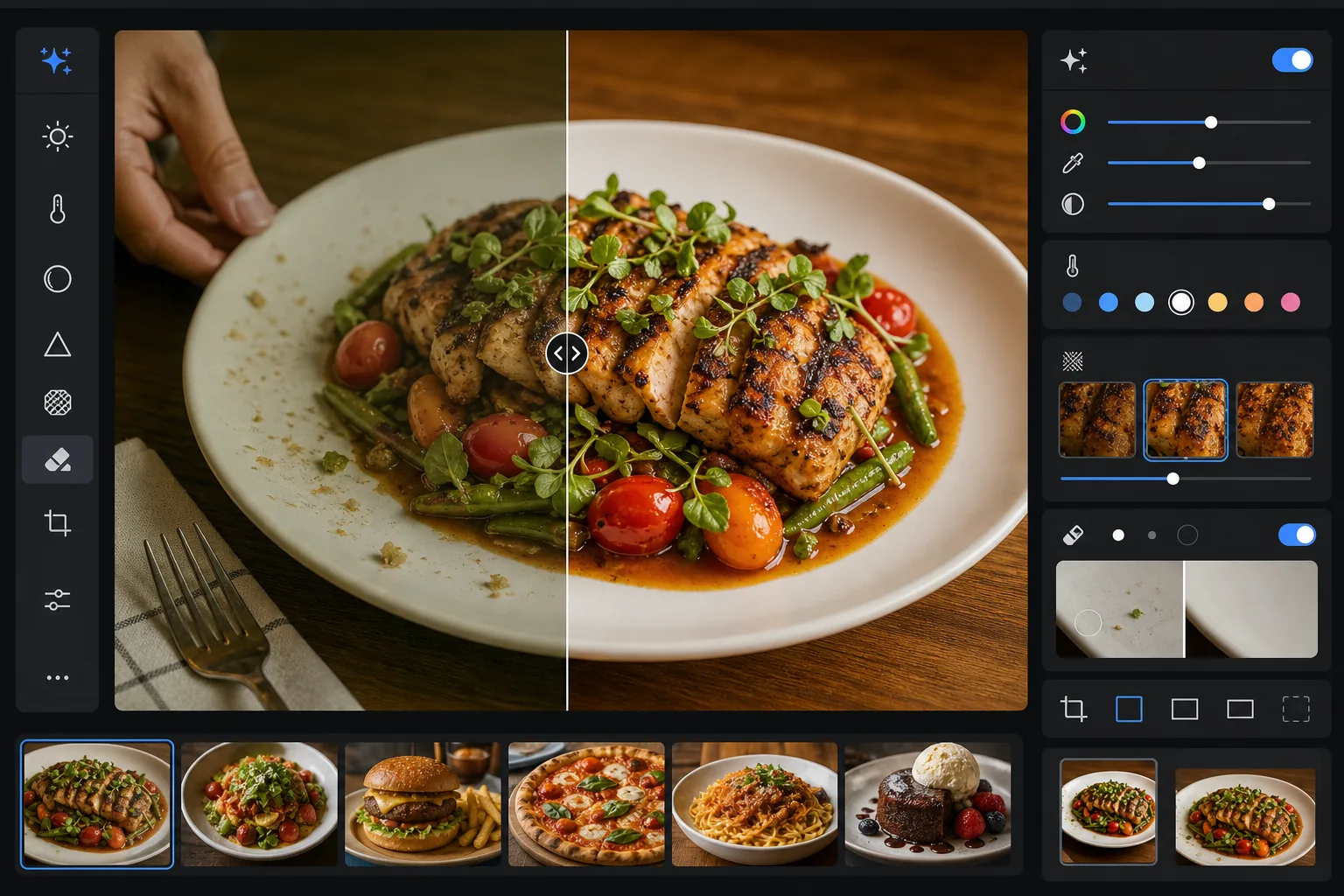
このテンプレートでできること
料理が実物でどう見えるかと写真でどう写るかのギャップを解消します。レストランの照明や真上からの照明は、しばしば黄色や緑がかった色かぶりを生み、新鮮な食材をくすんで見せてしまいます。AI Enhance はホワイトバランスを補正し、葉物を鮮やかに、赤を濃厚に、白を清潔に保ちつつ、不自然に見えるほど過度に彩度を上げません。Magic Eraser は気を散らす要素を取り除きます — フレームに残ったフォーク、端に写り込んだ店員の手、皿の縁の水滴、テーブル上のパンくずなど。選択的なシャープ化が、焼き目のある面・サクサクの衣・新鮮なハーブのテクスチャを引き立て、料理写真に質感を与えます。
テンプレート設定
| 色の鮮やかさ | +15 自然な彩度、+8 彩度(赤・緑・黄に選択的に適用) |
| ホワイトバランス | 料理向けに最適化したニュートラル(黄かぶりを除去し、温かいトーンを保持) |
| テクスチャのシャープ化 | ディテール認識(衣・焼き目・ハーブの細部を強調) |
| 皿のクリーンアップ | 皿の縁の汚れ・垂れ・指紋を自動検出 |
| 暖かみの度合い | +5 の暖かみとゴールデンアワー風のトーンカーブ |
| 出力 | 1080×1080px(Instagram)、2400×1600px(メニュー/ウェブサイト)のデュアル書き出し |
このテンプレートの使い方
料理の写真をアップロード
真上・45度の角度・正面のいずれかから撮影した盛り付け済みの料理の写真をアップロードします。自然光が差し込む窓辺が最適な出発点ですが、このテンプレートはレストランの蛍光灯や温かいタングステンの卓上ランプにも対応します。
色とテクスチャを強調
AI Enhance は色かぶりを補正し、緑・赤・黄金色がネオンのようにならない範囲で選択的に鮮やかさを高め、グリルの焦げ目・砂糖のグレーズ・新鮮なハーブの葉などの表面テクスチャをシャープにします。暖かみの調整が、誘うようなゴールデンアワーの雰囲気を加えます。
フレームを整理
Magic Eraser は、はみ出した食器・ナプキンの角・写り込んだ手・皿の縁の指紋やソースの垂れ・テーブルのパンくず・構図を乱す小道具を取り除きます。AI はクリーンアップした箇所を周囲のテーブルや皿の表面で埋めます。
プラットフォーム向けに書き出し
片方または両方の形式でダウンロードできます。Instagram やSNS向けの1080x1080pxの正方形、またはレストランのウェブサイト・デジタルメニューボード・デリバリーアプリの掲載向けの2400x1600pxの横長です。どちらもsRGBの画面表示用に色が最適化されています。
最良の結果を得るためのプロのコツ
- ✓盛り付け後の最初の90秒以内に撮影しましょう。レタスはしおれ、ソースは表面に膜が張り、氷は溶け、湯気はすぐに立たなくなります。タイミングを逃すと、テンプレートは色とテクスチャを強調できても、しおれたサラダや溶けたアイスクリームを元に戻すことはできません。
- ✓真上からの俯瞰(フラットレイ)撮影では、光源を真上ではなく片側に置くようにしてください。横からの光は、シャープ化アルゴリズムが強調する料理テクスチャの微細な影を生み出します — 真上からの直接光はそうした影を平坦にし、料理を立体感のないものに見せてしまいます。
- ✓料理に重なったフォークや食器を取り除く際、AI はその背後の料理のテクスチャを再構築します。最もきれいな結果を得るには、食器を料理そのものに埋もれさせるのではなく、皿の縁やテーブルクロスのようなシンプルな場所に置いてください。
- ✓レストランのメニューでは、すべての料理写真を1つのバッチで処理し、メニュー全体で一貫した色調整と暖かみを確保しましょう。写真ごとに色温度がばらつくと、個々の写真は良く見えてもメニュー全体が不格好に見えてしまいます。
よくある質問
これで料理が不自然に彩度過多に見えませんか?
+
色補正はフードフォトに特化して調整されており、料理が自然に収まる彩度範囲(ハーブの緑、トマトや肉の赤、パンや揚げ物の黄金色)を狙い、その他の色への影響は抑えます。結果はネオンやプラスチックのように見える領域に踏み込むことなく、食欲をそそる鮮やかな仕上がりになります。
デリバリーアプリの掲載に使えますか?
+
はい。2400x1600pxの出力は、DoorDash、Uber Eats、Grubhub などのデリバリープラットフォームの画像要件を上回ります。色調整とシャープ化は、サムネイルサイズでも料理写真がすぐに目を引く必要がある小さな画面での閲覧向けに最適化されています。
飲み物やカクテルにも使えますか?
+
はい。このテンプレートは液体・ガラス器・あしらいをうまく処理します。色の鮮やかさの強調は、フルーツのあしらいや層になった色を持つカクテルで特に効果を発揮します。クリーンアップはガラス表面の指紋・水の輪じみ・フレームに残ったバーツールを取り除きます。
すべての料理写真をプロがスタイリングしたように仕上げる
スマートフォンやカメラの料理写真をアップロードして、見る人をお腹が空かせるような鮮やかでクリーンな、Instagram に最適な画像を手に入れましょう。
無料で試すRelated templates
More food & beverage templates for your workflow.