
Ritocco naturale della pelle
Migliora i ritratti senza l'effetto plastica. Questo modello rimuove le imperfezioni temporanee, uniforma l'incarnato e attenua le irregolarità di illuminazione, preservando volutamente i pori, le linee sottili e la texture naturale che rendono la pelle reale. Il risultato è un ritratto in cui il soggetto appare nella sua versione migliore nel suo giorno migliore, non un manichino generato dall'IA.
Prova gratis questo modelloPortrait template preview
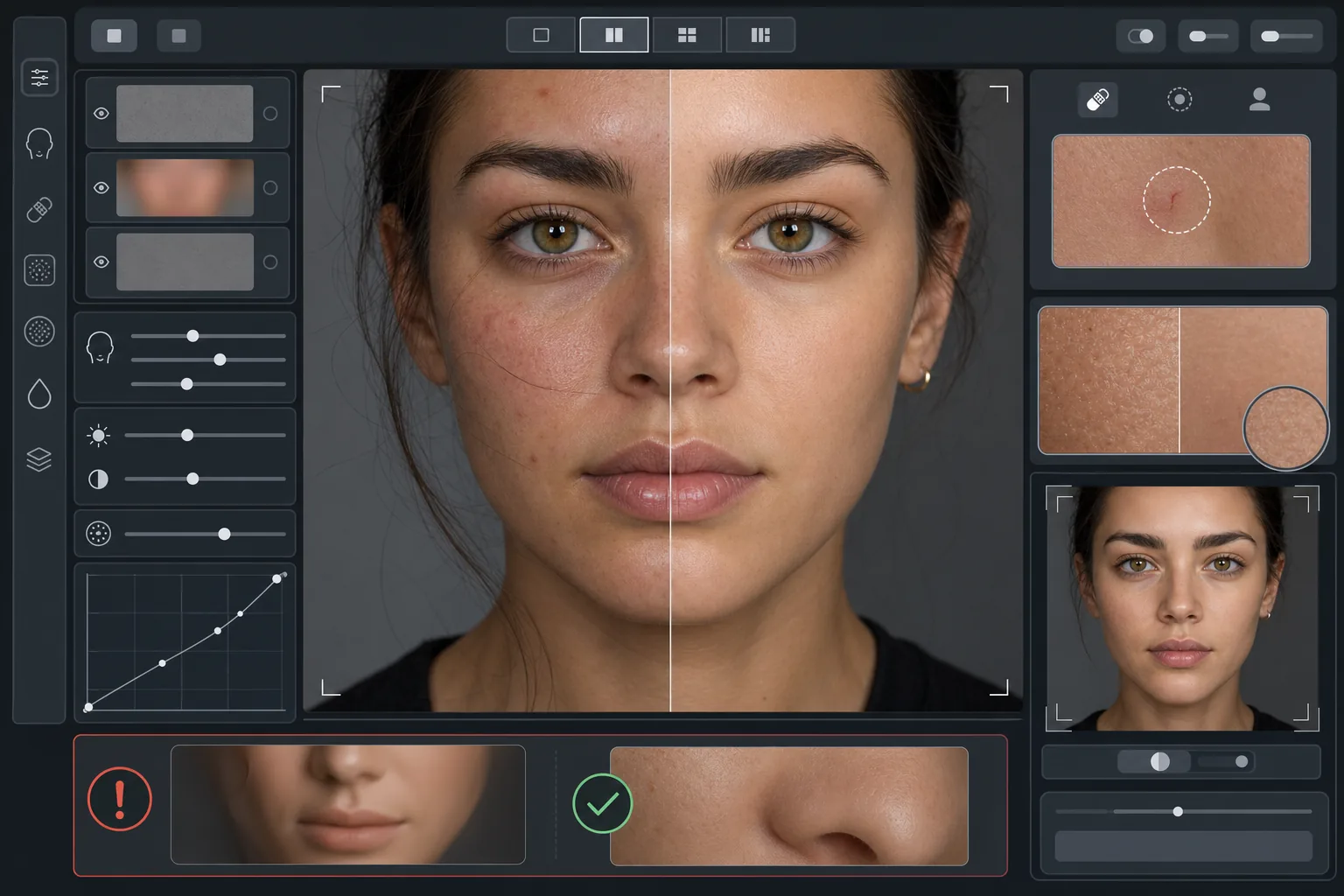
Cosa fa questo modello
Applica un ritocco della pelle basato sulle frequenze che separa la texture dall'incarnato. AI Enhance rimuove le imperfezioni temporanee (brufoli, rossori, occhiaie) preservando la fine texture cutanea — pori, peluria e variazioni naturali — che l'occhio percepisce come autentica. Magic Eraser gestisce la rimozione mirata dove il miglioramento con IA risulta troppo ampio, come eliminare un singolo graffio o la puntura di un insetto senza intaccare la pelle circostante. L'effetto complessivo è una pelle uniforme e dall'aspetto sano che supera la prova dello zoom.
Impostazioni del modello
| Intensità del ritocco | Naturale — agisce su imperfezioni e rossori, preserva la texture |
| Conservazione dei pori | Completa — mantiene tutta la texture naturale della pelle a livello di pixel |
| Uniformità dell'incarnato | Moderata — riduce le chiazze e i rossori senza appiattire la variazione di colore |
| Correzione delle occhiaie | Delicata — schiarisce le occhiaie senza eliminare l'ombra naturale |
| Levigatura dell'illuminazione | Riempie le ombre dure e riduce le zone sovraesposte dal flash diretto |
| Risoluzione di output | Corrisponde all'originale (conserva tutti i dettagli per ritaglio e zoom) |
Come usare questo modello
Carica una foto ritratto
Usa un ritratto ben illuminato con il volto a fuoco nitido. Il modello funziona meglio quando la texture naturale della pelle è visibile nell'originale: le immagini sfocate o molto compresse offrono meno texture che l'IA possa preservare.
Applica il ritocco naturale
AI Enhance individua le imperfezioni temporanee, i rossori irregolari e le irregolarità di tono e li corregge mantenendo del tutto intatta la texture sottostante della pelle. Pori, linee sottili e variazioni di colore naturali restano visibili: cambiano solo le imperfezioni.
Correggi punti specifici
Usa Magic Eraser per qualsiasi segno individuale rimasto che vuoi rimuovere: un graffio in via di guarigione, un'irritazione temporanea o un capello sul viso. Ogni rimozione si fonde con la texture naturale della pelle circostante.
Controlla allo zoom massimo ed esporta
Ingrandisci al 100% per verificare che la texture della pelle sia intatta: i pori devono essere visibili e naturali. Se un'area appare troppo levigata, riduci l'intensità del ritocco ed elabora di nuovo. Esporta alla risoluzione massima per conservare il dettaglio naturale.
Consigli da professionisti per i migliori risultati
- ✓Inizia con l'intensità di ritocco più bassa e aumentala solo se necessario: è più facile aggiungere levigatura che recuperare una texture già eliminata dall'elaborazione.
- ✓Per soggetti con acne o rosacea, il modello rimuove le singole imperfezioni senza alterare l'incarnato sottostante: il risultato sembra una giornata di pelle pulita, non una persona diversa.
- ✓Evita di combinare questo modello con i filtri di bellezza della fotocamera del telefono: la levigatura integrata di molte fotocamere già riduce la texture, e una doppia elaborazione crea proprio l'effetto plastica che questo modello vuole evitare.
- ✓Se possibile, scatta in formato RAW e converti in JPEG prima di caricare: il RAW cattura più dati sulla texture della pelle che l'IA può preservare durante il ritocco.
Strumenti
Domande frequenti
In cosa è diverso dai filtri di bellezza che levigano la pelle?
+
I filtri di bellezza applicano una sfocatura uniforme che cancella pori, linee sottili e texture naturale, creando l'inconfondibile effetto plastica. Questo modello usa un'elaborazione basata sulle frequenze che separa la texture dall'incarnato, rimuovendo le imperfezioni dallo strato tonale e lasciando intatto lo strato di texture. Il risultato sembra pelle vera, non una superficie renderizzata.
Questo cambia la forma dei lineamenti del viso?
+
No. Il modello agisce solo sull'aspetto superficiale della pelle: incarnato, imperfezioni e uniformità dell'illuminazione. Non rimodella mai naso, mascella, occhi o qualsiasi struttura del viso. Il soggetto appare esattamente com'è, solo con una pelle più pulita e illuminata in modo più uniforme.
Posso usarlo per ritratti professionali e lavori di portfolio?
+
Sì. Lo standard di ritocco naturale soddisfa le aspettative professionali per ritratti aziendali, portfolio di recitazione, profili di incontri e social media dove conta l'autenticità. Il soggetto apparirà come nella sua foto anche di persona, che è esattamente lo scopo del ritocco naturale.
Pelle migliore, sempre tu
Carica un ritratto e ottieni in pochi secondi un ritocco della pelle naturale che preserva la texture. Nessun effetto plastica, nessuna levigatura innaturale: solo tu nel tuo giorno migliore.
Provalo gratisRelated templates
More portrait templates for your workflow.
Modello di ritocco di ritratti scolastici adatto all'età. Rimozione naturale delle imperfezioni, sfondi coerenti e output standard da annuario con elaborazione batch per intere classi.
Modello di ritratto di animale domestico di qualità studio. Gestisce i bordi della pelliccia, rimuove guinzagli e conduttori, sostituisce gli sfondi e affina gli occhi di cani, gatti e altri animali.
Migliora le foto di neonati e bambini con toni caldi e tenui, levigatura delicata della pelle, rimozione di oggetti di scena e distrazioni e dimensionamento pronto per la stampa per annunci e decorazioni da parete.
Ritocca le foto di maternità con un delicato effetto levigante della pelle, un'illuminazione soffusa, una semplificazione dello sfondo e una calda gradazione dei colori per un look da ritratto di gravidanza senza tempo.
Pulisci i ritratti di famiglia rimuovendo le distrazioni dello sfondo, correggendo l'esposizione irregolare, levigando la pelle in modo naturale e assicurando che tutti appaiano al meglio nella stessa inquadratura.